AI in recruiting
How I built a custom AI CRM for a real-estate agency
A case study: how we shipped a custom dispatch, SLA, and reporting CRM for a 15-broker agency with Claude and CalyflowOS, and why the same pattern fits recruiting teams.

A CRM built around the work, not the other way round
Let me tell you about a build I just shipped for a client: a custom CRM for a real-estate agency. It is a good story on its own, and if you run a recruiting team, the pattern at the end is going to look very familiar.
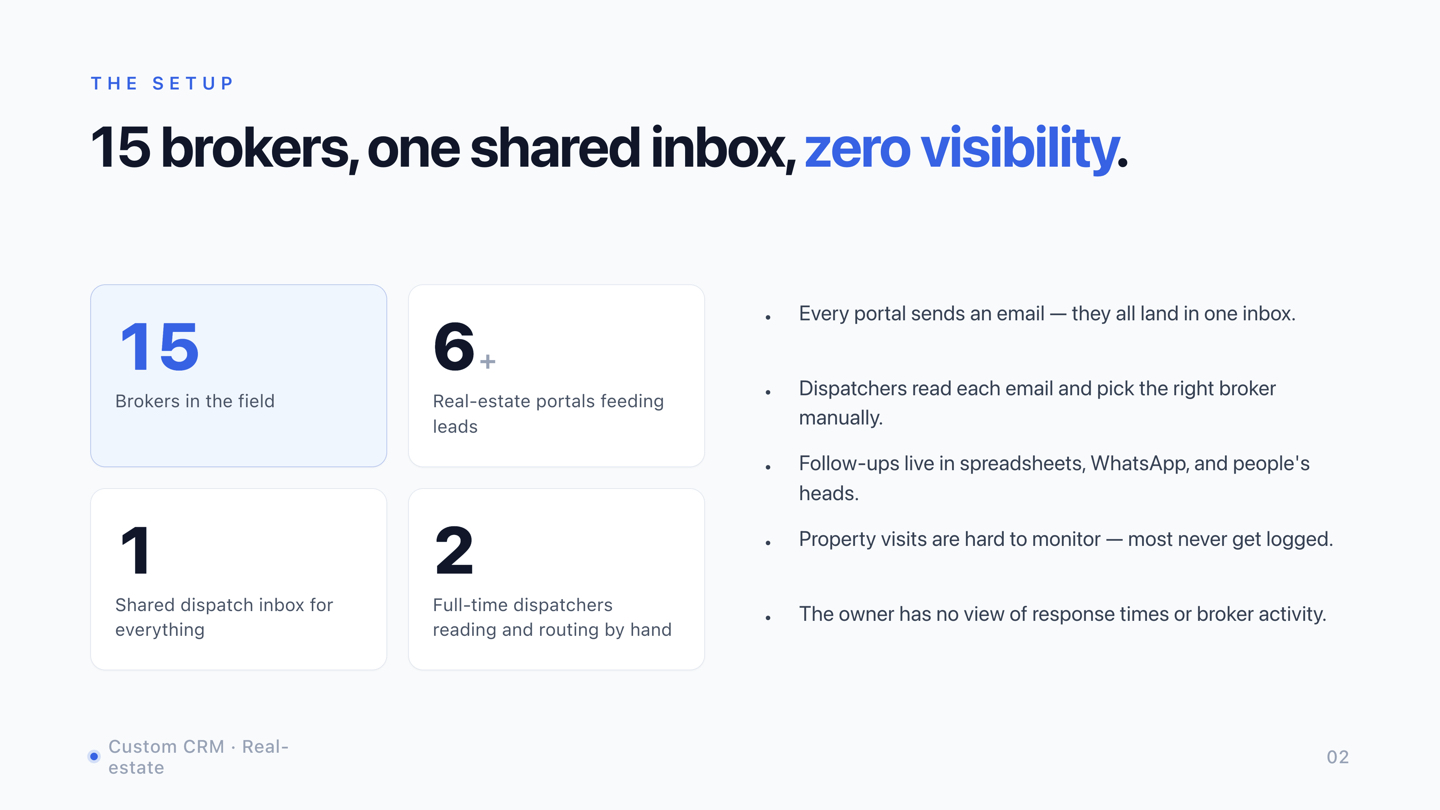
First, the business. Picture an agency with about 15 brokers in the field. Leads arrive from a handful of advertising portals, and every one of them lands in a single shared inbox. Each portal formats its emails differently. Two people had to sit on that inbox full-time, reading every message, figuring out which broker it belonged to, and assigning it by hand. Follow-ups lived in spreadsheets, WhatsApp threads, and people's heads. Property visits were rarely logged. And the owner had zero visibility into response times or who was actually doing the work.
Why we didn't just buy a CRM
The obvious move is to buy one. The owner looked, and the maths did not work.
The CRMs that genuinely fit start at enterprise tiers. For 15 seats at 70 to 80 euros a month, you are at a thousand euros a month before any setup or integration work. Worse, those products are built around generic contact management. The real pain here was lead dispatching, follow-up visibility, visit tracking, and SLA monitoring, which is a very specific workflow. You would pay enterprise prices and use maybe a fifth of the features. Paying full price for 20% utilisation is not a deal, it is a tax.
So we built a custom CRM instead.
Eight steps, one pipeline, AI in the middle
The shape of the system is simple. A lead arrives from a portal and lands in one dedicated inbox. Claude reads the email and analyses the content. We trained it on the different portal formats, what to expect, and how to handle the edge cases, so it now runs on autopilot. The structured lead is stored in a database and assigned to the right broker automatically. The broker and a dispatcher get notified the moment it arrives. Follow-ups and property visits are tracked. An SLA monitor flags slow responses. And the owner gets daily reporting on a dashboard.
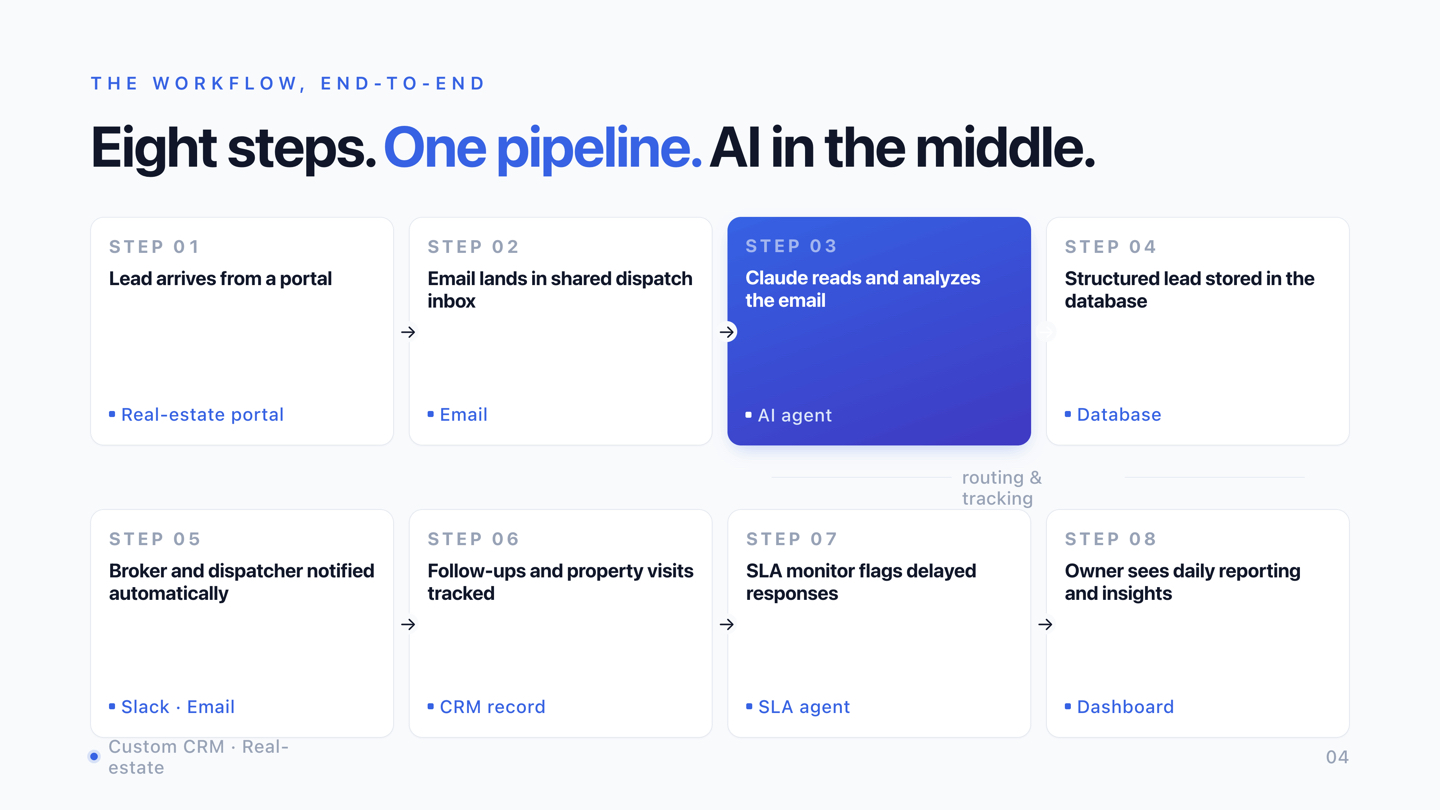
Under the hood, we used CalyflowOS as the automation hub, the orchestration layer that connects the services and runs the automations. Some fire every minute, some run in the morning or evening: reminders so prospects do not miss a planned viewing, nudges for brokers to update the status of past visits. The app is Node, React, and Tailwind so dispatchers and brokers get a clean interface. EuroSMS handles text messages, Postmark handles email, and we pull from the Office 365 inbox. GitHub Actions and Cloud Scheduler run the automations, and Google Cloud Run hosts it all with automated deploys.
Two things worth pulling out
We didn't need n8n or Make. Going in, I assumed we would reach for a no-code automation tool to run the background jobs. As we built, I realised we did not need one. With AI in the editor, we wire the connectors directly in code, GitHub Actions runs the pipeline, and Cloud Scheduler runs the crons. No third-party automation tax, no per-step billing, no vendor lock-in. And our version is covered by tests with proper logging. Once you have AI writing the code, the drag-and-drop editor just feels obsolete.
A junior developer with AI ships more than a senior used to. I piloted this with a relatively junior developer, and he shipped new features in better shape than a senior would have managed a few years ago. He has AI, and he has the project's knowledge base. He moves faster, at a fraction of the cost. It works flawlessly.
Three principles behind every build
- People with industry experience start the project. Recruiters who recruited, operators who operated, brokers who brokered. They land on the real bottleneck on the first call, not the fifth. The junior developer comes in later, once people are using the thing and want a button moved or a screen reordered.
- Use AI, always. Planning, analysis, implementation, coding, debugging, deploying to Google Cloud. The killer combination is someone with real domain experience who uses AI on every step. That is how you get a very good system in place very quickly.
- Be proactive. I like working with people who keep thinking, who do not wait for a specification before they execute. That is the kind of person you want on a build like this.
What the owner sees every morning
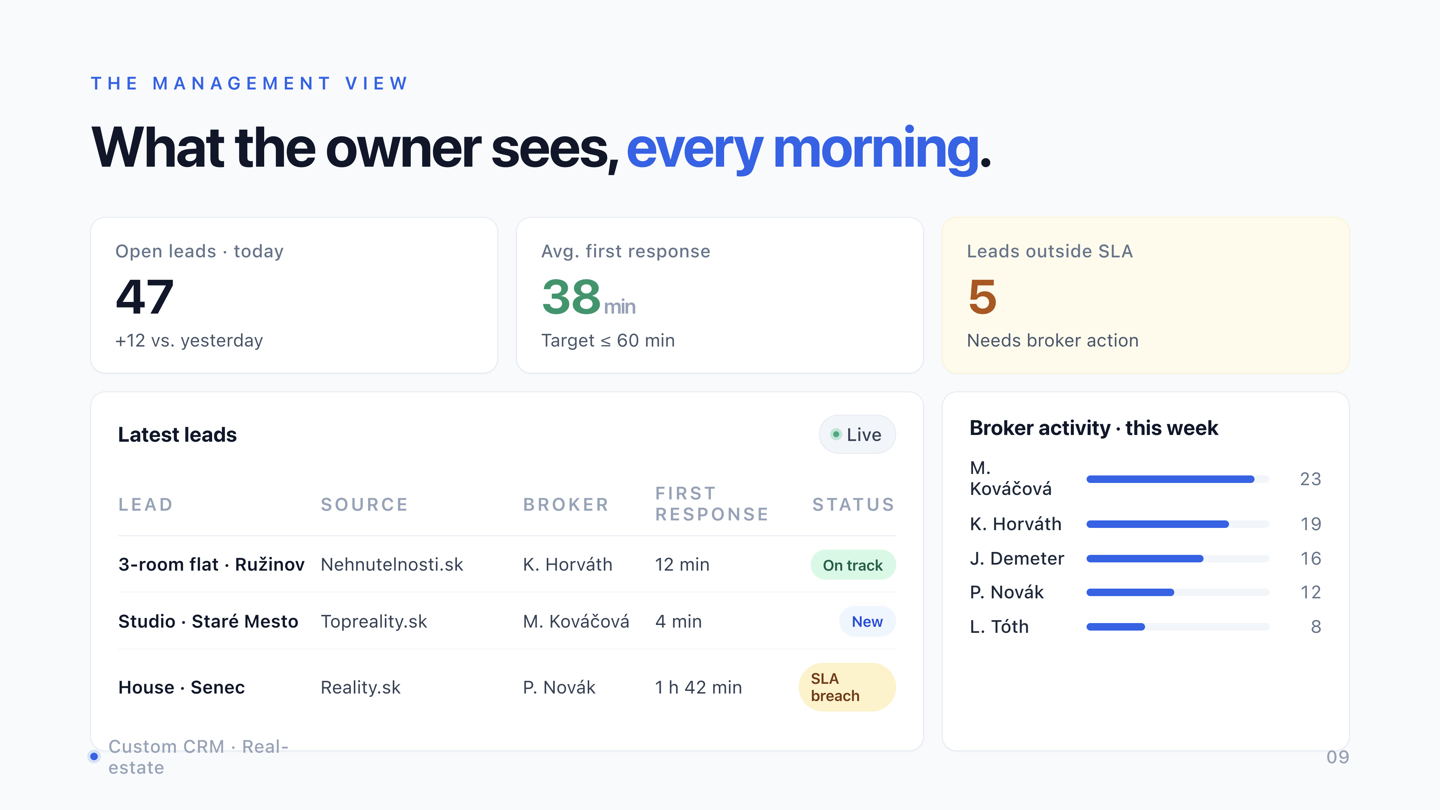
This is the part that changes how a business is run. Open leads today, average first response time against the SLA target, leads sitting outside SLA that need action, the newest leads with their source and assigned broker, and broker activity for the week.
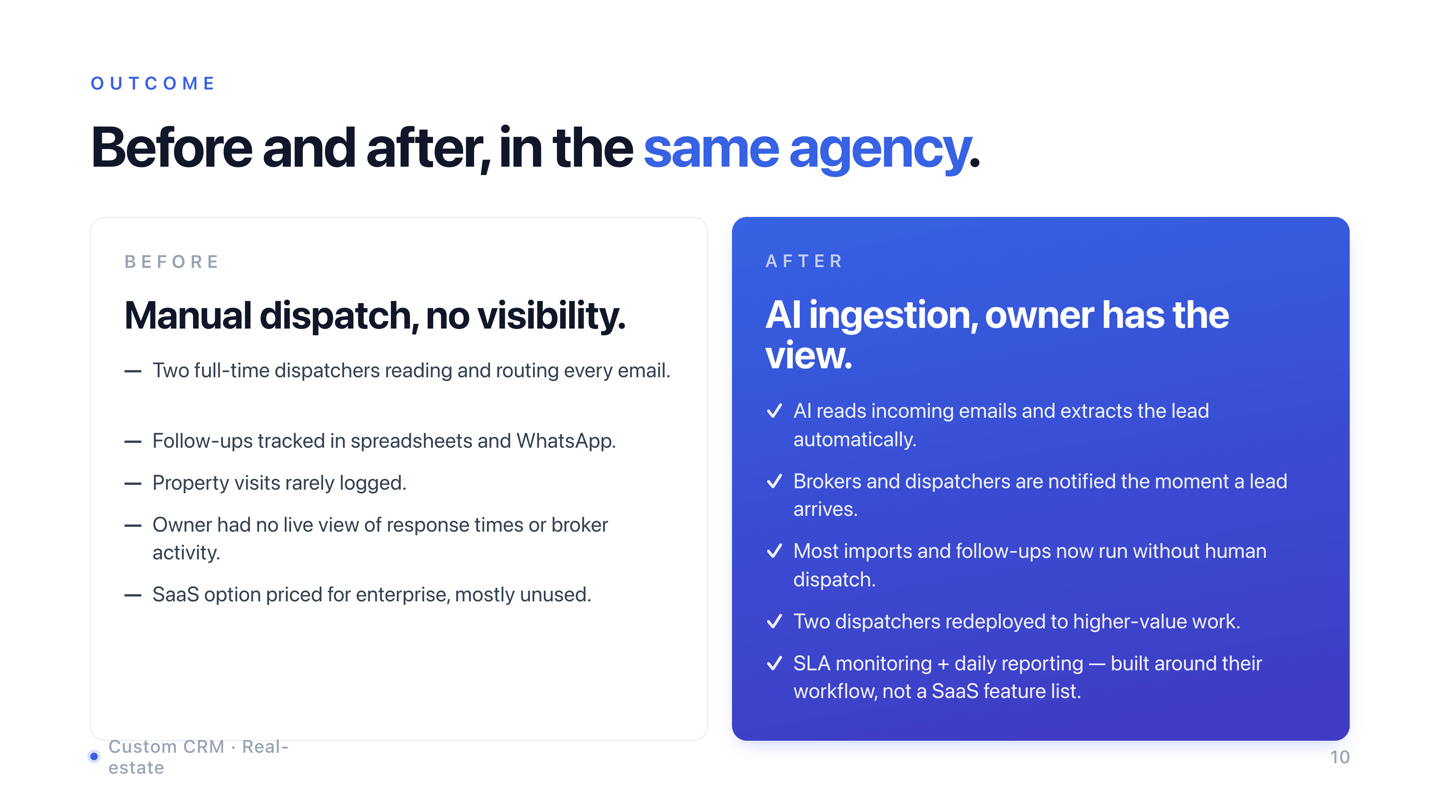
The before-and-after, in the same agency, is stark. Before: two dispatchers reading and routing every email by hand, follow-ups scattered, visits unlogged, no live view for the owner. After: AI reads incoming emails and extracts the lead, everyone is notified the moment one arrives, and the two dispatchers are redeployed to higher-value work like calling prospects and organising photo shoots instead of copy-pasting fields into spreadsheets.
The same pattern in recruiting
Here is why I am telling you this. The exact same shape shows up in recruiting agencies that handle a lot of inbound. Swap "lead from a portal" for "candidate from a job board," and the rest lines up almost one to one.
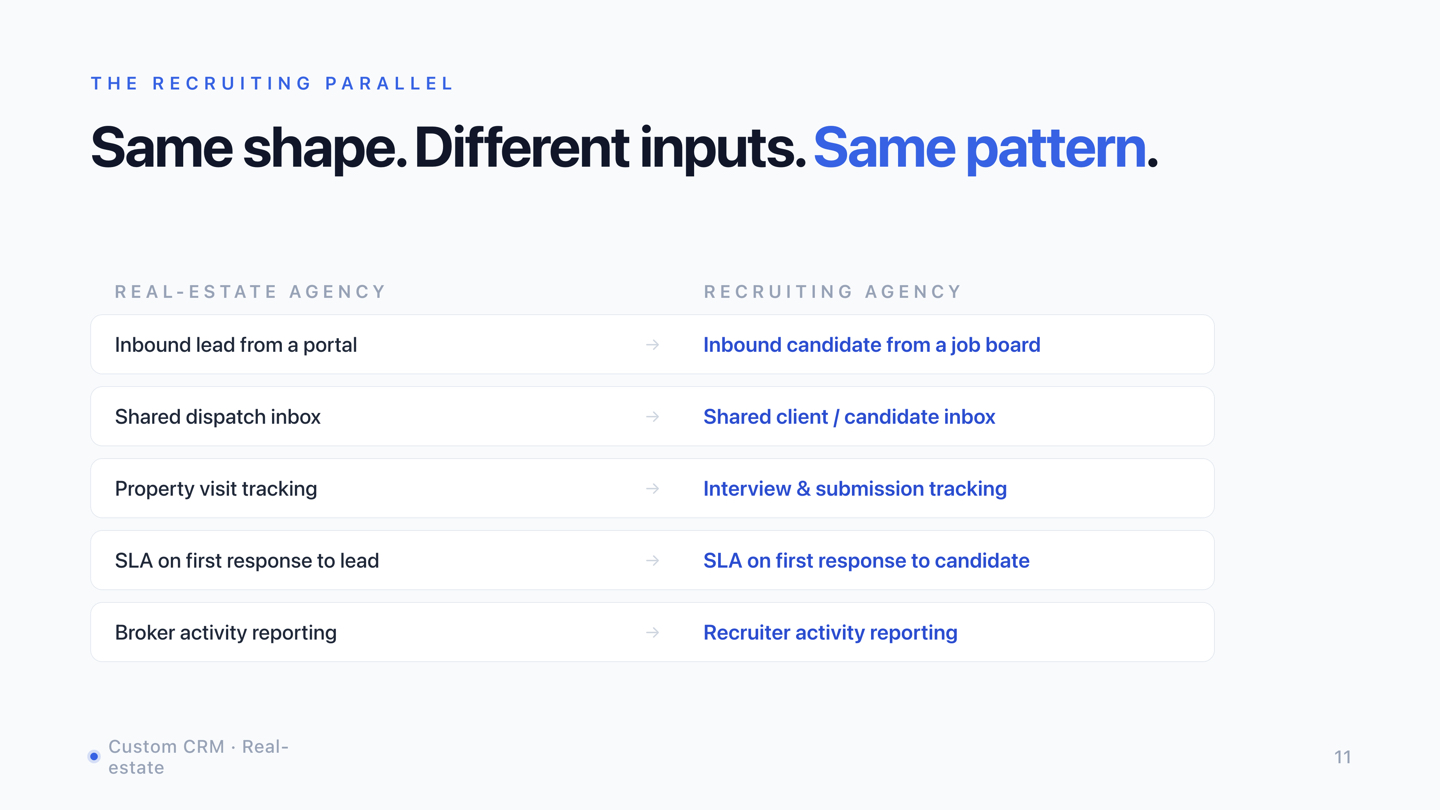
A shared inbox the AI can read, the best next action identified automatically, interview and submission tracking, an SLA on first response to a candidate, and activity reporting for management. I spent six years in recruiting for international clients, so I know these processes, and the principle holds: a person with industry experience plus AI beats a generic tool every time.
So before you buy software, map the workflow. Where do your leads or candidates come from? Who receives them, and who dispatches them? What has to happen in the first hour? What does the owner need to see every day? And what part of a generic CRM would never get used?
If your team runs its work through inboxes and spreadsheets, that is exactly what I help with. Tell me what you want to build on the Custom Build page, and we will map your workflow, find the pain, and ship something that fits.
Related articles
- How to connect your ATS with Claude AI
A practical guide to wiring your applicant tracking system into Claude so it can read CVs and notes, rank candidates against a live brief, and surface a recruiter-friendly shortlist instead of a 1,800-row keyword list.
- How to source candidates without LinkedIn (2026 AI stack)
A practitioner's stack for finding, enriching, and ranking candidates when LinkedIn Recruiter isn't available, with the Claude skill, databases, and prompts we use on hard-to-fill roles.