Employment assessment tools
Software platforms that let hiring teams administer, score, and integrate candidate assessments into their ATS pipeline, covering cognitive tests, skills simulations, behavioral screens, and compliance reporting dashboards across the full pre-hire workflow.
Michal Juhas · Last reviewed May 5, 2026
What is an employment assessment tool?
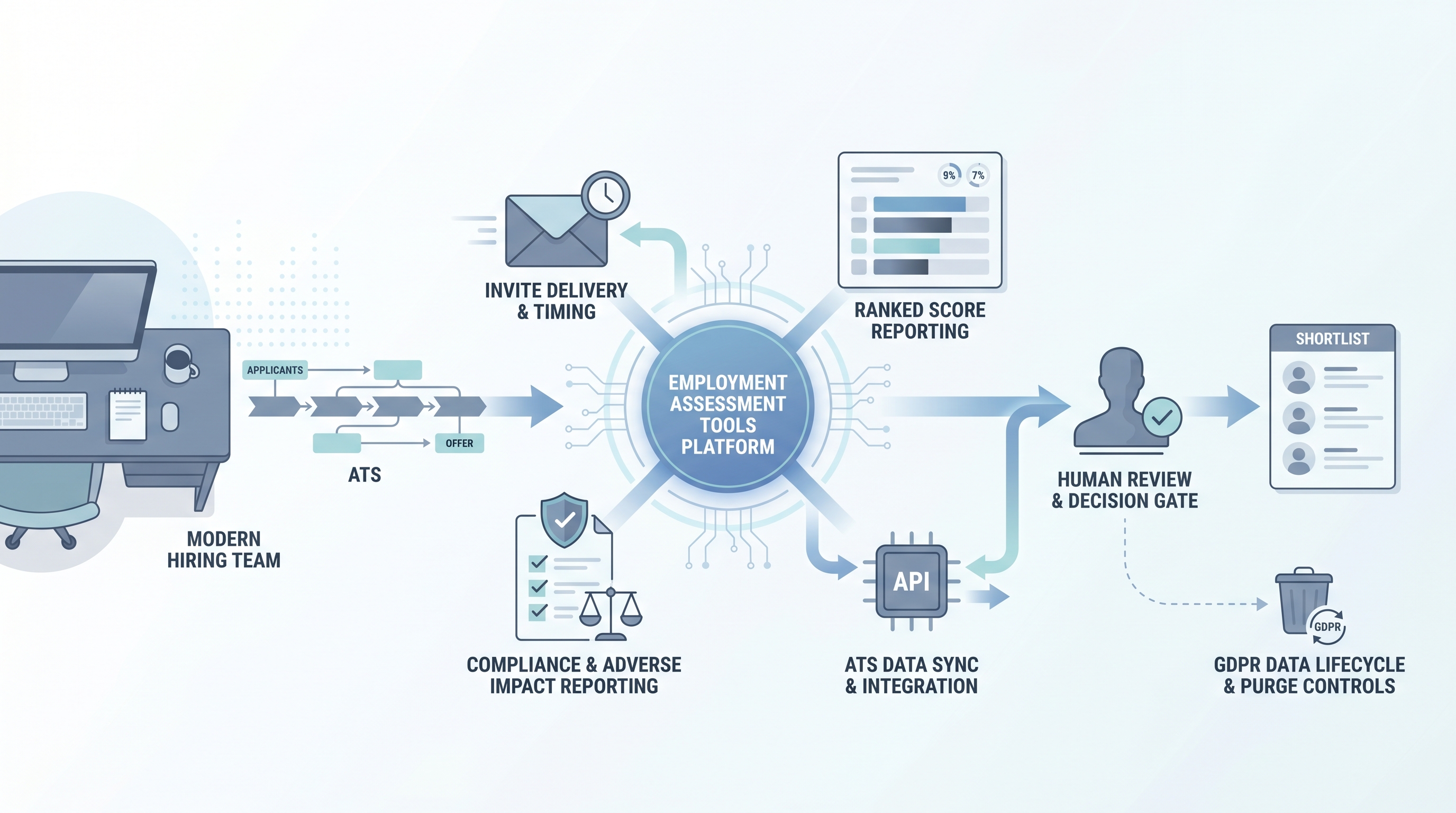
Employment assessment tools are software platforms that hiring teams buy, configure, and integrate to administer candidate assessments at scale. The platform layer sits above the assessment instrument itself: it handles invite delivery, timing controls, candidate experience, score aggregation, ATS integration, and compliance reporting. Vendors range from general-purpose suites bundling cognitive, skills, and personality tests under one dashboard to specialized platforms focused on live coding challenges, asynchronous work simulations, or AI-scored behavioral screens.
The distinction between the platform and the test it delivers matters in practice. A polished interface with instant scoring dashboards can make an unvalidated instrument look rigorous. Before deploying any platform, ask for the technical manual behind each test it hosts, not just a product demo of the delivery layer.
In practice
- A TA manager evaluating three assessment vendors shortlists them on four criteria: a validity study for the target role type, an adverse impact report by demographic group, a signed Data Processing Agreement, and an API that supports programmatic GDPR deletion. One vendor cannot supply the validity study for service roles and is eliminated before the pilot begins.
- A recruiter integrating an assessment platform with their ATS discovers the lightweight embed does not fire a webhook when candidates withdraw, so invited candidates continue to receive test reminders after they have been moved to a rejected stage.
- An HRBP reviewing quarterly hiring data notices that no one set a retention schedule on the assessment platform, and three cohorts of scored data are still stored beyond the 12-month limit in the company privacy policy.
Quick read, then how hiring teams use it
This is for recruiters, TA, and HR partners who need a shared picture when evaluating, configuring, or auditing an employment assessment platform. Skim the first section for a fast overview. Use the second when you are making integration or compliance decisions on a live deployment.
Plain-language summary
- What it means for you: An employment assessment tool is the software platform your team uses to send tests, collect scores, and pipe results into your ATS. The platform determines how easy it is to run adverse impact reports, fulfill deletion requests, and connect to your existing hiring stack.
- How you would use it: Select a platform that supports your assessment types, connects to your ATS via API, and can supply a validity study for your role family. Configure the invite stage to match the rest of your process, set a retention schedule at contract time, and assign a compliance owner before the first cohort goes live.
- How to get started: Request a technical manual for each test the platform hosts, ask for an adverse impact report on a comparable role and demographic mix, and test the GDPR deletion flow in a sandbox before production.
- When it is a good time: After you have a scorecard naming the competencies you are measuring, after legal has reviewed your lawful basis and signed a Data Processing Agreement with the vendor, and after you have confirmed accessibility accommodations are available for candidates who need them.
When you are running live reqs and tools
- What it means for you: The platform you chose is now a data processor under GDPR. Any AI scoring feature it runs is subject to Article 22 if it makes or materially influences hiring decisions without human review. The ATS integration determines whether your team can automate adverse impact reporting or is doing it manually in a spreadsheet at the end of each cycle.
- When it is a good time: When the volume of candidates in a single cycle makes manual assessment review unreliable, when your ATS can accept scores as structured fields rather than free-text notes, and when you have a process for candidates to request human review of any automated decision.
- How to use it: Configure the platform to push scores into a defined ATS field at stage completion, set up a webhook to pause invites when a candidate withdraws, and apply a human-in-the-loop review queue before any automated shortlisting decision reaches a candidate. Log which platform version and scoring model was active for each cohort.
- How to get started: Run a parallel pilot: have your review panel independently score ten candidates and compare rankings against the platform output. If correlation is low, either the instrument is not measuring the right thing or the platform default cut score does not reflect your role criteria. Run an AI bias audit on the first cohort before expanding to full-cycle use.
- What to watch for: Platforms that version-bump their AI scoring model mid-campaign without notifying customers, invite emails that do not pause when a candidate withdraws in the ATS, retention schedules set to platform defaults rather than your privacy policy, and adverse impact reports buried in the compliance tab that no one has opened since onboarding.
Where we talk about this
On AI with Michal live sessions, employment assessment tools come up in the AI in recruiting and sourcing automation tracks: how to evaluate a vendor's validity evidence, how to wire assessment scores into ATS pipeline stages without creating manual sync points, and how to set up the compliance reporting that protects your team from silent bias accumulation. Start at Sourcing Lab and bring the name of any platform you are currently evaluating or piloting.
Around the web (opinions and rabbit holes)
Third-party creators move fast. Treat these as starting points, not endorsements, and double-check anything before wiring candidate data.
YouTube
- Search "pre-employment assessment platform ATS integration" for practitioner walkthroughs of how assessment vendors plug into common ATS environments and where data handoff typically breaks.
- Search "validity study pre-employment test recruiting" for IO psychology explainers covering criterion validity, norming populations, and what a technical manual should contain before you trust the score.
- Search "adverse impact assessment tools EEOC compliance" for legal and HR compliance overviews of the four-fifths rule and when a platform default cut score creates legal exposure.
- r/recruiting has threads comparing assessment vendor shortlists, drop-off rates caused by long test batteries, and candid post-pilot reviews you will not find on paid review sites.
- r/humanresources covers GDPR obligations for assessment data, adverse impact questions, and Data Protection Impact Assessment patterns from HR practitioners.
Quora
- Search Quora for "best employment assessment software" to find company-size and industry-specific opinions as a first-pass landscape scan before requesting vendor demos (verify claims independently before signing).
Assessment platforms versus standalone tests
| Dimension | Standalone test | Employment assessment platform |
|---|---|---|
| Delivery | Manual or email link | Integrated invite, ATS sync, webhook |
| Compliance reporting | Manual export | Built-in adverse impact dashboard |
| AI scoring option | Rarely included | Common; requires model version logging |
| GDPR deletion path | Usually manual | Should be API-triggered |
| Vendor relationship | Test publisher | Data processor requiring a DPA |
Related on this site
- Glossary: Candidate assessment tools, Employment assessment test, Adverse impact, AI bias audit, Human-in-the-loop (HITL), Scorecard, ATS API integration
- Blog: AI sourcing tools for recruiters
- Live cohort: Sourcing Lab
- Course: Starting with AI: the foundations in recruiting
- Membership: Become a member