Webhooks in recruiting and ATS
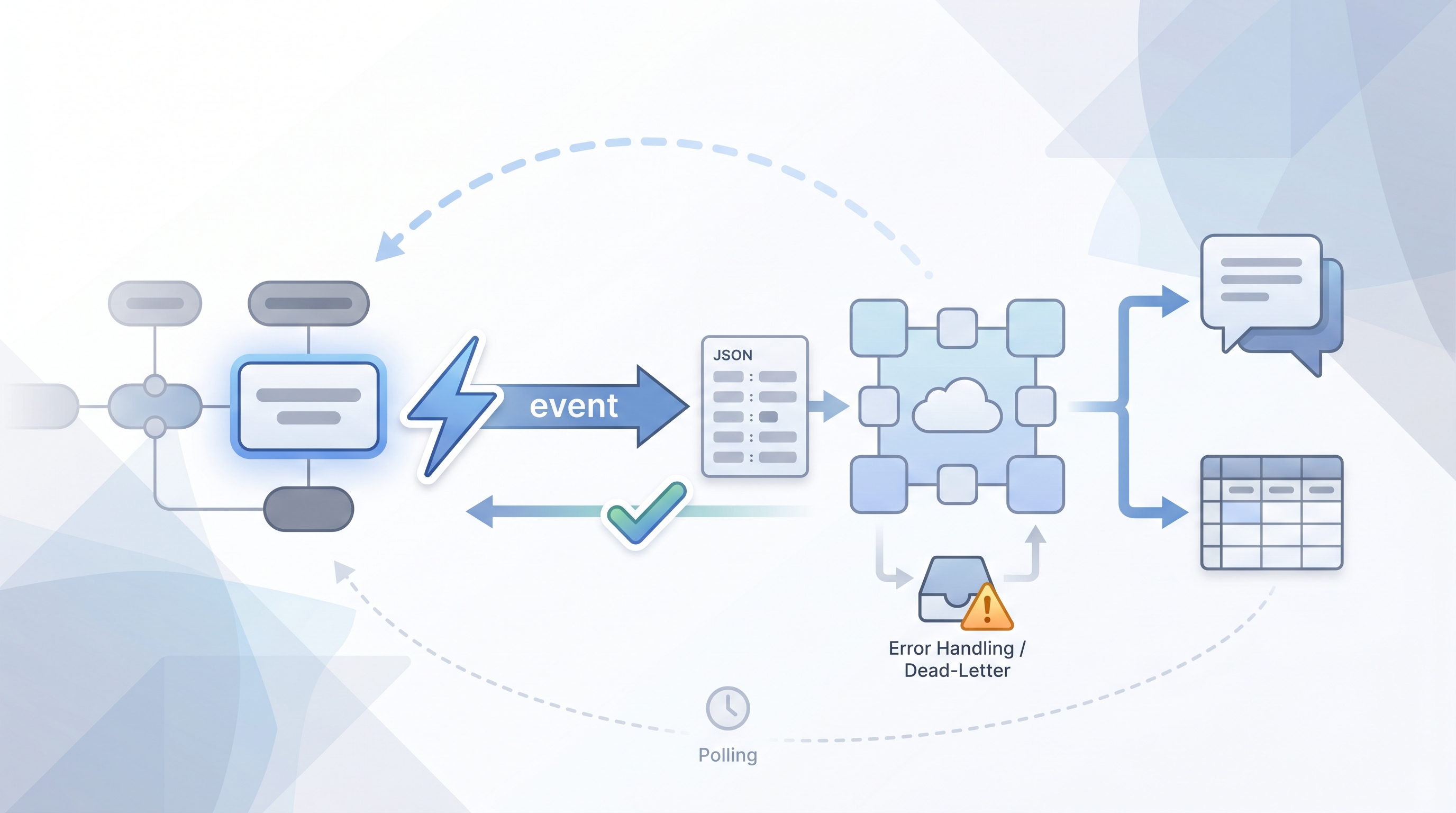
A webhook is an outbound HTTP call an ATS or recruiting tool sends to your own endpoint the moment something changes, so downstream systems update in near real time without polling.
Michal Juhas · Last reviewed May 4, 2026
What is a webhook in recruiting?
A webhook is a one-way push notification from one system to another. When something changes in your ATS or recruiting tool, the platform sends an HTTP POST to a URL you specify. Your receiving system reads the JSON payload and acts on it. No waiting, no polling loop, no stale dashboard.
Most ATS platforms send webhooks for events like a candidate moving to a new stage, an offer going out, or a job closing. That is how a Slack ping can arrive seconds after a hire is confirmed, not the next time someone refreshes a report.
In practice
- When a candidate in Greenhouse moves from "Offer Extended" to "Hired," a webhook fires to your internal endpoint, which then updates a headcount tracker and messages the hiring manager on Slack. Sourcers call this "closing the loop automatically."
- A no-code platform like Make or n8n receives the webhook payload, extracts the candidate ID and stage name, and routes the data to the right tool. No developer needed for basic flows.
- A RecOps analyst might say "the webhook broke" when new-hire Slack pings stop arriving, even if the ATS itself is working fine and the issue is a timed-out endpoint on their side.
Quick read, then how hiring teams use it
This is for recruiters, sourcers, TA, and HR partners who need the same vocabulary in debriefs, vendor calls, and policy reviews. Skim the first section when you need a fast shared picture. Use the second when you are deciding how it shows up in the ATS, sourcing tools, or candidate communications.
Plain-language summary
- What it means for you: When a candidate moves stages or an offer changes status, the ATS can automatically tell another app, so your Slack channel, spreadsheet, or CRM updates without anyone copy-pasting anything.
- How you would use it: Pick one event you track manually today (new hire confirmed, offer declined, final-round schedule confirmed), ask your ATS administrator for the webhook event name, and route it to one downstream action.
- How to get started: Check your ATS developer docs for a webhooks section. Most modern platforms have one. Point the webhook at a Make or Zapier "catch webhook" URL to inspect the raw payload before you build anything.
- When it is a good time: After you know which event you want to react to, what the payload contains, and who owns the receiving endpoint. Not before you have that clarity.
When you are running live reqs and tools
- What it means for you: Webhooks move candidate data the instant an event fires, which speeds up every downstream workflow automation but also means PII reaches your logging and queue systems in real time. Scope the payload and plan retention before you add a production webhook.
- How to use it: Wire webhooks from your ATS to a durable queue rather than a serverless function with a short timeout, so you do not lose events when your endpoint is briefly unavailable. Log delivery acknowledgments separately from the payload itself.
- How to get started: Use your ATS sandbox or a staging environment with test candidate records to confirm the payload schema before connecting production. Pair webhooks with scheduled API polling for bulk reconciliation so gaps from missed events do not accumulate overnight.
- What to watch for: Silent failures (delivery marked success but your server returned 200 without processing), schema changes from vendor updates, duplicate events on retry, and candidate data surfacing in third-party log aggregators you did not intend to use as processors.
Where we talk about this
On AI with Michal live sessions, webhooks come up in the sourcing automation tracks where we wire ATS stage changes to outreach queues and AI scoring steps. If you want to see a real payload, map it to a downstream tool, and handle failure modes with the room, start at Sourcing Lab and bring your ATS vendor name and your no-code platform of choice.
Around the web (opinions and rabbit holes)
Third-party creators move fast. Treat these as starting points, not endorsements, and double-check anything before you wire candidate data.
YouTube
- Fireship: Webhooks in 100 Seconds covers the concept in under two minutes, vendor-agnostic, good vocabulary primer before you open your ATS docs.
- Greenhouse Webhooks Configuration (search YouTube) shows the Greenhouse admin webhook setup screen so you see exactly where to paste your endpoint URL.
- n8n Webhook Trigger Tutorial (search YouTube) shows the no-code receive-and-route pattern end to end.
- r/recruiting: webhooks + ATS surfaces recruiter-first war stories when integrations break or vendors change payload shapes mid-flight.
- r/n8n: webhook trigger has receive-and-route patterns, queueing, and error handling from people wiring self-hosted automation.
- r/zapier: webhooks covers catch-hook setups, payload limits, and retries when an ATS fires faster than a Zap can keep up.
- r/humanresources: ATS automation sometimes picks up GDPR and retention angles when candidate data leaves the ATS in real time.
Quora
- What are webhooks and how are they used in HR systems? collects a range of practitioner and developer answers (quality varies, read critically).
Webhook versus polling
| Webhook (push) | API polling (pull) | |
|---|---|---|
| Latency | Near real time | Depends on poll interval |
| Server load | Low on ATS side | Grows with poll frequency |
| Reliability | Needs retry and dead-letter logic | Easier to recover from downtime |
| Data privacy surface | Payload delivered immediately | You request only what you need |
| Best for | Live reaction flows | Batch sync, historical back-fill |
Related on this site
- Glossary: Workflow automation, Candidate data enrichment, RAG (retrieval-augmented generation), Human-in-the-loop (HITL), Talent acquisition metrics
- Blog: AI sourcing tools for recruiters
- Live cohort: Sourcing Lab
- Membership: Become a member