Workflow automation
Connecting triggers, APIs, and human steps (often via tools like Make or n8n) so recruiting work moves between ATS, email, sheets, and models without retyping the same data.
Michal Juhas · Last reviewed February 7, 2026
What is workflow automation?
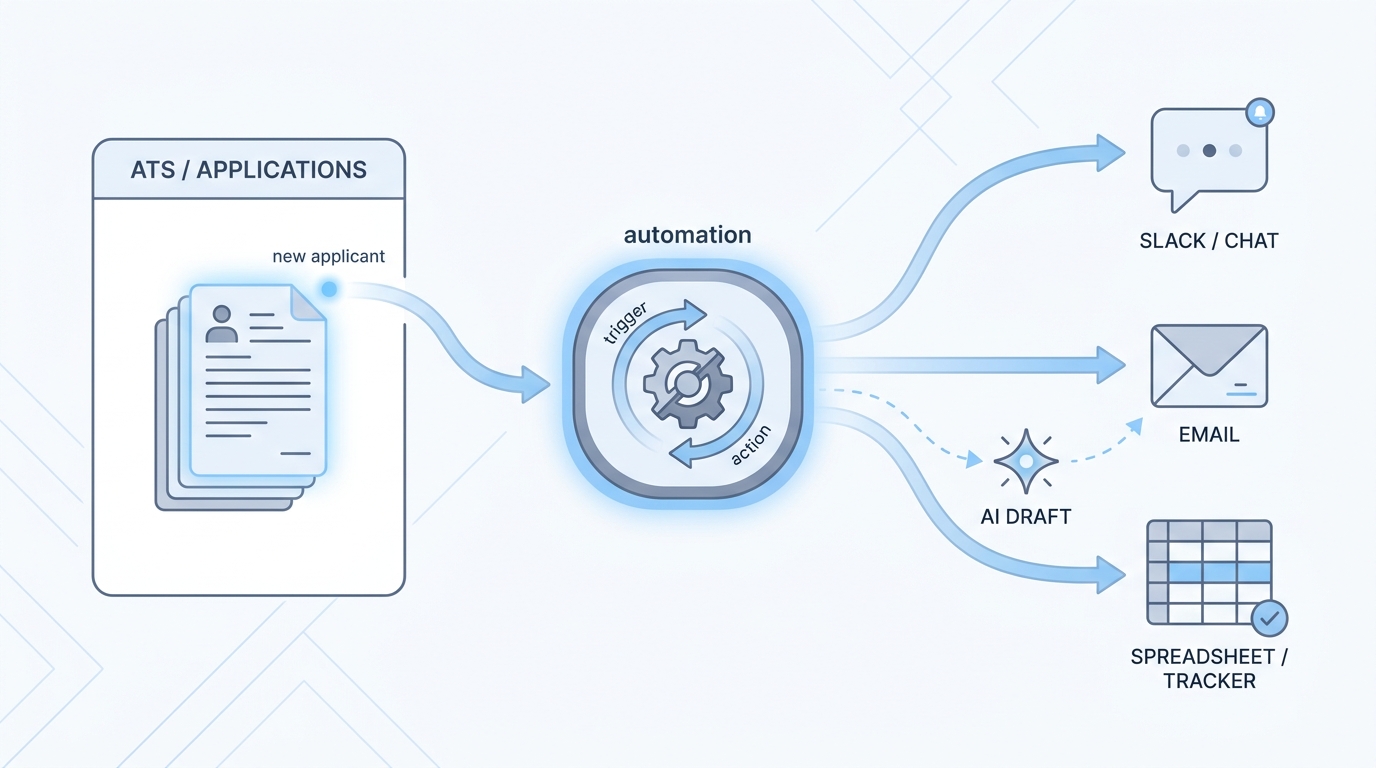
Workflow automation connects apps and AI so data moves after a trigger, for example a new application creating a task or updating a row. You still need clear rules, error alerts, and human review before sensitive messages go out.
In practice
- When a new application in your ATS triggers a Slack ping to the recruiter who owns that req, that is a small automation many teams set up in Zapier, Make, or n8n. Podcasts call it no-code workflow automation.
- Calendly-style links that drop straight into calendar invites without copy-paste are the same "if this, then that" idea recruiters use every week.
- A TA ops person might say "the webhook broke" when emails stop flowing overnight, even if recruiters only notice an empty inbox and not the technical word.
Quick read, then how hiring teams use it
This is for recruiters, sourcers, TA, and HR partners who need the same vocabulary in debriefs, vendor calls, and policy reviews. Skim the first section when you need a fast shared picture. Use the second when you are deciding how it shows up in the ATS, sourcing tools, or candidate communications.
Plain-language summary
- What it means for you: When something happens in hiring software (for example a new application), a small robot helper can copy the important bits to the next place, like Slack, email, or a spreadsheet, so nobody retypes the same name ten times.
- How you would use it: You pick one boring repeat task, you write the rule once ("if new row, then ping me"), and you let the computer run it every time.
- How to get started: Ask your team for the most annoying copy-paste step this week. Draw it on paper as three boxes: trigger, middle step, where the info should land. Only then open a tool.
- When it is a good time: After the steps are boring and stable, not while the process still changes every Monday.
When you are running live reqs and tools
- What it means for you: Automation moves state between systems (stages, owners, timestamps, tags), not just text inside a chat. That is how you scale screening queues and handoffs without hiring another ops person for every tool.
- When it is a good time: After prompts and scorecards are stable, when the same webhook would fire dozens of times a week, and when you have an owner for credentials plus a human inbox for failures.
- How to use it: Pair a no-code router (Zapier, Make, or n8n) with your ATS and comms stack. Keep candidate-facing sends behind review until error rates are boringly low. Log what each field is for so GDPR questions have an answer.
- How to get started: Ship one internal automation first (Slack ping on new req, sheet row from form, calendar hygiene). Add AI generation only after the data mapping is trusted. Read AI sourcing tools for recruiters before you chain vendors.
- What to watch for: Silent failures, duplicate rows, API keys in shared screenshots, and prompts baked into flows nobody updates when the policy changes. Plan alerts the way you plan the happy path.
Where we talk about this
On AI with Michal live sessions we walk this slowly: sourcing automation blocks spend time on triggers, keys, and what happens when a provider changes an API, and AI in recruiting blocks connect the same ideas back to hiring manager trust and GDPR. If you want the full room conversation, not only this page, start at Sourcing Lab and bring your real stack questions.
Around the web (opinions and rabbit holes)
Third-party creators move fast. Treat these as starting points, not endorsements, and double-check anything before you wire candidate data.
YouTube
- How to Automate Your Entire Hiring Process with n8n and Notion (Michele Torti) walks a full hiring-shaped build in public.
- n8n Tutorial: Build an AI HR Assistant That Shortlist… shows AI plus workflow nodes in one chain (title on YouTube may read slightly differently).
- Boost Your Productivity: Mastering the Power of Workflow Automation (DottoTech) stays tool-agnostic and good for vocabulary before you pick a vendor.
- Has anyone used Zapier? in r/recruiting is full of small real automations recruiters actually run.
- I want to make some recruitment automated workflows but… in r/RecruitmentAgencies is a frank "where do I start" thread from people in the chair.
- The most complete YouTube course in r/n8n is meta, but it is the community's own map when people feel lost in tutorials.
Quora
- How do we automate the process of recruiting as a recruiter? collects a wide range of practitioner answers (quality varies, so read critically).
Manual chain versus automation
| Stage | Manual | Automated |
|---|---|---|
| Prompt iteration | Fast | Dangerous if unbounded |
| Stable scoring | Tedious | Great fit |
| Candidate email | Review each | High risk |
Related on this site
- Glossary: AI adoption ladder, Human-in-the-loop (HITL), System instructions, LLM tokens
- Blog: Boolean search vs AI sourcing
- Tools: Cursor for scripting helpers
- Guides: Sourcers
- Live cohort: Sourcing Lab
- Membership: Become a member