AI browser automation for recruiting
Software that gives an AI agent control of a real web browser so it can navigate job boards, fill ATS forms, read profiles, and move candidate data between tools that have no public API.
Michal Juhas · Last reviewed May 4, 2026
What is AI browser automation for recruiting?
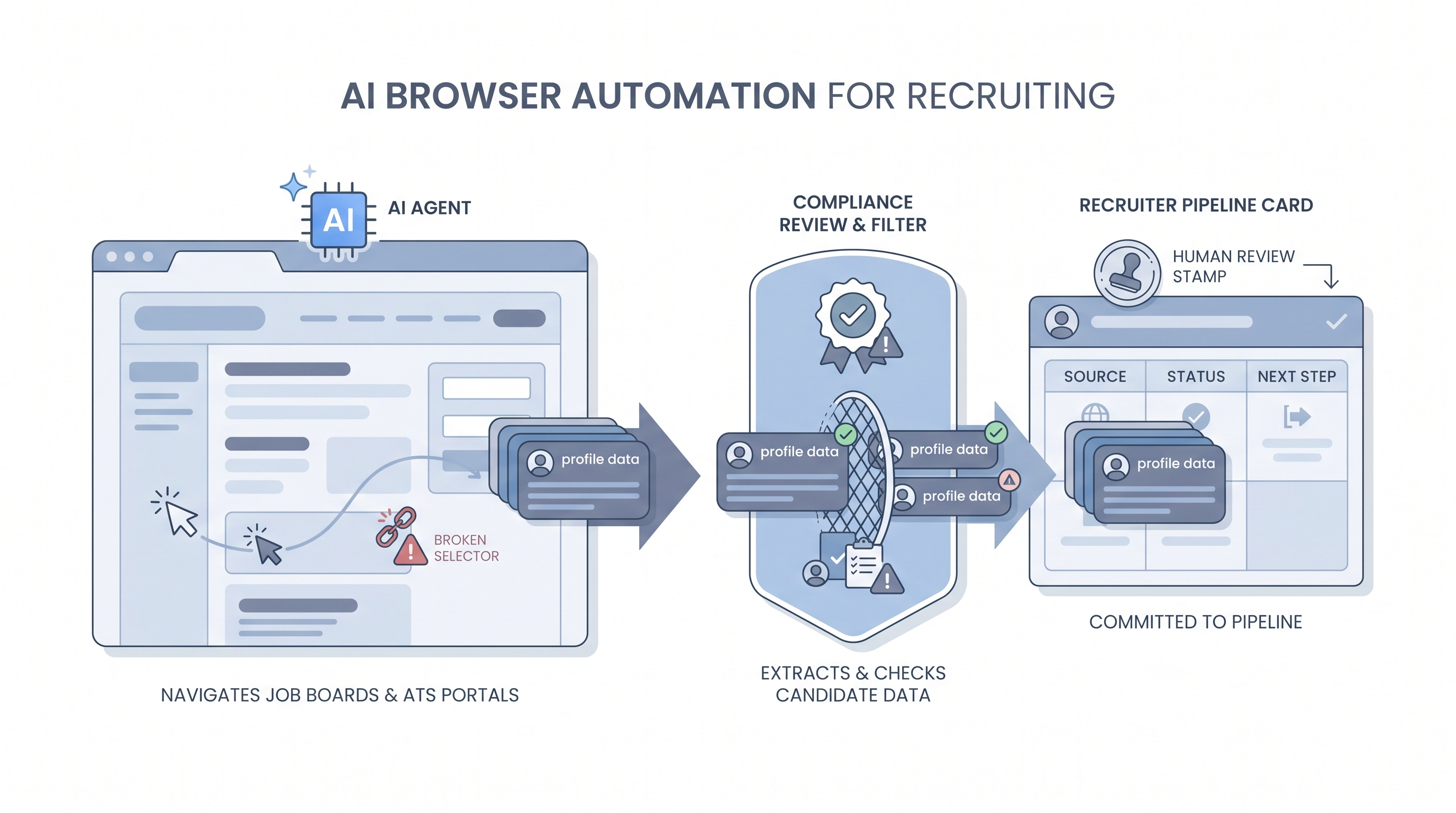
AI browser automation means giving an AI agent direct control of a real web browser so it can click buttons, fill forms, navigate pages, and read content the same way a human would, without needing a dedicated API from the tool it is visiting.
In recruiting, teams use it to bridge tool gaps: pulling candidate data from a niche job board with no API, pushing updates into a legacy ATS portal that predates webhooks, or verifying profile details across multiple sites in a single run. The agent sees the page, decides what to click or type, and acts, which makes it flexible but also fragile.
In practice
- A sourcer running a niche technical search points a browser agent at a company's public team page, has it read each person's title and LinkedIn URL, and drops the rows into a spreadsheet, skipping manual copy-paste for a list of 40 target profiles.
- A TA ops team uses a browser script to log into an older ATS that has no webhook support, read newly submitted applications each morning, and push structured data to Slack so the recruiter can triage without opening the portal.
- At an Recruiting OS session, we ran a Stagehand demo that navigated a job board, applied a seniority filter, and returned profile summaries. It then broke when the site updated its layout overnight, which is the lesson most teams need to hear before they automate.
Quick read, then how hiring teams use it
This is for sourcers, TA ops, and recruiters who need a shared picture when evaluating browser automation tools, discussing compliance with legal, or deciding whether to build a custom step versus buy a vendor integration. Skim the first section for the vocabulary. Use the second when you are deciding whether to add browser automation to a live stack.
Plain-language summary
- What it means for you: An AI-controlled browser can do the repetitive clicking and copy-paste on recruiting websites that have no API, freeing a sourcer to focus on evaluation and outreach strategy.
- How you would use it: Point the agent at a target site, describe what you want it to collect or fill, let it run on a small batch first, then review the output before treating it as real pipeline data.
- How to get started: Pick one narrow task with a clear success criterion, such as "collect company and title for 30 profiles on this niche board." Run it in a test account, not your live seat. Compare results to a manual check before scaling.
- When it is a good time: When no API exists, the volume justifies the maintenance cost, and you have a compliance review in place for what the agent reads and stores.
When you are running live reqs and tools
- What it means for you: Browser automation bridges tool gaps in your recruiting stack but inherits every fragility of the pages it touches. A design change, a CAPTCHA, or a Terms of Service update can silently kill the workflow overnight.
- When it is a good time: For legacy portal data pulls, one-off enrichment tasks, or prototyping a new data source before committing to an API integration or paid candidate data enrichment vendor.
- How to use it: Treat browser agents as brittle external dependencies. Add retries, human review queues for unexpected pages, and a clear owner who monitors run logs. Separate "read data" agents from "write to ATS" agents, and keep a human approval gate before any candidate-facing action, consistent with human-in-the-loop principles.
- How to get started: Evaluate Playwright or Stagehand for your first script, and set a maintenance budget before you commit. Start with internal tools or pages you own before touching external platforms. Document lawful basis and retention before the agent runs. See workflow automation for how browser steps fit into broader automated pipelines.
- What to watch for: Selector drift when a site updates its layout, session detection and IP bans from platforms that prohibit automation, GDPR exposure from collecting more personal data than intended, and credentials stored insecurely in scripts shared across the team.
Where we talk about this
On AI with Michal live sessions, sourcing automation blocks cover browser agents alongside workflow automation and candidate data enrichment. We run live demos with real failure modes so teams understand what to expect before wiring a browser agent into a production pipeline. For the full room conversation with real stack questions, start at Sourcing Lab.
Around the web (opinions and rabbit holes)
Third-party creators move fast on this topic. Treat these as starting points, not endorsements, and check anything before you wire candidate data through an automation you found in a tutorial.
YouTube
Use a few tight queries so you get demos instead of generic "AI will replace recruiters" clips. These open a results page you can sort by upload date:
- Stagehand + browser automation (AI-guided Playwright-style workflows; most hits tie back to Browserbase's stack)
- browser-use AI agent (open-source Python agent over Chromium; good for seeing failure modes and local setup)
- Playwright scraping tutorial (selector-first baseline before you add an LLM layer)
- AI computer use + browser (vendor and research demos of full desktop or browser control)
For product updates and Stagehand-adjacent talks, start from Browserbase on YouTube and work outward.
- r/recruiting: browser automation discussions surfaces practical ToS and rate-limit conversations recruiters are having in real time.
- r/n8n: browser agent has no-code integration notes from the automation community on combining n8n with AI browser steps.
Quora
Policy and tooling threads on Quora skew promotional, but the comment stacks often spell out ToS and GDPR angles recruiters care about:
- What are the best ways to extract data from LinkedIn?
- How do I collect data from LinkedIn profiles?
- LinkedIn profile scraper for recruiters
- Quora search: LinkedIn scraping recruiters for newer answers and follow-up questions
Browser agent versus other automation approaches
| Approach | Best for | Main risk |
|---|---|---|
| AI browser agent | No-API tools, legacy portals | Selector drift, ToS enforcement |
| Webhook or API | Stable integrations, ATS data | Setup time, vendor versioning |
| No-code router (Make, Zapier) | Connecting tools that have APIs | Limited custom logic |
| RPA | Repetitive structured UI tasks | High maintenance, brittle to UI changes |
Related on this site
- Glossary: Workflow automation, Candidate data enrichment, Human-in-the-loop, AI recruiting tools, Boolean search
- Blog: AI sourcing tools for recruiters
- Guides: Sourcers
- Live cohort: Sourcing Lab
- Membership: Become a member