ATS hiring software
The software layer that tracks applicants from job posting through offer, manages stage progression, stores candidate records, and connects recruiters and hiring managers across an open requisition.
Michal Juhas · Last reviewed May 4, 2026
What is ATS hiring software?
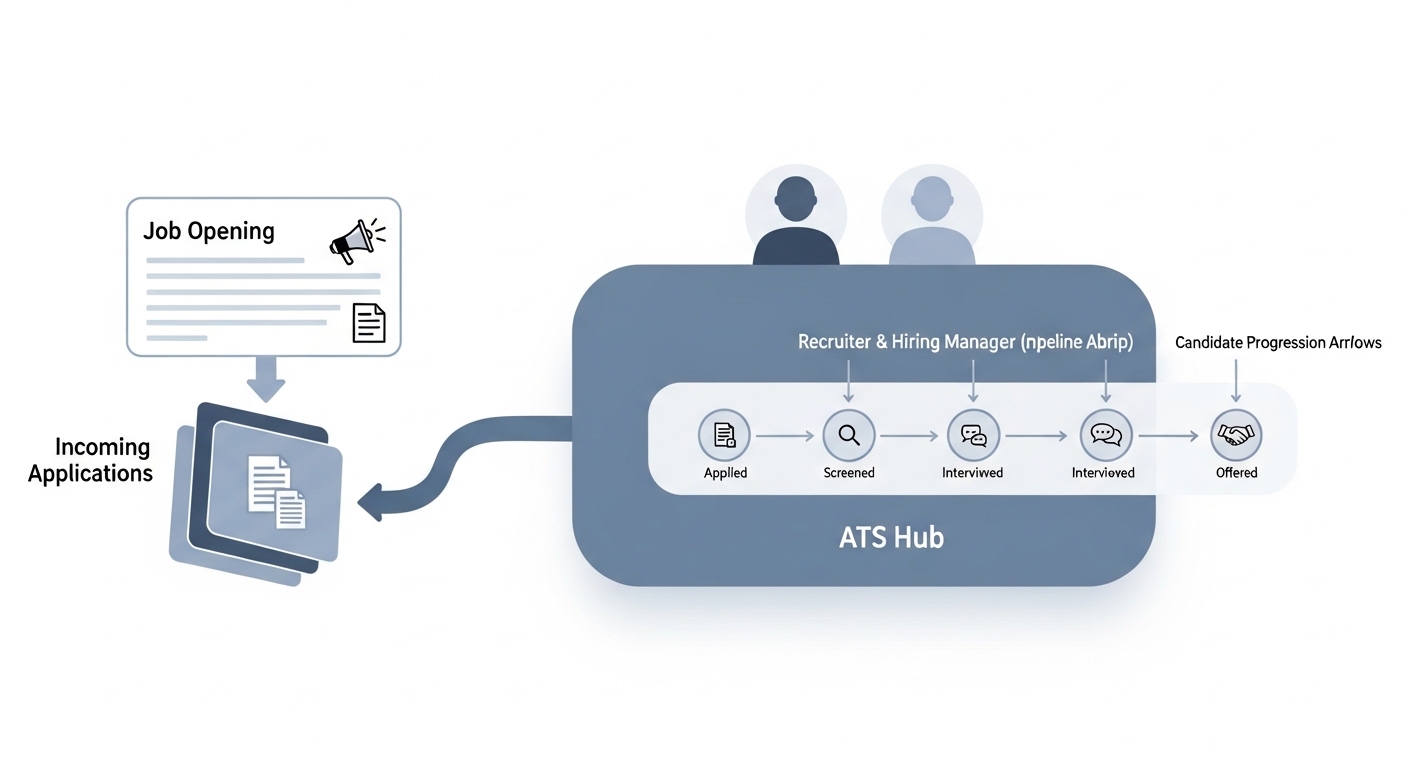
ATS hiring software, also called an applicant tracking system, is the central database and workflow engine that moves candidates from application to offer. It stores candidate records, defines the stages each candidate moves through, connects recruiters and hiring managers, and provides the audit trail that compliance and reporting require.
In practice
- A recruiter opens a req in the ATS, posts it to three job boards simultaneously, and receives all applications in a single inbox, avoiding the need to check multiple portals every morning.
- A hiring manager comments on a candidate profile inside the ATS rather than via email, keeping the full conversation attached to the record and making it searchable later.
- A TA ops lead notices that two-thirds of reqs have no disposition reason on rejected candidates, making it impossible to run source-of-hire or adverse-impact reports accurately. The fix is a required field at each reject stage, not a better reporting tool.
Quick read, then how hiring teams use it
This is for recruiters, sourcers, TA, and HR partners who need the same vocabulary in debriefs, vendor calls, and policy reviews. Skim the first section when you need a fast shared picture. Use the second when you are deciding how your ATS configuration affects data quality and tool integrations.
Plain-language summary
- What it means for you: The ATS is the single record of truth for every open req. Every candidate who applies, gets rejected, or gets hired should have a complete, timestamped trail in this system.
- How you would use it: Log every stage change with a disposition reason. Keep custom fields to a minimum and define each one clearly. Treat the ATS as the source of truth, not a secondary system to sync manually with a spreadsheet.
- How to get started: Audit your current open reqs for missing data: stages with no disposition reasons, candidates stuck in the same stage for over 30 days, and reqs that are listed as open but actually filled. Fix those before adding any AI or automation on top.
- When it is a good time: An ATS upgrade or configuration review is most impactful before a headcount ramp, not during one. Clean data from the start multiplies the value of every report and integration you add later.
When you are running live reqs and tools
- What it means for you: Every AI tool you connect to the ATS reads or writes candidate records. Bad stage definitions, missing fields, and duplicate records break AI outputs. The ATS data model is the foundation everything else runs on.
- How to use it: Define a fixed set of stages with clear entry and exit criteria. Require disposition reasons at every reject point. Use the ATS API for integrations rather than manual exports. Audit field completeness monthly rather than quarterly.
- How to get started: Map the data fields your AI tools need and check whether your ATS captures them reliably today. Fields like req owner, source, stage-change date, and disposition reason are the minimum for useful analytics.
- What to watch for: Vendors that promise AI features but depend on your existing ATS data being clean. Silent API changes that break integrations. Compliance gaps when your ATS does not capture data required for EEO or GDPR reporting in your jurisdiction.
Where we talk about this
On AI with Michal live sessions, ATS configuration comes up in both the AI in recruiting and sourcing automation tracks, specifically around what data the ATS needs to hold for AI tools to produce reliable outputs. If you want the full conversation, start at Sourcing Lab and bring your current ATS name and the top two reporting or integration problems you are trying to solve.
Around the web (opinions and rabbit holes)
Third-party creators move fast. Treat these as starting points, not endorsements, and double-check anything before you wire candidate data.
YouTube
- Search "ATS setup recruiter" for practitioner walkthroughs covering stage configuration, field definitions, and integration basics across popular platforms.
- Search "applicant tracking system comparison" for side-by-side feature reviews from independent analysts rather than vendor marketing content.
- r/recruiting has recurring threads comparing specific ATS platforms with candid pros, cons, and migration war stories from people who have actually switched systems.
- r/humanresources covers procurement and compliance angles for HR leaders evaluating enterprise ATS options.
Quora
- Search "best ATS for recruiting" for mixed practitioner opinions on what matters most at different company sizes.
ATS core features versus AI add-ons
| Capability | Core ATS | AI layer |
|---|---|---|
| Candidate records | Yes, fundamental | Reads and enriches records |
| Stage progression | Yes, fundamental | Can trigger automated actions |
| Resume screening | Basic keyword match | Semantic ranking and scoring |
| Reporting | Pipeline and funnel metrics | Predictive and pattern insights |
Related on this site
- Glossary: Applicant tracking software, ATS API integration, Workflow automation, AI in recruiting, Resume parsing, Best applicant tracking system
- Live cohort: Sourcing Lab
- Course: Starting with AI: the foundations in recruiting
- Membership: Become a member