AI in recruiting
Using AI tools to handle sourcing, screening, outreach, scheduling, and pipeline analytics across the talent acquisition cycle, so recruiters spend less time on repeatable tasks and more time on decisions that need human judgment.
Michal Juhas · Last reviewed May 4, 2026
What is AI in recruiting?
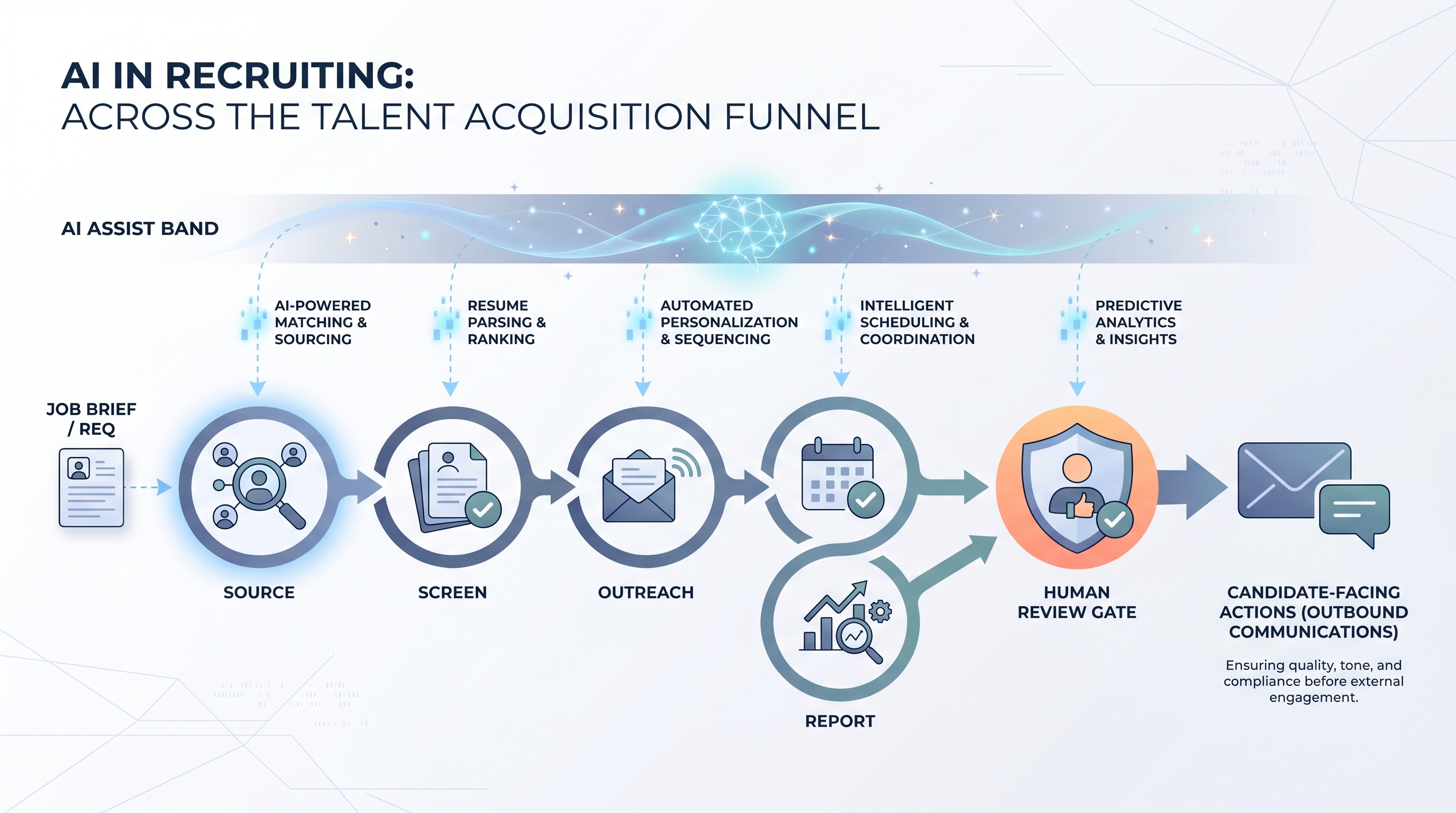
AI in recruiting is the use of language models, automation, and analytics tools across the talent acquisition cycle: sourcing, screening, outreach, scheduling, and pipeline reporting. It covers everything from a recruiter pasting a job brief into ChatGPT to a TA ops team running fully integrated workflows where ATS events trigger automated drafts that still pass a human review gate before they touch a candidate.
The term covers a wide range of maturity levels. A team using AI in recruiting might be generating sourcing messages in a chat window, running resume summaries through a prompt, or operating a multi-step workflow automation with human-in-the-loop checkpoints at every send. What connects them is the decision to apply language models to hiring work rather than keeping everything in spreadsheets and manual copy-paste.
In practice
- A sourcer opens their saved ChatGPT Project with role context pre-loaded and generates five InMail variants in 20 minutes instead of 90; every message still gets a read before it sends, but the drafting grunt work is gone.
- A TA lead tells the team "we have AI in our ATS now" after the vendor enables a resume match feature; the real question the team should ask is whether the scoring is documented, bias-checked, and traceable to a specific model version and date.
- A TA ops manager describes their Monday pipeline report as "AI-assisted" because a prompt chain summarises stage counts and conversion gaps from a spreadsheet export before the team call; recruiters still own the interpretation and the decisions.
Quick read, then how hiring teams use it
This is for recruiters, sourcers, TA leads, and HRBPs who need a shared definition before buying a tool, writing a policy, or running a pilot. Skim the first section for a fast shared picture. Use the second when you are deciding which task to start with and what review gates to put in place.
Plain-language summary
- What it means for you: AI in recruiting shifts repeatable cognitive work (drafting, summarising, scheduling, ranking) to a model while leaving judgment calls (culture read, offer negotiation, debrief facilitation) with the recruiter.
- How you would use it: Pick one high-volume step you do the same way every week: sourcing outreach, screen notes, or pipeline status emails. Run a prompt against five real roles. Measure rework time.
- How to get started: Start with an internal-facing task, not a candidate-facing one. Document the prompt, the format, and who reviews the output before you automate anything.
- When it is a good time: After your hiring process is stable enough to describe in one page. AI amplifies what is already working; it multiplies chaos if the process is still shifting every Monday.
When you are running live reqs and tools
- What it means for you: AI tools handle candidate PII, interact with your ATS, and can influence who gets human attention, so vendor DPAs, bias checks, and decision logs are not optional extras.
- When it is a good time: Before a high-volume campaign or after a bottleneck appears in screening speed or outreach quality that the team cannot fix by adding headcount.
- How to use it: Connect AI outputs to your ATS only after the prompt is stable and reviewed. Log model version, prompt, and output next to each candidate interaction. Set a human gate before any candidate-facing send or advance or reject decision.
- How to get started: Run a side-by-side on closed roles: compare the AI-suggested shortlist to who you actually hired. Gaps show you what the model misses before live candidates are affected.
- What to watch for: Opaque scoring tools, vendors that retrain shared models on your candidate data, and AI outputs formatted for a different ATS than the one you run. Ask the vendor which model version is live and when it last changed.
Where we talk about this
AI in recruiting Live Build sessions cover the full cycle: from the first sourcing prompt through to audit-ready logging and compliant outreach flows. Sourcing automation sessions go deeper on the technical integration layer, where ATS webhooks, prompt chains, and data routing come together. If you want a live room conversation and peer review on your specific stack rather than a static glossary entry, start at Sourcing Lab and bring a real role brief.
Around the web (opinions and rabbit holes)
Third-party creators move fast here. Treat these as starting points, not endorsements, and verify compliance postures and vendor details directly before wiring candidate data.
YouTube
- AI in Recruiting: What Talent Teams Need to Know covers the practical landscape for TA teams adopting AI tools across the funnel.
- Introduction to Generative AI (Google Cloud Tech) gives the language-model foundation useful before evaluating any AI recruiting vendor.
- AI Bias and Fairness Explained (IBM Technology) covers the algorithmic fairness concepts that underpin AI bias audits in hiring contexts.
- How are you actually using AI in your recruiting workflow right now? in r/recruiting is a candid survey of tools and use cases from practitioners in the chair.
- AI tools for recruiting: 6 months in, what worked and what did not in r/recruiting is honest about failure modes you do not see in vendor demos.
- Has AI made recruiting easier or just different? in r/Recruitment covers both the efficiency gains and the anxiety that AI adoption surfaces in teams.
Quora
- How is artificial intelligence changing the recruitment process? collects varied practitioner perspectives across sourcing, screening, and scheduling use cases.
AI in recruiting across the funnel
| Stage | Typical AI use | Human gate |
|---|---|---|
| Sourcing | Draft outreach, generate Boolean variants | Approve before send |
| Screening | Fill scorecard from resume or call notes | Recruiter reviews before advance or reject |
| Scheduling | Propose times, draft calendar invites | Confirm edge cases manually |
| Reporting | Summarise stage counts, flag bottlenecks | TA lead validates before exec presentation |
Related on this site
- Glossary: AI-native, Workflow automation, Human-in-the-loop, AI bias audit, Scorecard, Recruiter AI, AI adoption ladder
- Blog: AI sourcing tools for recruiters
- Guides: Sourcers
- Workshops: Sourcing Lab
- Courses: Starting with AI: the foundations in recruiting
- Membership: Become a member