HR recruiting software
Software used by HR teams to attract, track, and hire candidates, typically covering job advertising, applicant tracking, interview coordination, offer management, and handoff to the HRIS and payroll systems already in the people stack.
Michal Juhas · Last reviewed May 9, 2026
What is HR recruiting software?
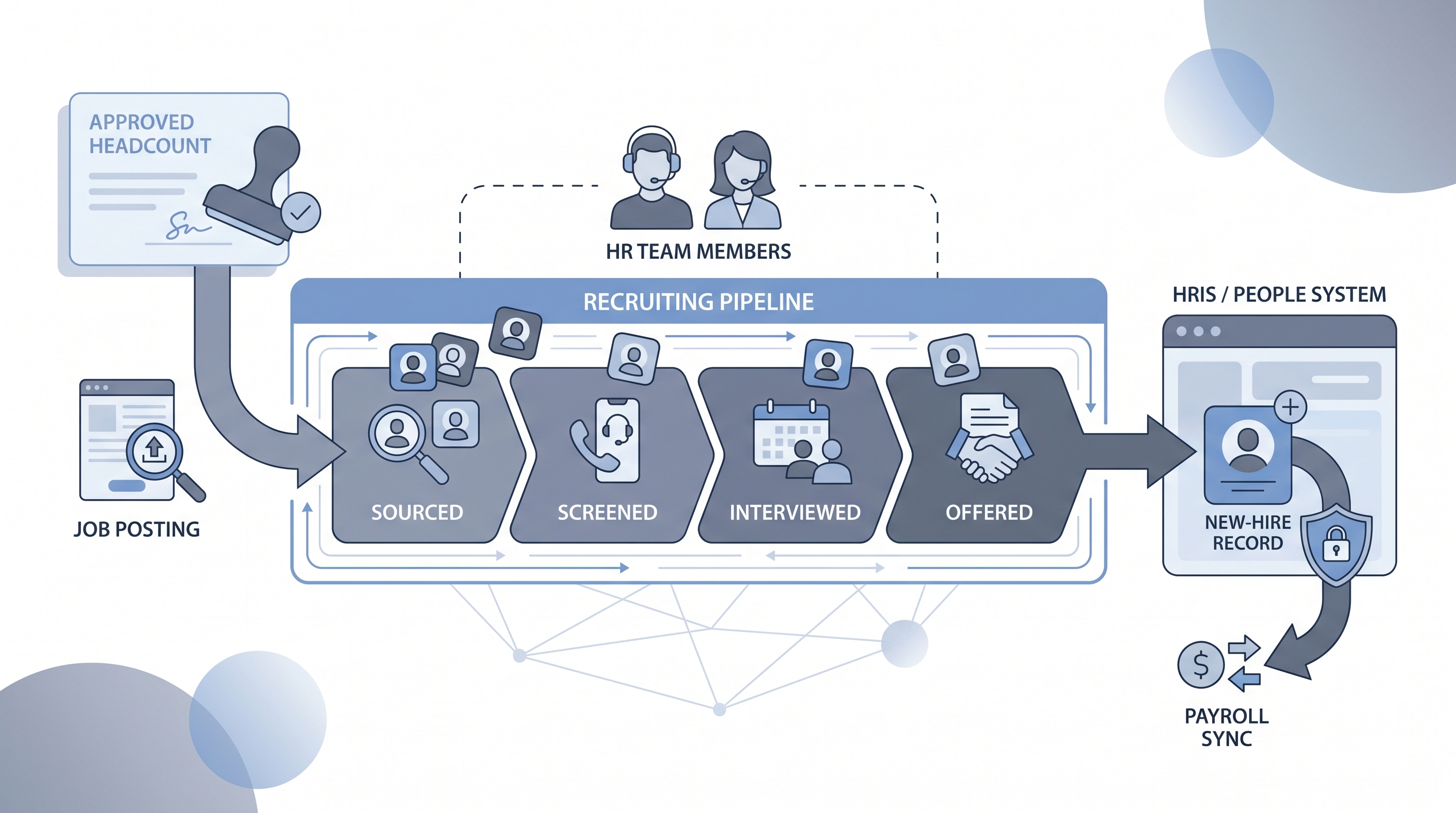
HR recruiting software is the collective term for the platforms and tools an HR team uses to manage hiring from an approved headcount request through offer acceptance and first-day handoff. The phrase distinguishes tools that live inside the people function from standalone recruiting stacks that dedicated talent acquisition teams might run independently.
The distinction matters in practice. An HR generalist evaluating software needs it to connect to the employee database already in use, route offers through existing comp approval chains, and produce EEO reports without a manual export. Those requirements sit on top of the core applicant tracking and interview coordination features any hiring tool needs to cover.
In practice
- An HRBP at a 300-person company opening three roles simultaneously uses the same platform to post jobs, manage interview panels, and generate the onboarding task list after a candidate accepts. Recruiters call this "having everything in one place."
- When a new-hire record created in the ATS does not sync to the payroll system before day one, that is the most common failure HR teams report about their recruiting software, regardless of how strong the applicant tracking feature set is.
- Finance asking "why did we miss the headcount target this quarter?" is often answered by pulling pipeline stage data from the recruiting software, which is why approval and reporting features matter as much as sourcing integrations for HR teams.
Quick read, then how hiring teams use it
This is for HR generalists, HRBPs, and People leaders who manage hiring alongside other HR responsibilities and need clear vocabulary for vendor evaluations, budget conversations, and compliance audits. Skim the first section for a shared picture; use the second when deciding how a platform fits your HRIS, approval process, and compliance requirements.
Plain-language summary
- What it means for you: HR recruiting software is the system that holds every open role, every applicant, and every interview note in one place, connected to the employee database so a hired candidate becomes a new-hire record without anyone retyping data.
- How you would use it: You open a requisition, attach a job description and scorecard, add the hiring manager, and track each candidate through stages until offer signed. The software notifies the right people at each step.
- How to get started: Map one complete hire from req open to onboarding task list on paper first. Then find a platform that covers each step without a manual handoff. Run a demo with a real recent hire as your test case.
- When it is a good time: When the team is managing more than five open roles at once or when a compliance question (EEO, GDPR) cannot be answered without a spreadsheet export.
When you are running live reqs and tools
- What it means for you: Recruiting software is where HRIS data integrity starts. A stage move in the ATS should trigger an offer letter, which should trigger a payroll record. When those connections break, HR owns the fallout.
- When it is a good time: After you have mapped your HRIS sync rules and approval chain before buying. Platforms that look fast in demos often have brittle connectors; test with a real edge case.
- How to use it: Configure approval workflows that match your actual headcount process. Keep candidate-facing communications behind a review step. Set retention schedules for applicant data before the first req goes live so GDPR obligations are met from day one.
- How to get started: Run a parallel process on one live req before switching fully. Check that the HRIS connector populates at least name, role, start date, and manager without manual correction. Read HR hiring software for the broader people-ops integration picture.
- What to watch for: Broken HRIS syncs that create duplicate employee records, EEO data collected in a field nobody exports, AI ranking features enabled by default without a bias audit log, and onboarding handoffs that require a manual Slack ping to IT.
Where we talk about this
On AI with Michal sessions the HR software conversation usually surfaces in two places: AI in recruiting blocks where teams map their current stack and decide where automation adds value without adding compliance risk, and sourcing automation blocks where HRIS integration becomes the rate-limiting constraint on how far to push workflow automation. Start at Sourcing Lab to bring your real stack and approval chain into the room.
Around the web (opinions and rabbit holes)
Third-party creators move fast. Treat these as starting points, not endorsements, and double-check anything before you wire candidate data.
YouTube
- Search YouTube for "HR software review [year]" from channels like Josh Bersin or SHRM for analyst-level commentary on category shifts, not just vendor demos.
- "HRIS vs ATS: what HR needs to know" style explainers from independent HR educators walk through the integration question before you commit to a platform.
- Vendor-produced "how to set up your first req" walkthroughs are useful for comparing onboarding complexity across platforms before a full demo.
- r/humanresources has recurring threads on which ATS survives payroll migrations and which ones require weekly manual syncs - search "ATS HRIS integration" for unfiltered practitioner experience.
- r/recruiting carries HR-side stack discussions alongside pure TA threads; filter by the "tools" flair for software comparisons.
- r/smallbusiness has candid "first HR hire" threads about setting up recruiting software from scratch with limited budget and no dedicated ops support.
Quora
- What is the best HR software for recruiting? collects a wide range of practitioner answers covering ATS, HRIS, and all-in-one suite trade-offs (quality varies; read critically).
HR recruiting software vs. standalone ATS
| Feature area | HR recruiting software | Standalone ATS |
|---|---|---|
| Primary user | HR generalist, HRBP | Recruiter, sourcer |
| HRIS sync | Core requirement | Optional add-on |
| Approval workflows | Built for headcount chains | Basic or absent |
| EEO / GDPR reporting | Built in | Often third-party |
| Sourcing integrations | Limited | Extensive |
| AI ranking | Increasingly standard | Often more configurable |
Related on this site
- Glossary: HR hiring software, Applicant tracking software, Hiring software, Hiring platforms, Employee onboarding software, Resume parsing, Adverse impact
- Blog: AI sourcing tools for recruiters
- Guides: Sourcers
- Live cohort: Sourcing Lab
- Membership: Become a member