Utilization and productivity for agency recruiters
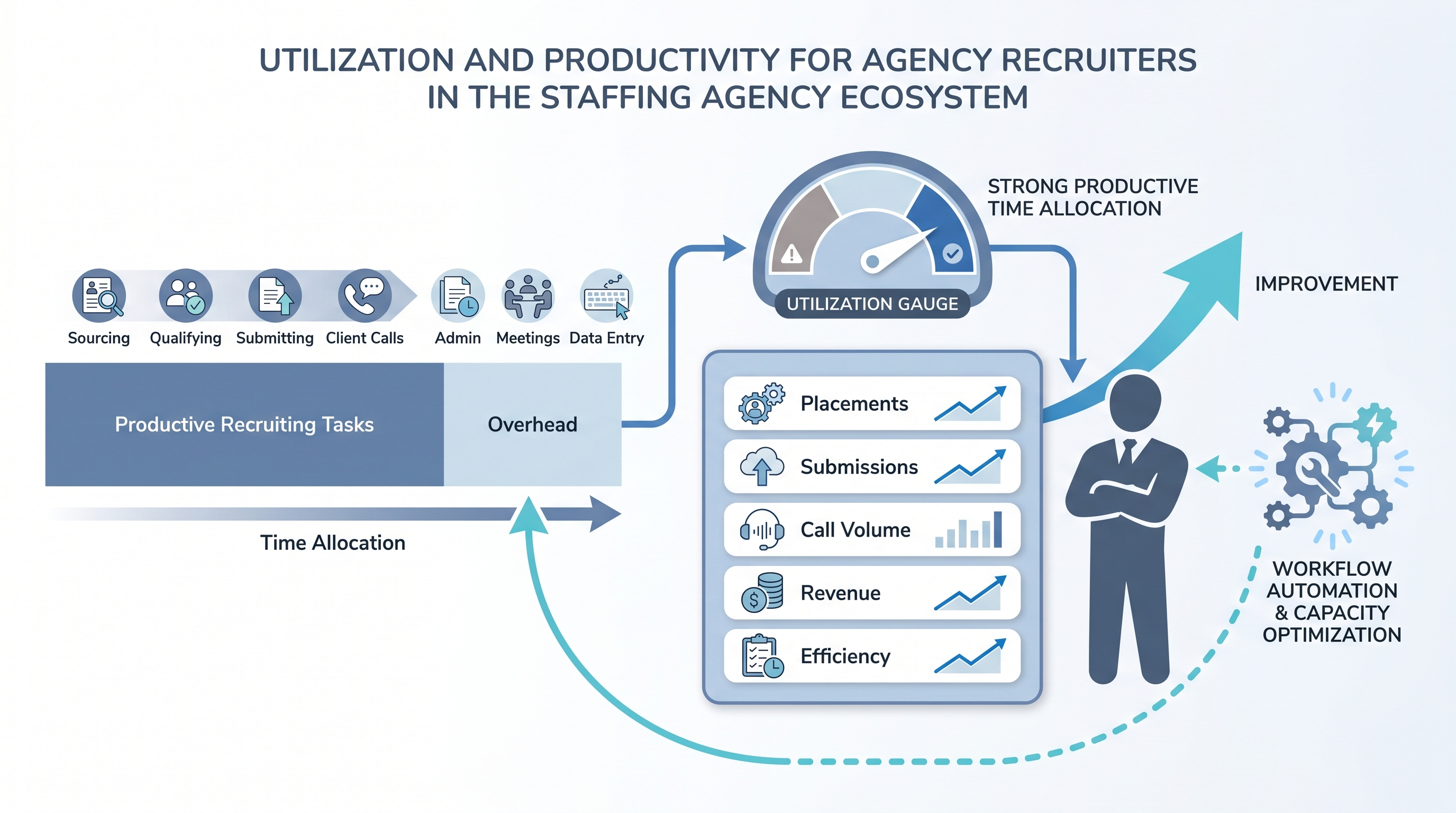
Utilization for agency recruiters is the ratio of productive or billable recruiting hours to total available hours, showing how much of a recruiter's capacity is generating revenue versus being absorbed by administration, internal meetings, and non-revenue overhead. Alongside revenue per head and placements per month, it gives agency leaders a complete picture of where output is being produced and where capacity is being lost.
Michal Juhas · Last reviewed May 5, 2026
What is utilization and productivity for agency recruiters?
Utilization is the answer to a question most agency leaders avoid asking directly: where does recruiter time actually go?
A recruiter has a fixed number of working hours each week. Some of those hours move candidates and clients forward. Others disappear into email threads, ATS data entry, internal meetings, and administrative tasks that are necessary but do not generate placement revenue. The utilization rate is the ratio of productive hours to total hours. It is not a judgment on effort; it is a diagnostic on direction.
Productivity is the output side of the same picture. Placements per month, revenue per head, submissions per week, and interview-to-offer ratios together show what the utilization is producing. Tracking both tells you whether a recruiter who is underperforming on output is working hard at the wrong things or simply not working enough of the right hours.
In practice
- A mid-size agency runs a weekly review and notices that one recruiter has placed two candidates in the past month but is logging 45-hour weeks. After reviewing their time allocation, the team lead finds that the recruiter is spending nearly a third of their time updating records and writing job descriptions for new orders - tasks that were never automated. After setting up templated job brief prompts and auto-fill rules in the ATS, the recruiter's administrative time drops by eight hours a week. Placements increase within six weeks.
- An executive search firm tracks revenue per recruiter quarterly and sees a pattern: two of their five consultants are generating 70% of total billings. The other three are fully loaded by job order count but have a low submission-to-sendout rate. Utilization is high; productivity is low. The root cause is intake quality: they are accepting poorly defined briefs that produce unqualifiable shortlists. The fix is an intake checklist, not a hiring decision.
- A staffing agency rolls out a recruiter scorecard that includes utilization, placements, call volume, and ATS submission rate. Within two months, three recruiters who previously looked similar on placement count are clearly differentiated: one is very efficient with a light load, one is heavily loaded but efficient, one is heavily loaded and inefficient. Each needs a different conversation and a different action from the team lead.
Quick read, then how hiring teams use it
This page is for agency founders, team leads, and operations managers who want to measure recruiter output more precisely, and for recruiters who want to understand how their time allocation connects to their performance numbers.
Plain-language summary
- What it means for you: Utilization measures what proportion of your working time is spent on activities that directly generate placements and revenue. Productivity measures what that time produces. Both matter and neither tells the full story without the other.
- How you would use it: Track your own time allocation for two weeks - not to report to anyone, but to see where your hours actually go versus where you think they go. Most recruiters find they spend 20% to 30% more time on administration than they estimated.
- How to get started: Pick three to five metrics to track weekly: placements, submissions, qualification calls, ATS stage updates, and outreach sent. Log them for a month. The pattern will show you where your productive time is going and whether it is generating proportional output.
- When it is a good time: When placement volume has been flat for six weeks and you cannot identify why, when a new team member joins and you want to set clear performance expectations, or when you are evaluating whether to hire another recruiter or automate more existing workflows.
When you are running live reqs and tools
- What it means for you: Every hour your ATS, email, or calendar tooling wastes is an hour that comes out of productive recruiter capacity. Measuring utilization shows you where the tooling is the bottleneck.
- When it is a good time: When you are onboarding new technology, when your team is at capacity but placement volume has not increased, or when you are making a case to leadership for additional headcount versus additional automation investment.
- How to use it: Build a simple weekly tracker - a shared spreadsheet or a lightweight ATS report - that captures calls made, submissions sent, placements closed, and hours billed per recruiter. Layer utilization estimates once per month by reviewing calendar and ATS activity logs. Use workflow automation to eliminate the highest-frequency administrative tasks first: ATS stage updates, interview confirmations, follow-up sequences. Use recruitment agency software with built-in recruiter activity reporting if your current ATS does not surface this data.
- How to get started: Define what counts as productive time at your agency before measuring. Run a one-week pilot where two or three recruiters log their own time in 30-minute blocks. The discrepancy between estimated and actual productive time almost always generates the most useful conversation about where to focus automation or process change.
- What to watch for: High utilization with declining productivity is a signal worth investigating quickly - it usually means the job order mix has degraded, the sourcing channels are producing worse candidates, or a key client relationship needs attention. Low utilization with strong productivity means capacity exists and the question is whether to add job orders, add BD effort, or reduce team size. See sourcing funnel metrics for the candidate-flow data that sits underneath these utilization numbers.
Where we talk about this
On AI with Michal live sessions, recruiter utilization and productivity tracking come up in the AI in recruiting track when agency leaders discuss how to systematise performance management, identify automation opportunities, and build team capacity without growing headcount. The Sourcing Lab cohort covers agency operations metrics, recruiter scorecards, and how to use AI tools to reclaim productive hours from administrative overhead.
Around the web (opinions and rabbit holes)
Third-party creators cover recruiter productivity and utilization from agency operations, sales leadership, and recruiting technology perspectives. These are starting points, not endorsements. Verify any benchmarks or targets with your own data before using them in performance reviews.
YouTube
- Recruiter productivity metrics: what to track and why covers the core output metrics agency leaders use beyond raw placement count.
- How to improve recruiter utilization in a staffing agency walks through time allocation analysis and common overhead traps in agency desk workflows.
- Recruiter scorecards and performance management for staffing firms covers how team leads structure weekly reviews around activity and output data.
- Recruiter KPIs and productivity tracking in r/recruiting contains real conversations from agency recruiters and leaders about what metrics actually correlate with billing output.
- Agency recruiter performance management in r/RecruitmentAgencies covers practical approaches to tracking and coaching recruiter output in agency settings.
- Staffing agency operations in r/smallbusiness covers how smaller agencies balance recruiter autonomy with performance visibility.
Quora
- How do staffing agencies measure recruiter productivity? collects answers from agency operators, team leads, and recruiters on what metrics matter most in practice.
Utilization vs productivity: the key distinctions
| Dimension | Utilization | Productivity |
|---|---|---|
| What it measures | Proportion of hours spent on revenue-relevant work | Volume and value of output produced |
| Leading or lagging | Leading indicator | Lagging indicator |
| High + low (other) | Working hard, wrong direction | Efficient but underloaded |
| Low + high (other) | Capacity gap or pipeline problem | High efficiency, possible burnout risk |
| How to improve | Automate admin, clarify role focus | Better job orders, improved sourcing channels |
Tracking both together gives agency leaders more precise diagnosis than either metric alone.
Related on this site
- Glossary: Markup and margin on contract staffing, Agency invoice payment terms and collections, Business development for recruiting agencies
- Glossary: Talent acquisition metrics, Sourcing funnel metrics, Interview-to-offer ratio
- Glossary: Workflow automation, Recruitment agency software, AI outreach drafting
- Workshops: Sourcing Lab
- Course: Starting with AI: the foundations in recruiting
- Membership: Become a member