AI drafting for candidate outreach
Using AI models to generate first drafts of sourcing messages, InMails, and follow-up sequences so recruiters spend time personalizing and reviewing rather than starting from a blank page.
Michal Juhas · Last reviewed May 5, 2026
What is AI drafting for candidate outreach?
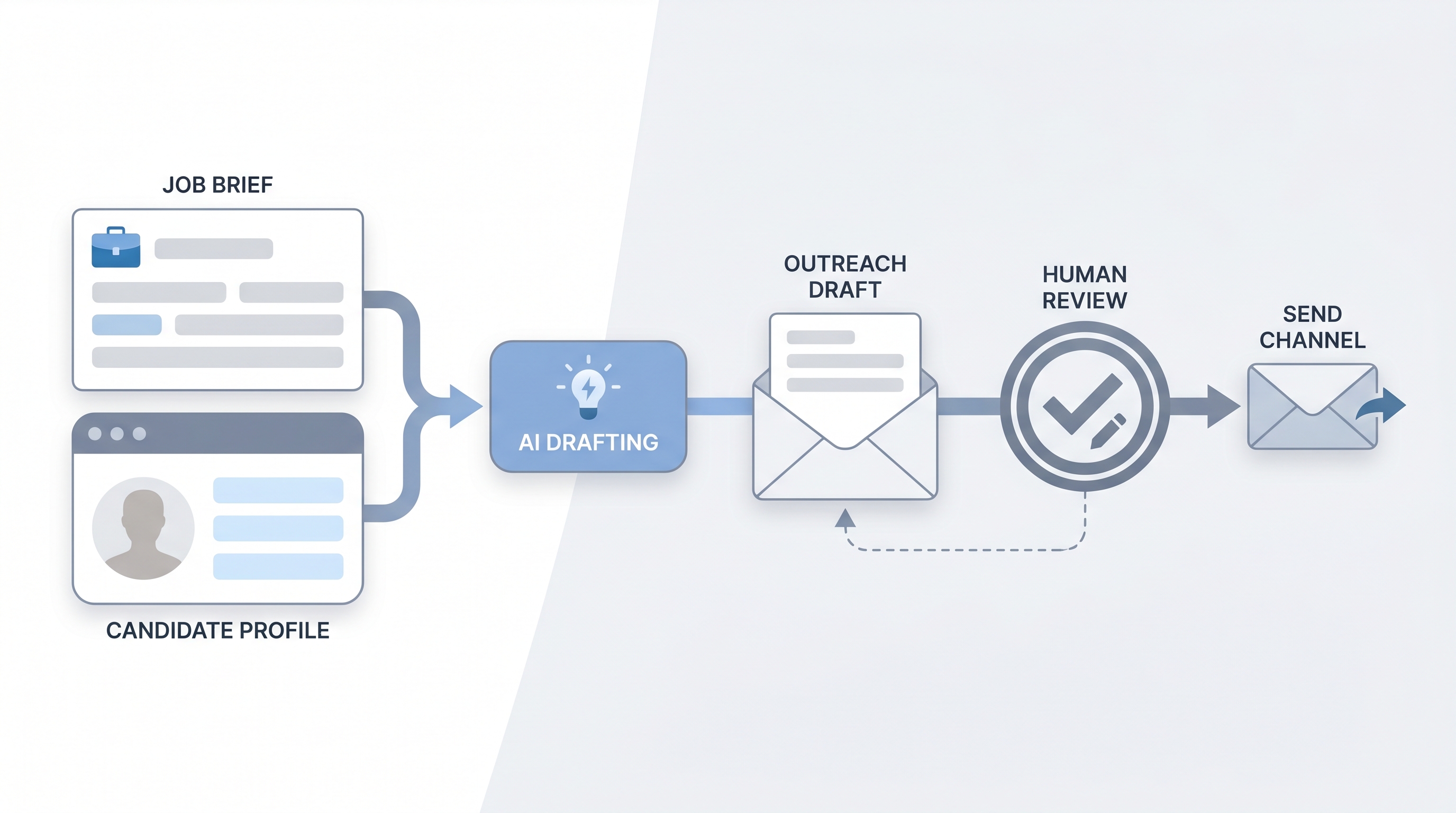
AI drafting for candidate outreach means asking a model to generate the first version of a sourcing message so the recruiter edits rather than starts from a blank page. You supply the job brief, the candidate signal (a title, a company, a recent project), and your tone rules. The model returns a draft. You read it, sharpen the hook, cut the filler, check for invented details, then send.
The phrase shows up in TA team debriefs as "AI-assisted outreach," "AI-drafted InMails," or "model-generated first touch." The tool doing the drafting can be Claude, ChatGPT, or a purpose-built sourcing platform. What matters is not the vendor but the human review gate before the message leaves your queue.
In practice
- When a sourcer pastes a job brief and a LinkedIn title into a chat model and gets back a three-sentence InMail that needs only a name and one specific hook, that is AI drafting for outreach at its simplest.
- Recruiting teams often call this "the first pass" internally; the operating norm is that no message leaves the queue without a human read, even if the draft took five seconds to generate.
- A TA lead might say "we draft with AI now but reply rates went up because people actually edit instead of copy-pasting the same template" after switching from a shared template bank.
Quick read, then how hiring teams use it
This is for recruiters, sourcers, TA, and HR partners who need the same vocabulary in debriefs, vendor calls, and policy reviews. Skim the first section when you need a fast shared picture. Use the second when you are deciding how AI drafting fits your stack, your ATS workflow, or your GDPR posture.
Plain-language summary
- What it means for you: Instead of staring at a blank reply box for five minutes, you paste the role context, get a draft back, and spend your time making it sound like you wrote it.
- How you would use it: Write one short prompt (role, candidate signal, tone note), read the output, edit the first sentence to add a real hook, remove filler, then send.
- How to get started: Take your best-performing past outreach message. Use it as a few-shot example in your prompt. Tell the model what tone and length you want. Compare reply rates after 20 sends.
- When it is a good time: After your prompts are reviewed and stable. Before then, drafting from scratch is often faster than correcting hallucinated role details.
When you are running live reqs and tools
- What it means for you: At sourcing scale, even a two-minute edit saves hours across a week of sends. AI drafting is leverage on the edit step, not a replacement for it.
- When it is a good time: When you have a stable role brief, a clear ideal candidate profile, and a send-gate habit in place. Not when the job description still changes every Monday.
- How to use it: Use system instructions to lock voice and ban filler phrases. Add a few-shot example of your top-performing past message. Keep a human read before any message sends. Log model version and prompt variant so you can A/B reply rates over time.
- How to get started: Run a one-week pilot on a single req. Draft 20 messages with AI, edit manually, send, and compare reply rate to your baseline. Tune the prompt structure, not the send volume.
- What to watch for: Hallucinated role or company details, generic hooks that could go to anyone, tone drift toward corporate filler, and unreviewed batches going out under volume pressure.
Where we talk about this
On AI with Michal live sessions the sourcing automation block walks AI drafting end to end: prompt structure, system instructions, send-gate design, and what reply-rate data actually shows across teams. The AI in recruiting block connects the same moves to hiring manager trust and GDPR first-touch rules. Both tracks run with real job briefs, not sandbox examples. Start at Sourcing Lab and bring your current outreach templates so the room can pressure-test whether AI drafting fits your workflow or whether your prompts need calibrating first.
Around the web (opinions and rabbit holes)
Third-party creators move fast on this topic. Treat these as starting points, not endorsements, and verify anything before you wire candidate data through an automation you found in a tutorial.
YouTube
- AI outreach message recruiting for practitioner walkthroughs of prompt-to-InMail flows with real before-and-after reply rate comparisons
- ChatGPT sourcing message recruiter for early adopter demos showing both the drafting step and the edit step side by side
- Claude recruiting outreach prompt for Claude-specific prompt structures used by sourcers in live sourcing pipelines
- r/recruiting: AI outreach surfaces real reply-rate data and template fatigue conversations from sourcers who have run these workflows at scale
- r/RecruitmentAgencies: AI message drafting for agency-side views on volume, personalization limits, and client expectations
- r/humanresources: AI sourcing messages for HR and TA perspectives on governance and brand risk
Quora
- How do recruiters use AI to write outreach messages? collects practitioner answers on tooling, prompt design, and where human editing still matters most
- Does AI-written outreach hurt reply rates? for the sceptic perspective and data from sourcers who tested then pulled back
AI drafting versus template libraries
| Approach | Personalization ceiling | Failure mode | Best use |
|---|---|---|---|
| Template library | Low (manual variable fill) | Staleness, wrong variable | High-volume commodity roles |
| AI draft, human edit | Medium to high | Hallucination if unedited | Most sourcing at scale |
| Fully manual | Highest | Inconsistency, slow | Executive or niche roles |
| AI draft, no edit | Unpredictable | Hallucination, AI slop, brand damage | Avoid |
Related on this site
- Glossary: AI slop, Hallucination, Human-in-the-loop, System instructions, Few-shot prompting, GDPR first-touch outreach, Workflow automation, Recruiting email automation
- Blog: AI sourcing tools for recruiters
- Guides: Sourcers
- Live cohort: Sourcing Lab
- Membership: Become a member
- Course: Starting with AI: the foundations in recruiting