Email finder for sourcing
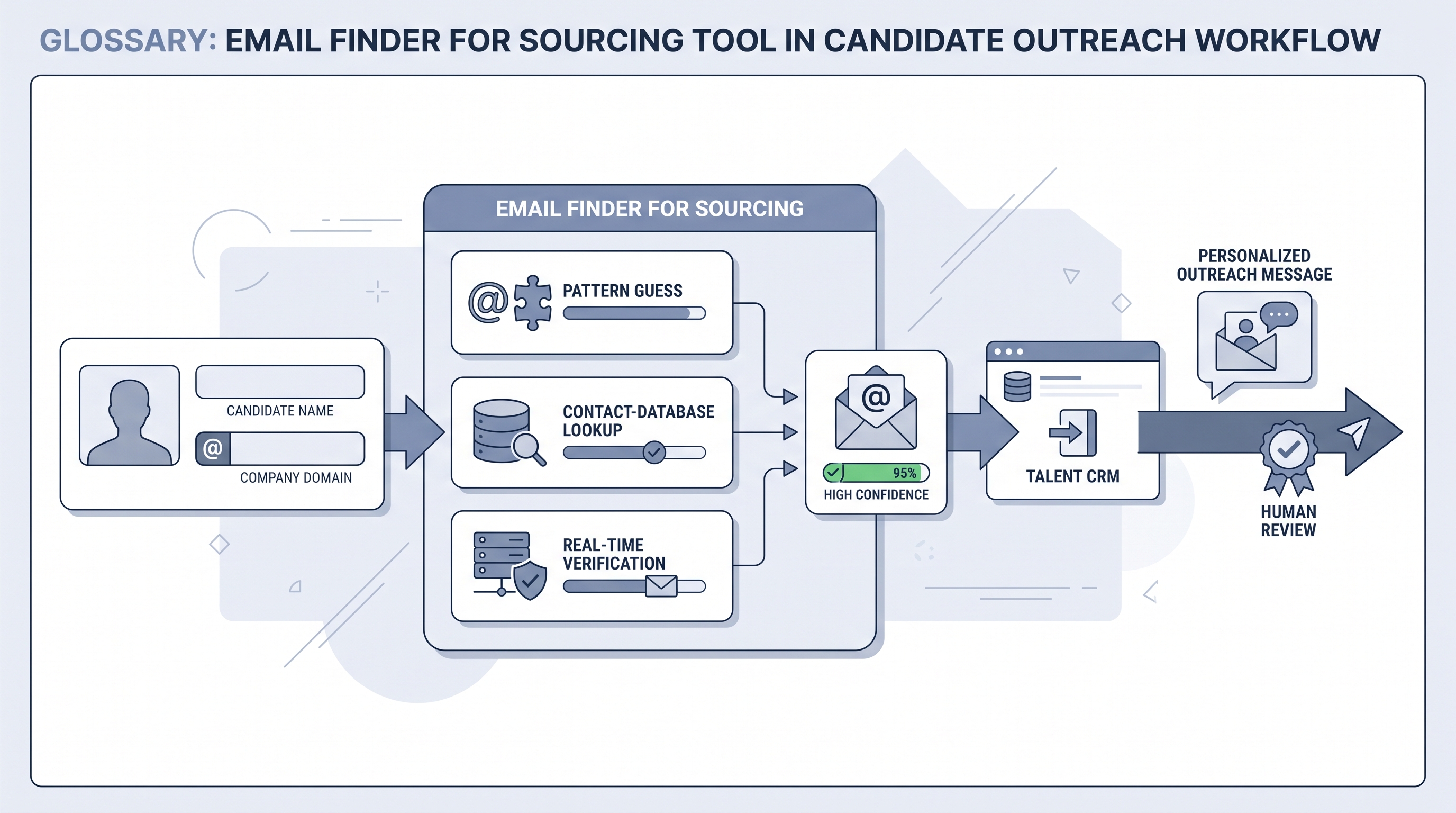
An email finder for sourcing is a tool that locates a candidate's professional email address from inputs like their name and employer, a company domain, or a profile URL, so recruiters can reach passive candidates directly outside a platform's messaging system. Most combine pattern guessing, contact databases, and real-time verification.
Michal Juhas · Last reviewed June 29, 2026
What is an email finder for sourcing?
An email finder for sourcing is a tool that turns limited information about a person, a name and employer, a company domain, or a profile URL, into their professional email address. It exists so recruiters can reach passive candidates directly by email instead of relying on a platform's internal messaging, which is often capped, paid, or easy to ignore.
Under the hood, most finders blend three methods. They infer a company's address pattern and construct a likely email, they look the person up in large aggregated contact databases, and they verify the candidate address in real time by checking whether the mail server will accept it. The verification step is what separates a usable address from a hopeful guess, and good tools report a confidence level alongside it.
The finder sits at a specific point in the workflow: after you have identified a relevant person through sourcing, such as an X-ray search or a profile review, and just before outreach. It is a bridge from sourcing to contact, not a sourcing method itself. And because a work email is personal data, the value of a finder is bounded as much by compliance and deliverability as by raw hit rate.
In practice
- A sourcer finds a strong passive candidate through an X-ray search, runs their name and company domain through an email finder, and gets a verified address with a high confidence score. They log it in the CRM and send a short, specific email rather than a platform connection request.
- A team notices high bounce rates from one finder on small-company candidates. They switch to verifying every address before send, drop anything marked catch-all, and bounce rates fall back to a healthy range.
- A recruiter builds a compliant outreach baseline: every found email is stored with its source and date, every message includes an easy opt-out, and opt-outs are suppressed across the whole tool, keeping the legitimate-interest basis defensible.
Quick read, then how hiring teams use it
This is for sourcers and recruiters who want a direct, deliverable way to reach passive candidates, without creating compliance or sender-reputation problems. Skim the first section for the idea. Use the second when you are choosing a tool or building an outreach workflow.
Plain-language summary
- What it means for you: An email finder turns a name and company into a likely, verified email address, so you can reach a candidate directly instead of through a platform's messaging.
- How you would use it: Run a candidate you have already sourced through the finder, verify the address, log it, and send a personal, relevant message.
- How to get started: Pick one finder, test it on ten real target profiles in your usual market, and check both hit rate and how many verified addresses actually deliver.
- When it is a good time: When platform messaging is too limited or expensive, or when email simply gets better open and reply rates for your audience.
When you are running live reqs and tools
- What it means for you: Finding the address is the easy part; verification, deliverability, and compliance are where outreach succeeds or fails. Treat unverified addresses as guesses.
- When it is a good time: When you can pair the finder with a disciplined sending setup (verification, domain warm-up, opt-out handling) and a CRM to log sources. Without that, volume just burns your domain reputation.
- How to use it: Verify before send, skip catch-all and risky addresses, personalise every message, and keep a documented lawful basis and retention period for the data.
- How to get started: Benchmark two finders on your real roles and regions, since accuracy varies by market, and keep the one that produces deliverable addresses, not just the most matches.
- What to watch for: Scraped databases and platform-terms risk, bounce rates that damage sender reputation, and treating a finder as a licence to send bulk cold email rather than targeted outreach.
Where we talk about this
On AI with Michal live sessions, email finders come up in sourcing automation blocks when participants build the bridge from finding a candidate to contacting them, and weigh accuracy, deliverability, and compliance. The membership community compares finder hit rates on real target profiles and shares outreach setups that keep reply rates high without harming sender reputation.
Email finder vs contact enrichment
| Tool | Job | Best for |
|---|---|---|
| Email finder | Locate and verify one email address | Reaching a specific candidate you already sourced |
| Contact enrichment | Add email, phone, social, and role data | Building or cleaning full records across a list |
Around the web (opinions and rabbit holes)
Third-party creators move fast. Treat these as starting points, not endorsements.
YouTube
- Searches for "email finder for recruiters" and "candidate email finder tools" surface tool walkthroughs and comparisons of accuracy and deliverability.
- r/sourcing debates which email finders are accurate and how to keep cold outreach deliverable.
- r/recruiting has threads on email outreach, bounce rates, and the compliance side of contacting passive candidates.
Quora
- Searches for "best email finder for sourcing" and "are email finders accurate" collect practitioner answers on tool choice, accuracy, and legality.
Related on this site
- Glossary: Contact enrichment (sourcing), AI candidate sourcing, AI sourcing tools, Talent CRM, X-ray search (sourcing), Direct sourcing
- Program: AI Recruiting Accelerator
- Membership: Become a member