Employee onboarding workflow
The sequence of steps, task owners, and automated handoffs that move a new hire from offer acceptance through paperwork, system access, and early training until they can work independently.
Michal Juhas · Last reviewed May 10, 2026
What is an employee onboarding workflow?
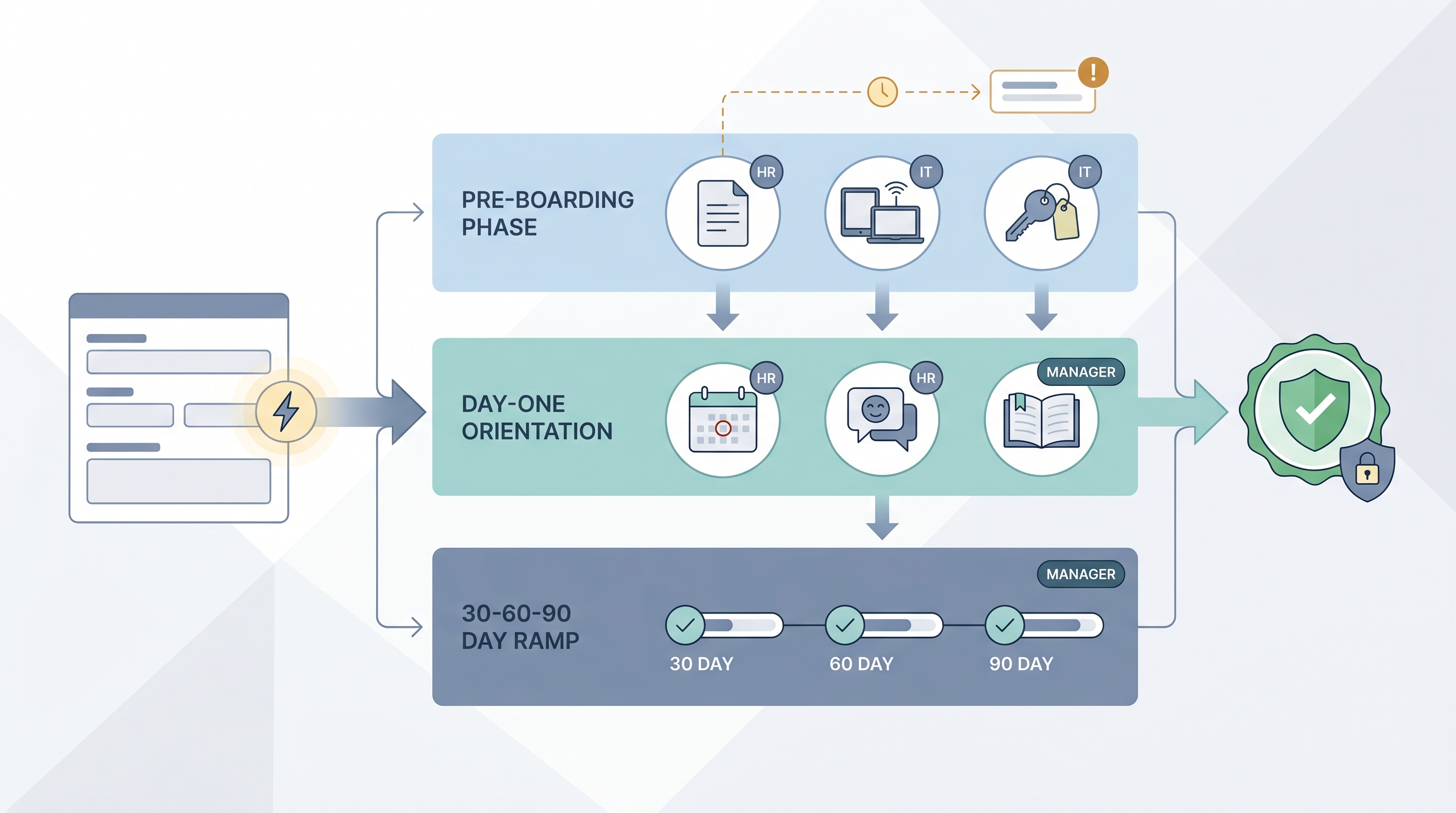
An employee onboarding workflow is the documented sequence of steps, owners, and handoffs that moves a new hire from offer acceptance to their first productive weeks in the role. It answers three questions for every task: who is responsible, what needs to happen, and by what deadline relative to the start date.
Without a written workflow, those answers live in someone’s head, and when that person is on leave during a busy hiring week, the new hire arrives to find their laptop sitting in a shipping queue and their IT account unprovisioned.
In practice
- When HR sends a Docusign packet three days before the start date and IT receives an access request automatically the moment the new hire signs, that is an onboarding workflow running as intended. Most teams start by documenting the manual version before they wire any automation.
- A people ops team might say “we lost two days on provisioning because the ticket never reached IT” when the onboarding checklist and the IT ticketing system were not connected, even though both showed the step as complete.
- A 30-60-90 day ramp plan is part of the onboarding workflow in a broader sense: it extends the structured handoff from HR into the manager’s regular check-ins and training milestones after day one.
Quick read, then how hiring teams use it
This is for recruiters, TA, HR partners, and people ops who need the same vocabulary in handoff meetings, vendor calls, and compliance reviews. Skim the first section for a fast shared picture. Use the second when you are deciding how the workflow connects to your ATS, HRIS, and IT ticketing system.
Plain-language summary
- What it means for you: A written list of every step between “offer signed” and “new hire is ready to work,” with a name next to each step so nobody is waiting for someone else to move first.
- How you would use it: Map every step on paper before you touch any software. Draw three columns: what happens, who owns it, how many days before or after the start date it must be done. Only then build the automation.
- How to get started: Pick your most recent difficult onboarding and list every step that slipped. Those are your first candidates for workflow fixes: assign a specific owner and a concrete deadline to each one.
- When it is a good time: Before the next high-volume hiring quarter, not during it. A half-documented workflow under pressure produces more errors than an honest manual checklist.
When you are running live reqs and tools
- What it means for you: The workflow is the source of truth that employee onboarding software runs against. A platform with empty owner fields and no ATS integration is just a prettier checklist than the one you had in a spreadsheet.
- When it is a good time: After the core template is stable, runs without manual nudges for at least two hires, and has named owners at every step. Only then connect the ATS webhook and add AI-assisted steps.
- How to use it: Wire the ATS handoff via webhook or native integration so the trigger fires when the offer is accepted, not when someone remembers to start the onboarding manually. Keep human-in-the-loop review on any AI-drafted step that affects employment status, compliance deadlines, or the content of communications the new hire will read.
- How to get started: Run one dry-run rehearsal on a dummy employee profile before the first real hire runs through the flow. Confirm that every required field from the applicant tracking software lands in the right onboarding field and that the IT provisioning step creates a real ticket in the system IT actually monitors.
- What to watch for: Shared-inbox task owners, missing overdue-item alerts, IT tickets that exist in the onboarding platform but never reach IT’s queue, and GDPR retention settings that default to indefinite. Add a daily digest of overdue tasks routed to whoever is on duty before any real hire runs through the flow.
Where we talk about this
On AI with Michal live sessions we walk through post-hire handoffs directly: AI in recruiting blocks connect ATS events to onboarding triggers and show where workflow automation routers replace manual email chains. Sourcing automation blocks cover the same webhook and integration logic that applies equally well to the offer-accepted trigger as to the candidate-sourced trigger. If you want the full room conversation, not only this page, start at Sourcing Lab and bring your current onboarding checklist.
Around the web (opinions and rabbit holes)
Third-party creators move fast. Treat these as starting points, not endorsements, and do not copy stranger scripts that move employee personal data without reviewing them carefully.
YouTube
- Search “employee onboarding workflow automation” on YouTube to find practitioner screencasts showing how onboarding templates are built and triggered in tools like BambooHR, Rippling, and Notion. Focus on videos that show the IT provisioning step explicitly, since that is the step most teams get wrong.
- Search “onboarding workflow n8n” for technical walkthroughs showing how a single ATS webhook event fans out to calendar invites, IT tickets, and document collection without manual hand-holding.
- The SHRM YouTube channel publishes HR leadership content on onboarding strategy and compliance that is useful framing before you design the operational steps.
- r/humanresources has recurring threads about onboarding failures, overdue-task nightmares, and which platforms actually connect to IT ticketing systems. Search “onboarding workflow” in the subreddit for first-hand accounts.
- r/peopleops covers the intersection of people operations and automation, with practical threads on how teams wire ATS to HRIS to onboarding platforms in small and mid-size companies.
Quora
- What are the steps in an employee onboarding process? collects a range of practitioner answers on what belongs in a core workflow versus a role-specific overlay (quality varies, so read critically).
Pre-boarding versus first-day versus ramp
| Phase | Typical steps | Who owns it |
|---|---|---|
| Pre-boarding | Tax forms, device order, system access request, handbook sign-off | HR and IT |
| Day one | Orientation, introductions, tool setup, benefits enrollment | HR and hiring manager |
| Ramp (30-60-90) | Role training, manager check-ins, early milestones | Hiring manager and team lead |
Related on this site
- Glossary: Employee onboarding software, HR employee onboarding software, Workflow automation, Human-in-the-loop (HITL), RAG, Applicant tracking software
- Tools: Employee onboarding tools, Best employee onboarding software
- Live cohort: Sourcing Lab
- Course: Starting with AI: the foundations in recruiting
- Membership: Become a member