HR employee onboarding software
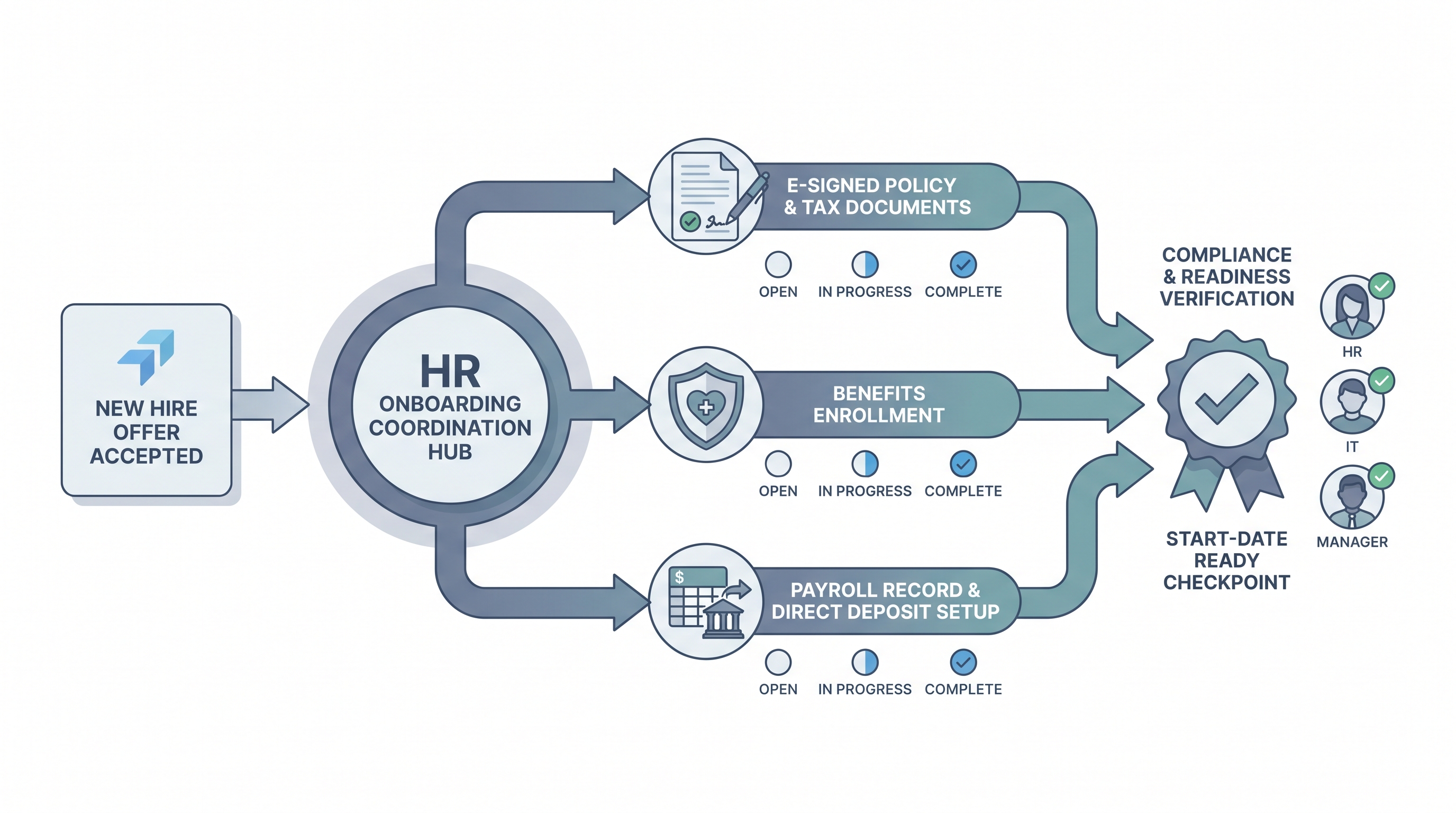
Software that automates the HR side of new hire onboarding: collecting e-signed policy documents, routing benefits enrollment, setting up payroll records, and tracking compliance tasks across HR, IT, and managers before the employee's first day.
Michal Juhas · Last reviewed May 8, 2026
What is HR employee onboarding software?
HR employee onboarding software manages the HR team's tasks in moving a new hire from offer accepted to fully active: collecting signed policy documents, routing benefits enrollment, setting up payroll records, and tracking compliance steps across HR, IT, and the hiring manager against a single start-date deadline.
The practical problem it solves is accountability. Without it, a start date runs on an email thread between four teams and the laptop arrives three days late because the IT request was never formally filed. With it, every overdue item has a named owner, a deadline, and a shared status visible to everyone who needs to act.
In practice
- A head of People at a 150-person company discovered their US onboarding flow was hardwired with I-9 steps that blocked every task in the sequence for new hires in Germany. The platform had no multi-country logic; the workaround was a separate manual checklist for every non-US hire, which they ran in parallel to the platform for two years before anyone noticed.
- An HR team at a scale-up configured their onboarding platform over a weekend, went live on the next hire, and watched a policy form link return a 404 error on day one because no one ran a dry-run on a dummy profile before pushing to production.
- “The laptop wasn't ready” is the most common first-week complaint. It is almost always an IT provisioning step embedded in the onboarding platform but never wired to the actual IT ticketing system, so the task completed on paper and the laptop stayed in a queue nobody was monitoring.
Quick read, then how hiring teams use it
This is for HR business partners, People Ops managers, and TA leads who are evaluating, configuring, or setting policy around HR onboarding software. Skim the first section for a shared definition. Use the second when you are choosing a platform or deciding which features to enable first.
Plain-language summary
- What it means for you: HR onboarding software is the shared task board that HR, IT, and managers all see so every step between offer acceptance and day one has a named owner, a deadline, and a clear status.
- How you would use it: Set up a template per hire type (full-time, contractor, location), assign each task to a real person with a deadline relative to start date, and trigger it automatically when the offer is accepted in your ATS.
- How to get started: Map your current process on paper first. List every step, who owns it, and when it is due relative to start date. Build the platform template against that list, not the vendor's default demo template.
- When it is a good time: When you are hiring more than four people a month and coordination overhead between HR, IT, and managers is already visible in first-week complaints or late system access.
When you are running live reqs and tools
- What it means for you: HR onboarding software sits between the ATS accepted-offer event and the HRIS active-employee record. It is the data collection and compliance layer that neither system handles cleanly on its own.
- When it is a good time: When right-to-work checks, benefits enrollment deadlines, and payroll setup all have to complete before a specific start date and currently run across three separate email chains with no shared visibility.
- How to use it: Wire the ATS webhook to trigger the onboarding platform at offer acceptance. Map the exact fields that need to move: name, start date, role, manager, location, and employment type. Test with a dummy profile in a sandbox before the first live hire.
- How to get started: Prioritise compliance-critical steps first (I-9 or right-to-work, policy acknowledgement, payroll setup). Get those running reliably before adding manager orientation tasks or AI-generated 30-60-90 day plans.
- What to watch for: Silent sync failures between the onboarding platform and HRIS that appear as payroll errors two weeks after start date. Multi-country edge cases the default template does not cover. IT provisioning steps that live in the platform but connect to no actual IT ticketing queue.
Where we talk about this
On AI with Michal live sessions, HR onboarding software comes up in the AI in recruiting track when we map the full cycle from sourcing through day one. We look at how the ATS hands off to onboarding, where workflow automation replaces the manual email to IT, and which AI features in modern platforms are ready to use versus which still need a full human review gate for every output. Start at Sourcing Lab and bring your current onboarding checklist so the room can help you find the steps worth automating first.
Around the web (opinions and rabbit holes)
Third-party creators move fast. Treat these as starting points, not endorsements, and verify anything before you wire personal HR data through a new integration.
YouTube
- Search "employee onboarding software setup" on YouTube for practitioner walkthroughs of tools like Rippling, BambooHR, and Workday onboarding configuration. Focus on videos from 2025 or later because the AI features in most platforms changed significantly after mid-2024.
- HR tech channel videos on HRIS integration with onboarding platforms are useful for understanding the field mapping challenges before you start a vendor evaluation.
- Vendor-produced demos are worth watching for feature orientation, but verify that the sync shown uses live data rather than pre-populated sandbox fields.
- r/humanresources threads on onboarding software give candid accounts of what breaks after go-live, which vendor support teams respond promptly, and which platforms have genuine multi-country compliance support.
- r/recruiting has threads on the ATS-to-onboarding handoff that are useful for TA teams configuring the trigger side of the integration.
- Search "onboarding software I-9" or "onboarding platform HRIS sync" in r/humanresources for frank discussions of which platforms handle edge cases and which leave them to a manual workaround.
Quora
- What is the best employee onboarding software for a small HR team? collects practitioner answers with specific vendor names and trade-offs (quality varies; read critically and cross-check with recent Reddit threads before acting on any recommendation).
HR onboarding software versus general onboarding tools
| Focus area | General onboarding tools | HR employee onboarding software |
|---|---|---|
| Primary user | Manager, coordinator | HR team, People Ops |
| Core tasks | IT provisioning, orientation tasks | Compliance docs, payroll, benefits enrollment |
| Compliance depth | Basic checklist | I-9, right-to-work, multi-country |
| HRIS integration | Often optional | Central requirement |
| AI features | Manager plan drafts | Policy chatbot, document classification |
Related on this site
- Glossary: Employee onboarding software, Employee onboarding tools, Applicant tracking software, Workflow automation, Human-in-the-loop (HITL), HR AI tools
- Blog: AI sourcing tools for recruiters
- Live cohort: Sourcing Lab
- Course: Starting with AI: the foundations in recruiting
- Membership: Become a member