Tool use for recruiting assistants
The ability of an AI model to call external functions, APIs, or services during a conversation, enabling a recruiting assistant to search a database, check a calendar, or write a record to an ATS without the recruiter doing each step manually.
Michal Juhas · Last reviewed June 26, 2026
What is tool use for recruiting assistants?
Tool use is the capability that turns a language model from a text generator into an agent: instead of producing only words, the model can call external services, retrieve live data, and write results back to real systems during a conversation.
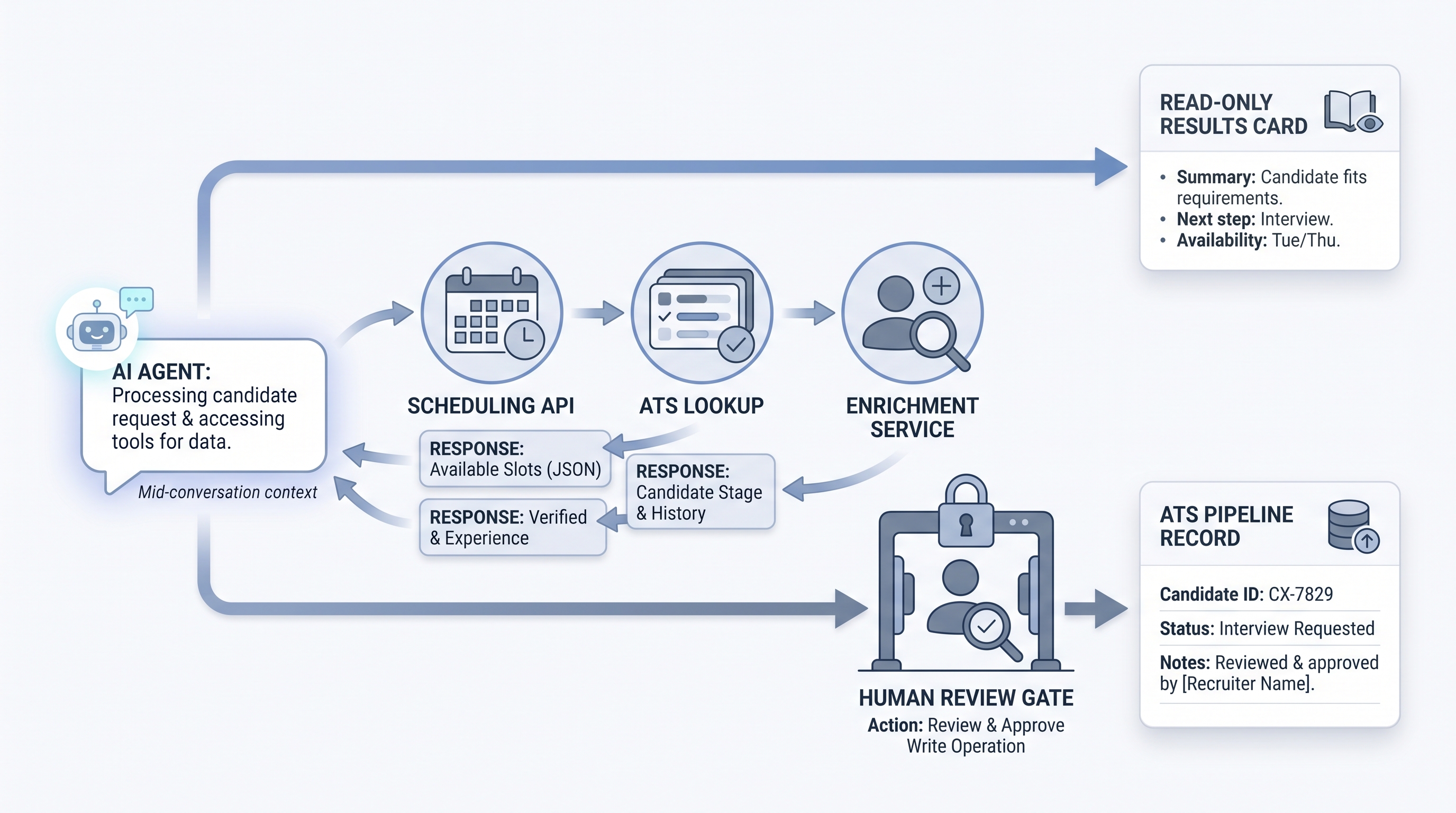
For recruiting teams, this is the difference between a copilot that helps you draft a message and an assistant that can look up which candidates are at the phone screen stage in your ATS, find a shared calendar slot for an interview panel, and post a structured screening note back to the record, all inside a single request.
The capability also raises the stakes. Every tool the model can call adds a permission scope, a failure path, and a logging requirement. Understanding the boundary between prompting and tool use is foundational for anyone building on workflow automation or recruiter AI platforms.
In practice
- A sourcing agent uses tool use to call a talent database API with a semantic query, retrieve the top ten matching profiles, and return them ranked by fit score, without the recruiter writing the query or parsing raw results.
- During an AI in recruiting live build, a participant wires a calendar tool into a scheduling assistant. The model reads available slots across three interviewers, selects two options that work for everyone, and drafts the invite copy, cutting a multi-step coordination task to one prompt.
- A team discovers tool call failures after noticing ATS stages not updating. Investigation finds the model was catching a schema mismatch silently and moving on. The fix is explicit error handling and a human review queue for uncertain writes.
Quick read, then how hiring teams use it
This is for recruiters, sourcers, and TA operations partners who need to understand what separates a chatbot from an agent before wiring up real integrations. Skim the first section for vocabulary. Use the second when you are evaluating platforms or building your own agent setup.
Plain-language summary
- What it means for you: Tool use is how an AI assistant goes beyond drafting text to actually doing things in your recruiting stack, like reading stages, finding calendar gaps, or posting notes.
- How you would use it: You choose which tools to expose (start with read-only), define what inputs and outputs look like, and test before connecting to production.
- How to get started: Pick the most repetitive lookup task your team does (checking candidate stage, finding interview slots) and explore whether your ATS or calendar provider has an API the model can call.
- When it is a good time: After prompts are stable and you have a human review step in place for any write operations.
When you are running live reqs and tools
- What it means for you: Tool-enabled agents can automate ATS lookups, enrichment calls, and scheduling coordination at a scale manual workflows cannot match, but each tool adds a failure surface and a compliance scope.
- When it is a good time: After read-only tools run cleanly for at least two weeks and IT security has reviewed the permission model and data processing agreements.
- How to use it: Scope tool permissions to the minimum required (read-only before read-write), log every call with model version and timestamp, and add a review gate before any tool that touches candidate-facing channels or ATS records.
- How to get started: Build against a sandbox environment. Define the tool schema carefully, including error responses, before connecting to production ATS credentials.
- What to watch for: Silent failures where the model proceeds after a tool error, schema drift when an API updates without notice, and GDPR questions about which vendors receive candidate data during tool calls.
Where we talk about this
On AI with Michal live sessions, tool use comes up in sourcing automation and AI in recruiting blocks when participants move beyond prompting to building agents with real integrations. If you want to see a live build with actual ATS and calendar APIs, start at Sourcing Lab and bring your stack details.
Around the web (opinions and rabbit holes)
Third-party creators move fast. Treat these as starting points, not endorsements, and verify anything before wiring candidate data through a new vendor.
YouTube
- Searches for "AI agent tool use recruiting" and "function calling AI HR" on YouTube surface a mix of developer tutorials and TA tech demos showing how agents call external APIs in practice.
- r/recruiting and r/AIAssistants have candid threads on what actually works when connecting AI to ATS APIs versus what breaks in production.
Quora
- Searches for "AI agents in recruiting" and "ATS API integration with AI" collect practitioner answers on tool calling, permissions, and where agent workflows save time versus add overhead.
Related on this site
- Glossary: Workflow automation, Recruiter AI, Human-in-the-loop, Agent knowledge base, ATS API integration
- Blog: AI sourcing tools for recruiters
- Lab: AI Sourcing Lab
- Membership: Become a member