Recruiter AI
AI tools and assistants purpose-built for recruiting workflows that help sourcers, full-cycle recruiters, and TA teams draft outreach, screen resumes, schedule interviews, and analyse pipelines without switching to a generic chat model.
Michal Juhas · Last reviewed May 3, 2026
What is recruiter AI?
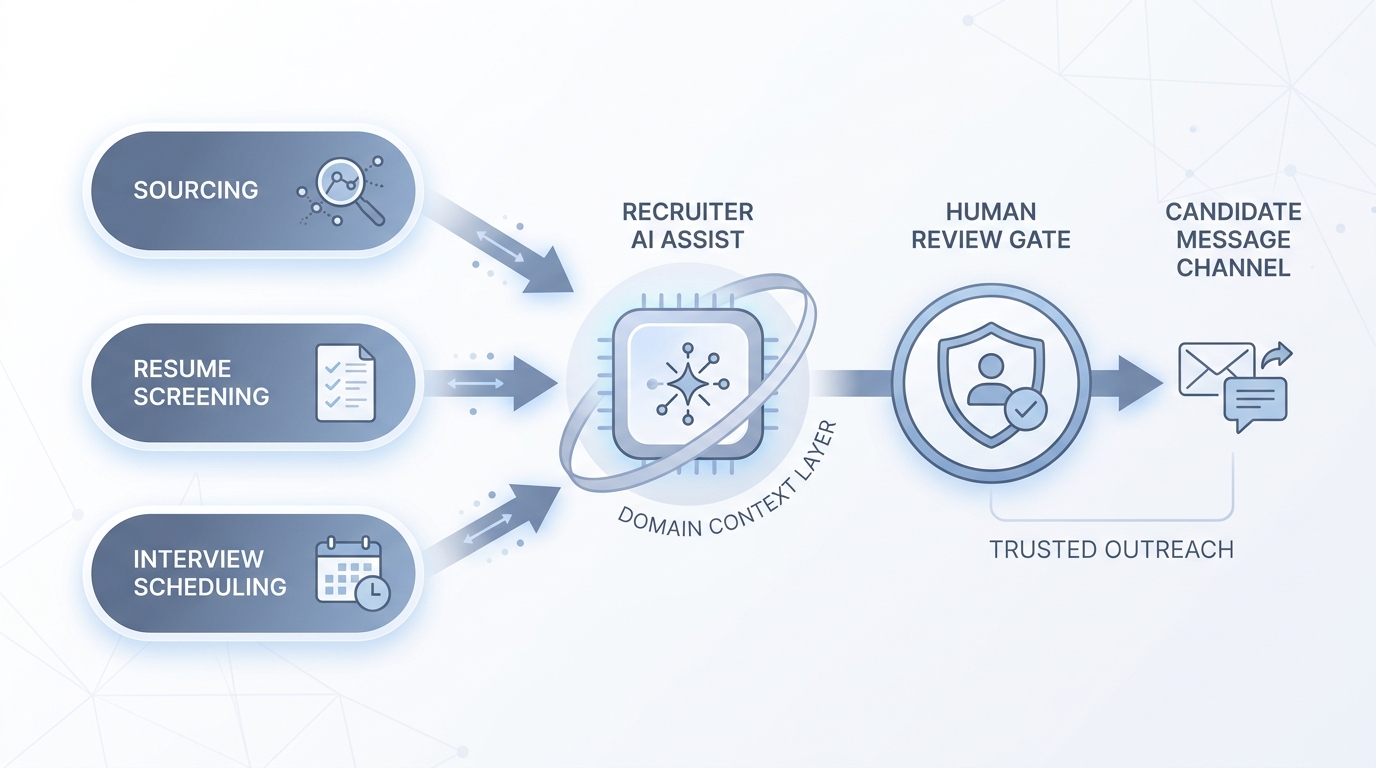
Recruiter AI refers to AI tools and assistants built specifically for hiring work: sourcing, screening, outreach, scheduling, and pipeline analysis. Unlike a general chat model you prompt from scratch, recruiter AI comes pre-loaded with hiring domain context so the first draft is already in the right format and register for TA teams.
In practice
- A sourcer types a role brief into a recruiter AI and gets five InMail variants back, each pre-loaded with the sourcing angle and a follow-up sequence; the tool knows what "passive candidate" means without a paragraph of setup.
- A TA ops lead hears "our screener is the AI" from a vendor during a renewal call; the real question is whether the screener logs its reasoning and who reviews the output before candidates see a decision.
- In a weekly team debrief, someone says the ATS "AI assistant" suggested a shortlist but nobody knows which fields it weighted; that moment is the compliance risk hiding behind the feature.
Quick read, then how hiring teams use it
This is for recruiters, sourcers, TA leads, and HRBPs who need to evaluate, adopt, or set policy for recruiter AI tools. Skim the first section for a shared definition. Use the second for operational decisions about tooling, vendor selection, and audit readiness.
Plain-language summary
- What it means for you: Recruiter AI is a category of tools trained on hiring work so your prompts need less setup and outputs arrive closer to sendable.
- How you would use it: Draft sourcing messages, screen resumes against a scorecard, schedule interviews, or summarise a pipeline without pasting context into a generic chatbot every time.
- How to get started: Pick one high-volume step (usually outreach or screen notes), run five real roles through a recruiter AI tool, and compare rework time against your current process.
- When it is a good time: After your sourcing strings are stable and your ATS workflow is documented, so the AI amplifies a working process rather than automating a broken one.
When you are running live reqs and tools
- What it means for you: Recruiter AI tools handle candidate PII and may influence who gets human time, so vendor DPAs, bias checks, and decision logs matter from day one.
- When it is a good time: Before a high-volume campaign or after conversion metrics show a bottleneck in screening speed that human bandwidth alone cannot fix.
- How to use it: Log model version, prompt hash, and output next to each screening decision; run a quarterly bias check on any score that influences shortlisting; set a human review gate before outbound messages and before reject decisions.
- How to get started: Run a pilot on roles you have already closed so you can compare AI shortlists to the humans you actually hired. Gaps point to calibration issues before they reach live candidates.
- What to watch for: Tools that hide scoring logic, vendors that use your candidate data to retrain shared models, and outputs that arrive formatted for a different ATS than the one you run.
Where we talk about this
AI in recruiting sessions build recruiter AI fluency from the first prompt through to audit-ready logging. Sourcing automation sessions cover the integration layer: where recruiter AI outputs land in your ATS, how to wire retries, and which fields need human sign-off before downstream actions trigger. Bring a real vendor contract or a tool you are currently evaluating to Sourcing Lab for hands-on peer review.
Around the web (opinions and rabbit holes)
Third-party creators move fast in this space. Treat these as starting points, not endorsements, and verify tool capabilities and compliance postures directly with vendors.
YouTube
- Generative AI in 9 minutes (Fireship) is a fast stack-level reset useful before evaluating any recruiter AI vendor.
- Introduction to Large Language Models (Google Cloud Tech) explains why recruiter AI tools built on LLMs inherit the hallucination and context-limit tradeoffs.
- The AI Adoption Curve Explained (IBM Technology) helps frame recruiter AI adoption in a maturity conversation with leadership.
- What AI tools are you using in your recruitment workflow? in r/recruiting is a candid round-up of tools sourcers actually run day to day.
- AI in recruiting in r/recruiting has debate on where AI adds value and where it creates noise.
- Has anyone tried AI to help with high volume recruiting? in r/Recruitment covers practical volume-hiring results with honest caveats.
Quora
- How is AI being used in recruitment? surfaces practitioner views across sourcing, screening, and scheduling use cases.
Recruiter AI across the funnel
| Stage | Recruiter AI task | Human gate |
|---|---|---|
| Sourcing | Draft outreach, suggest Boolean variations | Approve before send |
| Screening | Fill scorecard fields from CV and notes | Recruiter reviews before advance or reject |
| Scheduling | Propose times, draft calendar invites | Confirm exceptions manually |
| Pipeline | Summarise stage counts and conversion | TA lead validates before exec report |
Related on this site
- Glossary: AI-native, Workflow automation, Human-in-the-loop, AI bias audit, Scorecard, Hallucination
- Blog: AI sourcing tools for recruiters
- Guides: Sourcers
- Workshops: Sourcing Lab
- Membership: Become a member