AI adoption ladder
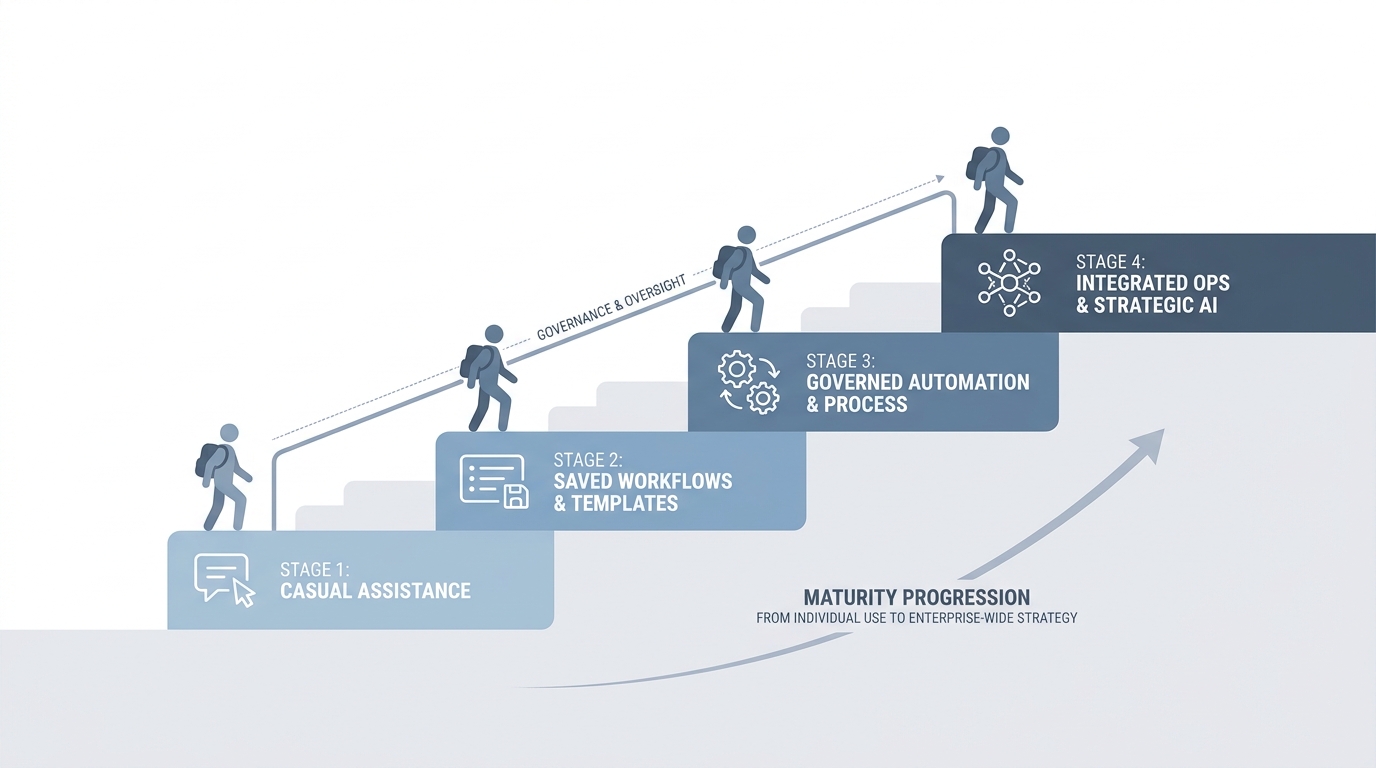
A simple maturity map for TA and recruiting teams: from no AI use, through ad-hoc chat and saved instructions, to workflow automation and fully redesigned AI-native processes.
Michal Juhas · Last reviewed May 2, 2026
What is the AI adoption ladder?
The AI adoption ladder is a simple picture of stages a team moves through as it goes from casual AI tries to steady, governed use. It gives recruiters, TA, and leaders the same words when they plan training, budget, and safety.
In practice
- TA puts four boxes on a planning slide from "not using AI" to "automated workflows" so finance can see where training money should land. Consultants often sell a "maturity model" that sounds like the same ladder idea.
- A manager says "we are still step two" when leadership wants fancy bots but the team still retypes context each time. You hear that framing in Live Build sessions and change-management blogs.
- HRBPs use it to explain why recruiters cannot skip straight to auto-send without guardrails, because the picture makes the order of work visible.
Quick read, then how hiring teams use it
This is for recruiters, sourcers, TA, and HR partners who need the same vocabulary in debriefs, vendor calls, and policy reviews. Skim the first section when you need a fast shared picture. Use the second when you are deciding how it shows up in the ATS, sourcing tools, or candidate communications.
Plain-language summary
- What it means for you: A ladder is a picture with steps at the bottom and top. Bottom is "we sometimes use chat." Top is "the computer moves work between tools on its own." The point is you climb in order, not jump to the roof on day one.
- How you would use it: You pick where your team really is today, you agree what "one step up" looks like on Monday, and you stop pretending you are automated when you still paste the same paragraph by hand.
- How to get started: Draw four boxes on paper: chat, saved prompts, shared playbooks, then automation. Put a real weekly task in each box so the words mean something.
- When it is a good time: When leadership wants a bot but hiring managers still get five different tones in email. The ladder is for alignment, not for shame.
When you are running live reqs and tools
- What it means for you: A maturity framing is only useful if it names risks at each step: hallucination checks, data retention, and who owns updates when policy changes.
- When it is a good time: When you are budgeting training, picking vendors, or explaining why auto-send is not allowed yet.
- How to use it: Pair the ladder with concrete artifacts: system instructions, Markdown for AI packs, then workflow automation only after prompts are boringly stable.
- How to get started: Read AI adoption maturity levels, audit one req end to end, and pick a single step to improve next sprint.
- What to watch for: Vanity labels ("we are AI-native" with no QA), comparing teams by tool count instead of prompt quality, and skipping GDPR discipline because the slide looked green.
Where we talk about this
On AI with Michal we use this ladder in live sessions so sourcers, recruiters, and TA leads argue about order, not only tools: AI in recruiting blocks stress hiring-manager trust and review, and sourcing automation blocks stress keys, webhooks, and failure alerts. Start at Sourcing Lab if you want the room to pressure-test where your team actually sits.
Around the web (opinions and rabbit holes)
Third-party creators move fast. Treat these as starting points, not endorsements, and double-check anything before you wire candidate data.
YouTube
- The AI Adoption Curve Explained (IBM Technology) walks a familiar maturity picture in plain language.
- How to Create an AI Strategy (Microsoft Cloud) is vendor-colored but good for vocabulary you will hear in enterprise meetings.
- Generative AI in 9 minutes (Fireship) is a fast reset on what changed in 2023 onward before you debate "step three."
- How is AI being used in your recruiting process? in r/recruiting is a recent "what are we actually doing" thread.
- Corporate wants us to use AI for recruiting in r/recruiting surfaces policy and discomfort in the chair.
- AI adoption maturity levels in r/recruiting links back to blog-style maturity talk with practitioner pushback.
Quora
- What are the stages of AI adoption in enterprises? collects a wide range of consultant and practitioner answers (read critically).
Chatting versus systemizing versus automating
| Rung | What changes | Typical risk |
|---|---|---|
| Chatting | Faster drafts, still manual context | Inconsistent tone, no audit trail |
| Systemizing | Saved rules and examples | Drift when brand or policy changes |
| Automating | Rows and stages move without retyping | Leaked keys, duplicate sends, bad filters |
Related on this site
- Glossary: AI-native, System instructions, Workflow automation
- Blog: AI adoption maturity levels, How to use AI in recruiting
- Live learning: Sourcing Lab
- Membership: Become a member