Hallucination
When a language model produces fluent but false or ungrounded details (employers, dates, URLs, policy claims) that look credible until you verify them.
Michal Juhas · Last reviewed May 2, 2026
What is a hallucination?
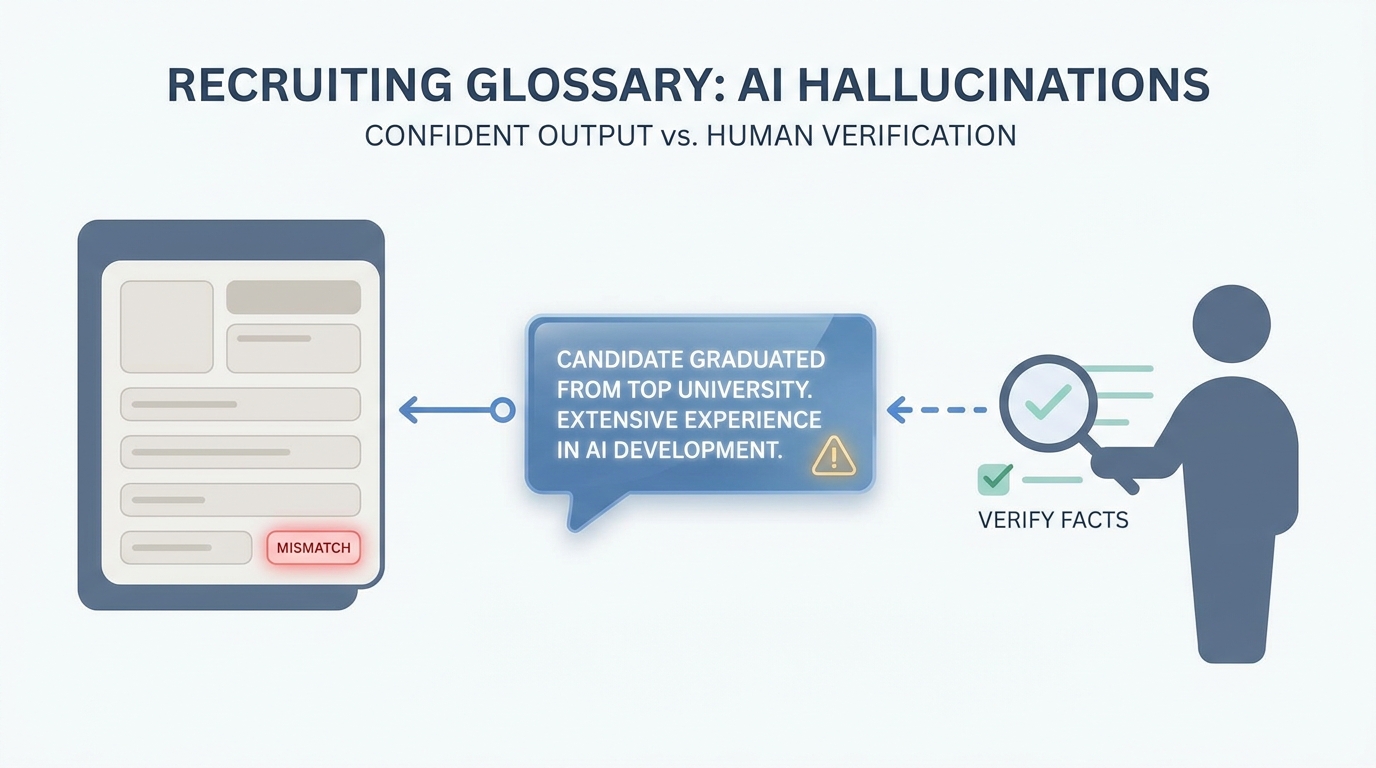
A hallucination is when the AI writes something that sounds confident but a fact is wrong or was never in the data you gave it. In recruiting that can be wrong employers, dates, or links, so you check facts before anything goes to a candidate.
In practice
- After a model drafts a candidate blurb, someone says "double-check the dates and employer" in debrief because once in a while the city or level is wrong. You hear "hallucination" in AI safety talks and more often now in recruiter Slack groups.
- Legal or HR may ask "how do we know the assistant did not invent this sentence" when they review an internal FAQ or offer letter draft that touched AI at some step.
- Before you paste an InMail into LinkedIn, you scroll the profile next to the draft even when the mail reads smoothly. That side-by-side habit is how teams catch mistakes without saying a jargon word at every step.
Quick read, then how hiring teams use it
This is for recruiters, sourcers, TA, and HR partners who need the same vocabulary in debriefs, vendor calls, and policy reviews. Skim the first section when you need a fast shared picture. Use the second when you are deciding how it shows up in the ATS, sourcing tools, or candidate communications.
Plain-language summary
- What it means for you: The model can sound confident while wrong about a date, a job title, or a city. You treat pretty sentences like a junior who needs a fact check.
- How you would use it: You keep LinkedIn or the ATS open beside the draft and you fix mismatches before send.
- How to get started: Run five real profiles through your prompt and mark every line that is not directly supported by the profile text.
- When it is a good time: Always for candidate-facing text; especially when you personalize outreach at scale.
When you are running live reqs and tools
- What it means for you: Hallucination is confident error: plausible language without grounded facts. Risk rises with open-ended personalization and long contexts.
- When it is a good time: When you automate enrichment, chains, or RAG without error budgets.
- How to use it: Constrain outputs (structured output), cite only verified fields, and log incidents the way you log offer-letter typos.
- How to get started: Re-read session notes on verify-before-send and tighten prompts to restate facts, not invent narrative.
- What to watch for: Beautiful Markdown that hides wrong seniority, multilingual title mismatch, and reviewers skimming under time pressure.
Where we talk about this
Participants often meet hallucinations first on outbound: wrong office city or product name. The fix is rarely "a better model" and usually verify-before-send plus shorter prompts. We rehearse that live in Sourcing Lab.
Around the web (opinions and rabbit holes)
Third-party creators move fast. Treat these as starting points, not endorsements, and double-check anything before you wire candidate data.
YouTube
- Introduction to Large Language Models (Google Cloud Tech) names limitations in executive-friendly language.
- Let's build GPT: from scratch, in code, spelled out (Andrej Karpathy) explains why next-token prediction is not a database lookup.
- Generative AI in 9 minutes (Fireship) is a fast share for stakeholders who want "why it lies."
- Eradicate hallucinations from CV/ Personal statement returns. How?! in r/ChatGPTPro collects mitigation prompts.
- Just noticed ChatGPT hallucinations in my coverletter in r/interviews is candidate-side but trains recruiter empathy.
- How is AI changing recruiting? in r/recruiting includes trust and verification themes.
Quora
- What are hallucinations in AI? mixes definitions and opinions (read critically).
Hallucination risk by task
| Task | Relative risk | Mitigation |
|---|---|---|
| Outreach personalization | High | Facts from profile only |
| Intake summary | Medium | Quote hiring manager |
| Boolean string | Lower | Still test in tool |
| Policy interpretation | High | Legal, not LLM |
Related on this site
- Blog: Boolean search vs AI sourcing
- Tools: Cursor for local drafts with diffs
- Guides: Hiring managers
- Live practice: Sourcing Lab
- Course: Starting with AI: the foundations in recruiting