AI Boolean string generator
An AI Boolean string generator is a tool that turns a plain-language role description into a ready-to-use Boolean search query, using a large language model to expand titles and skills into synonyms and assemble the AND, OR, NOT, and parentheses logic, often with presets for specific platforms.
Michal Juhas · Last reviewed June 29, 2026
What is an AI Boolean string generator?
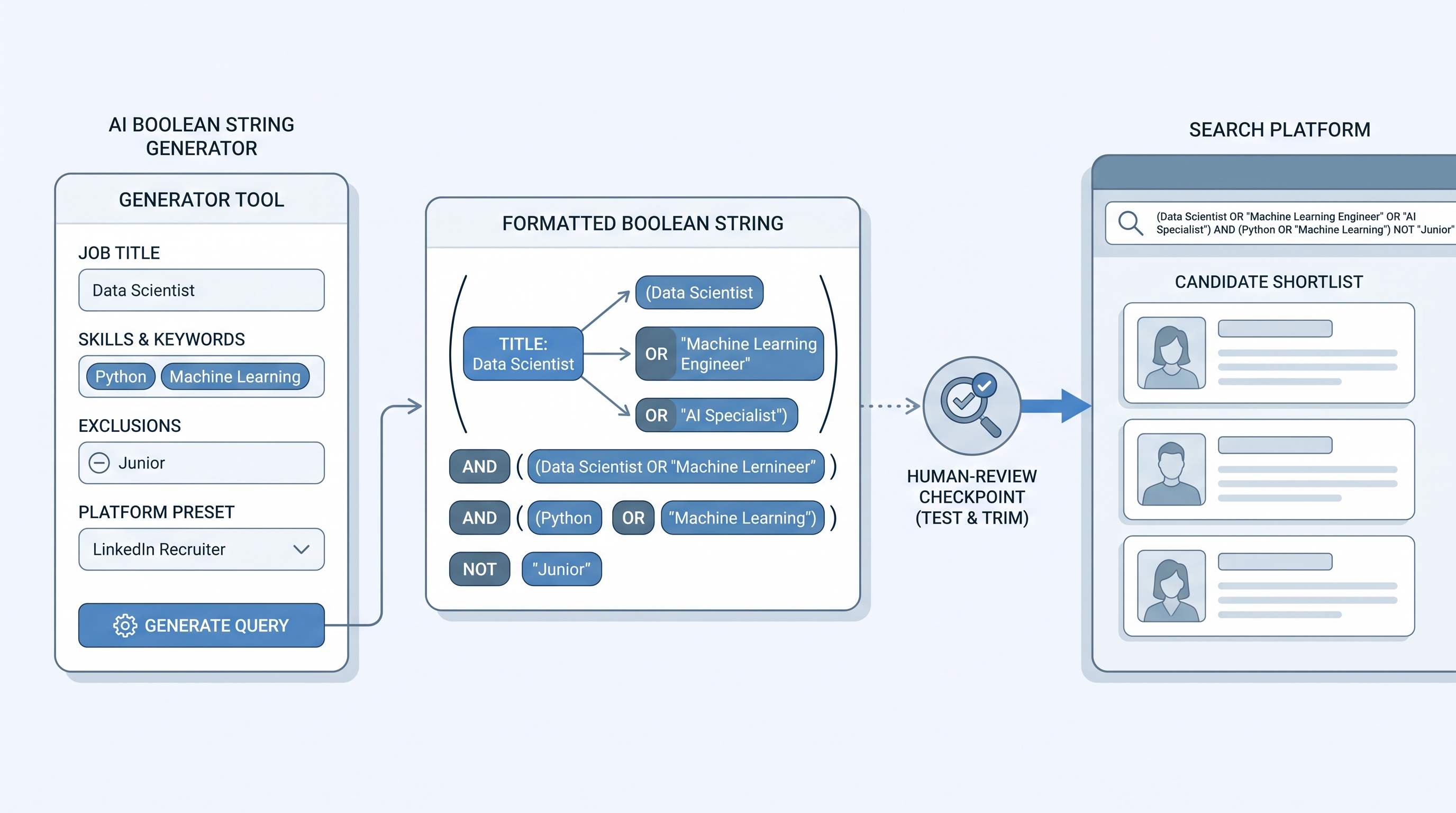
An AI Boolean string generator is a tool that turns a plain-language role description into a finished Boolean search query. You give it a title, the must-have skills, seniority, and location, and it returns a string with synonyms expanded and the AND, OR, NOT, and parentheses logic already assembled, often formatted for a specific platform.
It is the productised version of writing ChatGPT Boolean strings. Under the hood it usually calls a large language model, but it wraps that model in structured input fields, platform presets, saved templates, and a copy button. That packaging is the point: instead of crafting a prompt every time, you fill in a form and get a string tuned to the syntax the target site actually accepts.
Generators span a wide range, from free single-page web tools and browser extensions to Boolean features built into larger sourcing tools. What they share is a promise of speed: a usable string in seconds. What they share as a limit is that they draft the query but do not run or judge it. The model can still over-broaden, invent titles, or format for the wrong platform, so the sourcer still owns testing and trimming before the string touches a real search.
In practice
- A sourcer uses a generator with a platform preset to produce a syntactically valid string for a professional network, including title synonyms and an exclusion for agency recruiters. They test it on a small result set, trim one noisy synonym, and save the cleaned version as a template for similar roles.
- A team standardises on a generator that exposes separate fields for title, skills, exclusions, and location, because the structured input produces more controllable strings than pasting a job description into a single box. New sourcers reach competent output faster as a result.
- A recruiter hits an unusual niche the generator's defaults handle poorly, so they fall back to raw ChatGPT prompting for that one search, then return to the generator for the rest of the requisition list.
Quick read, then how hiring teams use it
This is for sourcers and recruiters deciding whether a Boolean generator earns a place in their workflow, and how to use it without trusting it blindly. Skim the first section for the idea. Use the second when you are evaluating or rolling one out.
Plain-language summary
- What it means for you: A generator turns a role brief into a ready-to-use Boolean string, handling synonyms and operator logic for you, often with platform presets so the syntax is correct.
- How you would use it: Fill in the structured fields, pick the target platform, generate, then test and trim before running the search at scale.
- How to get started: Take a role you are filling now, generate a string for your specific platform, and compare it against one you would write by hand and one from raw ChatGPT.
- When it is a good time: When you source at volume, work across unfamiliar titles, or want junior sourcers producing competent strings before they have memorised Boolean syntax.
When you are running live reqs and tools
- What it means for you: The generator drafts a platform-valid scaffold; you still own relevance. Presets reduce syntax errors, but term selection and noise control remain human work.
- When it is a good time: When the tool covers the platforms you actually source on and lets you save templates for recurring roles. A generator that only outputs generic Boolean adds little over raw prompting.
- How to use it: Prefer structured inputs over a single text box, keep an explanation of each block to audit logic, and always test on a sample before scaling. Treat any hallucinated operator or invented title as a signal to tighten the input.
- How to get started: Build a small library of saved templates for your highest-volume roles and log which generated strings produced replies and hires so the templates improve.
- What to watch for: Data handling when you paste role or candidate details (GDPR and retention), over-broad synonym expansion, and presets that quietly format for the wrong platform.
Where we talk about this
On AI with Michal live sessions, Boolean generators come up in sourcing automation blocks when participants compare generators, raw ChatGPT prompting, and hand-written strings on the same role to see where each approach wins. The membership community shares template patterns and notes on which generators produce strings that actually convert.
Generator vs ChatGPT vs hand-written
| Approach | Strength | Watch for |
|---|---|---|
| AI Boolean string generator | Fast, platform-valid syntax, saved templates | Generic-only tools, data handling, over-broad output |
| Raw ChatGPT prompting | Flexible, handles edge cases | Depends on prompt skill, syntax errors |
| Hand-written Boolean | Full control, niche precision | Slower, easy to forget synonyms |
Around the web (opinions and rabbit holes)
Third-party creators move fast. Treat these as starting points, not endorsements.
YouTube
- Searches for "AI Boolean string generator review" and "Boolean generator for sourcing" surface tool walkthroughs and comparisons against manual Boolean.
- r/sourcing debates which Boolean generators are worth using and where their output breaks.
- r/recruiting has threads weighing generators against learning Boolean properly.
Quora
- Searches for "best AI Boolean search generator" and "are Boolean generators accurate" collect practitioner answers on tool choice and reliability.
Related on this site
- Glossary: ChatGPT Boolean strings, Boolean search, X-ray search (sourcing), AI sourcing tools, AI candidate sourcing, Hallucination
- Lab: AI Sourcing Lab
- Membership: Become a member