Automated hiring software
Software that combines rule-driven triggers, no-code routers, and AI to handle repetitive hiring tasks (posting jobs, screening CVs, scheduling interviews, and sending status updates) so that recruiters own the decisions rather than the data entry.
Michal Juhas · Last reviewed May 10, 2026
What is automated hiring software?
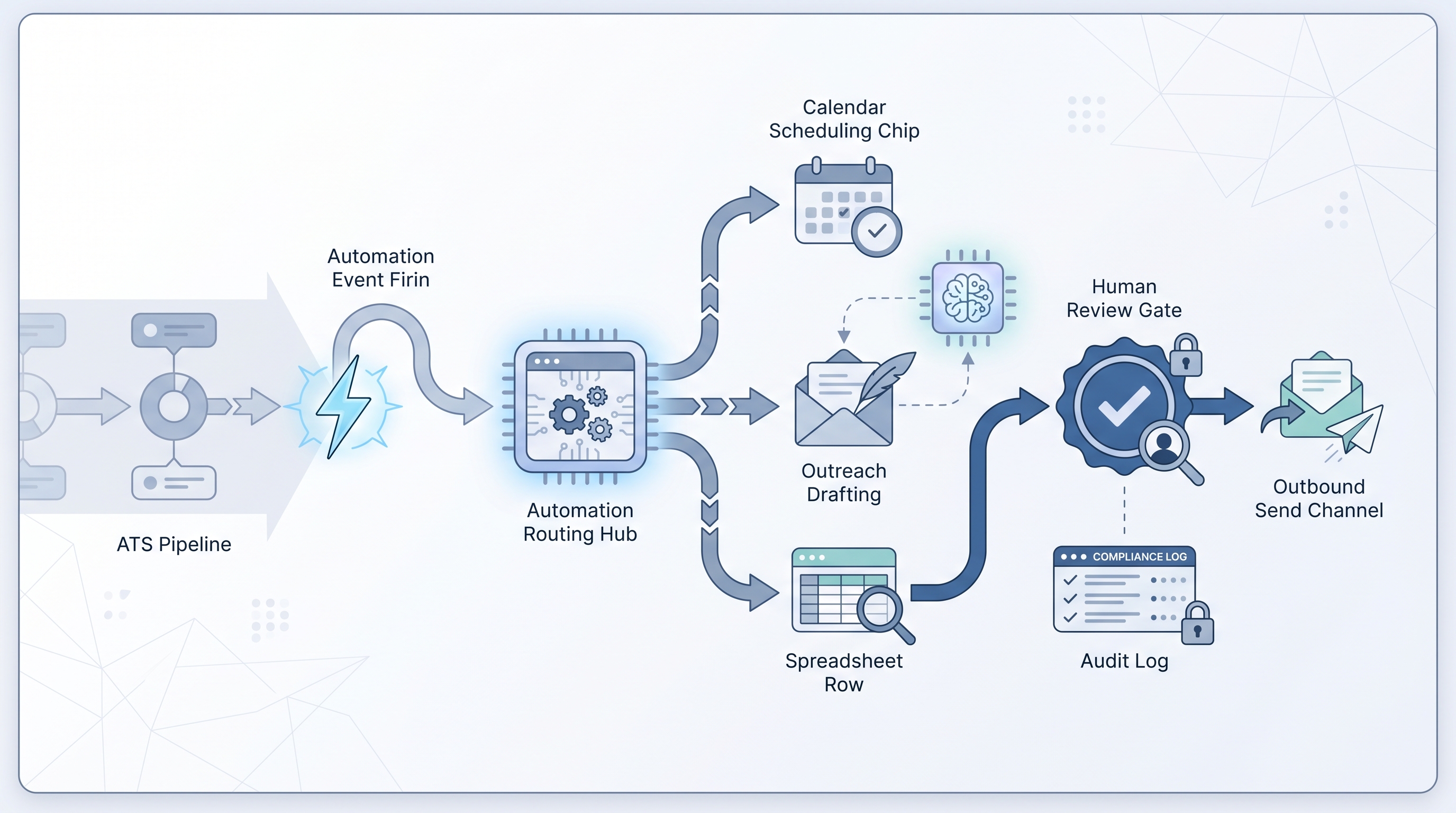
Automated hiring software connects your ATS, sourcing tools, email, and calendar through triggers and rules so that recruiting data moves between systems without a recruiter manually retyping it. A candidate reaches Phone Screen and a calendar link fires. A new req opens and a sourcing sequence starts. A screening call ends and a structured note is drafted for the ATS record.
Two layers are involved. The data-moving layer uses webhooks and API integrations to transfer records, update fields, and route notifications between tools. The AI-generation layer drafts outreach messages, scores CVs, or summarizes call notes on top of that moving data. Keeping the two separate matters: a misconfigured webhook silently drops rows, while a bad prompt multiplies a wording mistake across hundreds of sends.
In practice
- When a candidate is moved to Phone Screen in the ATS and a calendar booking link fires automatically to the candidate, that is the data-moving layer of automated hiring software working as intended. Many teams wire this in n8n or Make before they involve AI generation at all.
- Recruiters who say the tool sent the wrong email are usually describing an automation trigger that fired on a renamed stage or a stale template: the software did what it was told, but what it was told had not been updated.
- TA ops roles frame automated hiring software in terms of error budgets and runbooks. The question is not whether it saves time but who calls who when the webhook fires wrong on Friday afternoon and the inbox goes silent.
Quick read, then how hiring teams use it
This is for recruiters, sourcers, TA leads, and HR partners who hear about automating the hiring stack in leadership meetings and need a working vocabulary before the next vendor demo or internal project kickoff. Skim the first section for a shared picture; use the second when you are deciding what to build and what to buy.
Plain-language summary
- What it means for you: Software that handles the copy-paste steps between your tools so that when a candidate moves to a new stage in the ATS, the next action (calendar link, email, spreadsheet row) happens automatically without you doing it manually.
- How you would use it: Identify the step you repeat most often, draw it as a trigger and an action, then wire it in the automation layer of your existing ATS or in a no-code router.
- How to get started: Pick one internal loop with no candidate-facing output (a Slack ping when a req opens, a sheet row from a form) and run it alongside the manual version for two weeks before trusting it alone.
- When it is a good time: After the same step runs identically more than ten times a week and the stage logic has not changed in at least a month.
When you are running live reqs and tools
- What it means for you: Automation changes state in systems (ATS stages, timestamps, ownership flags) rather than just text in a chat. Errors create wrong records, not just awkward sentences, which means audit trails and correction costs are real and traceable.
- When it is a good time: After prompts and scorecards are stable, when trigger volume justifies maintenance overhead, and when one named person owns the credentials with a written runbook for failures.
- How to use it: Separate the data-moving node from the AI-generation node from the send gate. One node transfers candidate data; a second drafts a message; a third waits for human approval before anything reaches a candidate. See workflow automation for the broader design pattern and recruiting email automation for outreach-specific sequencing.
- How to get started: Ship one internal automation with zero candidate-facing output first, measure its error rate for two weeks, then layer in the AI-generation step with a human-in-the-loop gate before automating any send.
- What to watch for: Silent partial runs, duplicate records from retries, API keys in shared Slack channels, GDPR data-transfer gaps when enriched profiles leave the ATS, and prompts baked into flows that nobody updates when company tone of voice changes.
Where we talk about this
On AI with Michal live sessions, automated hiring software comes up across two tracks. The sourcing automation block shows how to wire ATS triggers, manage credentials, and recover from provider API changes. The AI in recruiting block connects the same automation concepts to hiring manager trust, candidate experience, and compliance review. Both tracks assume you have stable manual flows and tested prompts before you automate anything. Start at Sourcing Lab and bring your ATS name, the manual step you most want to eliminate, and any policy constraints your legal or data team has raised.
Around the web (opinions and rabbit holes)
Third-party creators move fast. Treat these as starting points, not endorsements. Do not copy external scripts that move candidate data without reading the data processing terms first.
YouTube
- How to Automate Your Entire Hiring Process with n8n and Notion (Michele Torti) walks a full build with real tools and configuration detail.
- n8n Tutorial: Build an AI HR Assistant That Shortlists Candidates shows how the AI generation layer sits inside a broader automation flow, useful for seeing where the human gate belongs.
- Boost Your Productivity: Mastering the Power of Workflow Automation (DottoTech) stays tool-agnostic and is useful for building shared vocabulary before picking a vendor.
- Has anyone used Zapier? in r/recruiting captures real practitioner automations and the failure modes teams hit first.
- I want to make some recruitment automated workflows but... in r/RecruitmentAgencies is a frank starting-point thread from people actively building.
Quora
- How do we automate the process of recruiting as a recruiter? collects a range of practitioner perspectives; quality varies, so read critically before wiring anything.
Manual versus automated hiring tasks
| Task | Manual | Automated |
|---|---|---|
| Req notification to team | Recruiter sends a Slack message | ATS stage change fires a webhook |
| Interview scheduling | Recruiter emails a calendar link | Tool triggers on stage move |
| Candidate outreach | Recruiter writes and sends | Software drafts, human approves, then sends |
| Screening note summary | Recruiter types from memory | AI drafts from transcript, recruiter reviews |
| ATS status update | Recruiter clicks in each tool | Integration writes back automatically |
Related on this site
- Glossary: Workflow automation, No-code recruiting automation, Automate recruitment process, Recruiting email automation, Human-in-the-loop, ATS API integration, Applicant tracking software
- Blog: AI sourcing tools for recruiters
- Tools: n8n for no-code routing
- Guides: Sourcers
- Live cohort: Sourcing Lab
- Membership: Become a member