No-code recruiting automation
Building recruiting workflows in tools like Make or Zapier by connecting apps with visual triggers and actions, without writing code, so tasks like ATS stage updates, Slack pings, and candidate notifications run automatically after a setup that any recruiter can maintain.
Michal Juhas · Last reviewed May 4, 2026
What is no-code recruiting automation?
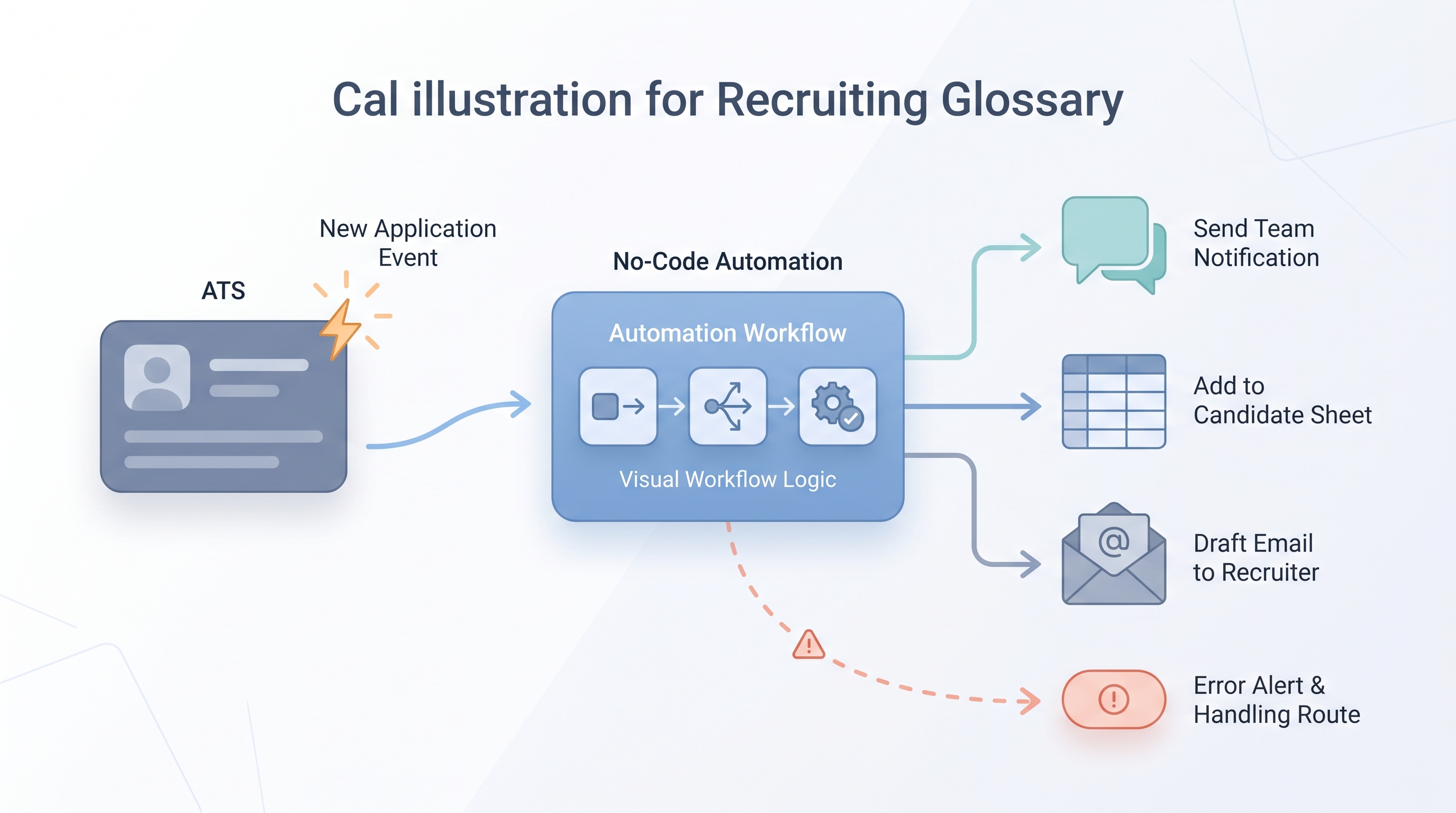
No-code recruiting automation means building workflows in tools like Make (formerly Integromat) or Zapier using a visual editor instead of code. You connect triggers (a new application in your ATS, a form submission, a calendar event) to actions in other apps (a Slack message, a spreadsheet row, an email, an API call) and the tool runs the sequence automatically every time the trigger fires.
The "no-code" label is accurate for the setup: no engineering required for most standard flows. It does not mean no ownership. Someone still needs to manage field mappings, monitor for failures, and update scenarios when an ATS vendor changes an API response format.
In practice
- When a recruiter gets a Slack ping 10 minutes after a new application arrives in their ATS, that ping is almost always a Zapier or Make webhook firing on the ATS trigger, even if the recruiter never built it themselves.
- A TA ops person saying "the Zap broke" when new applications stop appearing in a tracking spreadsheet is describing a no-code scenario that lost its ATS connection after a password rotation.
- Make scenarios with branching logic (route enterprise applicants to one recruiter, SMB to another, based on company size field) represent the more advanced end of what no-code tools handle without developer support.
Quick read, then how hiring teams use it
This section is for recruiters, sourcers, TA partners, and ops practitioners who need shared vocabulary when evaluating tools, planning integrations, or explaining what broke. Skim the first part for a shared picture. Use the second when you are deciding what to build or fix.
Plain-language summary
- What it means for you: A no-code tool like Make or Zapier connects your apps so information moves automatically after a trigger, without anyone writing a line of code. New application in ATS, row added to sheet, ping sent to Slack.
- How you would use it: You draw out the trigger, one or two actions, and the destination. The tool handles the plumbing. You own the field mapping and the failure monitoring.
- How to get started: Pick one repetitive copy-paste task your team does after every new application or stage change. Draw it as three boxes: what starts it, what happens in the middle, where it ends up. Build that first and run it alongside the manual process for two weeks.
- When it is a good time: When the process is stable, documented, and boring. Not while the step still changes every Monday.
When you are running live reqs and tools
- What it means for you: No-code automation moves state between systems: stages, owners, timestamps, tags, and CRM fields. That is how you scale screening queues and recruiter handoffs without adding headcount for each new tool in the stack.
- When it is a good time: After prompts and scorecards are stable, the same trigger would fire dozens of times a week, and you have a named owner for credentials and a human inbox for failed runs.
- How to use it: Pair Make or Zapier with your ATS and comms stack. Keep candidate-facing sends behind a review queue until error rates are consistently low. Log every field mapping so GDPR questions have a one-screenshot answer.
- How to get started: Ship one internal automation first: Slack ping on new req, spreadsheet row from application form, calendar hygiene reminder. Add AI drafting steps only after the data mapping is trusted. See ATS API integration for when standard connectors are not enough.
- What to watch for: Silent partial runs, duplicate rows from retries, API keys in shared screenshots, and scenarios nobody updates when the ATS vendor changes a field name. Plan error alerts the same way you plan the happy path.
Where we talk about this
On AI with Michal sessions, the sourcing automation track spends significant time on Make and Zapier: building a live scenario from scratch, handling credentials safely, and walking through what happens when a step fails at 2 a.m. on a Friday. The AI in recruiting track connects the same automation ideas back to hiring manager trust and compliance. If you want the full room conversation, start at Sourcing Lab and bring your actual ATS names and a sample payload.
Around the web (opinions and rabbit holes)
Third-party creators move fast. Treat these as starting points, not endorsements. Double-check everything before you wire candidate data to a script you found in a tutorial.
YouTube
- Make.com Full Tutorial for Beginners (Liam Ottley) covers the core scenario builder concepts applicable to recruiting workflows.
- Zapier Tutorial for Beginners (Kevin Stratvert) walks the fundamental trigger-action model before you connect your first ATS.
- How to Automate Your Entire Hiring Process with n8n and Notion (Michele Torti) uses n8n instead of Make/Zapier but shows the same sequence logic applied to a full hiring flow.
- Has anyone used Zapier? in r/recruiting has honest recruiter takes on what Zapier handles well and where it breaks in a TA context.
- I want to make some recruitment automated workflows but... in r/RecruitmentAgencies is a frank thread from practitioners deciding where to start.
- Make vs Zapier: Which is better for complex workflows? in r/nocode covers the tool comparison with production-tested opinions.
Quora
- How do we automate the process of recruiting as a recruiter? collects wide-ranging practitioner answers on automation entry points (quality varies; read critically).
Make vs Zapier for recruiting teams
| Dimension | Zapier | Make |
|---|---|---|
| Setup complexity | Lower for simple 2-3 step flows | Higher, but visual editor rewards it |
| Conditional logic | Limited without premium plan | Built-in branching and loops |
| Error handling | Basic retry; alerts on paid tiers | Detailed error routes, custom alerts |
| ATS connector coverage | Extensive | Growing; parity on major ATS |
| Cost model | Per task; adds up at scale | Per operation; cheaper at high volume |
| Best for | First automation, linear flows | Multi-step ops sequences, TA ops teams |
Related on this site
- Glossary: Workflow automation, ATS API integration, Recruiting webhooks, Human-in-the-loop, Prompt chain, Candidate data enrichment
- Blog: AI sourcing tools for recruiters
- Guides: Sourcers
- Workshops: AI Sourcing Lab
- Courses: Starting with AI: the foundations in recruiting
- Membership: Become a member