Job applicant tracking software
Software that creates a digital record for each person who applies for a role, tracks their progress through every evaluation stage, and gives recruiters and hiring managers a shared view of where every applicant stands across all open requisitions.
Michal Juhas · Last reviewed May 9, 2026
What is job applicant tracking software?
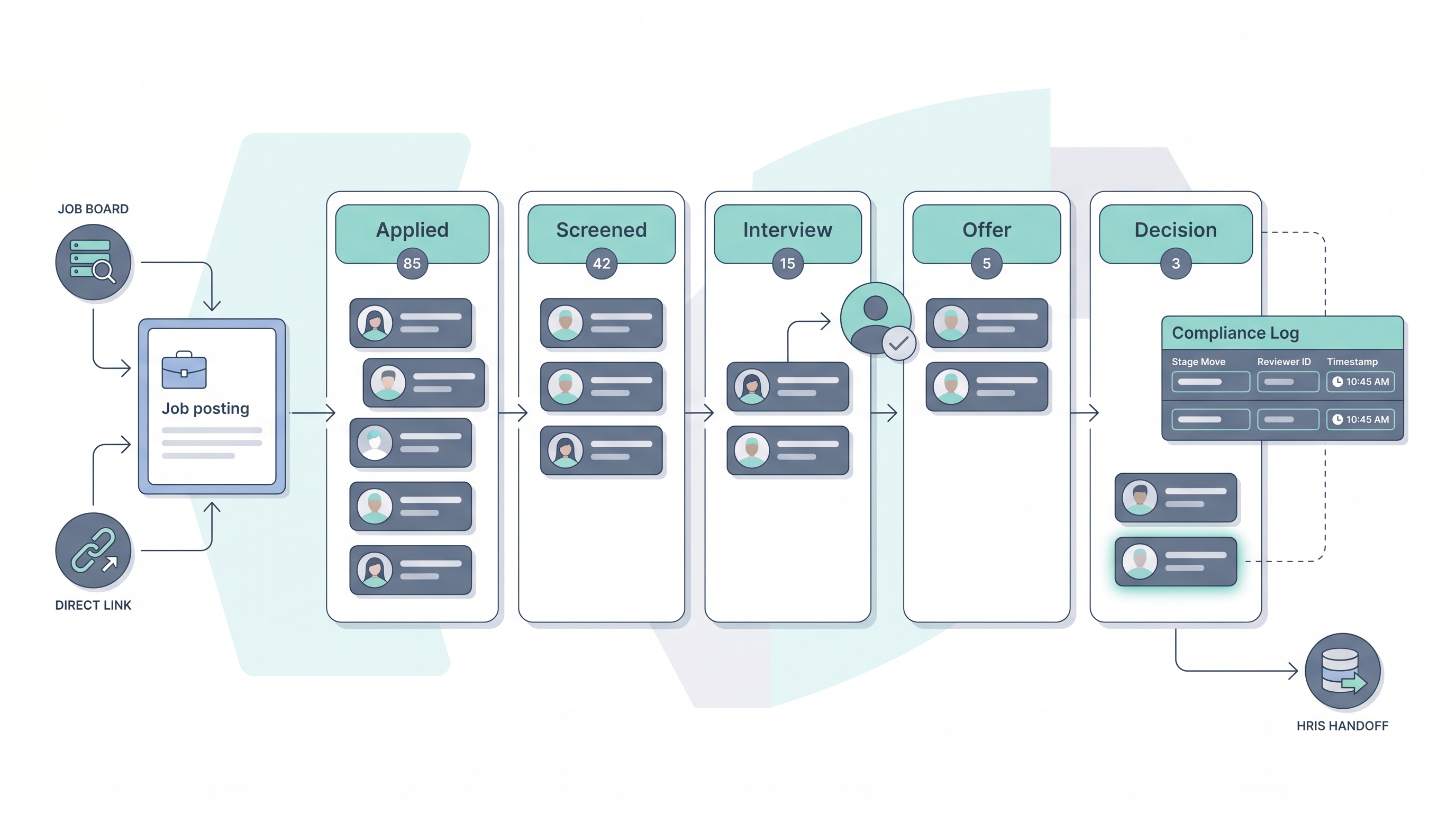
Job applicant tracking software receives applications submitted for open roles, creates an individual record for each applicant tied to the specific requisition, and moves that record through a defined set of evaluation stages: from initial application through screening, interview rounds, offer, and final decision. Every stage transition is logged automatically with a timestamp so there is an auditable history of who reviewed a candidate and when.
The practical value is a shared operational view. Instead of a hiring manager sending status emails and a recruiter replying from a different spreadsheet, everyone sees the same pipeline data in one place. That shared state is also what compliance audits, pipeline reports, and AI scoring features read from. When stage logic is fuzzy or key fields are blank, every downstream tool inherits the same gap.
In practice
- A recruiter describes a stalled req as "no movement in the ATS" when three applicants have sat in the Phone screen stage for two weeks because the hiring manager has not logged feedback in the platform since the initial intake meeting.
- A TA ops lead calls it a data quality problem when the rejection reason field is blank for 40 percent of closed applicants, making it impossible to tell whether roles closed due to a weak pipeline, a withdrawn offer, or a budget freeze.
- When an HRBP asks "where are we with the software engineer applicants," they expect to pull a single pipeline view from the ATS, but in practice often find the recruiter's live tracking is still a shared spreadsheet running in parallel with the platform.
Quick read, then how hiring teams use it
This is for recruiters, HR generalists, TA leads, and HRBPs who need shared vocabulary for stage design, data quality reviews, and compliance conversations. Skim the first section for a fast shared picture. Use the second when you are configuring, auditing, or selecting a platform.
Plain-language summary
- What it means for you: Job applicant tracking software gives every person who applies for a role a digital record tied to that role, so your team can see exactly where each applicant stands in the process at any time without sending status emails.
- How you would use it: Open a req, receive applications, move each applicant through stages as you screen and interview, collect structured feedback from every reviewer, and document the final decision with a closing reason.
- How to get started: Write down the five to seven stages that reflect your real hiring process, then configure those in the platform before the first applicant enters. Stage names that match real handoffs are the foundation everything else depends on.
- When it is a good time: Any time more than one recruiter is managing the same pipeline, when a hiring manager asks for status updates more than twice a week, or when you cannot explain a rejection decision three months later.
When you are running live reqs and tools
- What it means for you: ATS applicant data feeds every downstream tool: AI scoring, pipeline analytics, HRIS sync, and compliance reporting. Every empty field and skipped stage move becomes a gap in every output that tool produces.
- When it is a good time: After stage logic matches real decision handoffs and field completion rates on key fields are above 90 percent, then turn on AI scoring and report automation with reliable inputs.
- How to use it: Set a stage advance cadence so applicants do not age in one column. Track time-in-stage as a leading indicator before time-to-fill becomes a fire, and assign a stage owner for every req so there is always a name attached to a late move.
- How to get started: Pull a field completion report from your current ATS. Identify the three fields with the lowest fill rates, fix those with team agreement or required-field configuration, then add AI features or automation on top of cleaner data.
- What to watch for: AI scoring that hides which model version ran on each applicant, integrations that create duplicate records when the same person applies through multiple sources, and data retention settings that store applicant PII longer than your data processing agreement allows.
Where we talk about this
On AI with Michal live sessions, applicant tracking setup comes up in both the AI in recruiting and sourcing automation tracks: the first covers how AI features inside ATS platforms need clean stage and field data before they produce reliable shortlists, and the second covers the automation triggers that connect stage transitions to outreach tools and downstream HRIS events. Bring your actual stage list and one pipeline metric that currently feels wrong to Sourcing Lab so the room works through your real configuration rather than a vendor demo.
Around the web (opinions and rabbit holes)
Third-party creators move fast and tooling changes often. Treat these as starting points, not endorsements, and verify anything before you connect candidate data to an unfamiliar platform.
YouTube
- Search "applicant tracking system tutorial" filtering by upload date to find practitioner walkthroughs from the past twelve months that show real configuration steps, not only vendor marketing demos.
- Search "ATS stage setup recruiting" for independent videos that walk through stage logic design choices and how stage names affect pipeline reporting and AI feature reliability.
- Search "ATS data quality hiring" for content that covers the specific field and stage issues practitioners find after go-live, the problems vendor demos rarely address.
- r/recruiting carries regular threads on ATS configuration, stage hygiene, and which platforms practitioners actually run in production versus which win vendor bakeoffs.
- r/humanresources covers the HR generalist and HRBP perspective on applicant tracking, including HRIS integration decisions and compliance documentation gaps that standalone TA teams often miss.
- r/RecruitmentAgencies is useful for understanding how agencies run multi-client applicant tracking without the single-ATS assumption that enterprise setups rely on.
Quora
- How do companies track job applicants? collects practitioner answers covering both the candidate perspective and the recruiter workflow, useful context before evaluating a platform.
Applicant tracking versus sourcing pipeline
| Feature | Applicant tracking (ATS) | Sourcing pipeline (CRM) |
|---|---|---|
| Record type | Formal applicants tied to an open req | Prospective talent who has not applied |
| Stage trigger | Application submission | Recruiter outreach or passive engagement |
| Data compliance | PII retention after process closes | Consent for proactive contact |
| AI use case | Resume ranking, screen automation | Profile scoring, sequence personalisation |
| HRIS connection | On hire, offer accepted | Rarely, on active pipeline |
Related on this site
- Glossary: Applicant tracking software, Best applicant tracking software, Resume parsing, Human-in-the-loop, AI bias audit, Workflow automation, Time-to-fill, ATS API integration, Candidate data enrichment, Talent acquisition metrics
- Blog: AI sourcing tools for recruiters
- Guides: Sourcers
- Workshops: Sourcing Lab
- Course: Starting with AI: the foundations in recruiting
- Membership: Become a member