OpenAI API in recruiting workflows
A programmatic interface that lets recruiting teams connect GPT-4o and related OpenAI models directly into ATS pipelines, sourcing tools, and HR scripts, enabling custom screening logic, outreach drafting at scale, and structured scoring without relying on a chat interface.
Michal Juhas · Last reviewed May 5, 2026
What is the OpenAI API in recruiting workflows?
The OpenAI API is a programmatic interface that lets software send text to GPT-4o or other OpenAI models and receive structured responses automatically, without anyone opening a chat tab. For recruiting and TA teams, this means the same language model logic that a recruiter runs manually in ChatGPT can run hundreds of times a day inside an ATS pipeline, a sourcing script, or a no-code workflow tool.
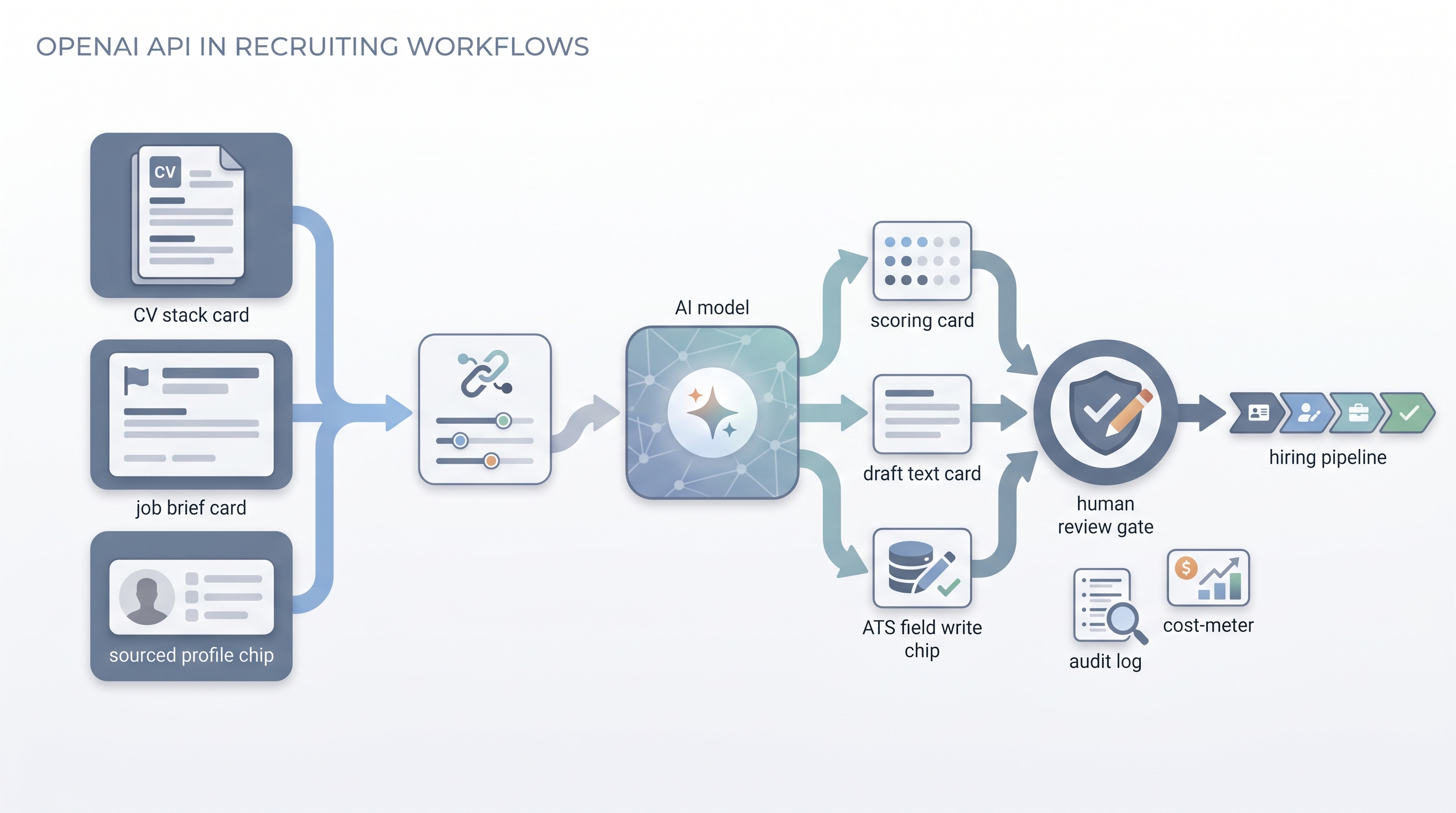
The practical shift from the chat interface is control and scale: you define the prompt once, set the output format, pin the model version, and the same logic applies consistently across every application or sourced profile the system receives. The hard constraints are that you take on responsibility for data routing, GDPR compliance, error handling, and cost monitoring once the model is wired into automated pipelines.
In practice
- A TA ops team connects the OpenAI API to their ATS via a Make scenario: when a new application arrives, the scenario sends the CV and a scoring prompt to GPT-4o and writes a structured score and one-line summary back to a custom ATS field before the recruiter sees the record.
- A sourcing lead uses an API-connected script to draft personalized first-touch outreach for a batch of fifty sourced profiles overnight, then reviews and edits the drafts the next morning before any message sends.
- A recruiting engineer sets temperature to zero in every API call and logs the model version and prompt hash alongside each output so the team can audit which prompt was running on any given day.
Quick read, then how hiring teams use it
This is for recruiters, TA ops practitioners, and HR leaders who need shared vocabulary when evaluating automation vendors, reviewing engineer proposals, or deciding what to build. Skim the first section for a fast shared picture. Use the second when you are deciding how the OpenAI API fits into your current stack and what guard rails to put around it.
Plain-language summary
- What it means for you: The same AI that answers questions in ChatGPT can be wired into your ATS or sourcing tool so it processes every application automatically, not just the ones you paste by hand.
- How you would use it: You write a prompt that scores or drafts, you connect it to a workflow tool, and the model runs that logic every time a trigger fires, such as a new application arriving or a profile being added to a list.
- How to get started: Test your prompt manually on ten real CVs before automating. Only then connect it via a no-code tool and run it in parallel with your manual process for two weeks.
- When it is a good time: When you have a stable, reviewed prompt and a repeatable task that runs often enough to justify the setup time, typically more than fifty times a week.
When you are running live reqs and tools
- What it means for you: API integration moves model outputs into system state: ATS fields, stage tags, spreadsheet rows, and outreach queues. Mistakes at volume are expensive and hard to undo, so the same human-in-the-loop discipline that applies to chat applies with more force here.
- When it is a good time: After the prompt is stable, after you have a test sample showing acceptable accuracy, after you have logging and error alerting in place, and after your legal team has confirmed the data routing is covered by your DPA with OpenAI.
- How to use it: Pair the OpenAI API with a workflow automation layer (n8n, Make, or a custom script). Use structured output modes so results are parseable. Set temperature to zero for scoring tasks. Log the model version and prompt with every run.
- How to get started: Wire one internal scoring task first, write results to a spreadsheet before any ATS field, and run in parallel with manual review. See ATS API integration for the field-mapping patterns that survive ATS schema changes.
- What to watch for: Silent partial runs, JSON parse failures, rate limit interruptions mid-batch, prompt drift after model updates, and GDPR gaps if candidate data crosses vendor boundaries without a documented lawful basis. Add a dead-letter queue for failed calls so nothing disappears silently.
Where we talk about this
On AI with Michal live sessions, the OpenAI API comes up in the sourcing automation track when teams move from manual prompting to wired workflows. The cohort setting lets you hear which integration patterns survive production traffic versus which ones look clean in a demo and break on the first batch of three hundred CVs. Start at Sourcing Lab and bring your ATS name and a sample payload.
Around the web (opinions and rabbit holes)
Third-party creators move fast. Treat these as starting points, not endorsements, and double-check anything before you wire candidate data to any tool.
YouTube
- Build Hour: Responses API on the OpenAI channel: official walkthrough of the Responses API, tools, and agent-style patterns behind many production integrations.
- OpenAI API Quickstart: Send Your First API Request: short first-request demo before you route real recruiting payloads through a connector or script.
- How to connect and set up the OpenAI API key in n8n: community tutorial on credentials and OpenAI nodes in n8n, a common stack for ATS-triggered workflows.
- No-code AI agents: automate with n8n and OpenAI (2025 guide): community walkthrough of agent-style automation patterns teams often adapt for screening and drafting (audit data flows and GDPR before production).
- r/recruiting threads on API automation surface real friction: which ATS APIs are stable enough to trust, where prompt scoring breaks, and how teams handle GDPR when sending data to OpenAI.
- r/n8n has workflow examples with OpenAI nodes that TA ops practitioners adapt for screening and outreach tasks.
Quora
- How can AI be used in the recruitment process? collects practitioner answers on API-connected screening and drafting (quality varies; read critically and verify claims before building).
OpenAI API versus ChatGPT interface versus embedded ATS AI
| Dimension | ChatGPT interface | OpenAI API | Embedded ATS AI |
|---|---|---|---|
| Setup required | None | Credentials and connector | None |
| Runs at volume | Manual only | Automated | Automated |
| Custom prompt control | Full | Full | Limited |
| ATS write-back | Manual copy-paste | Automatable | Native |
| GDPR data routing | User-controlled | Requires DPA and config | Vendor-managed |
| Cost model | Subscription flat | Per token | Subscription or usage |
| Error handling | Human notices | Must be built | Vendor responsibility |
Related on this site
- Glossary: ChatGPT for recruiters, Workflow automation, Structured output
- Glossary: Human-in-the-loop (HITL), ATS API integration, Hallucination
- Glossary: Prompt chain, GDPR first touch outreach
- Live cohort: Sourcing Lab
- Courses: Starting with AI: foundations
- Membership: Become a member