Recruiting database software
Software that stores and searches candidate profiles, contact history, and recruiter notes so teams can find and re-engage talent proactively, independent of the application pipeline tracked in an ATS.
Michal Juhas · Last reviewed May 9, 2026
What is recruiting database software?
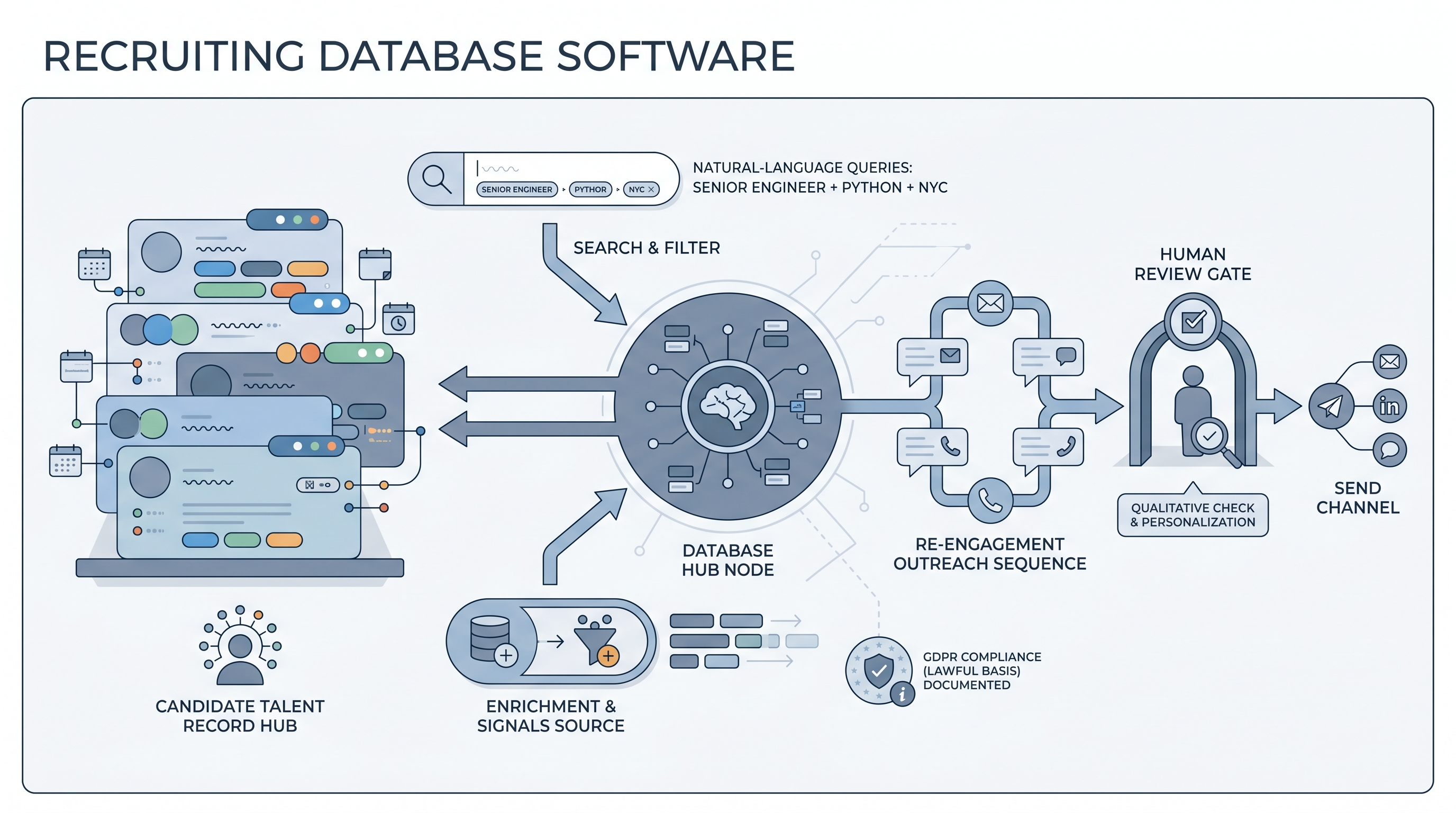
Recruiting database software stores candidate profiles, contact history, notes, and tags in one searchable place so teams can find and re-engage talent proactively, without relying on a fresh job posting to bring people back. The core idea is different from an ATS: an ATS is application-centric, tracking each candidate as they move through a specific hiring pipeline for a specific req. A recruiting database is person-centric, holding one record per individual across multiple req cycles, outreach threads, and years.
The overlap between the two categories is real. Modern ATS platforms include basic CRM-style features, and most dedicated recruiting databases sync into ATS stages when a candidate becomes active. The dividing line is whether the system was built to manage relationships over time or to process applications through a workflow. Both matter. Most serious TA teams use both.
In practice
- A sourcer at a growing tech company tags every strong candidate who reaches the final three with a specific skill gap note. When a similar role opens three months later, she runs a database search before posting anywhere, re-engaging the shortlist first and cutting sourcing time in half for that req.
- A TA lead describes the recruiting database as the "second-chance system": anyone who passed a phone screen but was not hired stays tagged, enriched once a year, and reachable in under five minutes when a similar role opens. Without it, those conversations just disappear into email history.
- A TA ops manager says their database "broke" when the team grew from twelve to forty sourcers without a shared tag taxonomy: four different people had tagged the same concept in four different ways, and search results became unreliable by month six.
Quick read, then how hiring teams use it
This is for recruiters, sourcers, TA, and HR partners who need the same vocabulary in debrief meetings, vendor calls, and policy reviews. Skim the first section when you need a fast shared picture. Use the second when you are deciding how the database fits into your ATS, sourcing tools, or compliance workflow.
Plain-language summary
- What it means for you: A searchable address book for your entire candidate history: everyone your team has spoken to, tagged with notes and last-contact dates, so you can re-engage before opening a job board.
- How you would use it: After every candidate interaction, log a note and add one or two tags. When a new req opens, search the database before you source externally. Re-engage warm contacts first.
- How to get started: Before buying any tool, list every category of candidate your team tracks (function, seniority, skill set, location, timeline). That becomes your tag taxonomy. A taxonomy built before the tool saves months of cleanup.
- When it is a good time: When your team regularly re-opens reqs that look similar to past reqs, when strong past candidates are being sourced again from scratch, or when post-offer fall-through rates suggest you have no warm pipeline to draw from.
When you are running live reqs and tools
- What it means for you: The database is your proprietary talent layer: first-party relationships you own, with enriched contact data, interaction history, and re-engagement signals that a job board cannot replicate. It is also a compliance asset when maintained correctly.
- When it is a good time: When your ATS deletes or hides candidate history after a req closes, when sourcers rebuild the same target list repeatedly for similar roles, or when the team passes five active sourcers and note consistency starts to break down.
- How to use it: Keep the database in sync with your ATS for active candidates. Use the database for passive candidate management, re-engagement sequences, and talent pool segmentation. Pair with an enrichment layer to keep contact data current. See candidate data enrichment for the enrichment workflow.
- How to get started: Migrate your last twelve months of screened candidates with tags and notes before sourcing new records. Set a retention policy and a data owner before you go live. Run a GDPR review on the first hundred records to confirm lawful basis and consent logging are working. See proprietary talent pool for the talent pool strategy that sits on top.
- What to watch for: Stale contact details from candidates who changed jobs without telling you. Duplicate records from multi-channel sourcing. Tag drift when new recruiters join and use their own conventions. Enrichment vendor DPA gaps. And the slow erosion of trust when search results return irrelevant profiles because hygiene was skipped for two quarters.
Where we talk about this
On AI with Michal live sessions, recruiting database software comes up in both tracks. Sourcing automation blocks cover how talent pools are built, tagged, enriched, and maintained with GDPR-compliant retention policies so the database stays useful without becoming a liability. AI in recruiting blocks connect the same concepts to hiring manager expectations and re-engagement rates, including how AI-powered semantic search changes what is possible to find in a large candidate record set. Start at Sourcing Lab if you want the room conversation with your actual stack questions rather than a generic vendor walkthrough.
Around the web (opinions and rabbit holes)
Third-party creators move fast. Treat these as starting points, not endorsements. Double-check anything before you wire candidate data to a new platform.
YouTube
- Search "talent CRM recruiting database walkthrough" on YouTube for practitioner builds. Look for team-specific setups that show tagging taxonomy design, not just vendor demos.
- Search "building a talent pool sourcing strategy" for content that goes deeper on the pipeline strategy behind the database, including how teams decide which candidates to keep warm and for how long.
- For AI-enhanced database features, search "semantic search recruiting platform" for recent product walkthroughs. Check the upload date: product interfaces change quarterly and UI tips from a year ago may not match what you see.
- Talent CRM vs ATS: what's actually different? in r/recruiting surfaces practical opinions from full-cycle and agency recruiters on when a dedicated database actually changes outcomes versus adding complexity.
- How do you manage your silver-medal candidates? in r/TalentAcquisition is where re-engagement workflows and the business case for recruiting databases come up most honestly.
- What software do you use for managing passive candidates? in r/RecruitmentAgencies shows agency-side database management, where data volume and GDPR pressure tend to be higher.
Quora
- What is the difference between an ATS and a recruiting CRM? collects practitioner perspectives on when the second tool earns its seat in the stack (quality varies, read critically).
ATS versus recruiting database
| Dimension | ATS | Recruiting database |
|---|---|---|
| Data model | Application-centric (one row per application) | Person-centric (one record per candidate) |
| Primary use | Pipeline tracking for active reqs | Relationship management across all reqs and time |
| Retention default | Often archived or hidden after req closes | Designed for multi-year passive talent retention |
| Search | Stage, req, and filter-based | Semantic, tag, and enrichment-supported |
| GDPR complexity | Lower (applicants have a clear relationship) | Higher (sourced passives need documented lawful basis) |
| When to buy | Always | When re-engagement ROI is visible and data is being lost |
Related on this site
- Glossary: Applicant tracking software, Proprietary talent pool, Candidate data enrichment, Semantic search, Talent sourcing software, Recruiting automation software, Outbound talent sourcing
- Blog: AI sourcing tools for recruiters
- Guides: Sourcers
- Live cohort: Sourcing Lab
- Membership: Become a member