Recruiting automation software
Software that handles repetitive recruiting tasks automatically: moving candidates through ATS stages, sending status emails, scheduling interviews, and routing sourcing data, so recruiters spend time on judgment calls rather than copy-paste work.
Michal Juhas · Last reviewed May 9, 2026
What is recruiting automation software?
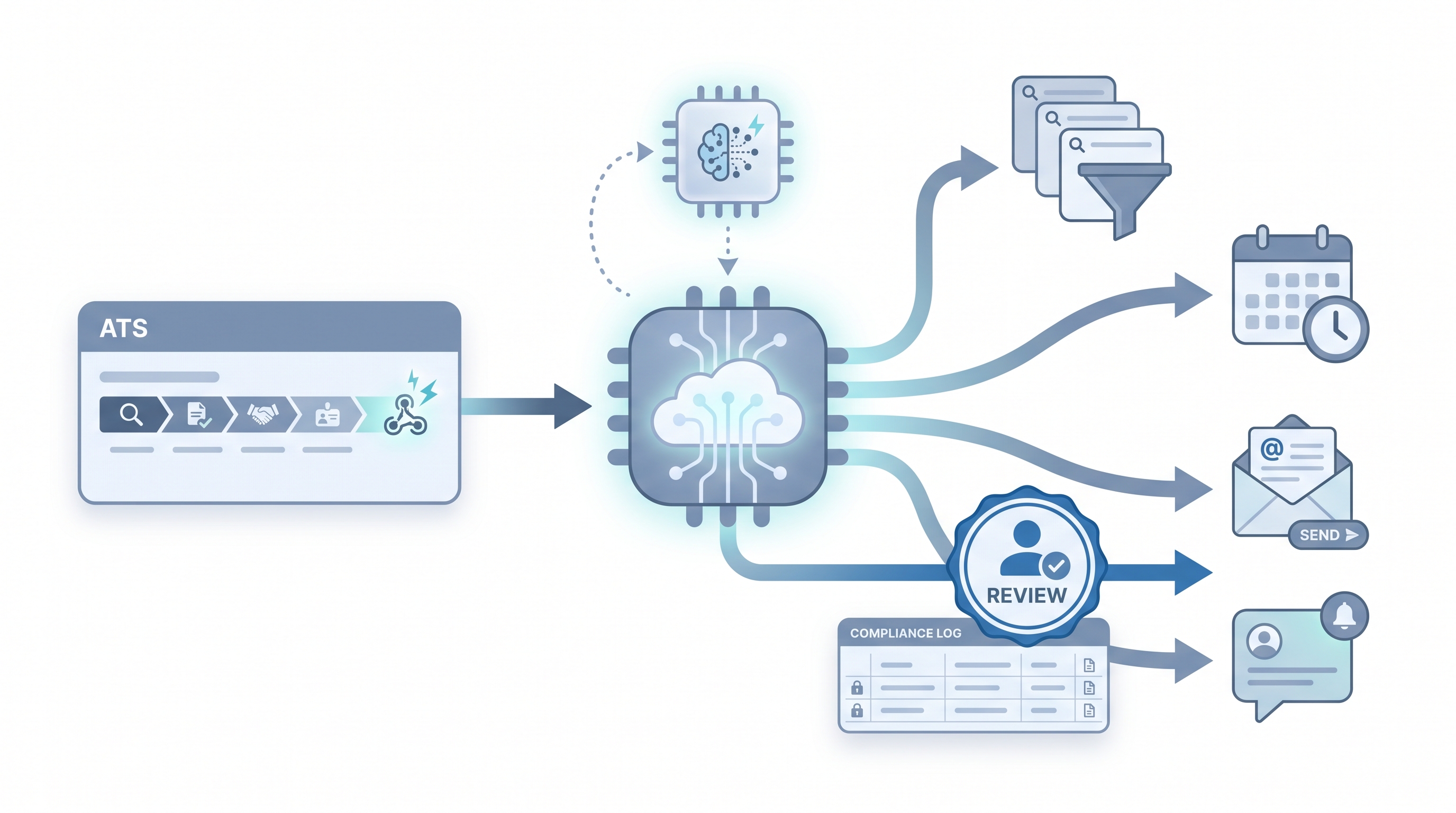
Recruiting automation software connects the tools in a hiring stack so candidate data moves and actions trigger automatically after defined events, without a recruiter manually copying fields, sending reminders, or nudging a calendar invite. The definition covers a wide range: ATS-native automation rules, dedicated workflow platforms like Make or n8n, sourcing sequence tools, and AI-assisted screening layers. What they share is the same core idea: a trigger fires, a rule runs, and the next state in the hiring process updates without a human initiating it.
The distinction that matters in practice is not the product category but the risk profile of the task. Scheduling and status notifications are low-stakes and easy to reverse. Automated resume screening and rejection routing carry bias and legal exposure that require explicit human review before results affect candidates.
In practice
- A sourcer sets up a three-step sequence in a sourcing tool: a personalised first message drafted by AI, a follow-up seven days later if no reply, and a pause when a positive reply arrives. The recruiter approves each template once; the tool handles timing.
- A TA ops lead wires an ATS webhook to Slack: every time a req moves to "offer extended," a channel ping goes to the hiring manager with a link to the candidate record and next-step checklist. No ticket required, no manual update.
- An HRBP at a 500-person company describes "recruiting automation software" as the layer that sends the candidate their interview invite and pre-work link automatically after a recruiter books the time, so the recruiter is not chasing calendar links at 6pm.
Quick read, then how hiring teams use it
This is for recruiters, sourcers, TA, and HR partners who need the same vocabulary in debriefs, vendor calls, and policy reviews. Skim the first section when you need a fast shared picture. Use the second when you are deciding how it shows up in the ATS, sourcing tools, or candidate communications.
Plain-language summary
- What it means for you: Software that does the mechanical steps in hiring automatically once you have set the rules. Sending a confirmation email when an interview is booked, moving a candidate to the next stage when a form is submitted, pinging a Slack channel when a req goes live.
- How you would use it: You pick one repetitive task, write the rule once, connect the apps, and the software runs it every time the trigger fires. You handle exceptions and judgment calls; the software handles the repeatable part.
- How to get started: Map one workflow end to end before opening any tool. Draw three boxes: what fires the trigger, what action should happen, where the result should land. Only wire the automation after the manual version has run the same way at least ten times.
- When it is a good time: After the process is stable, documented, and boring. Not while the hiring manager is still changing the scorecard every week.
When you are running live reqs and tools
- What it means for you: Automation moves candidate state across systems (ATS stages, calendar invites, HRIS fields, email sequences) automatically based on events. That is how a five-person TA team manages three hundred applications without dropping candidates into silence.
- When it is a good time: After prompts and scorecard criteria are reviewed, when the same trigger fires dozens of times per week, and when you have a named owner for credentials plus a human inbox for failed runs.
- How to use it: Connect your ATS to downstream tools via webhooks or native integrations. Keep candidate-facing sends behind a human approval gate until error rates are low and outputs are reviewed. Log every field mapping so GDPR questions have a documented answer. See ATS API integration for the technical wiring.
- How to get started: Ship one internal automation first: a Slack ping on new application, a sheet row from a form submission, a calendar hygiene check. Add AI-assisted drafting only after the data plumbing is trusted. Read AI recruiting tools before chaining paid sourcing vendors.
- What to watch for: Silent failures, duplicate rows from retries, API keys in shared screenshots, field mapping drift after an ATS update, and AI outputs baked into flows that nobody refreshes when the model or policy changes. Plan your alert strategy the same way you plan the happy path.
Where we talk about this
On AI with Michal live sessions, recruiting automation sits across two tracks. Sourcing automation blocks walk trigger design, webhook credentials, error handling, and what happens when a provider changes an API mid-campaign. AI in recruiting blocks connect the same ideas to hiring manager trust, candidate experience, and GDPR obligations. If you want the full room conversation with real stack questions, start at Sourcing Lab. Bring your ATS names and sample payloads so feedback is grounded, not theoretical.
Around the web (opinions and rabbit holes)
Third-party creators move fast. Treat these as starting points, not endorsements. Double-check anything before you wire candidate data.
YouTube
- Automate Your Recruitment Process with AI (n8n AI HR Assistant) walks a full hiring-shaped build showing AI plus workflow nodes in one chain.
- How to Automate Your Entire Hiring Process with n8n and Notion (Michele Torti) is a real end-to-end public build from sourcing intake to offer.
- Boost Your Productivity: Mastering Workflow Automation (DottoTech) stays tool-agnostic and works for shared vocabulary before you pick a vendor.
- Has anyone used Zapier for recruiting workflows? in r/recruiting collects small practical automations recruiters actually run.
- I want to make some recruitment automated workflows but where do I start? in r/RecruitmentAgencies is a frank starting point thread.
- What automation have you built that saves the most time in TA? in r/TalentAcquisition is worth searching for practitioner war stories on what actually holds up.
Quora
- How do we automate the process of recruiting as a recruiter? covers a wide range of practitioner answers (quality varies, read critically).
Manual versus automated recruiting tasks
| Task | Manual | Automated with review | Fully automated (high risk) |
|---|---|---|---|
| Interview confirmation email | 2-3 min per candidate | Good fit after template review | Acceptable if no personalisation needed |
| Sourcing sequence follow-up | Hours per campaign | Good fit with human approval gate | Risk: burns domain if untargeted |
| Resume screening and routing | High volume fatigue | Viable with bias monitoring and HITL | GDPR Article 22 applies |
| Offer letter generation | 15-30 min per offer | Draft only, human sends | Never fully automated |
| Final rejection messaging | Varies | Draft only, recruiter approves | Always needs a human name |
Related on this site
- Glossary: Workflow automation, No-code recruiting automation, Recruiting email automation, Human-in-the-loop (HITL), AI in recruiting, ATS API integration, AI bias audit
- Blog: AI sourcing tools for recruiters
- Tools: n8n for self-hosted workflow routing
- Guides: Sourcers
- Live cohort: Sourcing Lab
- Membership: Become a member