Recruitment software for small business
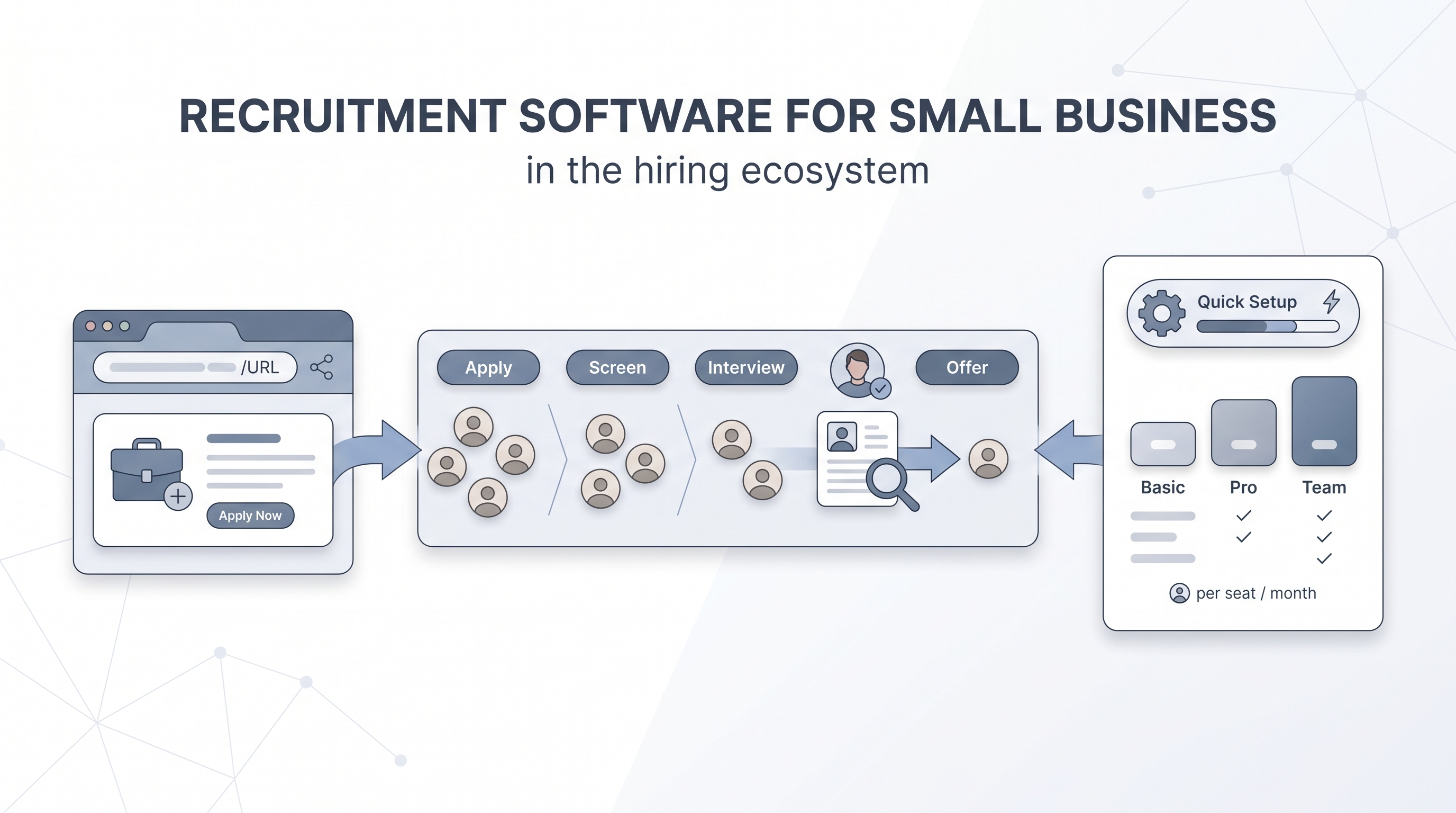
Recruitment software for small business is a lightweight ATS or hiring tool that covers job posting, candidate pipeline, interview scheduling, and offer management without requiring a dedicated admin, a vendor implementation engagement, or enterprise-level pricing.
Michal Juhas · Last reviewed May 9, 2026
What is recruitment software for small business?
Recruitment software for small business is a hiring tool, or a small stack of tools, that covers the core hiring steps without requiring a dedicated TA ops function to set up or maintain. The job is to get a req open, collect applications, move candidates through a simple pipeline, schedule interviews, and send an offer, all from one place the hiring manager actually logs into.
The term overlaps with ATS, but the emphasis is different. An enterprise ATS is optimized for a TA team processing hundreds of reqs with configured approval chains, role-based permissions, and HRIS integrations managed by an admin. Small business recruitment software is optimized for a founder, an office manager, or a part-time recruiter who needs the same pipeline without the implementation engagement.
The practical test: if a new hire can run their first req without calling vendor support in the first two weeks, the software is appropriately scoped.
In practice
- A startup founder posting their first engineering role on a job board, collecting applications in a shared email inbox, and tracking candidates in a spreadsheet is already hitting the limits of no-tool recruiting by the time they are managing five simultaneous conversations. That is the exact moment small business recruitment software earns its keep.
- In AI in recruiting sessions, the question "does it need an admin?" comes up every time a small team evaluates a new ATS. Tools that require a vendor implementation call to configure the careers page fail that test at small business scale.
- A 15-person company that moved from a spreadsheet to a lightweight ATS found that automating scheduling links alone saved the hiring manager roughly four hours per open role, before any AI features were turned on.
Quick read, then how hiring teams use it
This is for founders, office managers, part-time recruiters, and HR generalists at small businesses who need to run a structured hire without an enterprise TA stack. Skim the first section for a shared picture. Use the second when you are comparing tools or configuring a new system.
Plain-language summary
- What it means for you: Recruitment software for small business is the tool that replaces your hiring spreadsheet and keeps all candidates, notes, and offers in one place the whole team can see.
- How you would use it: You post the job, applicants land in the tool, you move them through stages with one click, schedule interviews from a link, collect feedback, and send the offer without switching tabs.
- How to get started: Run the last three hires you made through a free trial account using real job descriptions and historical applications. Note where you hit friction before you pay.
- When it is a good time: When you have more than two open roles at the same time, when a hiring manager has lost a candidate email in their inbox, or when you cannot answer "where did this candidate come from?" without opening a spreadsheet.
When you are running live reqs and tools
- What it means for you: At a small business, the recruitment software is often also the system of record for compliance. Who saw which candidate, when, and why they were advanced or declined needs to be answerable without rebuilding an email thread.
- When it is a good time: After you have confirmed the tool can delete a specific candidate record on request, retain data for a documented period, and produce an export a lawyer can read.
- How to use it: Keep the stage pipeline simple: Applied, Screening, Interview, Offer, Hired, Declined. Add stages only when a real workflow step requires them. The more stages, the more likely candidates end up parked in the wrong one. See time-to-fill to understand what you are now able to measure.
- How to get started: Configure the careers page first. Confirm the URL is shareable and that applications land in the tool, not in an inbox. Then add the hiring manager as a user and test the full cycle before posting publicly.
- What to watch for: Add-on pricing that triples the headline cost, AI features that activate by default with no clear off switch, and GDPR retention periods that default to forever. Ask about each before you sign.
Where we talk about this
On AI with Michal live sessions, recruitment software for small business comes up in both the AI in recruiting track (where we compare lightweight tools alongside AI-native stacks) and the sourcing automation track (where small teams often discover that a missing integration is the first bottleneck, not the tool itself). Start at Sourcing Lab and bring your current tool name, your biggest hiring friction point, and any pricing quotes you have collected.
Around the web (opinions and rabbit holes)
Third-party creators move fast and tooling changes monthly. Treat these as starting points, not endorsements, and verify anything before you connect candidate data.
YouTube
- Search "ATS for small business" on YouTube and filter by upload date: the last twelve months will surface practitioner walkthroughs comparing tools at sub-enterprise scale. Vendor-produced content is common; independent recruiter reviews tend to be more candid about configuration friction and total cost.
- Search "small business recruiting software review" to find founders and HR generalists comparing tools in public. These tend to cover real cost-of-ownership numbers more honestly than official comparison sites.
- r/smallbusiness has recurring threads on first ATS decisions, often covering real price-to-value comparisons and what broke six months after go-live.
- r/recruiting surfaces TA practitioners who have run small-team setups and can describe which tools survive first contact with a hiring manager who does not want to learn new software.
Quora
- Search "best recruitment software for small business" on Quora to find practitioner answers across company sizes; the setup time and support quality notes are often more useful than feature comparisons for narrowing a shortlist.
Small business recruitment software vs. enterprise ATS
| Capability | Small business recruitment software | Enterprise ATS |
|---|---|---|
| Setup time | Hours to days, self-serve | Weeks to months, vendor-led |
| Hiring manager access | Included in base pricing | Often a separate seat cost |
| Approval chains | Simple or none | Configurable multi-step |
| AI screening features | Basic or optional add-on | Often bundled and active by default |
| HRIS integration | Lightweight or Zapier-based | Native, direct |
| Compliance audit trail | Basic deletion and export | Detailed, with group-level reporting |
| Pricing model | Per seat, predictable | Per module or custom contract |
Related on this site
- Glossary: Applicant tracking system for small business, Best recruiting software for small business, Applicant tracking software, Hiring tools, Hiring platforms, Recruitment management software, Time-to-fill, AI recruitment software, Resume parsing
- Blog: AI sourcing tools for recruiters
- Live cohort: Sourcing Lab
- Membership: Become a member