Hiring tools
Software, platforms, and AI assistants that help recruiters, sourcers, and TA teams attract, evaluate, and hire candidates - from applicant tracking systems and job boards to sourcing AI and interview scheduling apps.
Michal Juhas · Last reviewed May 3, 2026
What are hiring tools?
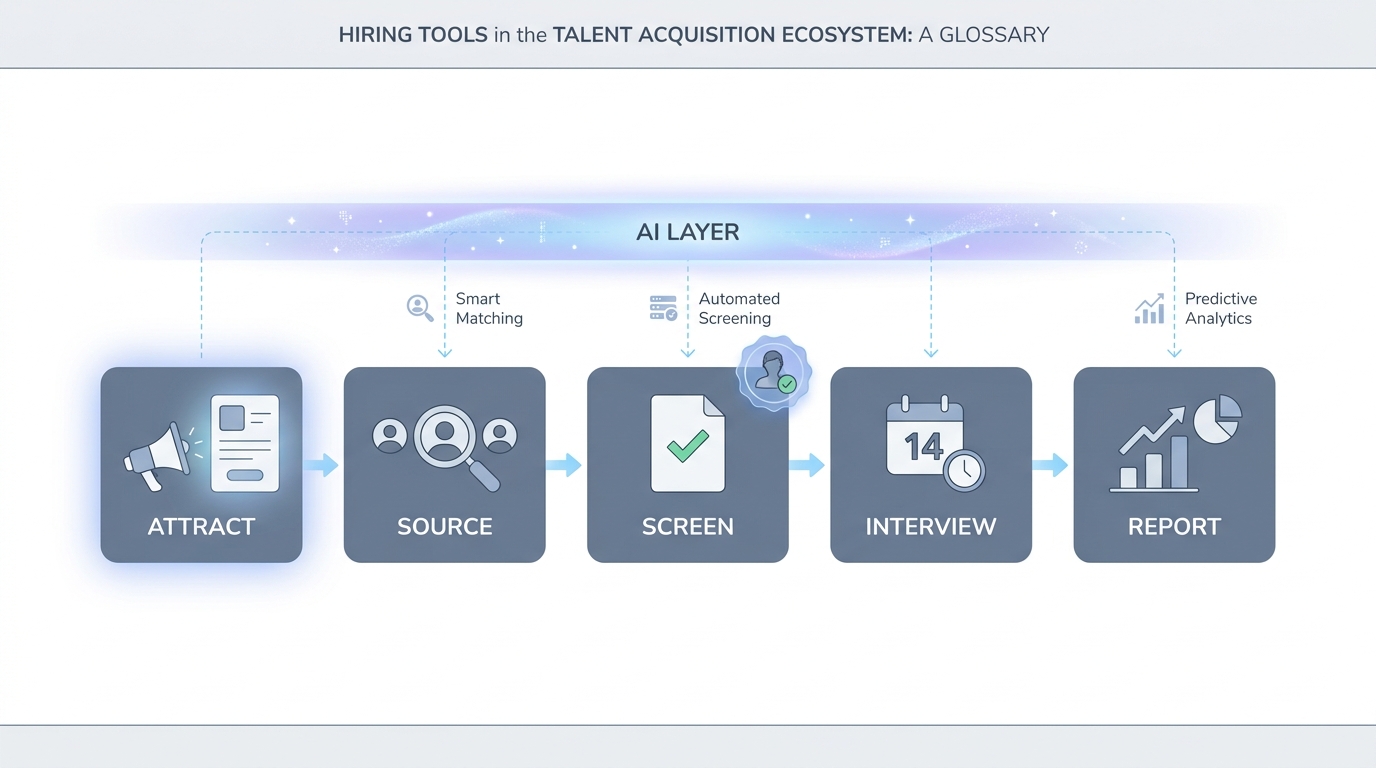
Hiring tools is the umbrella term for any software, platform, or AI assistant that helps recruiters, sourcers, and TA teams move candidates from job posting to accepted offer. The category includes applicant tracking systems, sourcing tools, resume screening software, interview scheduling apps, and the AI assistants layered on top of each. The word "stack" describes how most teams run them: several tools connected by integrations, each handling a slice of the hiring funnel.
In practice
- A TA ops lead reviewing the annual tool budget might say "we have six hiring tools and three of them do the same thing," meaning the sourcing, enrichment, and outreach tools overlap more than the original vendor pitches suggested.
- A recruiter who cannot move a candidate between tools because the ATS and the scheduling app do not sync is experiencing an integration gap that most hiring tools stacks develop after the second or third tool is added.
- A hiring manager who asks "which tool flagged this candidate?" is asking an accountability question that most teams cannot answer without logging which tool scored or suggested each candidate.
Quick read, then how hiring teams use it
This is for recruiters, sourcers, TA leads, and HRBPs who need a shared vocabulary for tool decisions, procurement conversations, and compliance reviews. Skim the first section for a fast shared picture. Use the second when you are evaluating, building, or auditing a real stack.
Plain-language summary
- What it means for you: Hiring tools are the software your team uses at each stage of bringing someone from unknown to hired. Each tool does a slice: find, screen, schedule, track, or report.
- How you would use it: Pick one stage that costs the most time per week and ask whether the tool you have there is the right one, or whether a different tool or an AI layer on top would cut that time in half.
- How to get started: List every tool your team uses by stage. Count overlapping tools. Flag the integrations that break most often. That list is your stack audit.
- When it is a good time: Before any new tool purchase, before a platform migration, or after a quarter where a hiring bottleneck traced back to a tool gap or a broken integration.
When you are running live reqs and tools
- What it means for you: Every tool in your stack that touches candidate data is a data processing decision with legal implications, not just a vendor invoice.
- When it is a good time: Before you add an AI-powered tool to any early-funnel step: that is where scoring bias, GDPR automated decision rules, and data residency risks converge.
- How to use it: Map which tool outputs feed which other tool. Confirm where candidate PII lands. Log model versions and prompt hashes for any AI-generated suggestion that influences who advances. Add a human review gate before outbound messages and before reject decisions.
- How to get started: Pull a one-pager on each tool: vendor name, data location, DPA signed, who owns the contract, and whether AI is in the product. Most teams discover one or two gaps they did not know existed.
- What to watch for: Vendors that fold AI into an existing tool without re-opening the DPA negotiation. Integration changes that silently drop candidate records. Scoring outputs that influence shortlists but are never reviewed after initial configuration.
Where we talk about this
On AI with Michal live sessions the hiring tools conversation shows up in both tracks. AI in recruiting Live Build sessions cover tool evaluation, AI feature claims, and where human gates belong. Sourcing automation sessions dig into the integration layer: how tools hand off data, which fields need mapping, and what breaks when a vendor changes an API. Bring your current stack list and your biggest friction point to Sourcing Lab for a room-tested reality check.
Around the web (opinions and rabbit holes)
Third-party creators cover hiring tools at high volume. Treat these as starting points, not endorsements, and verify compliance postures and feature sets directly with vendors before purchase.
YouTube
- How to build a recruiting tech stack pulls recent practitioner walkthroughs of how tools connect across the funnel, with real workflow demos.
- ATS comparison and selection guide covers selection criteria from TA leads and ops people who switched platforms and documented why.
- AI features in hiring software explained shows how AI layers are being folded into sourcing, screening, and scheduling tools in practice.
- What tools does your recruiting team use? in r/recruiting collects candid stack comparisons from recruiters across company sizes.
- ATS recommendations in r/recruiting surfaces what people switched from and why the change mattered.
- AI tools that actually work in recruiting in r/recruiting separates hype from tools recruiters use in production today.
Quora
- What are the best tools for recruiting and hiring? collects practitioner recommendations across company sizes and industries (quality varies; read critically).
Hiring tools by stage
| Funnel stage | Tool category | AI layer (common) |
|---|---|---|
| Attract | Job boards, employer brand tools | AI job description drafting |
| Source | Sourcing platforms, LinkedIn | AI outreach drafts, semantic search |
| Screen | ATS, CV parsers, video tools | Resume parsing, scorecard fill |
| Interview | Scheduling, structured interview tools | Transcription, scorecard suggestions |
| Decide | ATS pipeline, offer management | Pipeline summaries, bias flags |
| Report | TA analytics, dashboards | Talent acquisition metrics roll-ups |
Related on this site
- Glossary: Applicant tracking software, Recruiter AI, Semantic search, Resume parsing, Async screening, Workflow automation, AI bias audit, Human-in-the-loop
- Blog: AI sourcing tools for recruiters
- Guides: Sourcers
- Workshops: Sourcing Lab
- Membership: Become a member
- Courses: Starting with AI: the foundations in recruiting