AI for HR Business Partners
HRBP adoption framed by the AI adoption ladder: data classes, traffic-light stages, example climbs, and when Systemizing beats risky Chatting or premature Automating.

If this is your job
You translate workforce signals into manager-ready narratives. Performance cycles, reorganizations, and difficult conversations sit next to policy constraints you cannot improvise away. AI can compress drafting time and catch gaps in a plan; it cannot absorb accountability for how people are treated or what gets recorded in an HRIS or case file. The AI adoption ladder in the cornerstone section is the shared frame: which rung is allowed for which data, and how HRBPs climb without painting Offline or unsafe Chatting as the only options.
This guide is for HRBPs and HRBP-adjacent leaders who need practical adoption. People data and Employee Relations make Offline (hard no) and risky Chatting (paste into consumer chat) equally dangerous for different reasons. The AI adoption ladder (cornerstone below) is how you align HRBPs, TA, and Legal on which rung you allow for which data class, then climb without sounding robotic to employees.
How to think about AI in HRBP work
Scaffolding versus sending is non-negotiable at every stage; the cornerstone section maps which rung matches green versus red data. Climb Systemizing before you chase employee-facing Automating.
Separate scaffolding from sending. Use models to outline agendas, checklists, and manager prep. Leaders still deliver sensitive messages in their own voice after editing.
Match tool to data class. Consumer chat is not a vault for investigation notes, medical detail, or identifiable complaints. If your organization offers an approved workspace with retention controls, use that path under Legal guidance.
Anchor numbers in systems of record. If People analytics gives attrition or headcount, summaries should cite those figures, not rounded guesses from a chat session.
Bias toward clarity over polish. Employees forgive imperfect wording faster than they forgive hollow reassurance that avoids the decision.
Where the pressure actually shows up
Sensitive data in the wrong workspace. Investigation notes, health accommodations, or identifiable allegations pasted into consumer chat to "polish tone" create retention and discovery risk. The failure mode we hear most is not a bad prompt; it is data in the wrong tool.
Tone without substance. Employees recognize generic reassurance instantly. Structure helps managers prepare; scripts read aloud rarely land well. You know you have this problem when talking points read "we hear you" and "we are committed" with no decision on headcount, timing, or exception process.
Speed versus care. Leaders want employee communications turned around quickly. You are still the person who makes sure the words match facts, policy, and empathy. Red flag: a manager wants a layoff script in an hour on a day you have not yet aligned with Legal on severance package details.
Consistency across managers. Two leaders handling similar situations in opposite ways erodes trust. AI can help standardize scaffolding; it cannot replace local judgment about individuals.
Analytics and narrative. When People analytics exists, HRBPs stitch dashboards into stories for leads. Models should echo numbers from systems of record, not invent precision.
Global nuance. Works councils, regional privacy expectations, and union contexts change what you can automate or summarize. AI might draft; local experts still gate.
Where you are on the AI adoption ladder (cornerstone)
Start here. HRBP work spans five ladder stages like everyone else, but yellow and red data mean you may stay Systemizing longer before Automating anything employee-facing. Use the AI adoption ladder page to anchor the conversation: Offline → Chatting → Systemizing → Automating → AI-Native. Your ethical climb is often better scaffolding with citations, not hands-off bots.
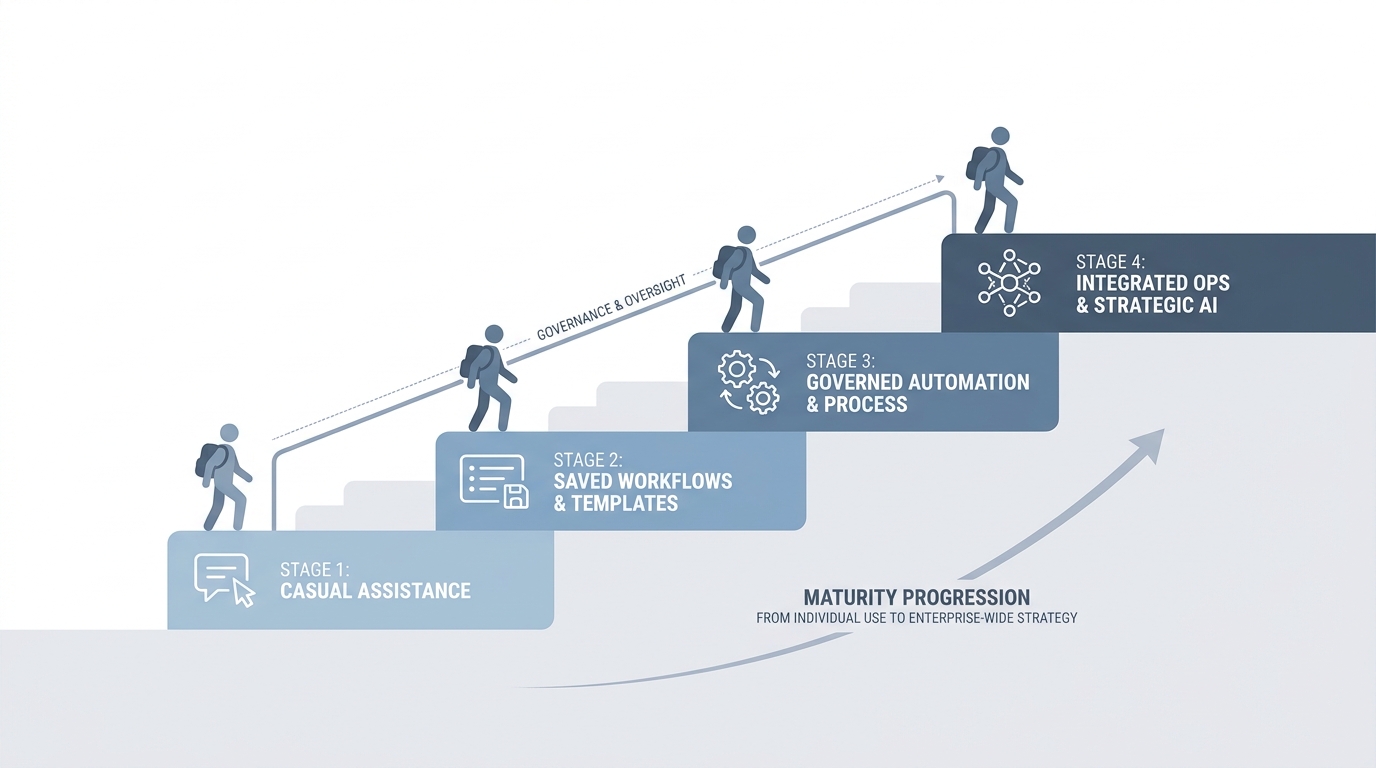
Explore the stages interactively on the AI adoption ladder page. Governance nuances map to the AI adoption ladder glossary entry and your Legal traffic-light rules.
Signals HRBPs often recognize
- Offline: Assistants off limits; managers still want faster drafts; shadow Chatting appears anyway.
- Chatting: Manager forwards you prose polished in a consumer chat; you fix tone under time pressure.
- Systemizing: Traffic-light doc; approved workspace for drafts; facts pasted from HRIS or policy PDFs only; Legal reviewed FAQ branches once.
- Automating (careful): Onboarding or lifecycle emails triggered from verified HRIS events; content pulled from canonical snippets; no investigations or medical detail.
- AI-Native HR ops: Playbooks assume structured Markdown and named reviewers; escalation paths are designed in, not improvised after the Slack storm.
Example climbs
- Shadow Chatting → Systemizing (urgent): Publish green-yellow-red examples with real tools named; ship one approved FAQ assistant seeded only from wiki text Legal blessed this quarter.
- Systemizing → limited Automating: Pilot lifecycle mail merge only when Legal confirms fields and retention; keep ER cases out of automation entirely until counsel agrees.
- Toward AI-Native: Every sensitive comm template lists required facts and approvals in the header block so nobody ships vibes-only drafts.
Walk your managers through AI adoption ladder language so "we should automate HR" becomes "we can automate step three after steps one and two live in the approved workspace."
High-leverage use cases (with examples)
Agendas and prep for hard conversations. Bullet outlines from facts you already verified: timeline, policy hooks, options the business can consider, and questions employees might ask. Managers edit voice; AI reduces the blank-page problem.
Example: Before a performance improvement conversation, feed verified timeline bullets only (dates of feedback, prior commitments, metrics from dashboards). Ask for an agenda with openings for empathy and clarity on consequences. The manager rehearses from that skeleton, not from a prose speech nobody would say aloud.
First drafts of FAQs and town-hall language after org changes. Start from a table your Legal team can bless: columns Audience, Question, Approved answer, Still open, Owner. Feed three rows of facts about the org change (what changed, effective date, what did not change). Ask the model to draft FAQ entries only inside those facts. Example row: "Question: Does my manager change? Answer: No for teams X and Y; team Z maps as in the spreadsheet dated March fourth." Conditional branches ("if remote policy is X, say Y") stay in footnotes Legal reviews.
Manager coaching collateral. Give managers a one-pager they can read before a calibration, not a script they read to employees. Example brief for performance calibration: "Here are three behaviors our rubric rewards (with examples from internal shadowing). Here are three behaviors that look positive but are not scored at this level. Here is how to write evidence that holds up in appeals." Generate from your actual competency framework PDF; strip anything that does not match your published definitions.
Calibration support. Before calibration, each manager pastes three bullet notes per report into the template; the assistant formats into a table "Criterion | Evidence quote or metric | Gap." Still run calibration live; you stop thirty-minute storytelling that skips criteria.
Checking completeness. Build a checklist your org actually uses: next step, effective date, where to escalate, links to policies, language on benefits eligibility. Example prompt: "Given draft email below, list which checklist items are missing." Fix gaps before send.
Employee journey communications. For onboarding week one, list each touchpoint (welcome email, equipment, buddy intro). Ask for drafts per touchpoint with tone "warm, concise, no jargon." Tuesday morning test: send yourself the week-one sequence; click every link; fix broken anchors before employees see them.
Leader briefings before sensitive announcements. One-page template: Decided (three bullets), Not decided (two bullets with owners), Employee questions we expect (five with draft answers), What not to say (two bullets). Paste your raw notes from the leadership meeting; model organizes; comms lead edits.
Traffic-light examples teams actually use
- Green: Polish tone on a published relocation FAQ using only text from the internal wiki; summarize public Glassdoor themes from screenshots without candidate names.
- Yellow: Draft ER talking points in the approved enterprise workspace; no case IDs in the prompt; Legal reviews before managers see it.
- Red: Paste investigation transcripts, medical notes, or identifiable harassment details into any consumer chat; ask the model to "guess" investigation outcomes.
Brush up on how to write better AI prompts. When tools touch candidate or employee outreach near regulatory edges, GDPR first-touch outreach is a useful glossary anchor.
What we often see thoughtful HRBP programs do
They publish a traffic-light list: green examples suitable for general assistants, yellow only in approved workspaces, red never in external chat. Training sticks when examples are concrete. See the traffic-light block above for starters; swap in your company names and tools.
They pair HRBPs with TA peers on recruiting-heavy quarters so messaging stays aligned when AI drafts hiring content. Practical pairing: one thirty-minute monthly sync where TA shares the outbound templates they use and HRBP shares employee-facing language on the same policy (e.g. visa support). Prevents candidates reading one story and employees reading another.
They record "near misses" in office hours: times someone almost pasted the wrong file class. Psychological safety reduces repeat risk more than another policy memo. Example near miss worth sharing: "I almost dropped a case number into ChatGPT to shorten an email; I stopped and used the approved doc instead."
They schedule quarterly refresh on prompts tied to policy changes, not model hype. When parental leave policy updates April first, update the FAQ assistant seeds March thirty-first, not when GPT-5 ships.
What tends not to work
Summarizing investigation interviews in consumer chat. Even if nothing "bad" happened yet, you may violate retention and privilege norms. If you need a summary, use the case tool your Legal team named, or a human note on paper in the room.
Sending AI prose verbatim on layoffs or investigations. People hear inauthenticity instantly; managers sound like legal bots. Fix: manager delivers short lines they wrote after using AI only to order bullet points from facts.
Letting managers paste employee emails into random tools for "tone help." Same leakage risk as recruiters pasting resumes. Instead: remove names and case numbers; paste a redacted paragraph; or use the approved enterprise assistant.
Trusting policy citations from models. Always verify against source documents maintained by Legal or People Operations. Test: if the model cites "Section 4.2," open the PDF and read 4.2 before you forward.
A simple rollout shape
Month one: inventory what managers ask you to rewrite most often. Literally track five emails you rewrote: return-to-office FAQ, performance improvement plan intro, promotion denial talking points, survey rollout, benefits window. Pick one category that burned more than three hours last month (for example return-to-office FAQs). Ship one approved template pack: master prompt + three finished examples Legal blessed.
Month two: measure hours saved on that category and employee confusion tickets if you track them. Simple spreadsheet: before average rewrite time twenty-five minutes, after eight minutes, sample size twelve managers.
Month three: expand only after Legal and IT confirm workspace boundaries. Expansion might mean second category, not second tool.
Where teams get hurt
If your employer restricts certain tools for HR-held data, treat that as non-negotiable. Consumer chat logs may not meet retention or discovery rules your Legal team expects.
Hallucinated policy citations are worse than no citation. Verify against source docs before anything reaches a manager deck.
Never paste identifiers or case detail into tools your security team has not approved for that data class. When in doubt, use internal counsel and approved workspaces only.
Where to explore on the site
Many HRBP-adjacent teams still share recruiting workflows with TA peers; our blog, tools, and AI glossary in practice hub stay recruiter-grounded on purpose because that is where a large share of structured hiring data appears.
For downloadable prompts you can adapt privately, see resources.
Courses, live sessions, and consulting on AI with Michal
Courses. Starting with AI is the common baseline when your stakeholders use different tools and need shared habits. For prompt discipline that applies to HR communications as much as recruiting copy, Better Prompts for Recruiters is still useful even when your title is not recruiter: it is about structured prompting under pressure.
Live sessions. See Sourcing Lab for public sessions when you want live facilitation and Q&A.
Teams. Private delivery for HR + leadership cohorts starts at AI sessions for teams.
Consulting. For leadership sessions that map where AI helps across HR and operations without breaking trust, Using AI in Your Business is a frequent starting point. For process-heavy HR operations beside policy, Improving Your Processes with AI helps prioritize what to streamline first. Personal Productivity with AI fits when you want hands-on habit change with managers and IC HR partners. Ongoing 1-on-1 mentoring: Individual AI Implementation Mentoring. Full options live on consulting; scoped asks go through contact.
Membership. membership for ongoing material after an initial upskill.
FAQ
- What is a safe first AI use case for HRBP work?
Start with internal-only scaffolding: agendas for manager conversations, FAQ drafts built only from Legal-approved text, and completeness checklists for announcements. Keep investigations and medical detail out of consumer chat entirely.
- Can HRBPs use AI to summarize investigation interviews?
Treat investigation materials as restricted. Many teams prohibit consumer AI for this work. If your employer provides an approved workspace with correct retention, follow Legal guidance on what may be summarized and how notes are stored.
- Which tools are realistic for HRBP stacks?
Use employer-approved assistants or workspaces with correct retention, plus HRIS exports for numbers. Consumer chat is rarely appropriate for identifiable employee data. Pick one approved surface and consolidate prompts there.
- How do we keep communications feeling human?
Use AI to organize bullets and check completeness, then rewrite in your voice. Managers deliver messages better when they own the wording after structure is clear.
- What should HRBPs avoid with AI in the first months?
Avoid pasting case IDs, medical detail, or investigation transcripts into personal chat. Avoid sending model prose verbatim on layoffs or disciplinary paths. Avoid automating employee-facing sends until Legal blesses templates and triggers.
- How do we spot unreliable AI output on sensitive topics?
If the draft cites policy but cannot point to a section number you verified, treat it as wrong. If tone feels soothing but avoids the decision employees are asking about, rewrite. Cross-check every number against HRIS or People Analytics.
- When should HR leadership hire consultants for AI and people risk?
Bring help when Legal, IT, and HR cannot agree on approved workspaces, when managers already use shadow tools for ER, or when you need a staged roadmap across countries. Email hello@aiwithmichal.com for scoped engagements. Executive framing often starts with increasing AI adoption in your business and team work with consulting for recruiting teams.
- Where can HRBP cohorts train together?
Private team workshops work well for cohorts. Individuals can start with Starting with AI and prompt discipline courses linked from the guides hub.
Skill bundles that pair with this role
Packaged skills and integration paths in the store help you move from one-off prompts to repeatable workflows. Browse bundles below or explore the full skill bundles catalog.
No matching bundles in the catalog from this device. Open the store or skill bundles to see what is available.
For teams
Private workshops and implementation support for rolling out AI responsibly across TA and HR.
AI workshops for teamsTeaching notes based on workshop delivery and recruiting practice. Tools and regulations change; verify current employer policies and vendor terms before production use.