AI browser agents for sourcing
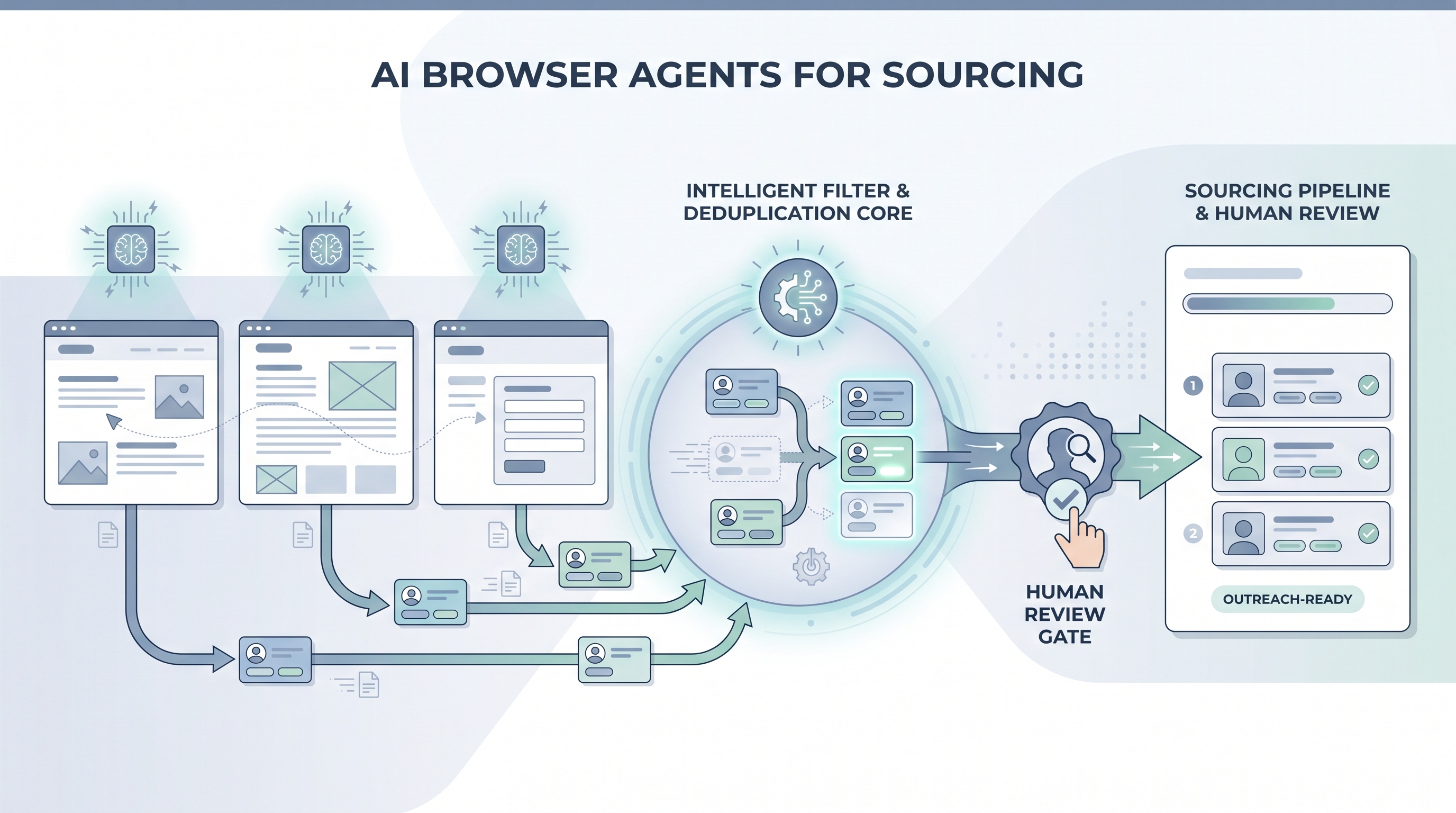
An AI model that controls a real web browser autonomously, reading pages by visual content rather than hardcoded selectors, so it can navigate niche job boards, company team pages, and community directories to find and collect candidate profile data without a predefined script.
Michal Juhas · Last reviewed May 5, 2026
What are AI browser agents for sourcing?
An AI browser agent is an AI model that controls a real web browser by reading and interpreting the page visually, the way a human would, rather than following a script with hardcoded selectors. For sourcing, this means the agent can navigate a company team page, a niche job board, a GitHub contributor list, or a community directory, read the profiles it finds, and hand the data back to the recruiter, without someone having written step-by-step code for that specific page layout.
The key difference from older browser automation: a Playwright script breaks when a site updates a CSS class. An AI browser agent sees the current page, figures out what the "next page" button looks like from context, and clicks it. This adaptability makes agents useful for sourcing on platforms that change frequently or that no vendor has built an integration for.
In practice
- A sourcer building a target list for a niche role points a Stagehand agent at a dozen company team pages, asks it to pull names, titles, and LinkedIn URLs, and gets a spreadsheet row for each person, skipping the hour of manual copy-paste.
- A TA ops team runs a browser agent against an association membership directory that publishes profiles publicly but has no API, verifying current employers for a warm outreach list before the recruiter touches it.
- In a live Live Build session, we ran a browser-use demo that navigated a job board, applied a seniority filter, and returned profile summaries reliably on the first run, then hit a CAPTCHA wall on the second run after the site detected the session pattern. That is the lesson most teams need before they wire an agent into a production sourcing workflow.
Quick read, then how hiring teams use it
This is for sourcers, TA ops practitioners, and recruiting leaders who want to understand what AI browser agents are, how they differ from older automation, and where they fit in a sourcing stack. Skim the first section for the vocabulary. Use the second when you are deciding whether to add a browser agent step to a live workflow.
Plain-language summary
- What it means for you: An AI agent can navigate sourcing platforms that have no API, read profiles visually, and return structured data, handling the repetitive browsing tasks so the sourcer focuses on evaluation and outreach.
- How you would use it: Point the agent at a target site with a clear task, such as "find the names and titles on this team page," run it against a small batch first, then review the output before treating it as sourcing data.
- How to get started: Pick one narrow task with a pass or fail criterion, such as verifying current employers for a 30-row URL list. Use Stagehand or browser-use in a test account. Compare the agent output to a manual spot-check before scaling.
- When it is a good time: When no API or vendor enrichment covers the platform you need, the volume justifies the monitoring overhead, and you have a compliance review on what the agent reads and stores.
When you are running live reqs and tools
- What it means for you: Browser agents bridge tool gaps in your sourcing stack but inherit every fragility of the pages they touch. A CAPTCHA, a layout change, or a Terms of Service update can stop a run silently or return garbage data without flagging an error.
- When it is a good time: For exploratory sourcing on niche platforms with no vendor coverage, for one-off target list building from company pages, or when prototyping a new data source before committing to an enrichment vendor contract.
- How to use it: Define the data fields the agent should extract and nothing more. Add a human review step before any sourced name enters your ATS or outreach sequence. Separate "read and return" agents from any agent that would write to a system or send a message. Keep a log of which URLs were accessed, when, and why.
- How to get started: Start with Stagehand for a code-light setup or browser-use for a Python-first approach. Test in a sandboxed account, not your live sourcing seat. Set a run cap (number of profiles per session) and a monitoring check before you automate the schedule. Review AI browser automation for recruiting for the broader tooling context and workflow automation for how browser steps fit into multi-step pipelines.
- What to watch for: CAPTCHA interruptions that fail silently and return an incomplete list, ToS enforcement from platforms that detect non-human session patterns, GDPR exposure from collecting more data fields than you documented, and credentials stored insecurely in scripts shared across the team.
Where we talk about this
On AI with Michal live sessions, AI browser agents for sourcing come up in the sourcing automation block alongside workflow automation and candidate data enrichment. We run live demos with real failure modes: CAPTCHA blocks, returned empty lists, and hallucinated profile fields, so teams understand what to expect before wiring an agent into a production pipeline. We also cover the GDPR documentation your legal team will ask for before any agent touches candidate data. Bring your sourcing stack and a specific platform you want to cover to Sourcing Lab for a room discussion on whether a browser agent is the right tool or whether a vendor API is the better fit.
Around the web (opinions and rabbit holes)
Third-party creators move fast on this topic. Treat these as starting points, not endorsements, and verify anything before you wire candidate data through an automation you found in a tutorial.
YouTube
Use tight queries to find working demos rather than generic commentary:
- Stagehand browser agent tutorial for Browserbase's open-source framework with LLM-guided navigation
- browser-use AI agent demo for the Python open-source alternative with practical failure-mode walkthroughs
- OpenAI Operator sourcing for demos of the commercial autonomous browsing product
- AI agent web scraping recruiting for practitioner-built workflows with real ATS integrations
- r/recruiting: browser agent sourcing surfaces real ToS and rate-limit conversations from sourcers running these workflows
- r/MachineLearning: browser-use covers the technical community's view on agent reliability and failure modes
- r/n8n: AI browser agent for no-code integration notes combining n8n with browser agent steps
Quora
Quora threads skew promotional but the comment stacks often surface ToS and practical-failure angles:
- What are the risks of automating LinkedIn sourcing? for ToS and ban-risk discussions from recruiters and agency operators
- Best tools for sourcing candidates without LinkedIn? for practitioner alternatives to LinkedIn-first sourcing including browser-based approaches
AI browser agents versus other sourcing approaches
| Approach | Best sourcing use case | Main limitation |
|---|---|---|
| AI browser agent | Niche platforms, company team pages, no-API sources | Reasoning errors, ToS risk, CAPTCHA blocks |
| Playwright or Puppeteer script | Repeatable structured scraping on stable pages | Breaks on layout change, needs a developer |
| Enrichment API vendor | High-volume, known data sources at scale | Coverage gaps on niche or emerging platforms |
| No-code router (Make, Zapier) | Connecting tools that already have APIs | Cannot navigate pages without an API |
Related on this site
- Glossary: AI browser automation for recruiting, Candidate data enrichment, Talent data aggregators, Workflow automation, Human-in-the-loop, AI sourcing tools, Boolean search, GDPR and first-touch candidate outreach
- Blog: AI sourcing tools for recruiters
- Guides: Sourcers
- Live cohort: Sourcing Lab
- Membership: Become a member