ATS software for recruitment
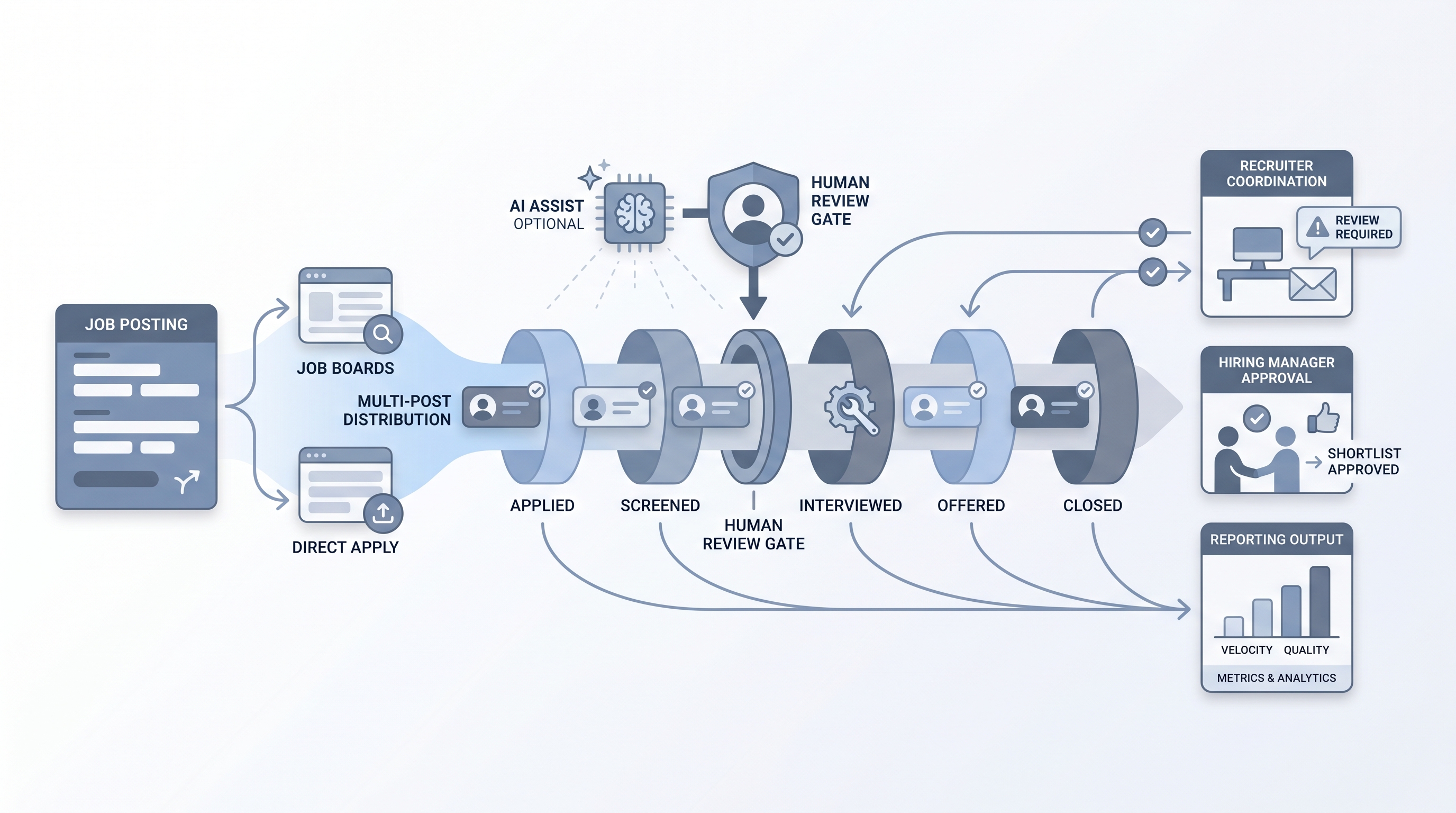
Applicant tracking software configured and used specifically for recruitment workflows: managing open requisitions, moving candidates through defined pipeline stages, coordinating recruiter and hiring manager activity, and generating the reporting that shows where hiring slows down.
Michal Juhas · Last reviewed May 10, 2026
What is ATS software for recruitment?
ATS software for recruitment is applicant tracking software configured to run a recruiting operation: managing open requisitions, tracking candidates through defined pipeline stages, coordinating recruiter and hiring manager activity, and producing reporting that shows where hiring slows down.
The framing matters because recruitment-specific configuration means stage names that match your actual workflow, fields your team actually fills, and integrations that connect to the sourcing, scheduling, and communication tools recruiters use every day. The same platform can be powerful or useless depending on how it is set up, not which logo it carries.
In practice
- When a recruiter says "move her to phone screen," they are updating an ATS stage. When a hiring manager gets a ping to review a shortlist, it came from an ATS rule. Both are standard ATS interactions most teams run without naming them.
- Recruitment agencies often use the same ATS as a multi-client candidate database, linking one candidate record to several jobs across different employer accounts over time, which requires different configuration from a single-employer in-house setup.
- A TA leader checking "how many candidates are in final round across all reqs" is reading pipeline data built on ATS stage records, which is only accurate if recruiters update stages consistently rather than in batches before reporting day.
Quick read, then how hiring teams use it
This is for recruiters, TA leaders, HR business partners, and agency consultants who need shared vocabulary when evaluating, configuring, or using ATS software in a recruitment context. Skim the first section for a fast shared picture. Use the second when deciding what to change in your current setup or what to look for in a new platform.
Plain-language summary
- What it means for you: ATS software is the shared file cabinet and process tracker for every candidate who enters your hiring funnel. Without it, stage data lives in email, hiring decisions go untracked, and pipeline reports cannot exist.
- How you would use it: You open a req, post it, receive applications or add sourced candidates, move them through stages as decisions are made, collect structured feedback, and close the req when a hire is made or the role is cancelled.
- How to get started: Audit your current stage names against your actual workflow. If a stage is almost always skipped or used as a holding area, remove or rename it. Clean stage logic produces clean data, and clean data is what AI features and pipeline reports actually need.
- When it is a good time: When your team manages more than a handful of concurrent open roles, when hiring managers are asking for pipeline visibility, or when you want to understand where your funnel loses qualified candidates.
When you are running live reqs and tools
- What it means for you: ATS software becomes the backbone of every other tool in your stack. Sourcing sequences, scheduling tools, and candidate communications all depend on ATS stage data being current and accurate. Stale stage data breaks automation before you finish debugging it.
- When it is a good time: When integrating a sourcing tool, scheduling tool, or AI scoring layer, or when your current ATS is producing reports your hiring managers do not trust.
- How to use it: Map your ATS stage names to the real decisions your team makes: no ambiguous stages like "in process" that could mean three different things. Set up webhook events for stage changes so downstream tools react in real time. Add human review gates before any AI-assisted shortlist reaches candidates.
- How to get started: Pull a report of time-in-stage for your last 20 closed roles. Find which stage had the longest average hold. Investigate whether the bottleneck is a notification gap, unclear criteria, or a reviewer with no deadline. Fix the configuration before adding automation, because automation multiplies whatever the stage logic already does.
- What to watch for: AI scoring features trained on past hire data can reproduce past skewed decisions. Run a bias check on any AI-assisted shortlist before enabling it at volume. Log which model version and prompt generated each score so disputed decisions can be traced to a specific run.
Where we talk about this
On AI with Michal live sessions, ATS configuration comes up in both sourcing automation and AI in recruiting tracks. The sourcing automation block covers webhook integration and stage-based triggers; the AI in recruiting block covers where to add human review gates before AI-assisted decisions affect candidates. To see these configurations built in a live room with real stack questions, start at Sourcing Lab and bring your actual ATS name and one workflow that does not work well.
Around the web (opinions and rabbit holes)
Third-party creators move fast. Treat these as starting points, not endorsements, and double-check anything before you wire candidate data.
YouTube
- ATS Tutorial - How To Use Applicant Tracking System For Jobs gives a recruiter-level walkthrough of what ATS software looks like from the inside.
- Top 5 FREE ATS Software For Small Businesses compares lightweight options for teams that have not yet committed to a full platform budget.
- Why Your ATS Is Costing You Great Candidates addresses friction points from the candidate experience side, worth reviewing against your current configuration.
- Best ATS for a 5-person recruiting team? in r/recruiting covers real practitioner opinions on lightweight platforms without vendor spin.
- What ATS does your company use and are you happy with it? is a long thread with current user feedback across multiple platforms.
- ATS recommendations for a staffing agency in r/RecruitmentAgencies covers agency-specific requirements that differ from in-house selection criteria.
Quora
- What is the best applicant tracking system for recruitment agencies? collects practitioner answers comparing agency-specific ATS options. Quality varies; read critically.
ATS software for in-house TA versus recruitment agencies
| Factor | In-house TA team | Recruitment agency |
|---|---|---|
| Primary database | Candidates for internal roles | Multi-client candidate pool |
| HRIS integration | Critical | Optional |
| Candidate ownership rules | Not applicable | Core compliance need |
| Commission tracking | Not applicable | Usually required |
| Hiring manager access | Essential | Rare |
| Search priority | Active pipeline stages | Deep historical database |
Related on this site
- Glossary: Applicant tracking software, Best applicant tracking software, ATS API integration, ATS hiring software, Resume parsing, Workflow automation, Human-in-the-loop
- Blog: AI sourcing tools for recruiters
- Tools: AI tools overview
- Guides: Sourcers
- Live cohort: Sourcing Lab
- Membership: Become a member