Automated hiring system
An end-to-end configured architecture that combines an applicant tracking system, trigger-based automation, optional AI layers, and human review gates so candidate data flows through the entire hiring pipeline without manual retyping at every step.
Michal Juhas · Last reviewed May 10, 2026
What is an automated hiring system?
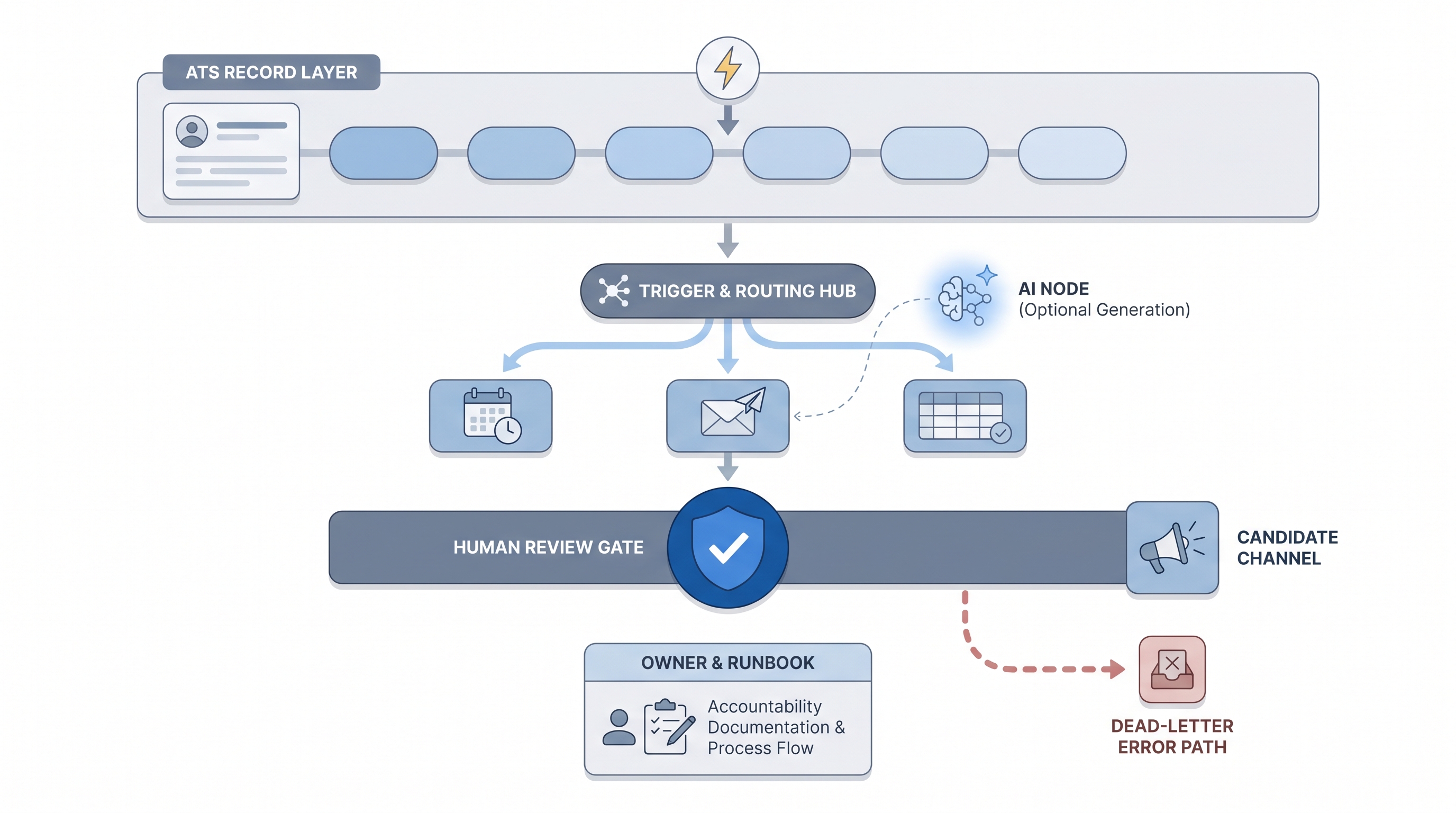
An automated hiring system is a configured stack of connected components: an applicant tracking system as the record layer, a trigger and routing layer that reacts to stage changes, an optional AI generation layer, and human review gates before anything candidate-facing leaves the building.
The key difference between a system and a collection of tools is ownership. A tool solves one task in isolation. A system defines what fires when, who is accountable for errors, and what the recovery path looks like at 9 p.m. on a Friday. Teams who wire tools without building a system tend to discover their gaps at exactly that moment.
In practice
- When a candidate hits Phone Screen in the ATS and a calendar booking link fires automatically, the ATS is the trigger source and the router is the layer that sends the link. That two-component setup is the simplest version of an automated hiring system, and it runs without AI.
- Recruiters who say "the system sent a blank email" are usually describing a routing layer that fired on a renamed ATS stage while the template still referenced the old stage name. The ATS record was fine; the system connection broke.
- TA ops teams describe automated hiring systems in terms of runbooks rather than features. The question is not what the system can do but who calls who when the webhook silently stops firing and the pipeline freezes on a busy Monday.
Quick read, then how hiring teams use it
This is for recruiters, sourcers, TA leads, and HR partners who hear about "automating the hiring stack" in project reviews and need working vocabulary before the next implementation kickoff or vendor demo. Skim the first section for a shared picture; use the second when you are deciding what to wire and in what order.
Plain-language summary
- What it means for you: A set of connected tools where an action in one tool (a candidate moves to a new stage) automatically starts the next action in another tool (a scheduling link sends), so you are not the human copy-paste layer between them.
- How you would use it: Identify the one step you repeat identically more than ten times a week. Draw it as a trigger and an action. Wire that one connection first and watch it for two weeks before adding the next one.
- How to get started: Write the trigger, the action, the owner, and the error path on a single sticky note before you open any tool. If you cannot fill in the owner and error path, you are not ready to automate yet.
- When it is a good time: After the manual step runs identically every time, after the stage logic has not changed in a month, and after you have named a person who will be paged if it breaks.
When you are running live reqs and tools
- What it means for you: Each component layer (ATS, triggers, router, AI, human gate) changes state in systems rather than generating text. A misconfigured trigger writes a wrong stage, not an awkward sentence, so audit trails and correction costs are real and traceable.
- When it is a good time: After prompts and scoring logic are stable, when trigger volume justifies maintenance overhead, and when one named person owns every credential with a written runbook listing what breaks, how to detect it, and who is called.
- How to use it: Wire internal-only automations first (Slack ping on new req, spreadsheet row from form submission). Add AI generation only after the data-moving layer has run without incident for two weeks. Add candidate-facing sends last, behind a human-in-the-loop gate. See workflow automation for the broader pattern and ATS API integration for the connection layer.
- How to get started: Build the data-flow diagram first. Map every integration arrow, name the data that moves, identify the vendor that receives it, and confirm a DPA is in place. Then wire one connection and measure its error rate before adding the next.
- What to watch for: Silent partial runs, duplicate candidates from retries, API keys in shared Slack screenshots, GDPR transfer gaps when enriched profiles leave the ATS, and AI-generated text baked into flows that nobody updates when company tone of voice changes.
Where we talk about this
On AI with Michal live sessions, automated hiring systems come up across two tracks. The sourcing automation block walks trigger design, credential handling, and recovery when a provider API changes mid-campaign. The AI in recruiting block connects the same system architecture to hiring manager trust, candidate experience, and compliance sign-off. Both tracks assume stable manual flows and tested prompts before you automate anything. Start at Sourcing Lab with your ATS name, the one manual step you most want to eliminate, and any policy constraints your legal or data team has raised.
Around the web (opinions and rabbit holes)
Third-party creators move fast. Treat these as starting points, not endorsements. Do not copy external scripts that move candidate data without reading the data processing terms first.
YouTube
- How to Automate Your Entire Hiring Process with n8n and Notion (Michele Torti) shows a complete end-to-end build with real trigger and routing decisions visible.
- n8n Tutorial: Build an AI HR Assistant That Shortlists Candidates is useful for seeing how an AI layer fits inside an automation system without replacing the human review step.
- Boost Your Productivity: Mastering the Power of Workflow Automation (DottoTech) is tool-agnostic and good for building vocabulary before picking a vendor for any component layer.
- Has anyone used Zapier? in r/recruiting documents the real small automations recruiters actually run and the failure modes they hit first.
- I want to make some recruitment automated workflows but... in r/RecruitmentAgencies is a frank thread from people actively building their first system.
Quora
- How do we automate the process of recruiting as a recruiter? collects a range of practitioner perspectives; read critically before wiring anything based on anonymous advice.
System components comparison
| Component | What it does | What breaks if it is missing |
|---|---|---|
| ATS record layer | Stores candidate state and stage history | No source of truth for triggers |
| Trigger layer | Detects stage changes and fires events | Automations never start |
| Routing layer | Decides which action follows each trigger | No fan-out to scheduling, Slack, or sheets |
| AI generation layer | Drafts outreach, scores CVs, or summarises calls | Manual drafting at scale |
| Human review gate | Reviews AI output before candidate-facing send | Errors reach candidates unreviewed |
| Owner and runbook | Names who is accountable and what to do when it breaks | Silent failures go unnoticed |
Related on this site
- Glossary: Automated hiring software, Workflow automation, No-code recruiting automation, ATS API integration, Human-in-the-loop, Recruiting email automation, Applicant tracking software
- Blog: AI sourcing tools for recruiters
- Tools: n8n for the routing layer
- Guides: Sourcers
- Live cohort: Sourcing Lab
- Membership: Become a member