Background screening integration
A direct API connection between a background check vendor and an ATS that lets recruiters initiate consent requests, track check status, and receive structured results inside the candidate record without switching systems.
Michal Juhas · Last reviewed May 15, 2026
What is background screening integration?
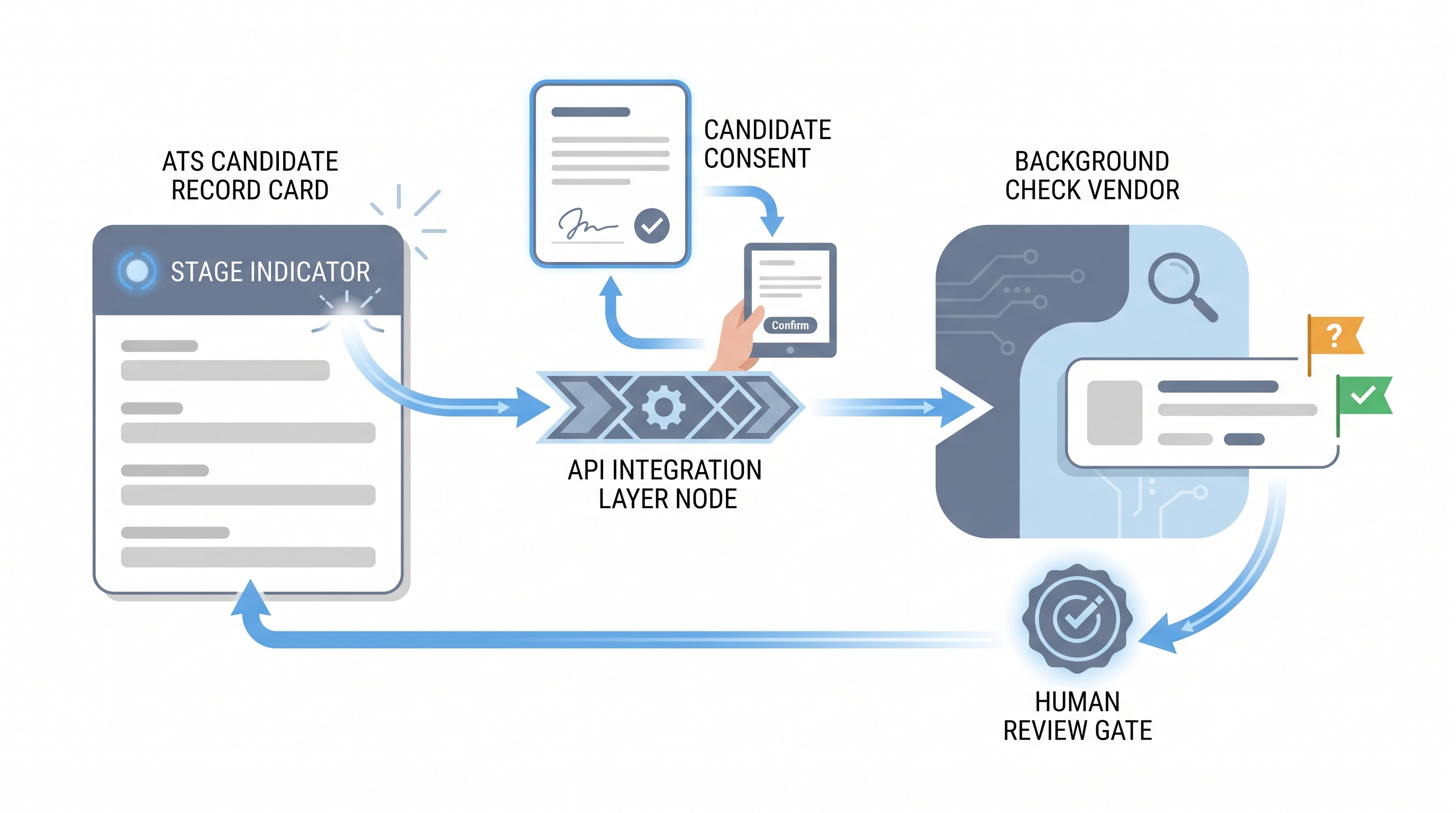
A background screening integration connects an ATS directly to a background check vendor through an API so recruiters can initiate a check, track its progress, and receive structured results inside the candidate record without logging into a separate portal or re-entering data.
The integration handles the sequence: the ATS triggers a check request when a candidate reaches the configured stage, the vendor sends a digital consent form to the candidate, and once consent is confirmed, the vendor runs the check and posts the result back as a webhook. The ATS updates the candidate stage based on the outcome, and a named reviewer decides what happens next.
The key governance point is that the integration automates data movement, not decisions. FCRA adverse action, GDPR deletion rights, and ban-the-box timing rules all require human judgment at defined moments in the process.
In practice
- When a recruiter advances a candidate to "background check" in Greenhouse or Lever and the candidate immediately receives an email from Checkr or Sterling asking them to complete an authorization form, that is a background screening integration firing. The recruiter never left the ATS.
- A TA ops lead who says "the check is stuck in pending" is usually describing a silent integration failure: the webhook fired but the candidate never received the consent form, so the check never started.
- Most vendor sales decks show the integration as a one-click flow. Practitioners running live pipelines know the real work is configuring the trigger stage, setting up the field mapping, and building the monitoring step that catches failed deliveries before they delay a start date.
Quick read, then how hiring teams use it
This is for recruiters, TA leaders, and HR partners who need the same vocabulary in vendor evaluations, compliance audits, and process design. Skim the first section for a fast shared picture. Use the second when you are configuring the integration, reviewing your DPA, or dealing with a candidate data request.
Plain-language summary
- What it means for you: Instead of emailing a candidate a separate form, logging into the background check portal to order the check, and checking back to copy results into the ATS manually, the ATS and the vendor talk directly. You initiate, track, and receive results in one place.
- How you would use it: You configure which ATS stage fires the check, which check package applies to which role type, and who gets notified when a result needs review. After that, the integration runs for every new candidate who reaches that stage without additional manual steps.
- How to get started: Map your current hiring process to identify the exact stage where the check should fire. Read the vendor's integration guide and your ATS connector documentation before configuring anything. Test with a dummy candidate and verify that the consent form lands, the result writes back to the ATS field, and the monitoring alert fires correctly.
- When it is a good time: After your hiring process is stable, after your compliance team has reviewed the trigger stage and the consent language, and after you have a named owner for the daily check-status monitoring step.
When you are running live reqs and tools
- What it means for you: Every automated trigger is also an automated compliance event. The integration creates a timestamped record of when the check was initiated, who the candidate was, and what consent was captured, which is exactly what FCRA and GDPR auditors ask for. That audit trail is an asset when configured correctly and a liability when the consent step was skipped or the field mapping was wrong.
- When it is a good time: After the trigger stage is aligned with your offer process, the consent language is reviewed by legal, and the adverse action workflow has a named human owner. Not before.
- How to use it: Wire the ATS trigger to the conditional offer acceptance event, not a loose stage click. Configure the vendor package by role type so the right check runs without a recruiter choosing from a dropdown each time. Set up a dead-letter alert for any check that has not progressed from consent pending after 48 hours. Cross-link to workflow automation documentation so the ATS stage change and the check trigger are in the same runbook.
- How to get started: Pull your last quarter's background check volume and identify how many resulted in adverse action. If none ever did, check whether the review step actually happened or whether all results were cleared automatically. Review your vendor's DPA and confirm it covers every jurisdiction you hire in. Ask your ATS admin to export a log of check triggers for the last 30 days and verify the trigger stage is correct for every record.
- What to watch for: Consent links that expire before the candidate completes authorization, duplicate checks from re-triggering a stage, result fields that write to the wrong ATS column, and adverse action notices sent without a pre-adverse waiting period. The human-in-the-loop principle applies directly: the integration moves data, but every decision to advance or reject based on a result must pass through a documented human review step.
Where we talk about this
On AI with Michal live sessions, background screening integrations come up in the AI in recruiting and sourcing automation tracks when we work through the full offer-to-start sequence. The compliance layer, specifically what the ATS can automate versus what must stay with a named human, is a recurring design question. If you want the room conversation with other TA practitioners building or auditing their screening pipelines, start at Sourcing Lab and bring your current ATS configuration and your vendor DPA.
Around the web (opinions and rabbit holes)
Third-party creators move fast. Treat these as starting points, not endorsements, and double-check anything before you wire candidate data to a new vendor.
YouTube
- FCRA Compliance for Employers: What You Need to Know covers the disclosure, authorization, and adverse action steps that every background check process must include, useful before you configure any integration.
- Background Check Integrations with Your ATS walks through a vendor-agnostic view of how background check APIs connect to applicant tracking systems and what can go wrong.
- HR Tech Integration Deep Dive: Background Screening discusses field mapping, webhook reliability, and the compliance checkpoints that TA ops teams typically discover too late.
- Anyone use Checkr with Greenhouse? in r/recruiting has honest practitioner notes on integration reliability, consent form completion rates, and what breaks in practice.
- Background check integration horror stories? in r/humanresources is a useful thread for understanding failure modes before you go live.
- FCRA adverse action process - is anyone actually following this correctly? in r/humanresources is a frank discussion of how the adverse action workflow breaks down in practice.
Quora
- How do background check integrations work with ATS platforms? collects vendor and practitioner perspectives on the technical and compliance layers of connecting ATS and screening tools.
Integration versus manual background check process
| Dimension | Integration | Manual process |
|---|---|---|
| Consent capture | Digital form sent automatically at trigger | Recruiter emails a separate form and tracks replies |
| Audit trail | Timestamped in ATS event log | Depends on recruiter documentation habits |
| Duplicate check risk | Requires de-dupe configuration | Caught manually if at all |
| FCRA adverse action | Still requires human review step | Also requires human review step |
| Field mapping errors | Surfaced in integration logs | Silent until a candidate record is wrong |
| Data retention compliance | Configurable in vendor settings | Relies on recruiter deleting files manually |
Related on this site
- Glossary: ATS API integration, Applicant tracking system, Recruiting webhooks, Workflow automation, Human-in-the-loop (HITL), Candidate data enrichment, Adverse impact
- Blog: AI sourcing tools for recruiters
- Guides: Sourcers
- Live cohort: Sourcing Lab
- Self-paced: Starting with AI: the foundations in recruiting
- Membership: Become a member