Context window limits in recruiting AI chats
The maximum amount of text a large language model can process in a single conversation session, which determines how much job description, candidate background, and instruction history fits before the model loses earlier context or truncates inputs silently.
Michal Juhas · Last reviewed May 4, 2026
What are context window limits in recruiting AI chats?
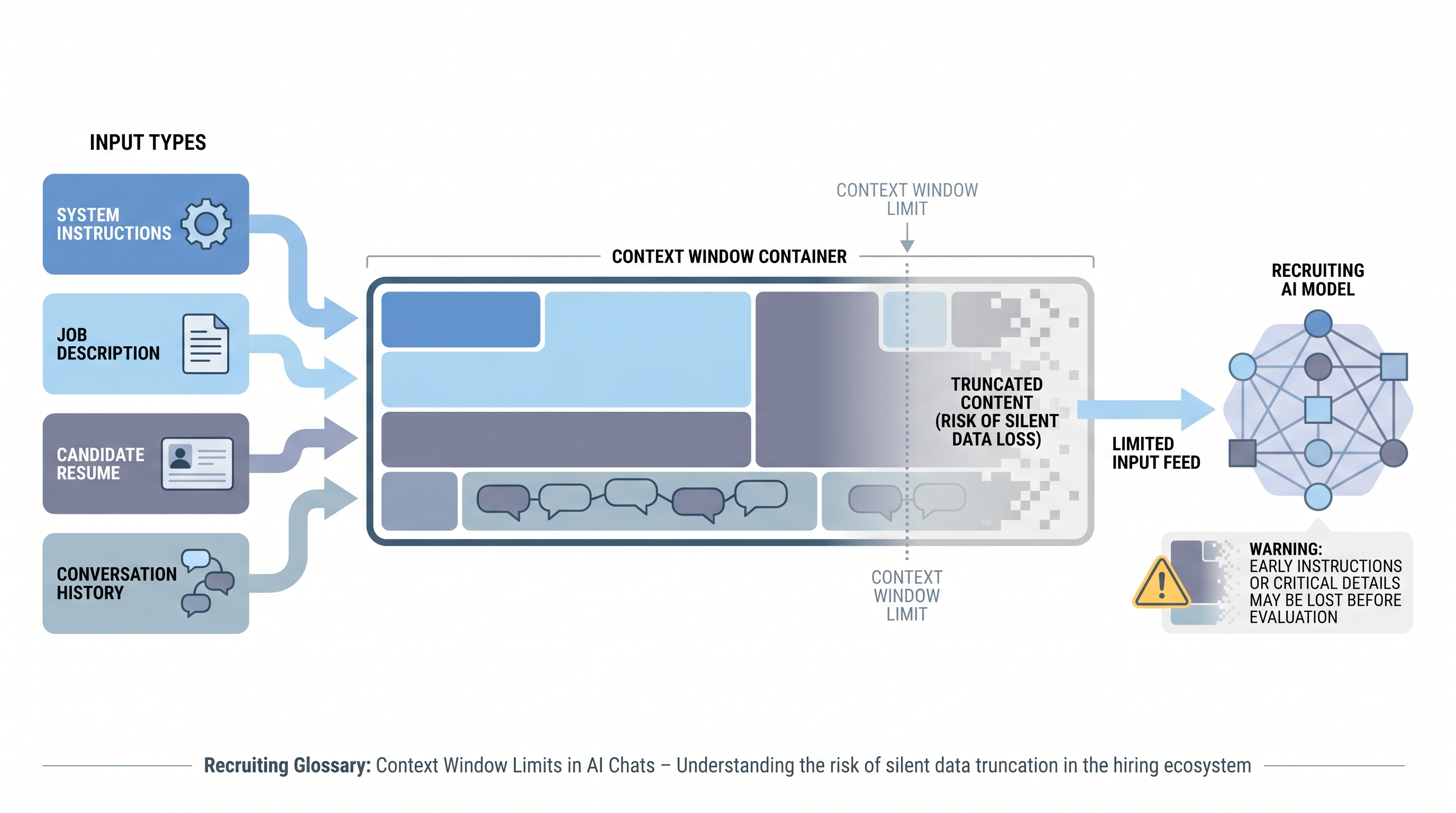
A context window is the maximum amount of text a large language model can process in a single conversation session. It covers everything: instructions, job descriptions, candidate materials, and the entire conversation history to that point. When inputs exceed the limit, the model truncates earlier content, often silently, which can remove job requirements or evaluation criteria from scope mid-session without any visible error.
In recruiting AI chats, context window limits become practical the moment a recruiter pastes a full job description, appends a PDF resume, and continues a multi-turn conversation. The combined input can push critical instructions out of the model's effective working memory faster than most teams expect.
In practice
- A recruiter pastes a full job description and then a complete CV export into ChatGPT and asks for a fit evaluation. The model produces a confident, fluent response that misses three must-have requirements from the first half of the JD because those tokens were deprioritized by the time the evaluation ran.
- A sourcer running a batch profile evaluation in an automated pipeline notices that the first 30 profiles score consistently but the last 20 produce erratic results. Token count logging reveals the session hit 85% of the context limit by profile 25, compressing system instructions for the remainder of the batch.
- A TA lead trains the team to condense JDs to 12 bullet points and extract career highlights from CVs before each AI evaluation session. Evaluation consistency improves measurably without a model change.
Quick read, then how hiring teams use it
This is for recruiters, sourcers, TA leads, and TA ops practitioners who use AI chat tools daily and want to understand why output quality degrades across longer sessions. Skim the first section for shared vocabulary. Use the second when configuring automation or building a prompt packaging standard.
Plain-language summary
- What it means for you: Every AI chat session has a memory ceiling. Once you fill it, the model starts forgetting what it read earlier - including the job requirements you entered at the start.
- How you would use it: Condense inputs before each session. A 12-bullet job brief and a structured 8-line career summary give the model enough to evaluate without crowding out your criteria.
- How to get started: Take your most common evaluation prompt and check how many tokens it uses (most AI tools show this in the interface). If you are regularly above 50% of the limit before adding candidate material, trim the job description first.
- When it is a good time: Before building any automated pipeline that processes multiple candidates in a single session, and whenever AI output quality degrades mid-session without an obvious cause.
When you are running live reqs and tools
- What it means for you: Automation that does not account for context window limits will produce inconsistent output quality across batches. The failure is silent: the model does not error, it just gives worse answers.
- When it is a good time: When debugging inconsistent AI scoring in a sourcing or screening pipeline, when onboarding a new model with a different context size than the previous one, and when evaluation criteria change and system instructions grow longer.
- How to use it: Log token counts per API call. Set a batch size limit that keeps each session under 70% of the context window. Reset context between batches rather than accumulating history. Store reusable instructions as compact prompt blocks and reference them at the start of each fresh session.
- How to get started: Review your current longest automation prompt end-to-end. Include system instructions, JD, and the average candidate input. If the total exceeds 50% of the model's context limit, restructure before adding more profiles or evaluation steps.
- What to watch for: Silent truncation mid-batch where later outputs are subtly different from earlier ones without explicit errors. Quality variation in a consistent batch is the earliest signal that context management needs attention.
Where we talk about this
AI with Michal Sourcing Lab covers context window management as part of prompt packaging practice: how to structure inputs so AI evaluations are consistent across full sourcing and screening sessions, not only the first few candidates. Come with a real JD and a sample candidate file to test your current input length in a live session.
Around the web (opinions and rabbit holes)
Third-party creators move fast. Treat these as starting points, not endorsements, and double-check anything before you wire candidate data.
YouTube
- Understanding Context Windows in AI (DottoTech) explains the concept in plain language suitable for recruiters learning AI fundamentals.
- How to Use AI for Recruiting Without Losing Context (Recruiting Daily Advisor) covers practical input packaging habits for daily recruiting work.
- RAG for HR and Recruiting Use Cases (AI automation practitioners) shows how retrieval-based approaches help teams work around context limits in document-heavy workflows.
- Why does ChatGPT seem to forget my job requirements? in r/recruiting is a common question with practical answers about context window behavior.
- Best practices for long recruiting prompts in r/ChatGPTPromptEngineering covers input condensing techniques directly applicable to recruiting scenarios.
- AI screening results inconsistent in batches in r/humanresources includes practitioner debugging stories that often trace back to context overflow.
Quora
- Why does AI give different answers for the same type of question later in a conversation? collects explanations of context window behavior across different AI platforms and use cases.
Context input sizing quick reference
| Input type | Typical token range | Recommended handling |
|---|---|---|
| Full job description | 500-1500 tokens | Condense to 10-15 bullet must-haves |
| Raw PDF resume | 800-2500 tokens | Extract career timeline and key skills |
| System instructions | 100-500 tokens | Keep compact, save as reusable block |
| Conversation history | Grows per turn | Reset between batches or evaluation tasks |
| Full handbook or policy | 5000+ tokens | Use RAG retrieval instead of full paste |
Related on this site
- Glossary: LLM tokens, RAG, System instructions, Markdown for AI, Hallucination
- Blog: How to write better AI prompts
- Guides: Sourcers
- Course: Starting with AI: the foundations in recruiting
- Live cohort: Sourcing Lab
- Membership: Become a member