Examples of AI in recruitment
A practical overview of how artificial intelligence is applied in talent acquisition today: from sourcing and resume screening to outreach drafting, interview scheduling, and post-interview summarization, with the risks, limits, and human review requirements each use case carries.
Michal Juhas · Last reviewed May 10, 2026
What are examples of AI in recruitment?
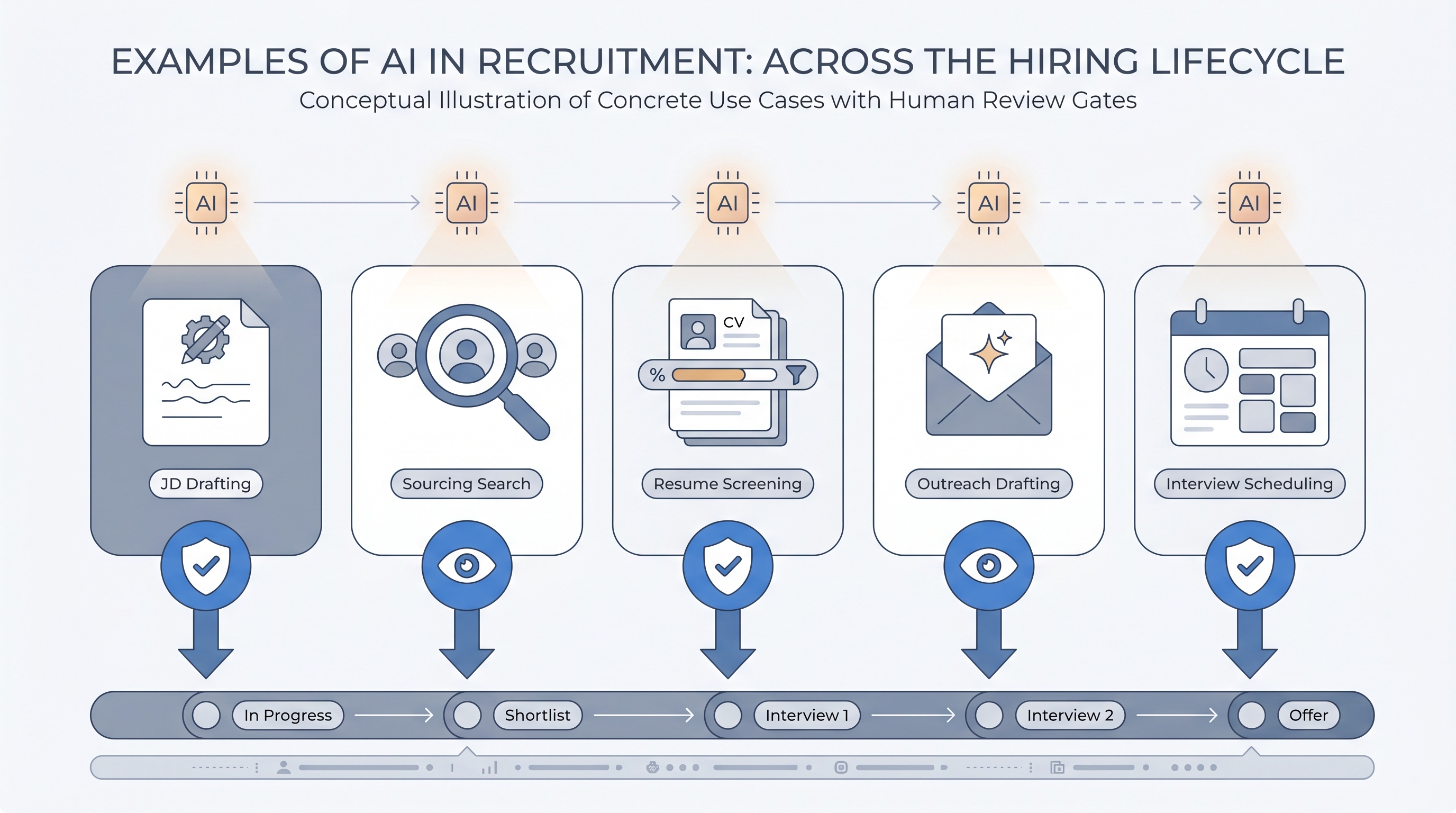
AI in recruitment is not a single technology but a collection of narrow applications layered into the hiring workflow at specific points. The clearest way to understand the landscape is to map each example to the task it performs: drafting, ranking, routing, scheduling, or summarizing.
The applications that are most production-ready share one trait: a human reviews the output before it affects a candidate or changes a record. The ones that carry the most risk are the ones where the model acts without review, whether that is sending a message, rejecting a resume, or advancing a stage automatically.
In practice
- When a recruiter pastes hiring manager notes into an AI tool and gets a job description draft back in two minutes, that is one of the most common examples of AI in recruitment. The draft still needs editing for tone, inclusion language, and accuracy before it posts, but the blank-page problem is gone.
- In AI Sourcing Lab sessions, teams often discover they are already using AI examples they did not identify as AI: ATS ranking indicators, LinkedIn suggestions, and grammar tools all embed model layers that influence which candidates they see and how.
- A TA lead at a 500-person scale-up described the shift: "We stopped asking whether to use AI and started asking which use cases we had actually reviewed and signed off on. The ones without sign-off went back to draft-only mode."
Quick read, then how hiring teams use it
This is for recruiters, sourcers, TA leaders, and HR business partners who need the same vocabulary in tool evaluations, debrief conversations, and audit prep. Skim the first section for a shared picture of what AI does in recruitment. Use the second when you are deciding which examples to adopt, which to test in a sandbox, and which need governance before scaling.
Plain-language summary
- What it means for you: AI in recruitment covers specific tasks it does well: writing a first draft of a job description, surfacing candidates who match a role, ranking resumes against a scorecard, scheduling a panel interview, and summarizing a call transcript. Each task has a version that is ready to use and a version that needs more setup before it is safe.
- How you would use it: Pick one task where the output is easy to review before it counts, for example a job description draft or a sourcing shortlist. Run it alongside your current process for two weeks. Check accuracy, check for bias indicators, check whether the output actually saves time. Expand only after that test is complete.
- How to get started: List the three tasks your team repeats most often with the highest error or frustration rate. Those are the candidates for a first AI example. Start with drafting tasks before moving to decision tasks.
- When it is a good time: After your basic process is documented and owned, not while the workflow is still changing. AI examples multiply whatever habits the underlying process already has.
When you are running live reqs and tools
- What it means for you: AI use cases in production need an audit trail: which model version ran, what input was used, what output was produced, and whether a human confirmed it before it affected a candidate stage or sent a message.
- When it is a good time: After at least one internal test round with no candidate blast radius, when the output quality is consistent enough that the review step is fast rather than a rebuild, and when you have named owners for both the AI layer and the human gate.
- How to use it: Log model versions alongside stage transitions. Use structured output from AI scoring tools rather than unformatted prose so the ATS can store and query decisions. Review pass rates by demographic group for any AI screening feature quarterly. See workflow automation for how triggers and routing connect AI examples into a broader pipeline.
- How to get started: Start with one AI example connected to one live req, not a platform-wide rollout. Run it in parallel with the manual version for one full hiring cycle. Check whether the output is actually used by recruiters or quietly worked around.
- What to watch for: AI features that produce output but never log it, outreach sent without a human send gate, screening scores with no group-level comparison, and integration breaks that cause the AI step to skip silently when a vendor API changes.
Where we talk about this
On AI with Michal live sessions, examples of AI in recruitment anchor both the AI in recruiting track and the sourcing automation track. The first covers which examples are production-ready, how to set up review gates, and how to audit AI-generated output before it reaches a candidate. The second covers how to wire AI examples into automation flows with proper error handling and data governance. Start at Sourcing Lab and bring the three AI tools your team is already using or evaluating, so the session covers your actual decisions rather than generic demos.
Around the web (opinions and rabbit holes)
Third-party creators move fast and tooling changes monthly. Treat these as starting points, not endorsements, and verify anything before you wire it to candidate data.
YouTube
- Search "AI recruiting examples 2025" filtered to the last 12 months for hands-on walkthroughs from independent TA practitioners rather than vendor demos. Failure mode stories are more useful than success showcases.
- Search "AI resume screening accuracy test" for practitioners who have run side-by-side comparisons between AI ranking and human review, including accuracy and bias checks. These exist and are more candid than case studies.
- r/recruiting includes candid threads from sourcers and TA leads about which AI tools actually stayed in their workflow and which were quietly dropped after the first real hiring cycle.
- r/humanresources has HR-side perspectives on AI feature rollouts inside large organizations, including governance failures that practitioners share more openly than vendors do.
Quora
- How is AI used in recruitment? collects practitioner answers across company sizes and roles; useful for a range of perspectives before committing to a specific tool or use case.
AI use cases by readiness level
| Use case | Production-ready | Needs governance first | Avoid without legal review |
|---|---|---|---|
| JD drafting from intake notes | Yes | Bias check on requirements | No |
| Resume triage ranking | With human gate | Log model version, compare group pass rates | Automated rejection without review |
| Candidate sourcing shortlist | Yes | Data freshness and GDPR basis | No |
| Outreach draft generation | With human send gate | Suppress opt-outs, confirm GDPR basis | Automated send without review |
| Interview scheduling | With calendar sync validation | Confirm panel privacy settings | No |
| Interview summary from transcript | Yes | Consent for recording, storage policy | No |
| AI video interview scoring | Only with human override | Bias audit required | Fully automated advance or reject |
Related on this site
- Glossary: AI in recruiting, Resume parsing, AI sourcing tools, AI outreach drafting, Human-in-the-loop (HITL), AI bias audit, Intake-to-JD AI, Workflow automation, Explainable AI in hiring, Semantic search
- Blog: AI sourcing tools for recruiters
- Live cohort: Sourcing Lab
- Membership: Become a member
- Course: Starting with AI: foundations in recruiting