New employee onboarding software
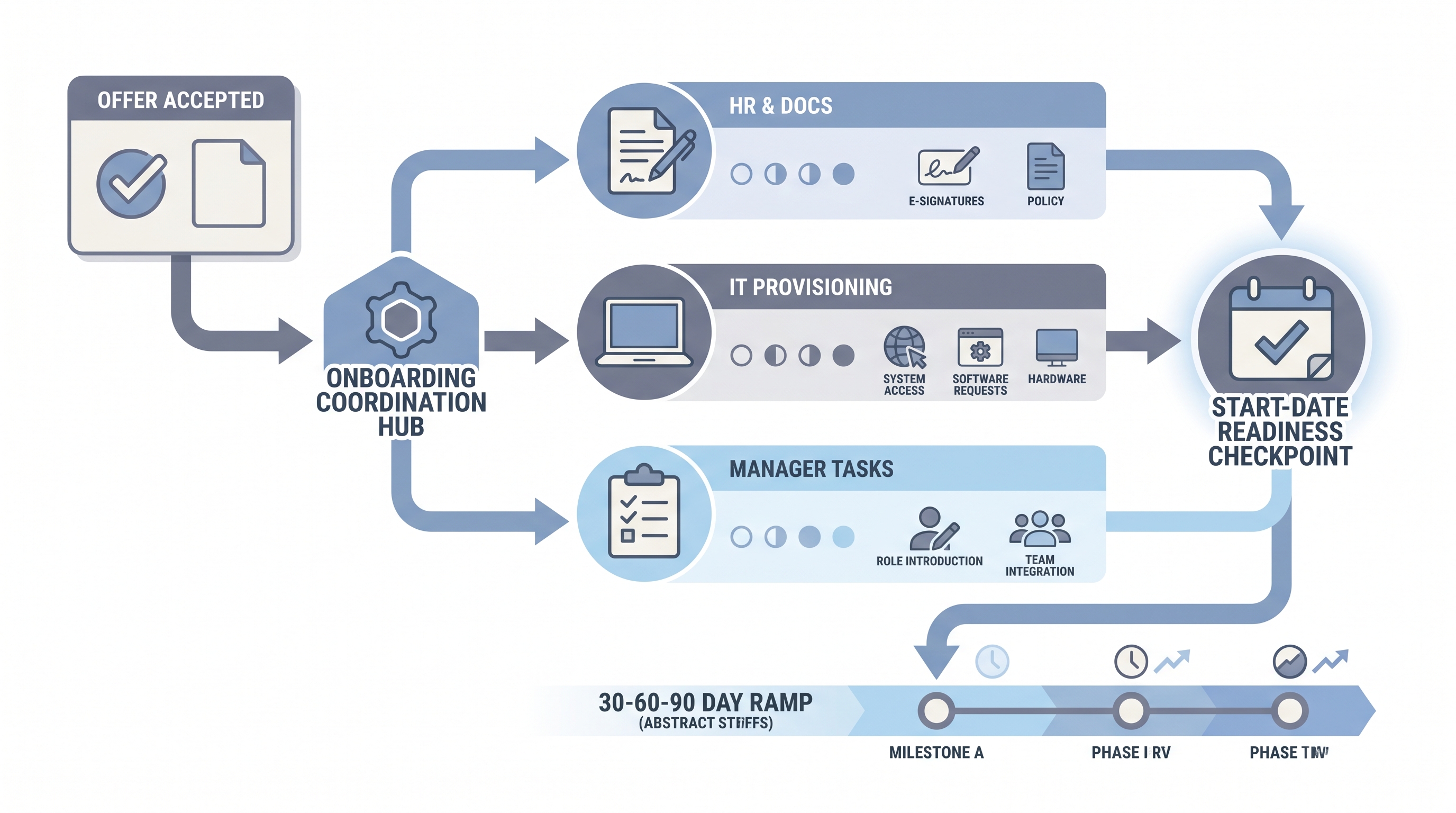
Software that guides a new hire from offer acceptance through pre-boarding paperwork, system provisioning, first-day orientation, and the 30-to-90-day ramp, coordinating HR, IT, and the hiring manager on shared task lists so the employee knows what to do at every stage.
Michal Juhas · Last reviewed May 9, 2026
What is new employee onboarding software?
New employee onboarding software coordinates the steps a new hire takes from offer acceptance through their first weeks on the job. It assigns tasks to HR, IT, and the hiring manager, tracks completion against start-date deadlines, and gives the new employee a clear view of what to do next: which forms to sign, which system access to request, and which orientation sessions to join.
The tool sits between the ATS (which closes the hiring process) and the HRIS (which holds the long-term employee record). Its core job is removing the email chain where four teams wait on each other to get a laptop provisioned and a policy document signed before day one.
In practice
- A new software engineer receives a pre-boarding link five days before her start date. She signs her offer letter, selects equipment, and completes a tax form. Her laptop arrives on day one because an IT provisioning ticket fired automatically when she signed, not because an HR coordinator remembered to ask IT that week.
- An HR ops lead adds a new hire portal that employees see before day one, with a first-day schedule, a link to the employee handbook summary, and a short message from their future manager. The HR inbox drops noticeably because “where do I go?” emails stop arriving.
- During an Recruiting OS session, a team discovers their onboarding platform has been live for six months with the task owner field set to a shared HR alias nobody checks. Fixing that one field clears a two-week average provisioning delay.
Quick read, then how hiring teams use it
This is for HR, TA, and people operations teams who need the same vocabulary when choosing a platform, wiring integrations, or reviewing why the last three new hires reported a rough first week. Skim the first section for shared context. Use the second when configuring the tool or reviewing the ATS handoff.
Plain-language summary
- What it means for you: A new hire sees one clear checklist instead of scattered emails from HR, IT, and their manager. You see whether each step is on track before the start date, not after the laptop complaint arrives.
- How you would use it: Set up task lanes for the three usual owners (HR documents, IT access, manager check-ins), name a specific person for each task type, and send the new hire a pre-boarding link at least five days before their start date.
- How to get started: Map your current onboarding steps on paper first: who does what, in what order, and what breaks most often. Then pick software that fits those steps, not software that requires changing the steps to match its templates.
- When it is a good time: Once you are hiring more than five or six people per quarter and the laptop-was-late or form-was-missing complaint comes up more than once a month.
When you are running live reqs and tools
- What it means for you: New employee onboarding software is the automation layer between your ATS and your HRIS. A well-configured platform fires IT tickets, sends compliance forms, and notifies the manager without anyone manually checking a spreadsheet. A poorly configured one creates the illusion of automation while hiding the same bottlenecks in a newer interface.
- When it is a good time: When ATS-to-HRIS data quality is high enough that a webhook handoff does not corrupt fields, and when at least one person owns the platform configuration and can update templates when roles or locations change.
- How to use it: Connect the platform to your ATS so an offer-accepted event triggers the onboarding flow automatically. Map which ATS fields (start date, role, manager, location) the platform needs and confirm they populate correctly before go-live. Wire IT provisioning to your actual ticketing system, not just a task inside the onboarding portal. Set a daily overdue-task digest to whoever is on duty that week.
- How to get started: Run one full dry run on a test profile before the first real hire goes through the flow. Assign specific named owners to every task category. Check retention settings and align them with your data processing agreement before collecting any new hire personal data.
- What to watch for: Onboarding portals with nobody assigned to respond to questions new hires post inside them. Pre-boarding forms collecting sensitive data without a documented lawful basis. IT provisioning wired inside the platform but never connected to the ticketing system IT actually uses. Template versions that are outdated because nobody updated them when a policy changed.
Where we talk about this
On AI with Michal live sessions, new employee onboarding software comes up in the AI in recruiting track when teams reach the post-hire handoff: how ATS data flows into onboarding templates, where workflow automation routers can trigger provisioning steps without manual emails, and how AI-generated onboarding plans work in practice. If you want to build this with a real team and real constraints, start at Sourcing Lab and bring your current onboarding checklist.
Around the web (opinions and rabbit holes)
Third-party creators move fast. Treat these as starting points, not endorsements, and double-check anything before wiring new hire personal data to a new platform.
YouTube
- Search “new employee onboarding software setup” on the AIHR YouTube channel for practitioner walkthroughs on configuring onboarding workflows, pre-boarding portals, and manager task lanes.
- Search “onboarding software HRIS integration” on YouTube for platform-specific guides covering ATS handoff, HRIS sync, and IT provisioning connections from both HR and IT perspectives.
- Search “new hire onboarding AI chatbot HR” on YouTube for recent demos of AI-powered onboarding assistants and how teams configure guardrails before exposing them to new employees.
- What onboarding software does your company use? in r/humanresources has candid practitioner comparisons of platform features, integration pain points, and what teams wish they had known before buying.
- Onboarding process automation in r/HRtech covers how HR ops teams wire ATS-to-onboarding handoffs and where automation breaks down in practice.
- New hire IT provisioning in r/sysadmin gives the IT perspective on provisioning integrations and why the laptop is still late even when the onboarding tool says the ticket was sent.
Quora
- What is the best employee onboarding software? collects practitioner and HR consultant views on what to prioritize when choosing a platform, from compliance features to HRIS integrations (quality varies; read critically).
New employee onboarding software vs related categories
| New employee onboarding software | HRIS onboarding module | General project management | |
|---|---|---|---|
| Primary use | Coordinate the new hire journey end to end | Record employee data long term | Track generic tasks across teams |
| Native e-signature | Usually yes | Sometimes | Rarely |
| IT provisioning hooks | Often | Rarely | No |
| ATS offer-accepted handoff | Yes | Sometimes | No |
| Compliance forms and deadlines | Yes | Yes | No |
Related on this site
- Glossary: Employee onboarding software, HR employee onboarding software, Employee onboarding tools, Best employee onboarding software, Workflow automation, Human-in-the-loop (HITL), Applicant tracking software
- Course: Starting with AI: the foundations in recruiting
- Live cohort: Sourcing Lab
- Membership: Become a member