New hire onboarding software
Software that manages the transition from accepted offer through the first 90 days, coordinating pre-boarding paperwork, IT provisioning, and manager check-ins so the new hire arrives informed and equipped, not chasing four teams for a laptop and a badge.
Michal Juhas · Last reviewed May 9, 2026
What is new hire onboarding software?
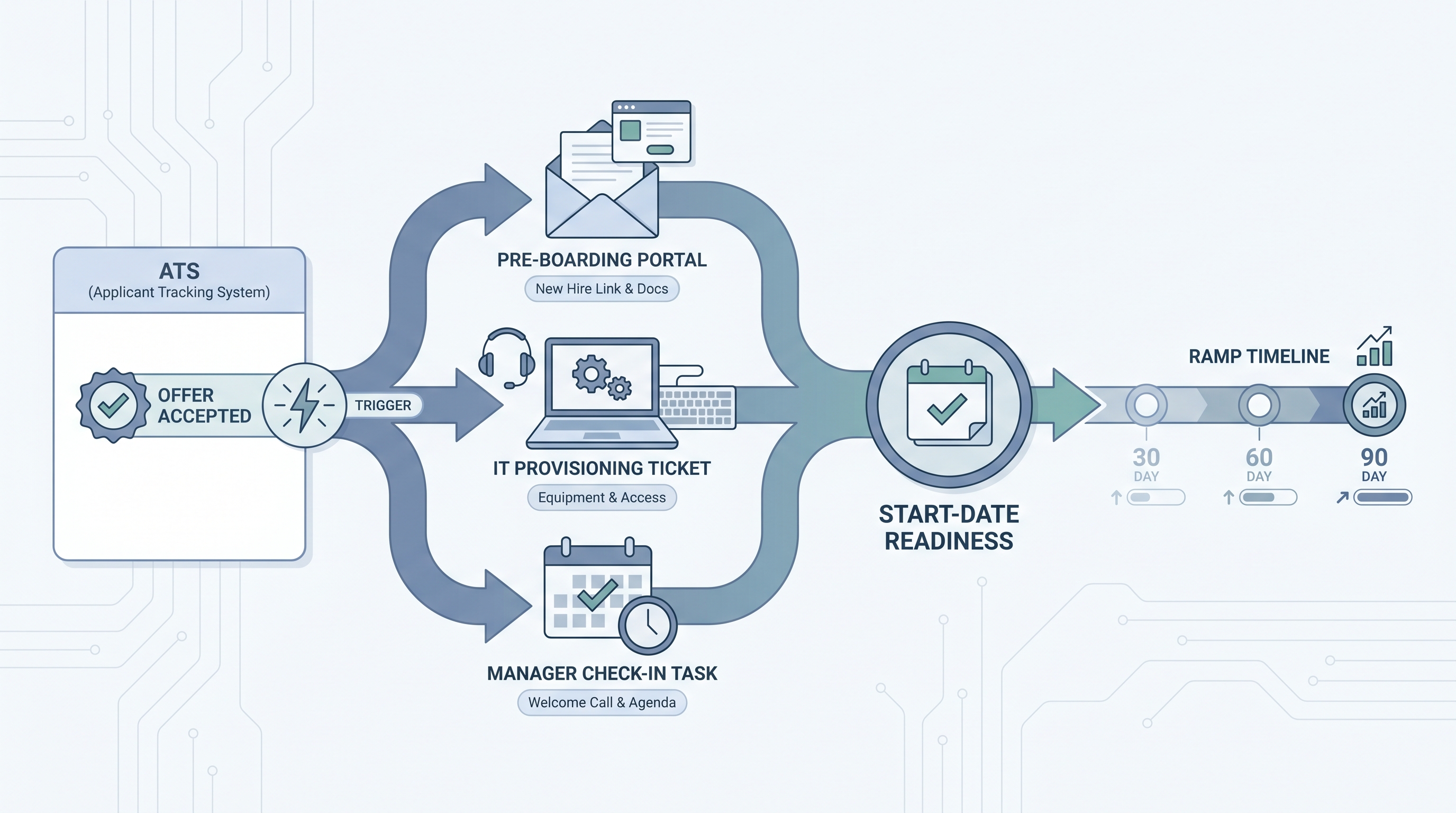
New hire onboarding software manages the transition from accepted offer through the first 90 days. It fires automatically when the ATS marks a candidate as hired, assigns pre-boarding tasks to HR, IT, and the hiring manager, tracks completion against the start date, and gives the new hire a clear portal showing exactly what to do next.
The tool sits between the ATS and the HRIS. Its job is to close the coordination gap where four teams should be working in parallel but instead wait on each other's emails: HR needs the manager to confirm the laptop spec, IT needs HR to open a ticket, and nobody notices the new hire never got a pre-boarding link until she texts the recruiter at 7am on day one.
In practice
- A recruiter marks an offer accepted in the ATS. Within two minutes, the onboarding platform fires: a pre-boarding link goes to the new hire, an IT provisioning ticket opens automatically, and the hiring manager receives a check-in task with the new hire's start date. Nobody typed an email to IT.
- During an Recruiting OS session, a team walks through their onboarding checklist and finds the provisioning task inside their platform was never connected to the IT ticketing system. The task showed complete inside the portal while IT had no record of it. Fixing the integration cleared a recurring first-week complaint.
- A mid-size agency configures a new hire chatbot to answer first-week logistics questions: parking, IT helpdesk number, benefits enrollment deadline. The HR inbox drops by roughly half in the first two weeks. The chatbot is routed through a human review gate for any question touching employment terms or compensation.
Quick read, then how hiring teams use it
This is for TA and HR teams who need a shared vocabulary when choosing a platform, wiring the ATS handoff, or figuring out why the last three new hires still reported a rough first week despite having onboarding software. Skim the first section for shared context; use the second when configuring the tool or reviewing the integration.
Plain-language summary
- What it means for you: The new hire arrives knowing where to go, with a working laptop and signed documents, because the pre-boarding tasks ran automatically after the offer was accepted, not because someone remembered to forward an email.
- How you would use it: Map your current onboarding steps on paper first: who does what, in what order, and what breaks most often. Then configure the platform to match those steps with named owners for each task category. Send the pre-boarding link at least five days before the start date.
- How to get started: Audit your ATS for field completeness (start date, manager, location, role) before building templates that depend on those fields. Run one full dry run on a test profile before the first live hire goes through the flow.
- When it is a good time: Once you are hiring more than five or six people per quarter and the same first-week complaint (laptop, badge, access) comes up more than once a month.
When you are running live reqs and tools
- What it means for you: New hire onboarding software is the automation layer between your ATS and your HRIS. A well-configured instance fires IT tickets, routes compliance documents, and notifies the manager without anyone manually checking a spreadsheet. A misconfigured one creates the appearance of automation while hiding the same bottlenecks in a newer interface.
- When it is a good time: When ATS-to-HRIS data quality is reliable enough that a webhook handoff does not corrupt required fields, and when one specific person owns the platform configuration and can update templates when roles or locations change.
- How to use it: Connect to your ATS so an offer-accepted event triggers the onboarding flow. Confirm that start date, role, manager, and location populate correctly in test profiles before go-live. Wire IT provisioning to your actual ticketing system, not just a task inside the onboarding portal. Set a daily overdue-task digest to whoever is on duty that week. Review GDPR retention settings before the first hire personal data enters the system.
- What to watch for: Task templates where the owner field is blank or set to a shared alias nobody monitors. IT provisioning tasks that exist inside the platform but are never connected to the system IT uses. New hire portals with no named person assigned to respond to questions. Pre-boarding forms collecting sensitive data without a documented lawful basis.
Where we talk about this
On AI with Michal live sessions, new hire onboarding software comes up in the AI in recruiting track when teams move past sourcing and look at what happens after an offer is accepted: how ATS data flows into onboarding templates, where workflow automation can handle provisioning without manual steps, and how AI-generated onboarding plans work in practice. Bring your current ATS and onboarding setup to Sourcing Lab to map the handoff in a live session.
Around the web (opinions and rabbit holes)
Third-party creators move fast. These are starting points, not endorsements. Do not wire new hire personal data to any platform before reviewing its data processing agreement.
YouTube
- Search “new hire onboarding software demo” on YouTube for walkthroughs covering pre-boarding portals, task assignment, and ATS integration from both HR and TA perspectives.
- Search “onboarding automation workflow HR” on the AIHR YouTube channel for practitioner-built automation flows connecting offer acceptance to first-day readiness.
- Search “AI new hire onboarding chatbot setup” on YouTube for recent demos showing how teams configure new hire Q&A bots and what guardrails they use before exposing them to new employees.
- New hire onboarding tools what do you use in r/humanresources has candid practitioner comparisons covering platform features, integration pain, and what teams wish they had configured differently.
- ATS to onboarding integration in r/HRtech covers how ops teams wire the offer-accepted handoff and where data mapping breaks in practice.
- New hire IT provisioning first day in r/sysadmin gives the IT side of why the laptop is still late even when the onboarding platform says the ticket was sent.
Quora
- What is the best software for onboarding new hires? collects practitioner views on what to prioritize in an evaluation, from pre-boarding features to HRIS integrations (read critically; quality varies).
New hire onboarding software vs related categories
| New hire onboarding software | HRIS onboarding module | ATS built-in onboarding | |
|---|---|---|---|
| Primary use | Coordinate hire-through-ramp journey | Record employee data long term | Basic task list after offer stage |
| Pre-boarding portal | Usually yes | Sometimes | Rarely |
| IT provisioning hooks | Often | Rarely | No |
| ATS offer-accepted trigger | Yes | Sometimes | Native |
| 30-60-90 day plan templates | Yes | Rarely | No |
Related on this site
- Glossary: New employee onboarding software, Employee onboarding software, HR employee onboarding software, Employee onboarding tools, Best employee onboarding software, Workflow automation, ATS API integration, Human-in-the-loop (HITL)
- Course: Starting with AI: the foundations in recruiting
- Live cohort: Sourcing Lab
- Membership: Become a member