Recruiter activity reporting
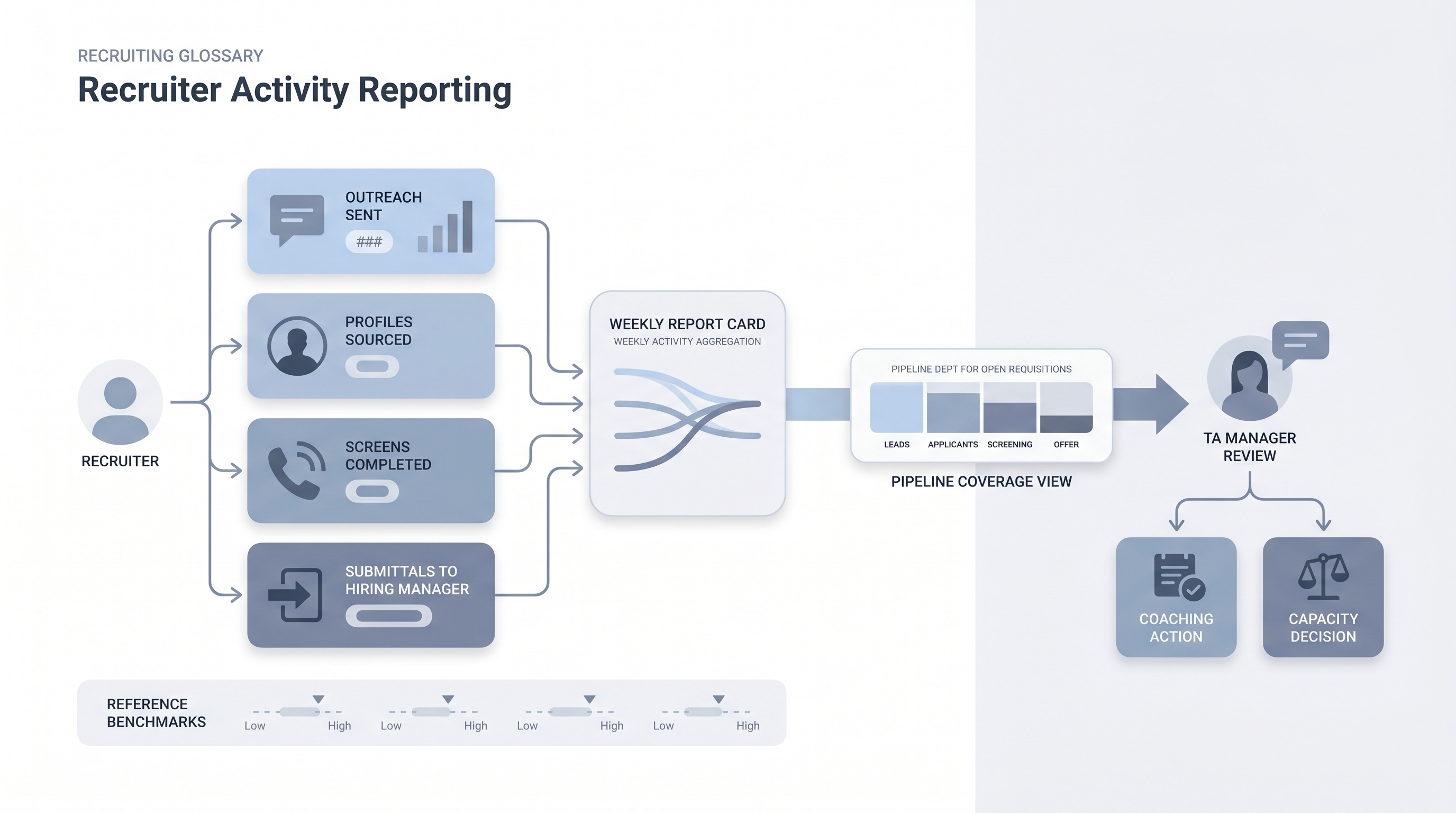
A structured record of what each recruiter does each week: profiles sourced, outreach messages sent, screens completed, and candidates submitted to a hiring manager, used to separate workload problems from pipeline and conversion problems.
Michal Juhas · Last reviewed May 9, 2026
What is recruiter activity reporting?
Recruiter activity reporting is a structured record of what each recruiter does each week: profiles sourced and reviewed, outreach messages sent, screens completed, and candidates submitted to a hiring manager. It fills the diagnostic gap between effort and output, sitting upstream of pipeline metrics and outcome measures like time to fill.
The distinction matters in practice. A pipeline that looks thin could mean sourcing volume is too low, screen-to-interview conversion is breaking, or one recruiter is carrying too many reqs at once. Without activity data alongside pipeline data, every stall looks the same from the outside and the wrong variable gets fixed.
In practice
- A TA manager reviews weekly sourcing volume and outreach response rates the morning before each recruiter 1:1. A drop in response rate with stable send volume usually points to targeting drift, not low effort, and the conversation shifts to message quality rather than hours worked.
- Recruitment operations teams refer to activity logging as "input tracking" when building capacity models for headcount planning. They need req load per recruiter alongside raw activity counts to catch overload before it shows up as a pipeline stall.
- Finance and HR leadership ask about "recruiter productivity metrics" when reviewing team size against open reqs. Activity data is the clearest bridge between headcount investment and pipeline throughput.
Quick read, then how hiring teams use it
This is for recruiters, TA managers, HR business partners, and operations leads who need shared vocabulary for 1:1 reviews, capacity planning, and analytics stack decisions. Skim the first section for a fast picture. Use the second when you are wiring this into your ATS, weekly review cadence, or reporting setup.
Plain-language summary
- What it means for you: A weekly count of what each recruiter actually did: how many profiles they reviewed, how many messages they sent, how many calls they ran, and how many candidates they moved forward to the hiring manager.
- How you would use it: Review it before your weekly 1:1. Compare outreach sent against response rate, and screens completed against submittals, to catch where the bottleneck is before the hiring manager notices the pipeline has gone quiet.
- How to get started: Check what your ATS auto-logs today. Most platforms record stage moves, ATS-native emails, and calendar events. Start with those before adding manual tracking for off-platform activity.
- When it is a good time: When a req is stalling and you cannot tell whether the problem is low sourcing volume, poor message targeting, or too many reqs on one person.
When you are running live reqs and tools
- What it means for you: Activity logs let you separate a sourcing problem from a conversion problem from a workload problem. Without them, every pipeline stall looks the same from the outside and you fix the wrong thing.
- When it is a good time: When running more than five active reqs per recruiter simultaneously, or when pipeline coverage reporting shows fewer than two qualified candidates per open stage across multiple reqs.
- How to use it: Pull weekly activity counts from your ATS, cross-reference them with pipeline coverage per req, and flag gaps in the same review. A simple view showing req load, sourcing volume, and outreach response rate side by side catches more than any single metric alone.
- How to get started: Map which ATS fields auto-log recruiter actions and which require manual entry. Build benchmarks from three months of historical data before setting reference ranges. Read talent acquisition metrics first if you are setting up a full TA metrics practice from scratch.
- What to watch for: Metric gaming (outreach volume rises but response rate falls), surveillance creep that erodes team trust, and over-reliance on inputs when outcome data would give faster diagnostic signal. Review trends over four to six weeks rather than flagging daily dips.
Where we talk about this
Live AI in recruiting sessions at AI with Michal cover activity and pipeline reporting as part of a broader TA metrics practice: which ATS fields to use, how to build a lightweight capacity model without a dedicated BI team, and how to present activity data alongside outcome data in hiring manager reviews. Bring your current req load and ATS setup to Sourcing Lab so the discussion fits your real stack rather than a generic dashboard demo.
Around the web (opinions and rabbit holes)
Third-party creators move fast and tooling changes often. Treat these as starting points, not endorsements, and double-check before you wire any tool to candidate data.
YouTube
- Search "recruiter productivity metrics" filtered to the past year for practitioner walkthroughs of ATS dashboard setups and capacity planning models, rather than vendor marketing demos.
- Search "TA metrics dashboard recruiting" for independent tutorials on building lightweight reporting from ATS exports or Google Sheets without a BI team.
- r/recruiting carries regular threads on what activity metrics TA managers actually track, including honest discussions about which numbers get gamed and which predict real outcomes.
- r/humanresources covers the HR operations side of recruiter performance measurement, including HRBP concerns about monitoring and trust.
Quora
- How do recruiters measure their performance? collects practitioner answers from both agency and in-house perspectives (quality varies; read critically and check dates).
Activity metrics versus outcome metrics
| Metric type | Examples | What it tells you | When to use it |
|---|---|---|---|
| Activity | Profiles reviewed, outreach sent, screens run | Was enough effort applied? | Weekly, in 1:1 reviews |
| Pipeline | Screens advanced, interviews scheduled, offers extended | Is the funnel moving? | Weekly, in pipeline reviews |
| Outcome | Time to fill, offer acceptance rate, quality of hire | Did hiring succeed? | Monthly or quarterly |
Related on this site
- Glossary: Talent acquisition metrics, Sourcing funnel metrics, Pipeline coverage reporting, Funnel velocity in recruiting, Hiring manager funnel review, Time to fill, Workflow automation, Human-in-the-loop (HITL)
- Blog: AI sourcing tools for recruiters
- Guides: Talent acquisition managers
- Course: Starting with AI: the foundations in recruiting
- Live cohort: Sourcing Lab
- Membership: Become a member