Video interview software
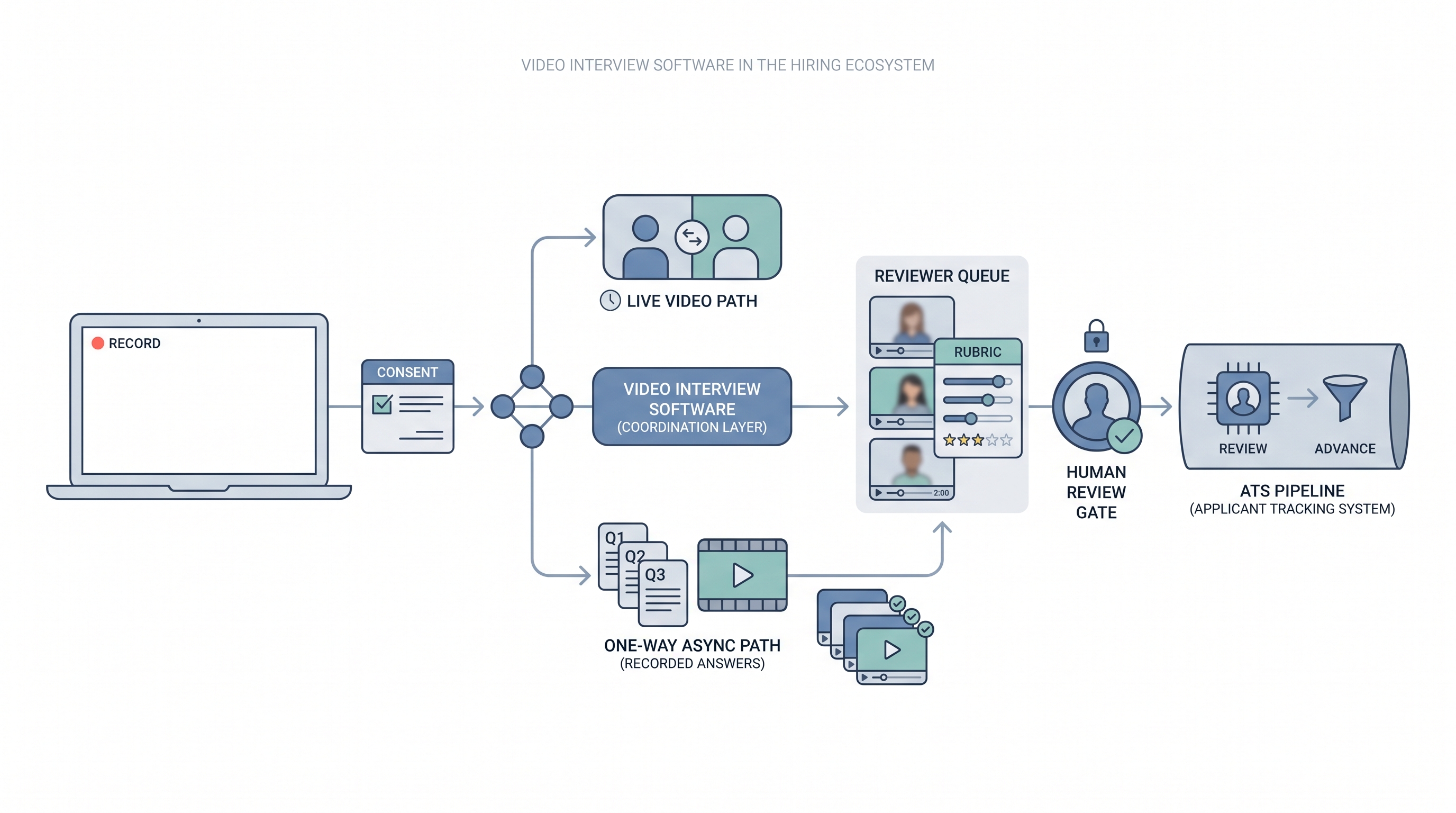
Video interview software covers platforms that host candidate screening sessions over video, in live formats where both parties join at the same time, or in one-way recorded formats where candidates answer preset questions that reviewers watch later.
Michal Juhas · Last reviewed May 9, 2026
What is video interview software?
Video interview software covers platforms that host candidate screening sessions over video. Two formats dominate hiring today: live video tools such as Zoom, Microsoft Teams, or Google Meet, where both parties join at the same time; and one-way platforms such as HireVue, Spark Hire, Willo, or myInterview, where candidates record answers to preset questions that reviewers watch later. Some vendors combine both formats in a single product with shared clip storage and rubric management.
The platform handles scheduling links, recording consent, clip storage, reviewer access controls, and typically a scoring or rubric layer. Volume and ATS integration depth determine which format fits: live for senior roles and final rounds, async for early-funnel screening where scheduling is the actual bottleneck.
In practice
- A TA ops lead at a 150-person company replaces 40 weekly phone screens on one high-volume SDR role with async video: three structured questions, 90 seconds each, reviewed by two team members before any candidate moves to a live call. Scheduling time drops; reviewing time rises.
- Recruiters describe candidates asking whether this is a bot or a real interview before completing the link, which becomes the prompt to add a plain-text explainer and a named sender to every async invite.
- A hiring manager asks to see the AI scores after reviewing clips. The conversation that follows makes the rubric visible for the first time and reveals the AI scores and rubric scores disagree on several candidates, which is the moment the team disables automated scoring.
Quick read, then how hiring teams use it
This is for recruiters, sourcers, TA, and HR partners who need the same vocabulary in debriefs, vendor calls, and policy reviews. Skim the first section when you need a fast shared picture. Use the second when you are deciding how video interview software fits into your ATS and screening stack.
Plain-language summary
- What it means for you: Instead of booking 30 phone screens, you send a link. Candidates record two to four questions on their own time. You and the hiring manager watch clips later, together or separately.
- How you would use it: For early funnel roles where the same questions appear on every call, volume is high, and scheduling is the real bottleneck, not the quality of conversation.
- How to get started: Write the three questions you ask on every first screen. Add a rubric for each. Pilot on one role with more than 15 applications per week. Resolve consent language before the first invite goes out.
- When it is a good time: When scheduling is the constraint, when hiring managers want pre-screen signal before committing calendar time, and when you can staff a human review gate within five business days of clip submission.
When you are running live reqs and tools
- What it means for you: Video interview software is a scheduling trade for async formats and a collaboration surface for live. The async format gains throughput and loses real-time follow-up. Pair it with a rubric and a reply SLA or you get faster screening with the same evaluation patterns running at higher volume.
- When it is a good time: When intake spikes from programmatic advertising or automated outreach, when hiring managers decline to take screen calls, or when the same five questions appear on every first call for a stable role.
- How to use it: Wire the vendor into your ATS so reviewed clips trigger stage moves automatically. Keep AI-generated scores off the official record until you have audited them for adverse impact. Use structured output patterns when exporting review notes back to the ATS.
- How to get started: Request the data processing agreement before any demo. Confirm mobile and low-bandwidth completion works end to end. Test the consent flow with legal before inviting candidates. Resolve caption and accommodation requirements upfront.
- What to watch for: Completion drop-off after the invite link goes out, ghosting post-submission, automated scoring overlays legal has not reviewed, and vendor subprocessors who receive clip data outside your required data region.
Where we talk about this
On AI with Michal live sessions, video tooling and async screening come up in both the AI in recruiting and sourcing automation tracks: where does human review need to stay, what does the rubric need to say, and how do you brief candidates so they trust the format. Bring your ATS name, current screening volume, and legal questions to Sourcing Lab and work through them with practitioners who have run both sides of the process.
Around the web (opinions and rabbit holes)
Third-party creators move fast. Treat these as starting points, not endorsements, and double-check anything before you wire candidate data.
YouTube
- Video Interview Software Reviews and Comparisons has practitioner walk-throughs of HireVue, Spark Hire, Willo, and similar platforms covering candidate experience and ATS integration.
- One-Way Video Interview Best Practices covers rubric setup and candidate communication patterns that affect completion rates.
- AI Video Interview Bias Risk Hiring surfaces compliance and bias conversations worth watching before accepting automated scoring from any vendor.
- Video interview software teams actually use in r/recruiting collects honest practitioner answers on which platforms survive past the first month.
- Async video interview completion rates and ghosting in r/recruiting surfaces candidate experience problems teams discover after launch.
- HireVue alternative video interview tools in r/recruiting is a practical comparison thread across team sizes and budgets.
Quora
- What is the best video interview software for recruiting? collects practitioner perspectives across industries (quality varies, read critically).
Live versus async video
| Factor | Live video tool | One-way async platform |
|---|---|---|
| Scheduling load | High: both parties must align | Low: candidate picks own time |
| Follow-up questions | Available in real time | Not available |
| AI scoring risk | Lower (no clip capture by default) | Higher if overlays are enabled |
| Candidate drop-off | Near zero (calendar confirmed) | 30 to 60 percent from invite |
| ATS integration effort | Minimal (link in invite) | Higher (clip webhook, stage sync) |
Related on this site
- Glossary: One-way video interview, Async screening, Best video interview software, Scorecard, Human-in-the-loop (HITL), Adverse impact (selection), AI bias audit, Workflow automation
- Blog: AI candidate screening
- Guides: Talent acquisition managers
- Course: Starting with AI: the foundations in recruiting
- Live cohort: Sourcing Lab
- Membership: Become a member