AI in the recruitment process
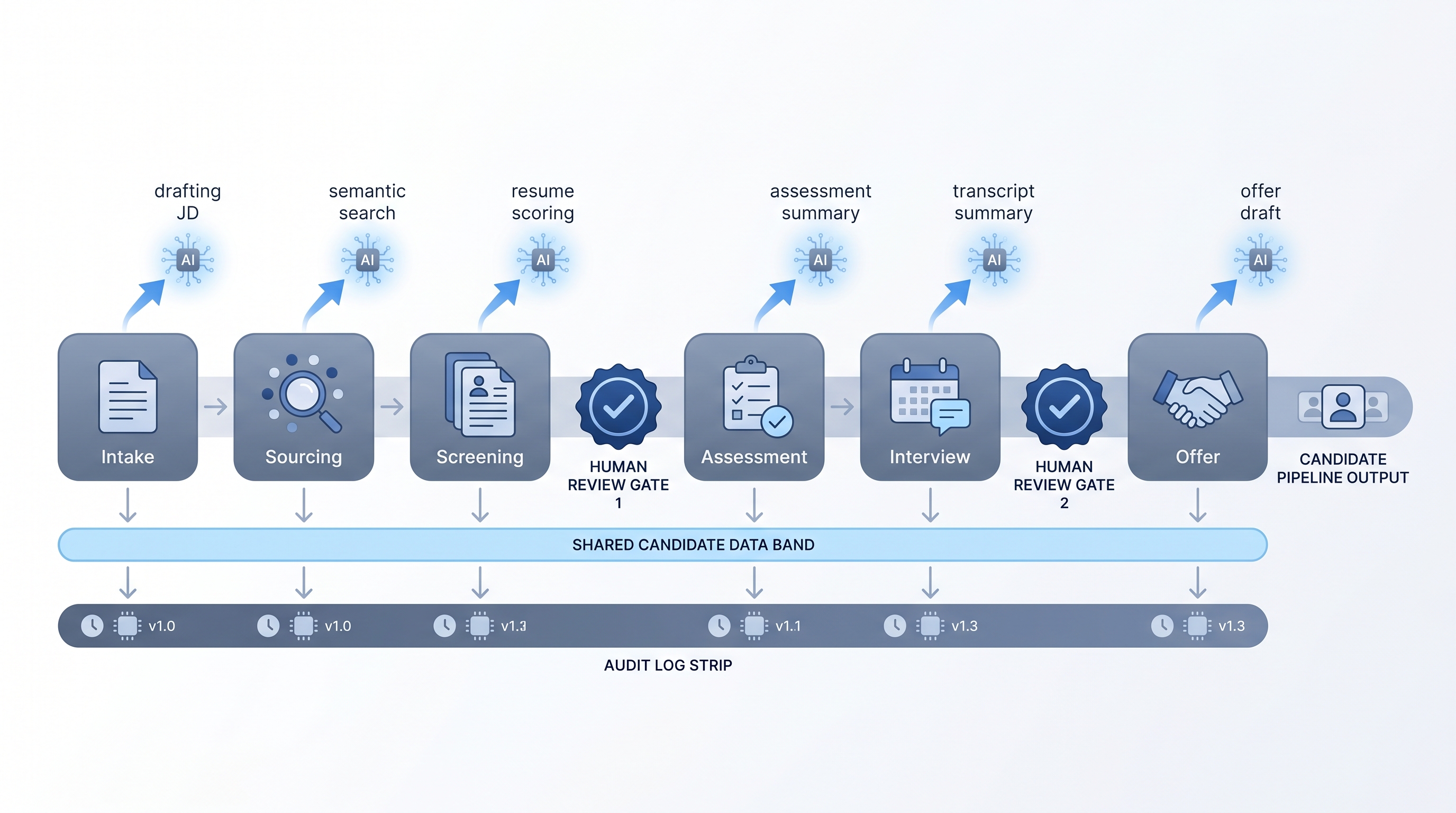
Applying AI to specific stages of the recruitment process (intake, sourcing, screening, assessment, and offer) to reduce manual work and improve decision consistency, with human review checkpoints before consequential outputs reach candidates or the ATS.
Michal Juhas · Last reviewed May 10, 2026
What is AI in the recruitment process?
AI in the recruitment process means applying specific AI tasks at specific stages of a documented hiring workflow: job brief parsing, candidate sourcing, resume screening, assessment scoring, interview summarization, and offer drafting. Each stage can adopt AI independently, at its own pace, with its own review checkpoint.
The process shape matters as much as the technology. Teams that add AI to a poorly documented process make errors faster. Teams that map their current steps first, pick one high-volume repetitive task, and add a human review gate before any output reaches a candidate or the ATS, see the gains.
In practice
- When a recruiter says "AI drafts our JDs now," they usually mean a prompt connected to a structured intake form that converts hiring manager notes into a first-draft job description the recruiter edits before posting.
- A TA ops lead saying "we screen with AI" typically means resumes are scored against a criteria card and ranked before a recruiter reviews the top tier, not that AI makes the advance decision.
- Compliance asks "which AI vendor touches our candidate data" because the answer determines the DPA vendor list and data processing log, not just the tool choice.
Quick read, then how hiring teams use it
This is for recruiters, sourcers, TA, and HR partners who need the same vocabulary in debriefs, vendor calls, and policy reviews. Skim the first section when you need a fast shared picture. Use the second when you are deciding how it shows up in the ATS, sourcing tools, or candidate communications.
Plain-language summary
- What it means for you: AI can help with specific tasks in each hiring step, like drafting a job post from your notes, sorting resumes by fit, or writing up interview takeaways, without replacing the decision you make at the end.
- How you would use it: Pick one stage that feels repetitive, add an AI step that gives you a draft or a sorted list, and review that output before it goes anywhere. That is the whole model.
- How to get started: Write down your current recruitment process on paper first. Find the step where you do the most copy-paste or repeated manual work. Start the AI experiment there, not everywhere at once.
- When it is a good time: After your process steps are stable and documented, when the same work repeats at least weekly, and when you have a named person who will review the AI output before it moves forward.
When you are running live reqs and tools
- What it means for you: AI adds a generation or scoring layer to specific ATS workflow steps, for example a webhook that fires when a new application arrives and runs a scoring prompt before the recruiter sees the record.
- When it is a good time: After prompts are stable and reviewed, when you have error alerts wired, and when the owner of each step knows what a wrong output looks like.
- How to use it: Map the current data flow first. Know which fields your ATS exposes, where the AI vendor stores the processed data, and whether that aligns with your DPA. Keep candidate-facing messages behind a human send gate. Candidate data enrichment practices apply at the sourcing stage when you add vendor lookups.
- How to get started: Start with internal steps (scoring notes appended to an internal field) before candidate-facing steps (AI-drafted outreach). Log the model version and prompt used so you can audit changes when criteria shift.
- What to watch for: Schema changes in the ATS breaking JSON parsing, prompts left unchanged when job criteria change, and intake forms with sensitive data being pasted into a public model interface. Build a quarterly audit habit for AI-assisted decisions.
Where we talk about this
On AI with Michal live sessions we work through this end to end: the AI in recruiting blocks connect intake notes to JD drafts, show how semantic sourcing filters work in practice, and walk the GDPR questions that come up before the first webhook fires. The sourcing automation blocks go deeper on the data routing and error-handling layer. If you want the full room conversation with real stack questions, start at Sourcing Lab and bring your current ATS setup.
Around the web (opinions and rabbit holes)
Third-party creators move fast. Treat these as starting points, not endorsements, and double-check anything before you wire candidate data.
YouTube
- Search "AI recruitment process" on YouTube filtered to the past year to find practitioners building live demos with Make, n8n, or direct API calls, showing how intake connects to sourcing and screening in real stacks. Prefer channels that show the error handling, not only the happy path.
- Recruiting Brainfood (Hung Lee) covers AI adoption in recruitment through practitioner interviews and process framing rather than vendor pitches, useful for calibrating what teams are actually doing versus what vendors claim.
- William Tincup and the HR Tech vendor analyst community post walkthroughs and honest assessments of where AI in the recruitment process adds value and where adoption stalls.
- r/recruiting threads tagged with AI or automation surface real recruiter questions about what is working and what breaks in production, not in demos.
- r/RecruitmentAgencies has agency-specific threads on where AI helps and where manual process still wins for client-facing work.
Quora
- Search "AI recruitment process" on Quora for answers from practitioners, HR leaders, and vendors. Read critically, the quality varies by answerer, and vendor answers tend to oversell.
AI-assisted versus fully automated
| Stage | AI-assisted | Fully automated |
|---|---|---|
| Job description | Recruiter reviews draft before posting | Rare and high risk |
| Sourcing | Ranked list reviewed before outreach | Possible for internal alerts |
| Screening | Score visible before advance decision | High risk without human gate |
| Offer drafting | Draft reviewed before send | Not recommended |
Related on this site
- Glossary: AI in recruiting, AI-enabled recruitment, Human-in-the-loop (HITL), Hallucination, Workflow automation, Candidate data enrichment, Sourcing funnel metrics
- Blog: AI sourcing tools for recruiters
- Guides: Sourcers
- Live cohort: Sourcing Lab
- Course: Starting with AI: the foundations in recruiting
- Membership: Become a member