Automated recruitment system
A configured set of connected tools and workflow rules that handles repeatable recruitment tasks, from job posting distribution and candidate intake to screening, scheduling, and status communications, without requiring manual handoffs between each step.
Michal Juhas · Last reviewed May 10, 2026
What is an automated recruitment system?
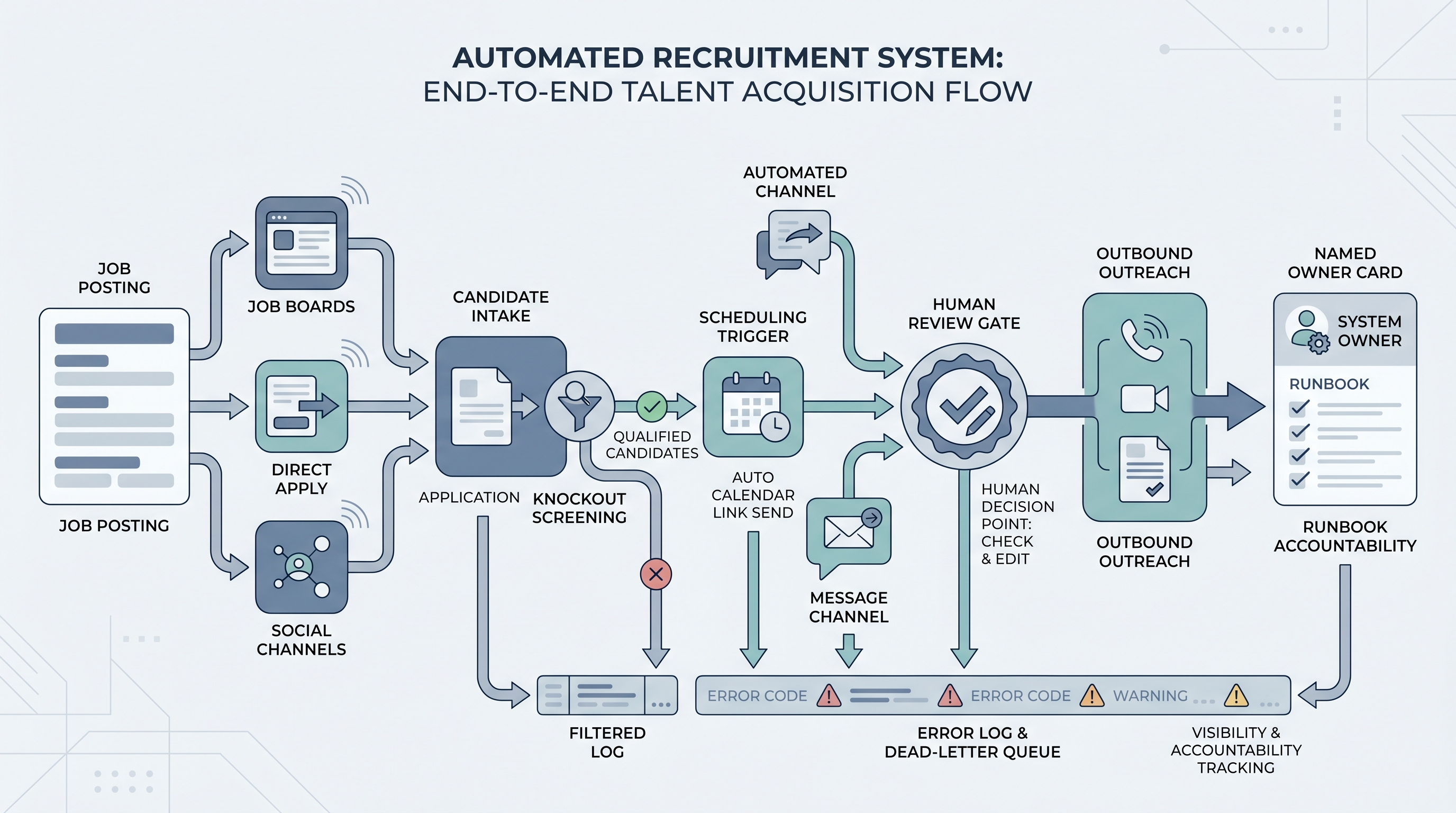
An automated recruitment system is a configured set of connected tools and workflow rules that handles the repeatable parts of the recruitment process without requiring a recruiter to manually trigger each step. When a candidate applies to an open req, a well-configured system routes the application, fires a confirmation, applies any knockout filters, queues a review task for a human, and logs the interaction, all without copy-pasting between tools.
The distinction from a tool collection is design: a system defines what fires when, who sees it, who owns the connection, and where errors land. Tools solve isolated tasks. Systems connect those tasks and make the handoffs between them visible and accountable.
In practice
- When a candidate applies and the system automatically routes their application, sends a confirmation, and applies knockout filters before any recruiter opens a queue, that is an automated recruitment system handling the intake layer. The recruiter's time starts at the queue review step, not at the receipt of the application.
- Sourcers who find candidates sitting at the same ATS stage for five or more days without a status update are often looking at a system where stage-transition messages were wired but the trigger stopped firing after a field rename. The ATS record shows the right stage; the automation silently did nothing.
- TA leaders who describe their setup as "we have Greenhouse plus a few Zaps" are often running an automated recruitment system that handles low volume without incident but has no dead-letter log for failed events and no named person accountable when a webhook stops firing on a busy Monday.
Quick read, then how hiring teams use it
This is for recruiters, sourcers, TA leads, and HR business partners who hear "automated recruitment system" in vendor demos or project reviews and need a grounded picture before the next tool evaluation or kickoff meeting. The first section gives you shared vocabulary. The second helps you decide what to wire and what to hold.
Plain-language summary
- What it means for you: A configured set of tools where a recruiter action (or candidate action) in one tool automatically starts the next step in another tool, so the manual handoff between tools is handled by rules rather than by you copying a link or sending an update.
- How you would use it: Identify the one step that repeats identically more than ten times a week, draw it as a trigger and an action, and wire only that connection first. Watch it run for two weeks before adding another.
- How to get started: Write down the trigger, the action, the owner, and the error path before opening any tool. If you cannot name the owner and error path, the step is not ready to automate.
- When it is a good time: After the manual step has run without variation for at least a month, after volume justifies the maintenance overhead, and after you have one named person whose name is on the runbook.
When you are running live reqs and tools
- What it means for you: Each component of the system changes state in real data, not in a chat window. A misconfigured screening filter rejects real candidates silently. A broken scheduling trigger leaves real candidates without a next step. Audit trails and correction costs are traceable and real.
- When it is a good time: After internal-only automations (Slack alerts, spreadsheet logging, ATS stage notifications) have run cleanly for two weeks, after prompts and scoring logic are stable, and after you have a named person who is paged when error counts exceed a threshold.
- How to use it: Wire internal steps first. Add candidate-facing messages second. Add AI generation last, always behind a human-in-the-loop gate. See automated hiring system for the architectural layer view and workflow automation for the general sequencing pattern.
- How to get started: Build a data-flow diagram: every arrow between tools, every data field that moves, every vendor that receives candidate PII. Confirm a data processing agreement is in place for each external hop. Wire one connection and measure its error rate for two weeks before adding the next.
- What to watch for: Silent screening rejections (candidates filtered by a rule nobody reviews), duplicate confirmation sequences from retry logic, scheduling links that expire before the candidate opens them, and template copy that drifts from current company tone because nobody updated the automation after a policy change.
Where we talk about this
On AI with Michal live sessions, automated recruitment systems come up across both tracks. The sourcing automation block walks trigger design, credential handling, and what to do when a provider changes an API mid-campaign without warning. The AI in recruiting block connects the same architecture to hiring manager trust, candidate experience, and compliance sign-off requirements. Both blocks assume the manual step is stable and tested before anything is automated. Start at Sourcing Lab with your ATS name, the one manual step you most want to remove, and any compliance constraints your legal or data team has raised.
Around the web (opinions and rabbit holes)
Third-party creators move fast. Treat these as starting points, not endorsements. Do not copy external scripts that move candidate data without reading the data processing terms first.
YouTube
- How to Automate Your Entire Hiring Process with n8n and Notion (Michele Torti) shows a complete end-to-end recruitment automation build with routing decisions and scheduling visible in real time.
- n8n Tutorial: Build an AI HR Assistant That Shortlists Candidates is useful for seeing how an AI screening layer fits inside a recruitment system without replacing the human review step.
- Boost Your Productivity: Mastering the Power of Workflow Automation (DottoTech) is tool-agnostic and good for building general automation vocabulary before picking any specific recruitment system component.
- Has anyone used Zapier? in r/recruiting documents the real small automations recruiters actually run and the failure modes they hit first.
- I want to make some recruitment automated workflows but... in r/RecruitmentAgencies is a frank thread from people actively building their first recruitment system and the blockers they encounter.
Quora
- How do we automate the process of recruiting as a recruiter? gathers practitioner perspectives; read critically before wiring anything based on anonymous advice.
What an automated recruitment system handles
| Function | What gets automated | What stays with a human |
|---|---|---|
| Job posting distribution | Routing a req to job boards and sourcing channels | Writing and approving the job description |
| Candidate intake | Confirmation send, knockout routing, ATS stage entry | Reviewing applications and making screen decisions |
| Screening | Knockout filtering, scoring rule application, queue sorting | Reading qualified applications and deciding who to advance |
| Scheduling | Sending calendar links on stage trigger, reminder sends | Confirming availability, adjusting times on request |
| Communications | Stage-transition messages, rejection notices, next-step updates | Personalizing outreach, writing offers, handling objections |
Related on this site
- Glossary: Automated hiring system, Automated hiring software, Automate recruitment process, Workflow automation, No-code recruiting automation, Human-in-the-loop, ATS API integration, Applicant tracking software
- Blog: AI sourcing tools for recruiters
- Tools: n8n for the routing layer
- Guides: Sourcers
- Live cohort: Sourcing Lab
- Membership: Become a member