Best recruitment tools
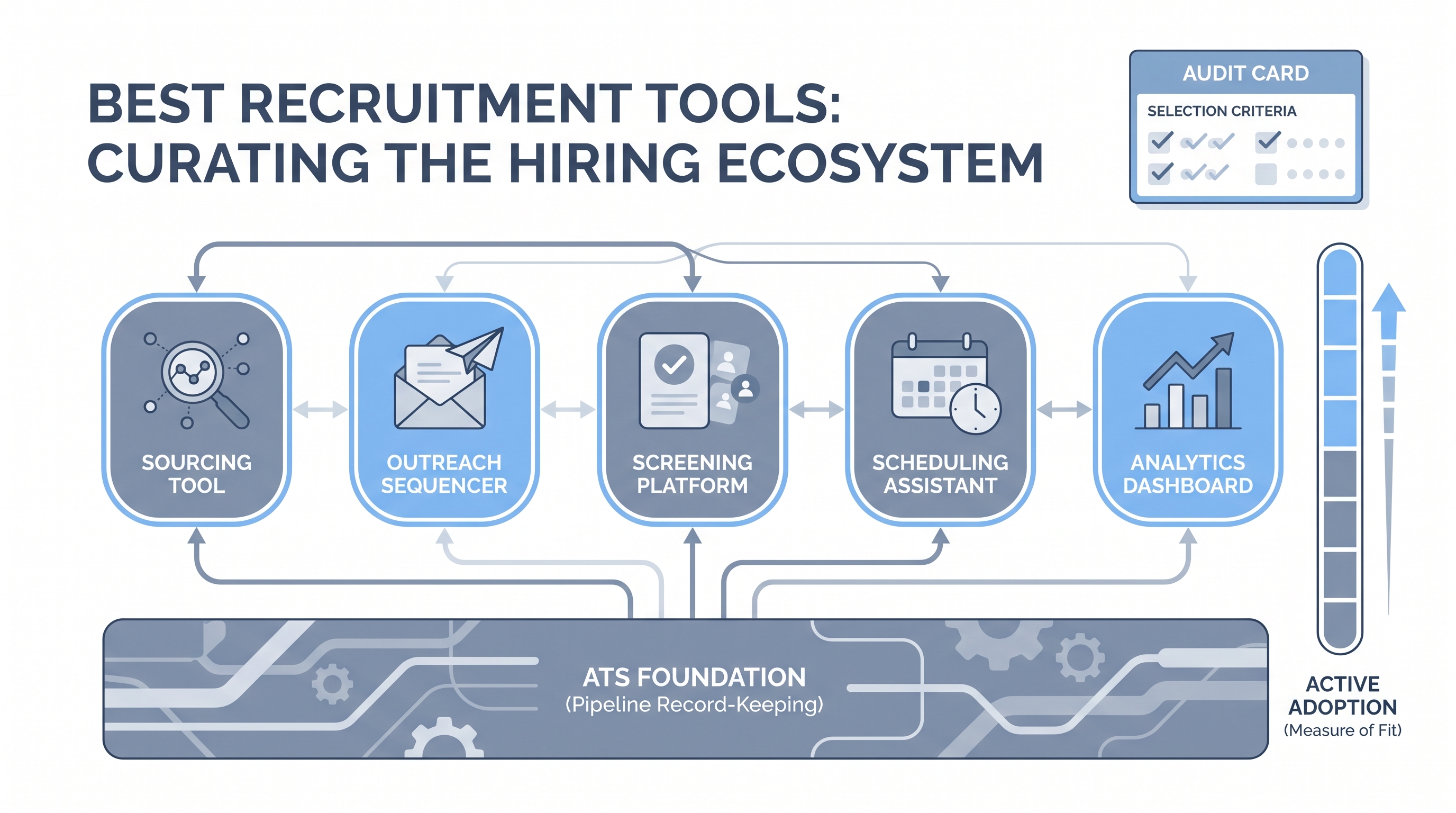
Recruitment tools are the instruments a TA team uses alongside the ATS to source, screen, schedule, draft, and analyze: each tool earns its place by fitting the actual workflow and getting used consistently, not by feature lists or analyst rankings.
Michal Juhas · Last reviewed May 5, 2026
What is a recruitment tool?
A recruitment tool is any system, software, or resource that helps a hiring team find candidates, move them through evaluation stages, or make and communicate decisions. The term covers a wide range: an ATS for managing pipeline, a sourcing extension for finding passive candidates on LinkedIn or GitHub, an AI drafting assist for outreach, a scheduling link that replaces interview phone tag, and a scorecard template to align interviewers. A team does not need every category. The right set covers your actual workflow gaps without adding complexity that no one on the team owns.
In practice
- A sourcer pulling contact data from a profile and loading it into an outreach sequence via a Chrome extension is using a recruitment tool in the way most people describe their daily stack.
- When a TA ops lead runs a tool audit before budget season, the usual finding is that three or four subscriptions have under thirty percent active usage: tools added to solve a specific problem that the team no longer has.
- In a session debrief, teams often report that their most-used tool is a shared document with a scorecard template, which tells you more about adoption habits than about tool sophistication.
Quick read, then how hiring teams use it
This is for recruiters, sourcers, TA, and HR partners who need the same vocabulary in debriefs, vendor calls, and policy reviews. Skim the first section when you need a fast shared picture. Use the second when you are deciding how tools show up in the ATS, sourcing stack, or candidate communications.
Plain-language summary
- What it means for you: Recruitment tools are the instruments your team uses alongside the ATS: sourcing tools, scheduling links, AI drafters, and scorecard templates. The best set closes your actual workflow gaps without creating new manual steps elsewhere.
- How you would use it: Audit your tools twice a year: list them, map which step each covers, pull usage data, and retire anything with under thirty percent active usage across paid seats.
- How to get started: Pick the step where your team spends the most manual time (usually candidate sourcing or interview scheduling) and pilot one tool that closes that specific gap before adding anything else.
- When it is a good time: When a specific step takes more than twice as long as it should, when a tool subscription renews and no one can name the last time someone used it, or when new hires struggle to understand the tool landscape in their first week.
When you are running live reqs and tools
- What it means for you: At the operational level, recruitment tools need to write clean data back to your ATS, handle errors without silently dropping records, and provide a usage log your team can read when something goes wrong.
- When it is a good time: When your ATS has stable API endpoints, when you have a named owner for each tool who handles vendor support questions, and when your team has agreed on the human review step before any AI-generated output reaches a candidate.
- How to use it: Map tool outputs to ATS fields before piloting. Confirm data flows in both directions. Run the tool in parallel with manual steps for two weeks to catch silent errors before they compound. See ATS API integration for the integration baseline and candidate data enrichment for enrichment-specific risks.
- How to get started: Run the tool audit first (list all tools, check usage data, retire what is unused), then evaluate the one category with the highest workflow gap. Start with one sourcing tool or one AI drafting tool, not both at the same time.
- What to watch for: Duplicate candidate records after integration, stale data when the tool and ATS update on different schedules, AI output that looks polished but contains hallucinated candidate details, and GDPR exposure when enrichment tools pass data to subprocessors you have not reviewed. See GDPR first-touch outreach for outreach compliance across any tool layer.
Where we talk about this
On AI with Michal live sessions, sourcing automation blocks cover which recruitment tools teams actually wire to their ATS, how to audit tool sprawl before adding AI layers, and where AI drafting tools fit in a lean stack. The AI in recruiting track connects the same tool landscape to hiring manager trust and compliance requirements. Start at Sourcing Lab with your current tool list in hand.
Around the web (opinions and rabbit holes)
Third-party creators move fast. Treat these as starting points, not endorsements, and double-check anything before you wire candidate data.
YouTube
- Best Recruiting Tools 2025 and 2026 has practitioner reviews covering tool categories from ATS to sourcing extensions to AI drafting assists.
- Recruitment Tech Stack: What Tools Do You Actually Need? covers how TA leaders structure their tool layers and which categories deliver the highest return in practice.
- How to Audit Your Recruiting Tech Stack surfaces conversations about tool consolidation and what to cut before adding AI layers.
- What recruiting tools does your team actually use daily? in r/recruiting has honest practitioner answers about which tools survive past the first month and which ones collect dust.
- Best tools for talent sourcing in r/recruiting surfaces community comparisons of sourcing tools across different team sizes and budgets.
- Recruiting tech stack tool sprawl in r/RecruitmentAgencies covers the consolidation conversations TA ops leads are having before budget cycles.
Quora
- What are the best tools for recruiting and talent acquisition? collects practitioner perspectives across team sizes and industries (quality varies, so read critically).
Platform versus best-of-breed tools
| Factor | All-in-one platform | Best-of-breed stack |
|---|---|---|
| Initial setup | Faster: one contract and one login | Slower: each tool integrates separately |
| Integration quality | Built-in between modules | Varies by vendor API quality |
| Customization | Limited to platform roadmap | Higher: swap any layer independently |
| Vendor lock-in | High | Lower per tool |
| Adoption complexity | One system to learn | More tools, higher onboarding cost |
Related on this site
- Glossary: Applicant tracking software, Talent sourcing software, Sourcer productivity tools, AI for recruiters, Hiring platforms, Hiring tools, ATS API integration, Workflow automation, Human-in-the-loop
- Blog: AI sourcing tools for recruiters
- Guides: Sourcers
- Live cohort: Sourcing Lab
- Membership: Become a member
- Course: Starting with AI: the foundations in recruiting