Microsoft Copilot in recruiting and HR
Microsoft Copilot is the AI layer built into Microsoft 365, Teams, Word, Outlook, and Viva, giving recruiting and HR teams AI-assisted interview summaries, job description drafts, email composition, and custom HR agents built with Copilot Studio, all within the Microsoft data boundary.
Michal Juhas · Last reviewed May 5, 2026
What is Microsoft Copilot in recruiting and HR?
Microsoft Copilot is the AI layer baked into Microsoft 365: Teams, Outlook, Word, Excel, SharePoint, and the broader Viva suite. For recruiting and HR, it means AI assistance is available inside the tools most teams already use daily, without routing candidate data to a third-party consumer service.
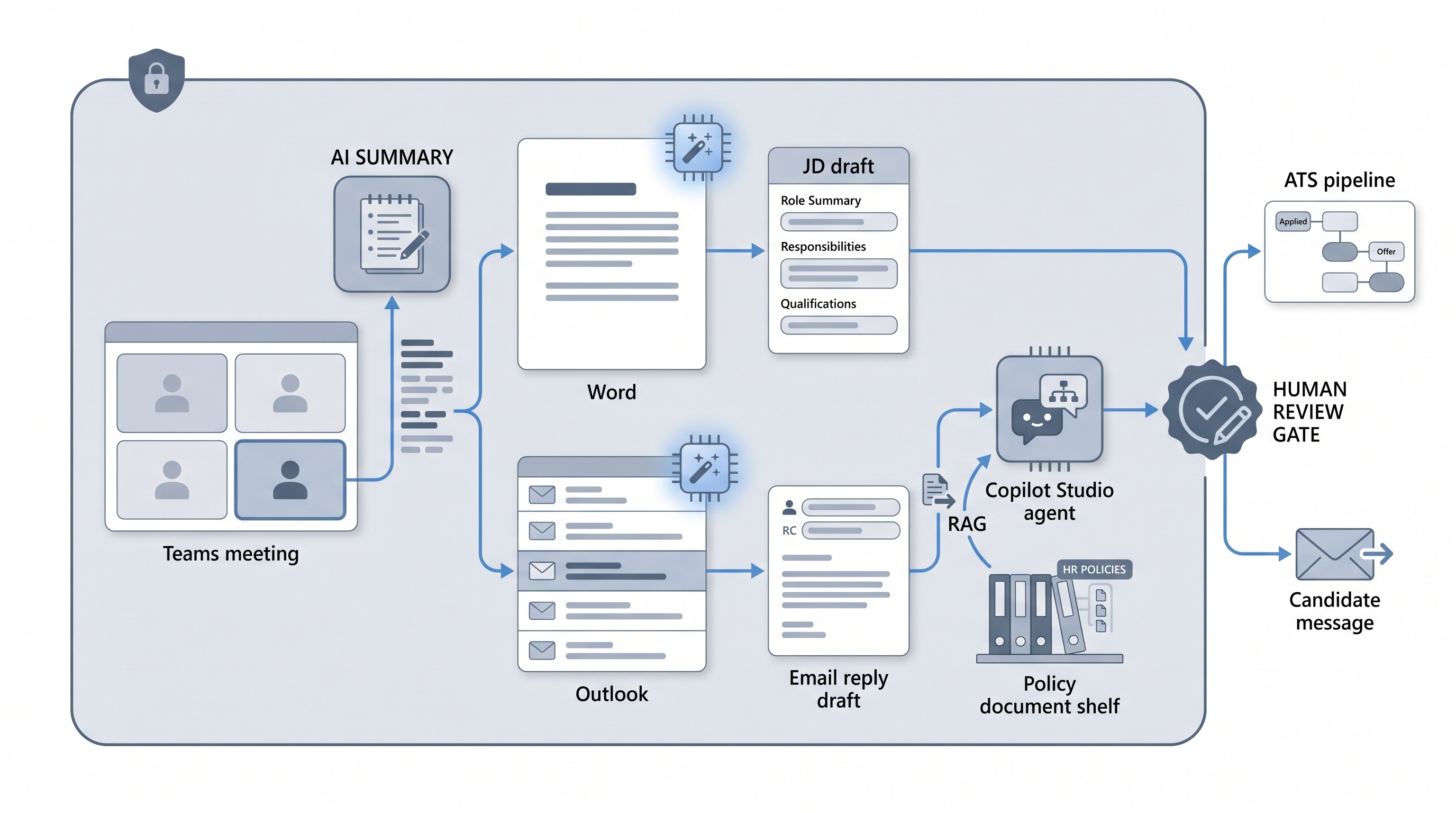
The practical scope covers four areas: Teams Copilot transcribes and summarises interviews; Word and Outlook Copilot draft job descriptions and candidate emails; Copilot Studio lets you build custom HR agents grounded in your own policies; and Viva Insights surfaces workforce patterns from Copilot usage data. Knowing where each feature adds real value and where a human-in-the-loop review is still non-negotiable separates teams that get leverage from those that approve a licence and then wonder why nothing changed.
In practice
- A recruiter finishes a 45-minute Teams interview and asks Copilot to summarise the meeting, pull candidate answers mapped to the scorecard criteria, and list any open follow-up questions. They spend ten minutes editing rather than thirty minutes writing from scratch.
- A talent acquisition lead uses Copilot in Word to turn a two-paragraph hiring manager intake note into a first-draft job description, then edits it for brand voice and removes vague benefit language before sharing with the hiring manager for review.
- An HR ops team builds a Copilot Studio agent in Teams that answers new-hire onboarding questions by referencing the employee handbook via RAG, escalating anything outside its scope to the HR inbox rather than guessing.
Quick read, then how hiring teams use it
This is for recruiters, sourcers, TA, and HR partners who need the same vocabulary in debriefs, vendor calls, and policy reviews. Skim the first section when you need a fast shared picture. Use the second when you are deciding how Microsoft Copilot fits your daily workflow, your ATS, or your compliance obligations.
Plain-language summary
- What it means for you: Copilot is AI built into the Microsoft apps your team already has open: Teams, Outlook, and Word. You do not need to switch tools or copy-paste into a chatbot.
- How you would use it: Ask Copilot in Teams to summarise an interview after it ends. Use Copilot in Word to turn intake notes into a JD draft. Use Copilot in Outlook to draft a first response to a candidate message.
- How to get started: Confirm your Microsoft 365 licence includes Copilot (it is a paid add-on), pick one tedious manual task, and run Copilot on it for two weeks with a human reviewing every output before it reaches candidates or the ATS.
- When it is a good time: After your IT and legal teams have confirmed the data access scope and your DPO has reviewed candidate data handling, not before.
When you are running live reqs and tools
- What it means for you: Copilot can access documents, emails, and calendar history in your tenancy. That is useful for context but creates real risk if SharePoint permissions are loose or if a prompt accidentally surfaces restricted HR data to the wrong person.
- When it is a good time: After you have audited SharePoint permissions, confirmed your data processing agreement with Microsoft covers candidate data, and defined which steps require a recruiter review before output reaches a candidate or an ATS record.
- How to use it: Use Teams Copilot summaries as a starting point for ATS interview notes, not as the final record. Use Word Copilot for JD first drafts with a mandatory editing pass. For Copilot Studio agents, ground them in a controlled document set via RAG and add a hard escalation rule for anything outside scope.
- How to get started: Read AI outreach drafting for the message review pattern and workflow automation for how Copilot fits alongside ATS webhooks and no-code routers.
- What to watch for: Over-permissioned data access surfacing salary or performance data; interview summaries that miss nuance or misrepresent candidate answers; Copilot Studio agents that guess confidently outside their knowledge base; and GDPR Article 22 risk if any step filters candidates out without documented human review.
Where we talk about this
On AI with Michal live sessions, Microsoft Copilot comes up in both AI in recruiting and sourcing automation tracks: the former covers how Teams and Outlook AI features change the interview and outreach workflow; the latter looks at how Copilot Studio agents connect to broader workflow automation stacks. If you want the full room conversation with peers comparing what actually works in production, start at Sourcing Lab and bring a specific Copilot use case you are trying to validate.
Around the web (opinions and rabbit holes)
Third-party creators move fast on Copilot updates. Treat these as starting points, not endorsements, and double-check anything before changing your hiring process or sharing candidate data with a new integration.
YouTube
- Microsoft Copilot for HR and recruiting walkthroughs for demos of Teams interview summaries, Word JD drafting, and Copilot Studio agent builds from practitioners
- Copilot Studio custom agent build tutorial for step-by-step guides on grounding an HR agent in internal documents
- Microsoft 365 Copilot licence and setup guide for IT-side activation, permission scoping, and data access controls before a team-wide rollout
- r/Microsoft365: Copilot for HR for honest user feedback on which Copilot features save real time and which feel half-finished in daily use
- r/humanresources: Microsoft Copilot for compliance-focused threads on data access permissions, GDPR questions, and HR policy team concerns
- r/recruiting: AI interview summaries for recruiter-level discussion on transcription accuracy, summary quality, and whether AI notes hold up compared to manual notes
Quora
- How do HR teams use Microsoft Copilot? for practitioner answers on real-world use cases and what surprised teams after enabling it (read critically; quality varies)
Microsoft Copilot features compared
| Feature | What it does in HR | Human review needed |
|---|---|---|
| Copilot in Teams | Interview transcription and meeting summary | Yes, review before ATS entry |
| Copilot in Word | JD and document drafting from brief | Yes, edit for brand and compliance |
| Copilot in Outlook | Email composition and reply suggestions | Yes, rewrite opening line |
| Copilot Studio | Custom HR agents grounded in internal docs | Yes, define scope and escalation |
| Viva Insights | Workforce analytics from Copilot usage | Yes, before presenting to leaders |
Related on this site
- Glossary: Human-in-the-loop, RAG, Workflow automation, AI outreach drafting, Scorecard, Claude in recruiting, GPT in recruiting, AI for recruiters, AI in recruiting, Intake to JD AI
- Blog: AI sourcing tools for recruiters
- Live cohort: Sourcing Lab
- Course: Starting with AI: the foundations in recruiting
- Membership: Become a member