Onboarding tools for new employees
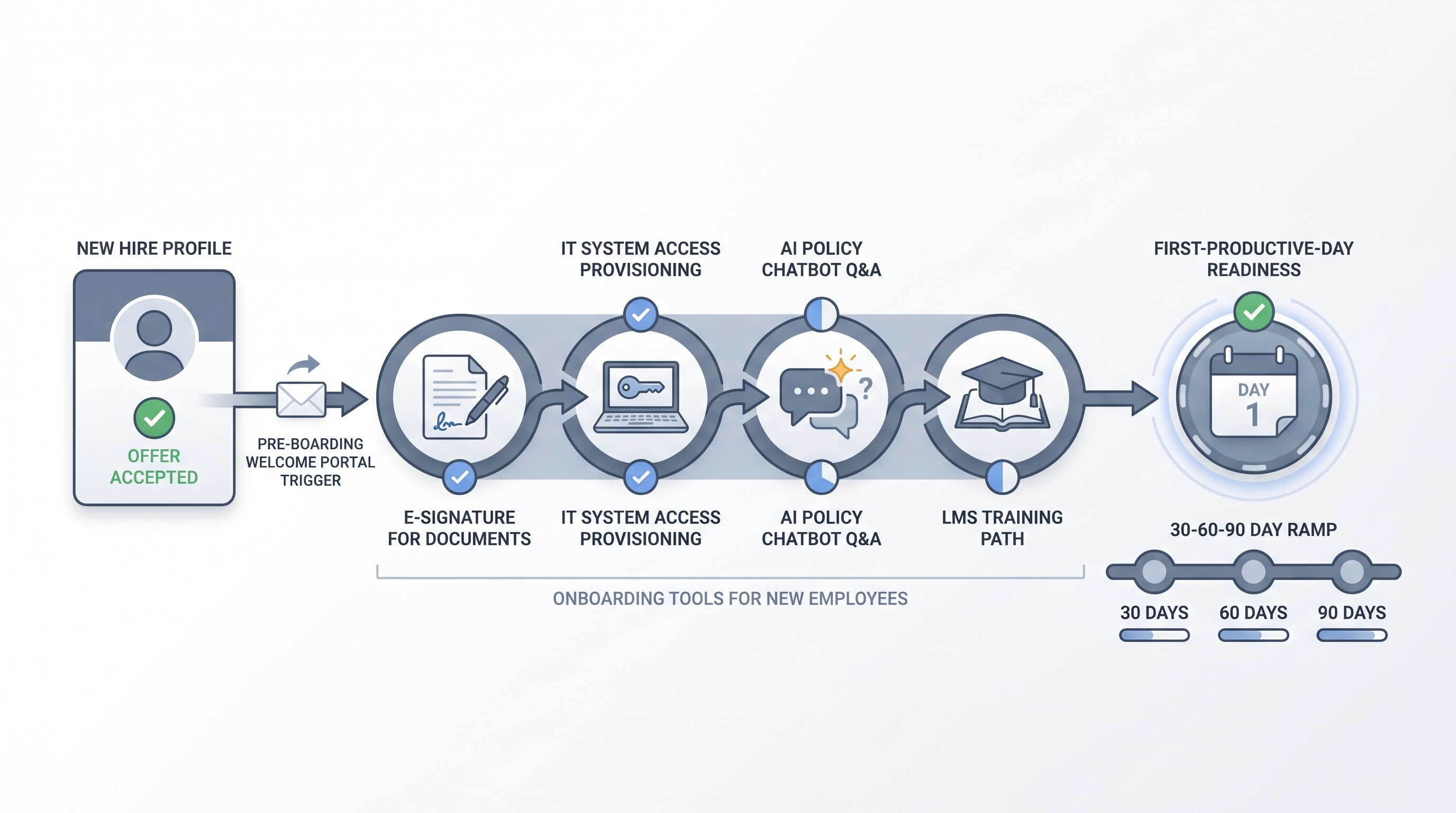
The platforms and integrations a new hire encounters between offer acceptance and full productivity, spanning a pre-boarding portal, e-signature for documents, IT system access provisioning, an LMS for role-specific training, and AI-powered policy assistants, assembled by HR and IT so each first-week experience runs consistently regardless of team or location.
Michal Juhas · Last reviewed May 15, 2026
What are onboarding tools for new employees?
Onboarding tools for new employees are the platforms and integrations a new hire encounters between accepting an offer and completing their first productive month. The set typically includes a pre-boarding portal where documents are signed before day one, an IT provisioning flow that requests the laptop and software licences, an HRIS self-service step for benefits enrolment, and an LMS or knowledge base for role-specific training.
What makes this category distinct from employee onboarding software is the angle: HR and IT are building and managing the stack, but the new hire is experiencing it. A capable platform with a broken pre-boarding link or a missing IT ticket is still a failed first day.
In practice
- A People Ops lead at a 120-person scale-up sent the pre-boarding portal link before IT had created the new hire's email account. The link required the work email to authenticate, so the new hire could not sign any documents until day one, and the whole onboarding template ran two days behind schedule for every start date that quarter.
- A new engineering manager said her first impression of the company was the Slack onboarding bot telling her to check a handbook link that returned a 404. The handbook had moved six months earlier and nobody had updated the bot prompt. She spent her first morning asking a colleague for basics she expected to find herself.
- "The laptop was not ready" is still the most common first-week complaint, and it almost always traces to an IT provisioning task that lived in the onboarding platform but never connected to the ticketing system IT monitors. The checklist showed complete; the laptop request never arrived.
Quick read, then how hiring teams use it
This is for HR business partners, TA leads, and People Ops teams who are evaluating, configuring, or setting policy for the tools new hires encounter in their first weeks. Skim the first section for a shared definition. Use the second for decisions about AI features, compliance, and integration.
Plain-language summary
- What it means for you: Onboarding tools are the first software a new hire opens on your company's behalf. If they work smoothly, the new hire concludes the company is organised. If they break, that impression is harder to fix than a bad day.
- How you would use it: Map every onboarding step on paper first: who owns it, which tool handles it, and what deadline it has relative to start date. Configure tools against that map, not the other way around.
- How to get started: Pull a completion report from your last five onboarding runs. Find the step with the highest overdue or failure rate. Fix the owner assignment or tool connection there before adding AI features on top.
- When it is a good time: From your second or third hire onward, or whenever more than one team is involved and coordination is already costing someone two hours a week.
When you are running live reqs and tools
- What it means for you: Each onboarding tool is an integration point that receives data from the ATS and sends data to the HRIS. Silent failures at any handoff delay the new hire experience without triggering an alert.
- When it is a good time: After your onboarding template runs correctly for at least five hires in a row, then wire the ATS-to-onboarding sync and IT provisioning trigger on top of a working foundation.
- How to use it: Map every task to a specific named owner, not a team inbox. Add a human-in-the-loop checkpoint for AI-generated content (personalised plans, policy summaries) before the new hire sees it. Log compliance-critical steps with timestamps you can export for an audit.
- How to get started: Run one dry-run on a test profile before the first live hire. Confirm that IT provisioning requests land in the actual ticketing system IT monitors, not in an onboarding inbox. See workflow automation for webhook retry and dead-letter patterns that apply here.
- What to watch for: Pre-boarding links that fire before the new hire email account exists; IT provisioning tasks that never leave the onboarding tool; AI-generated 30-day plans reaching the new hire before the hiring manager has reviewed them.
Where we talk about this
On AI with Michal live sessions we cover the post-hire handoff in the AI in recruiting track: how ATS data flows into onboarding templates, where automation routers can trigger IT provisioning without email chains, and how to add a policy chatbot scoped to internal documents without exposing HR data to a public model. If you want the full room conversation including real stack failures from practitioners, start at Sourcing Lab and bring your current onboarding checklist.
Around the web (opinions and rabbit holes)
Third-party creators move fast in this space. Treat these as starting points, not endorsements. Verify tool capabilities and compliance postures directly with vendors before connecting new hire data.
YouTube
- Employee Onboarding Process (Step by Step) maps the full process before any tool selection, which prevents wiring a broken flow into a capable platform.
- How to Build an Onboarding Program for New Employees is an HR-native walkthrough for aligning the People team on what the software should actually support.
- Search "AI chatbot employee onboarding policy" for practitioner reviews of internal Q&A bots, useful vocabulary before evaluating any vendor offering automated new hire support.
- What onboarding software does your company use? in r/humanresources collects candid opinions on tools across company sizes and HRIS combinations.
- What are your new hire onboarding horror stories? in r/humanresources surfaces the IT provisioning and template failures that vendor demos never show.
- First employee -- how did you handle onboarding? in r/startups is a frank thread from founders coordinating HR, IT, and legal for the first time.
Quora
- What is the best employee onboarding software for a small business? collects practitioner opinions across budget ranges and HRIS contexts (quality varies, read critically).
Dedicated onboarding tool versus HRIS module
| Dimension | Dedicated onboarding platform | HRIS onboarding module |
|---|---|---|
| New hire experience | Purpose-built portal with branded welcome | Functional but generic, depends on HRIS UI |
| Integration breadth | Deep ATS and IT provisioning connectors | Native HRIS sync, third-party connections vary |
| AI features | Chatbots, personalised plans, doc classification | Limited to what the HRIS vendor builds natively |
| Setup time | Faster for multi-team workflows | Faster if you already run the HRIS |
| Compliance tooling | Dedicated I-9, right-to-work, e-signature flows | Varies widely by HRIS vendor and tier |
Related on this site
- Glossary: Employee onboarding software, Employee onboarding tools, Workflow automation, Human-in-the-loop, Applicant tracking software, Talent acquisition
- Blog: AI sourcing tools for recruiters
- Guides: Sourcers
- Workshops: Sourcing Lab
- Course: Starting with AI: the foundations in recruiting
- Membership: Become a member