Online recruitment platform
A web-based software suite that manages the full hiring cycle from job posting through offer acceptance in one connected system, typically including an applicant tracking pipeline, branded career page, job board syndication, interview scheduling, and reporting.
Michal Juhas · Last reviewed May 9, 2026
What is an online recruitment platform?
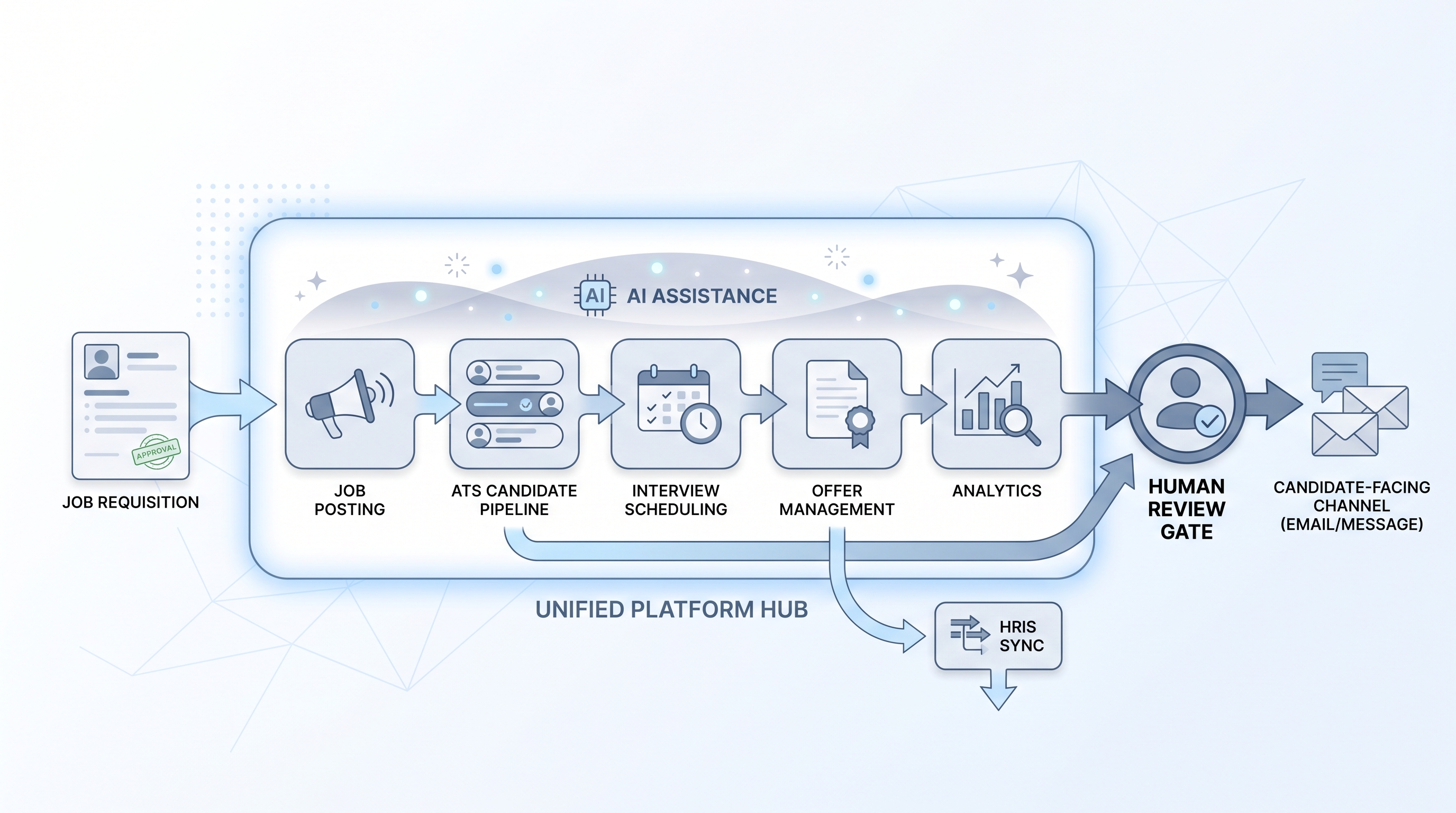
An online recruitment platform is web-based software that manages the full hiring cycle from open requisition to accepted offer in one connected system. The core is usually applicant tracking software: a pipeline where candidate records move through defined stages. Most platforms layer additional modules on top: a branded careers page, job board distribution to LinkedIn, Indeed, and niche boards, interview scheduling coordination, offer letter management, and funnel reporting.
The category covers general-purpose platforms (Greenhouse, Lever, Ashby, SmartRecruiters, Workable) and purpose-built products for enterprise volume or specific industries. The line between platform and ATS has blurred: most vendors now use both labels. Evaluate against your workflow rather than the category name.
In practice
- A 60-person company outgrows a simple ATS and switches to a full recruitment platform so sourcing, scheduling, and reporting live in one system rather than three disconnected tools and a shared spreadsheet.
- A TA ops lead might say "the platform sent the wrong status email" when they mean an automated workflow inside the recruitment platform fired the wrong template -- a reminder that platform automations need the same review habits as one-off sends.
- In vendor demos, the careers page and pipeline view usually look polished; the practical questions are about the HRIS sync, offer approval routing, and the DPA covering candidate data in your region.
Quick read, then how hiring teams use it
This is for recruiters, TA leaders, and HR partners who need shared vocabulary in vendor evaluations, tool audits, and stakeholder briefings. Skim the first section for a fast shared picture. Use the second when deciding whether to buy, migrate, or keep your current setup.
Plain-language summary
- What it means for you: An online recruitment platform is the software that handles the full hiring cycle in one place: posting jobs, collecting applications, tracking candidates through stages, scheduling interviews, and sending offers. Instead of separate tools for each step, one login connects the team.
- How you would use it: Log in to post a role, review incoming applications in a pipeline view, schedule calls inside the platform, send an offer letter, and pull a time-to-fill report without switching tabs.
- How to get started: Map your current tool stack and list the biggest gaps or manual handoffs. Request demos from two or three platforms that address those gaps. Ask for references from teams at similar headcount and hiring volume.
- When it is a good time: When your team runs more than 10 to 15 open reqs simultaneously and the handoffs between sourcing, scheduling, and pipeline tracking cost recruiters more than an hour a day.
When you are running live reqs and tools
- What it means for you: The platform is the system of record. Every stage move, disposition code, interview note, and offer letter lives in one auditable place. That matters for compliance, hiring manager accountability, and sourcing attribution when you need to know which channel produced hires.
- When it is a good time: When your current ATS cannot handle multi-region compliance, when job board syndication is manual copy-paste, or when recruiters maintain a separate spreadsheet for any part of the workflow.
- How to use it: Wire the platform to your HRIS for offer-accept-to-hire-record sync, configure a scorecard template per role family, and set stage-level ownership so every handoff has a named accountable person. Measure time-to-fill and source-of-hire before enabling any add-on module.
- How to get started: Run a trial on one job family first. Set up the careers page, one job board integration, and the interview scorecard before enabling workflow automation or AI features. Data migration from your existing ATS typically takes three to six weeks for cleanup alone.
- What to watch for: Vendor AI features (resume scoring, automated screening) require bias audits in several jurisdictions before you enable them. Automated candidate-facing messages need a human-in-the-loop review gate. Read your DPA carefully: some platforms route candidate data outside your region by default.
Where we talk about this
On AI with Michal live sessions we look at the platform selection decision as part of the broader hiring tool stack: when your ATS is enough, when a full platform justifies the migration and contract overhead, and how to stress-test vendor AI claims against published audit data. The AI in recruiting and sourcing automation tracks both examine which integrations survive production traffic, not only demo day. Start at Sourcing Lab and bring your real stack and compliance questions.
Around the web (opinions and rabbit holes)
Third-party creators move fast. Treat these as starting points, not endorsements, and double-check anything before you wire candidate data.
YouTube
- Online recruitment platform comparison: ATS vs full platform covers what differentiates end-to-end recruitment platforms from standalone ATS tools and where smaller teams should start.
- How to evaluate recruitment software for growing teams walks RFP-style selection criteria and common implementation pitfalls teams discover after signing.
- AI features in recruitment platforms: what to check before buying covers bias audit obligations, consent requirements for interview recording, and how to ask vendors the right compliance questions.
- Choosing between recruitment platforms in r/recruiting contains candid practitioner assessments of major platforms covering integration quality, support experience, and what they wish they had known before switching.
- Best ATS or recruitment platform for a 50-person team in r/humanresources is a useful thread for smaller teams weighing cost versus feature depth.
- What to look for in a recruitment platform besides the demo in r/RecruitmentAgencies addresses the DPA, integration, and data migration questions demos rarely cover.
Quora
- What is the best online recruitment platform for a growing company? collects practitioner opinions across platform types and company sizes (read critically and compare with peer conversations).
Platform vs disconnected tool stack
| Dimension | Online recruitment platform | Disconnected tool stack |
|---|---|---|
| Candidate record | Single source of truth across all stages | Fragmented across ATS, sourcing tool, scheduling app |
| Funnel reporting | Unified analytics in one place | Manual export and reconciliation |
| Data processing agreement | One DPA covering all modules | Separate DPAs per tool |
| Integration overhead | Lower within the platform | Higher for each tool-to-tool connection |
| Flexibility | Harder to swap individual modules | Each tool can be replaced independently |
Related on this site
- Glossary: Applicant tracking software, AI recruitment platform, Hiring platforms, Hiring tools, Workflow automation, Human-in-the-loop (HITL), Scorecard, Time to fill
- Blog: AI sourcing tools for recruiters
- Live cohort: Sourcing Lab
- Course: Starting with AI: the foundations in recruiting
- Membership: Become a member