Recruitment automation platform
An integrated software suite that combines applicant tracking, automated candidate workflows, AI-assisted tasks, and analytics in one product, so hiring teams run sourcing, screening, scheduling, and reporting without stitching together separate tools.
Michal Juhas · Last reviewed May 9, 2026
What is a recruitment automation platform?
A recruitment automation platform is software that goes beyond storing and staging candidates to moving work through the hiring pipeline automatically. Where a basic ATS records who applied and tracks what stage they are in, a platform adds triggers, rules, and integrations so the next action happens without a recruiter initiating it: a sourcing sequence pauses when a candidate replies, an interview confirmation fires from a calendar event, and a debrief template lands in a manager's inbox after the panel wraps.
The key distinguishing idea is the unified data model. Rather than stitching a workflow tool like Make or n8n onto an ATS that exposes limited webhooks, a recruitment automation platform shares one candidate record across sourcing, screening, scheduling, and analytics. That changes what is possible in reporting, audit trails, and GDPR compliance, since data does not need to cross vendor boundaries for each handoff.
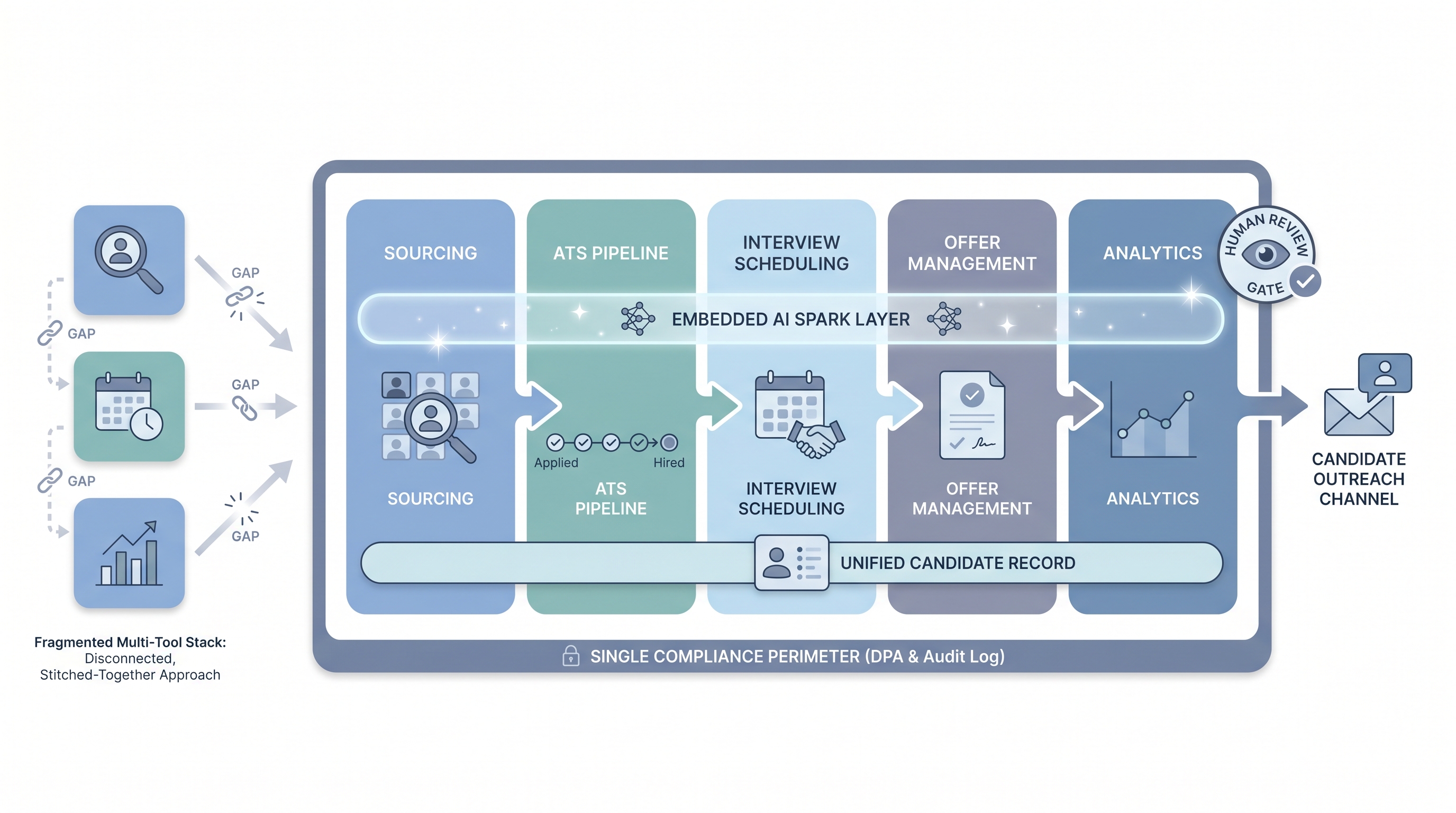
In practice
- A TA ops lead at a mid-sized company describes their recruitment automation platform as the product that handles every step between "application received" and "interview confirmed" without a recruiter manually moving records. The ATS they used before required a human trigger at each stage transition.
- In a vendor evaluation, the demo shows a candidate completing an async screen; the platform auto-scores it, updates the ATS stage, generates a recruiter summary card, and queues the next-round invite for recruiter review. No manual steps until the recruiter approves the advance.
- A sourcer at a scaling startup explains the move to a platform this way: maintaining six separate integrations for a three-person TA team was costing more coordination hours than the tools saved. One product, one DPA, one API key rotation cycle.
Quick read, then how hiring teams use it
This is for recruiters, sourcers, TA, and HR partners who need the same vocabulary in debriefs, vendor calls, and policy reviews. Skim the first section when you need a fast shared picture. Use the second when you are deciding whether to buy a platform or build a custom stack.
Plain-language summary
- What it means for you: One product that handles the whole recruiting pipeline automatically, from posting a job to extending an offer, without your team manually moving data between tools.
- How you would use it: You configure triggers and rules once (for example, "when a candidate completes the screen, schedule the next interview automatically"). The platform runs those rules every time; you handle exceptions and judgment calls.
- How to get started: Map your current manual steps before you demo any product. Identify which five tasks take the most recruiter time each week and check whether the platform handles those specifically, not just in principle.
- When it is a good time: After your hiring process is stable and documented for at least one full hiring cycle. Automating an unstable workflow makes mistakes faster, not fewer.
When you are running live reqs and tools
- What it means for you: A recruitment automation platform creates a single audit trail for every candidate action: who moved them, which rule triggered it, what version of the AI ran, and when. That matters for GDPR subject access requests and bias audits when regulators ask questions.
- When it is a good time: After your team has tested the integration with your ATS and HRIS using real payloads (not demo data) and after you have identified the owner of each automation flow for on-call purposes.
- How to use it: Start with two or three high-volume internal flows before wiring candidate-facing sends. Keep all AI-assisted outputs behind a human review gate until error rates are low. See no-code recruiting automation for lighter-weight starting points.
- How to get started: Run the platform demo environment with your actual job payload. Map which integrations are native versus pass-through before signing. Review the data processing agreement before your security team does, not after.
- What to watch for: Configuration drift between staging and production, field mapping assumptions that break when the ATS updates, and automation rules that nobody reviews after the consultant who set them up leaves. Document every trigger owner the same way you document system credentials.
Where we talk about this
On AI with Michal live sessions, recruitment automation platforms come up across two tracks. Sourcing automation blocks examine when a unified platform solves real integration pain versus when a custom stack with workflow automation tools is the better fit, including the vendor questions that surface production issues before they hit candidates. AI in recruiting blocks connect the same evaluation to hiring manager trust, candidate experience standards, and GDPR obligations. If you want the full room conversation with real stack comparisons, start at Sourcing Lab and bring your current tool list.
Around the web (opinions and rabbit holes)
Third-party creators move fast. Treat these as starting points, not endorsements. Double-check anything before you wire candidate data.
YouTube
- How to Automate Your Entire Hiring Process with n8n and Notion (Michele Torti) walks a full end-to-end recruiting build that shows what platform-level thinking looks like when assembled from a custom stack.
- n8n Tutorial: Build an AI HR Assistant That Shortlists shows AI and workflow nodes running together, a useful comparison to what a dedicated platform bundles for you.
- Boost Your Productivity: Mastering Workflow Automation (DottoTech) stays tool-agnostic and builds shared vocabulary before any platform evaluation conversation.
- Has anyone used Zapier for recruiting workflows? in r/recruiting surfaces practitioner comparisons between platforms and custom tooling from people in the chair.
- I want to make some recruitment automated workflows in r/RecruitmentAgencies is useful for reading the real decision context, not vendor positioning.
- Search r/TalentAcquisition for "automation platform" to find current practitioner threads on which products teams actually use versus what they evaluated and rejected.
Quora
- How do we automate the process of recruiting as a recruiter? collects answers at varying levels of depth (quality varies by contributor; read critically).
Unified platform versus best-of-breed stack
| Dimension | Recruitment automation platform | Best-of-breed stack |
|---|---|---|
| Integration overhead | Bundled by vendor | Your team maintains |
| Configuration flexibility | Vendor-constrained | High |
| Candidate data model | Unified | Fragmented across tools |
| Compliance perimeter | One DPA | Multiple vendor DPAs |
| Swapping tools | Vendor migration required | Replace one tool at a time |
| Best fit | Stable process, small TA ops team | Evolving process, technical TA ops |
Related on this site
- Glossary: Recruiting automation software, Workflow automation, No-code recruiting automation, AI recruitment platform, Applicant tracking software, Human-in-the-loop (HITL), AI bias audit
- Blog: AI sourcing tools for recruiters
- Tools: n8n for self-hosted workflow routing
- Guides: Sourcers
- Live cohort: Sourcing Lab
- Membership: Become a member