Recruitment software solutions
Recruitment software solutions is the broad category covering every tool a hiring team uses across sourcing, applicant tracking, screening, scheduling, and analytics, whether deployed as a single platform, a best-of-breed stack, or a hybrid of both.
Michal Juhas · Last reviewed May 9, 2026
What is recruitment software solutions?
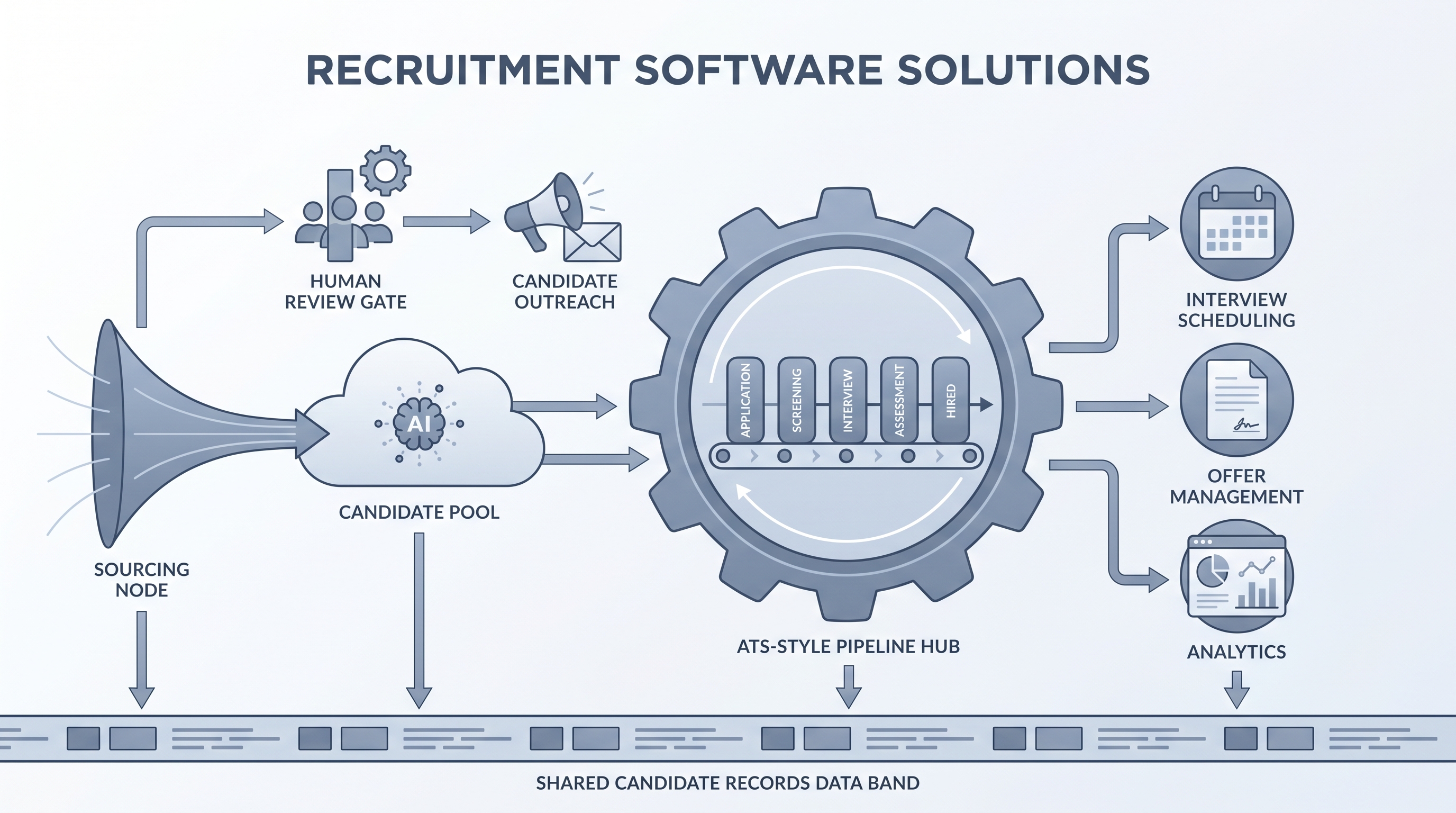
Recruitment software solutions is the category covering every tool a hiring team uses across the full hiring lifecycle: sourcing tools that find candidates before they apply, an ATS that tracks them through pipeline stages, screening and assessment tools that evaluate fit, scheduling tools that replace back-and-forth email, and analytics that surface whether the process is producing the right outcomes.
The term covers both ends of the market. A startup running its first ten hires might call a single lightweight ATS its recruitment software solution. An enterprise TA team might mean a six-tool stack connected by integrations and governed by a TA ops function. The practical question in either case is the same: does candidate data stay clean, does the team actually use the tools, and can the stack answer a compliance question in under thirty minutes?
In practice
- A talent acquisition lead evaluating three ATS vendors and discovering that two do not support GDPR deletion requests without a custom data export is using recruitment software solutions as a category frame, not a product name.
- In Recruiting OS sessions, the question "what is your current stack?" almost always reveals a disconnected set of point tools rather than a deliberate architecture: a sourcing database that does not sync with the ATS, a scheduling tool that does not write back to the candidate record, and reporting that lives in a spreadsheet.
- When a TA ops lead says "we need to consolidate vendors," that is almost always a response to integration failures and maintenance overhead across too many single-purpose tools, not a strategic preference for fewer vendors.
Quick read, then how hiring teams use it
This is for recruiters, TA managers, TA ops, and HR leaders who need to evaluate, configure, or make the case for hiring software. Skim the first section when you need shared vocabulary for a vendor conversation. Use the second when you are comparing platforms, mapping integrations, or diagnosing a workflow gap.
Plain-language summary
- What it means for you: Recruitment software solutions is the category covering every tool your team uses to run a hire from req open to offer accepted, whether that is one product or five connected tools.
- How you would use it: You map your current workflow step by step, identify where data gets lost or the process stalls, and buy or configure the tool that fixes that specific bottleneck rather than the one with the longest feature list.
- How to get started: List every tool your recruiting team opened in the last two weeks. Note which ones connect to the ATS and which require manual re-entry. That map is your starting audit.
- When it is a good time: When recruiters are maintaining a shadow spreadsheet next to the ATS, when hiring managers have stopped logging in, or when a GDPR deletion request takes more than thirty minutes to fulfil.
When you are running live reqs and tools
- What it means for you: The stack is a system of record for compliance as much as a productivity layer. Every tool that touches a candidate profile needs a documented data processing basis, a retention period, and a deletion pathway.
- When it is a good time: After the integration map shows where data crosses vendor boundaries and which vendor holds the authoritative candidate record, not before. Buying integration infrastructure before that map is complete usually doubles the maintenance load.
- How to use it: Treat each tool category as a separate accountability zone: who owns the data, who owns the integration, who is paged when it breaks. See recruiting webhooks for the technical side of integrations and ATS API integration for the data layer.
- How to get started: Run your last three hires through each tool in the stack and count the steps that required manual data re-entry. That number is integration debt before you buy anything new. See workflow automation for where automation earns its keep.
- What to watch for: Vendors that sell AI features as defaults with no clear off switch, pricing structures where each integration costs an additional monthly fee, and DPA templates that default to US-only data hosting without a written EU-region option.
Where we talk about this
On AI with Michal live sessions, recruitment software solutions comes up in both the AI in recruiting track (where we compare platform categories and which AI features are stable versus risky at each stage) and the sourcing automation track (where integration gaps are often the first bottleneck, not the tool itself). Start at Sourcing Lab and bring your current stack diagram, your biggest workflow friction point, and any vendor quotes you have collected.
Around the web (opinions and rabbit holes)
Third-party creators and vendor marketing move fast. Treat these as starting points, not endorsements, and verify anything before you connect candidate data.
YouTube
- Search "recruitment software comparison" on YouTube filtered to the last twelve months to find practitioner walkthroughs comparing platforms. Independent HR practitioners tend to surface total cost of ownership and integration issues more honestly than vendor-sponsored content.
- Search "ATS integration walkthrough" to find TA ops practitioners documenting real configuration setups, including where standard integrations break and which workarounds survive production traffic.
- r/recruiting has recurring threads on ATS switches, stack consolidation decisions, and which tools broke after a vendor acquisition.
- r/humanresources surfaces HR generalist perspectives on full-stack implementations, often including the onboarding and HRIS integration steps that TA-only reviews miss.
Quora
- Search "best recruitment software" on Quora to find practitioner comparisons across company sizes; the configuration time and support quality notes tend to be more honest than marketing pages for narrowing a shortlist.
All-in-one platform vs. best-of-breed stack
| Factor | All-in-one platform | Best-of-breed stack |
|---|---|---|
| Integration overhead | Low (vendor-managed) | High (internal or connector tools) |
| Feature depth | Moderate across all categories | High in specialist categories |
| Data consistency | Single candidate record | Mapping required across tools |
| Vendor management | One contract, one DPA | Multiple contracts, multiple DPAs |
| Risk if vendor is acquired | Concentrated | Distributed |
| Best fit for | Teams without dedicated TA ops | Teams with a dedicated TA ops function |
Related on this site
- Glossary: Applicant tracking software, Recruitment management software, AI recruitment software, Hiring tools, Hiring platforms, Recruitment automation tools, Workflow automation, ATS API integration, GDPR first-touch outreach, Sourcer productivity tools
- Blog: AI sourcing tools for recruiters
- Live cohort: Sourcing Lab
- Membership: Become a member
- Course: Starting with AI: foundations in recruiting