Recruitment automation tools
Software products that take over specific, repetitive recruiting tasks, such as sending interview confirmations, routing applications to the right stage, or triggering outreach sequences, so recruiters spend time on judgment calls instead of manual data entry.
Michal Juhas · Last reviewed May 9, 2026
What are recruitment automation tools?
Recruitment automation tools are software products that handle specific, repetitive tasks in the hiring process so recruiters can focus on the parts that require judgment: building relationships, evaluating fit, and making decisions under uncertainty.
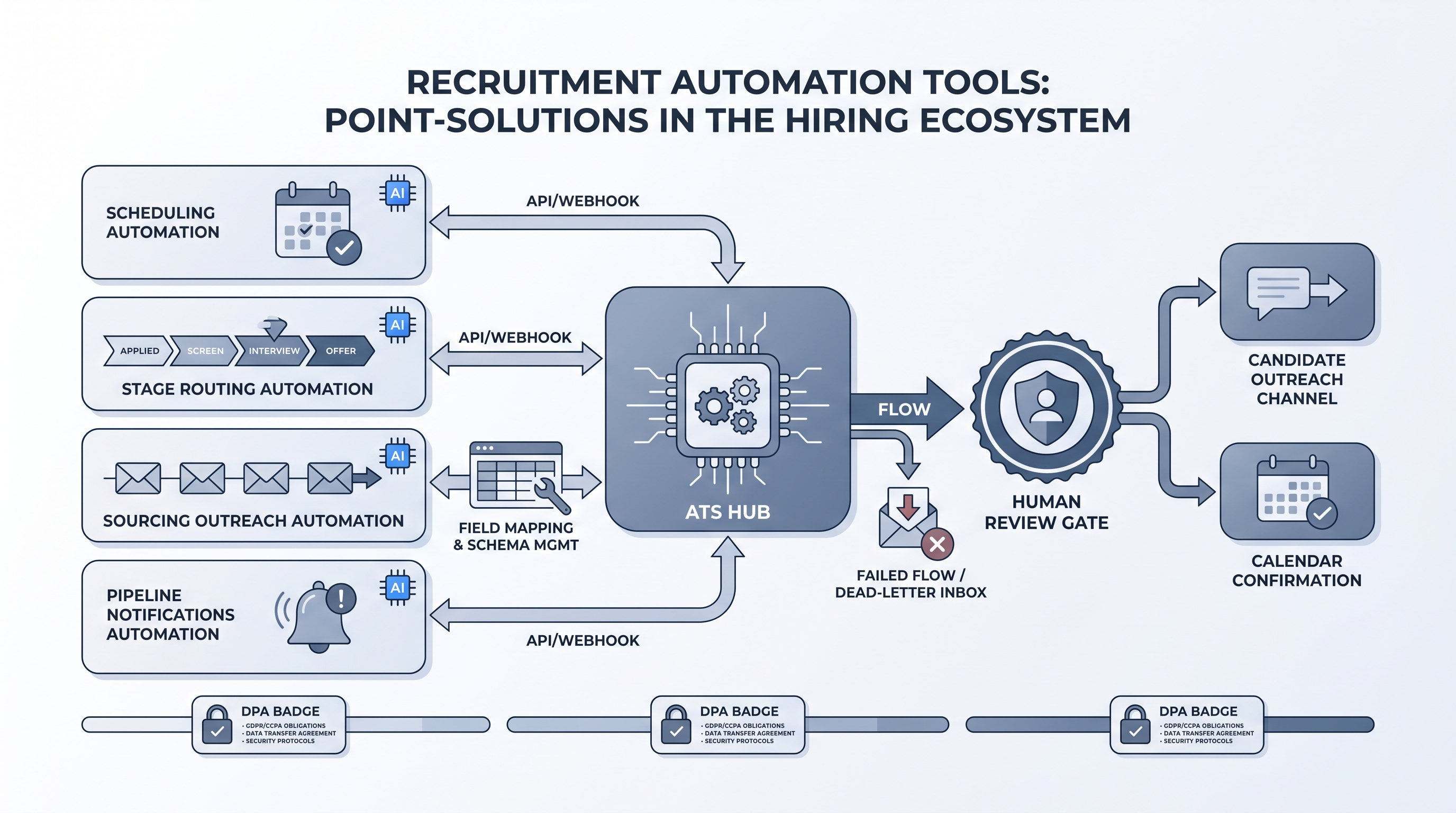
The category is wide. It includes scheduling tools that send calendar links and confirmations without a recruiter touching a keyboard, ATS-connected routers that move a candidate to the right stage when a knock-out answer triggers a rule, sourcing sequence platforms that pause automatically when a candidate replies, and notification tools that ping a hiring manager the moment a panel debrief is submitted. What unites them is that they replace a manual trigger with a configured rule.
In practice
- A recruiter at a mid-sized tech company describes their scheduling tool as the one automation that paid for itself in the first week: candidates book directly, confirmations go automatically, and a reminder fires 24 hours before. The recruiter now handles exceptions instead of logistics.
- In a sourcing automation cohort, a sourcer walks through a sequence tool that pauses when a candidate replies, routes the reply to the recruiter who owns that req, and logs the timestamp to the ATS. The manual version of that workflow took 20 minutes per candidate per week across a hundred open conversations.
- A TA ops lead at a scaling startup explains the decision to use individual tools instead of a platform: "We have three specific bottlenecks. We don't need a product that solves all fifteen steps; we need three tools that each solve one bottleneck and connect cleanly to Greenhouse."
Quick read, then how hiring teams use it
This is for recruiters, sourcers, TA, and HR partners who need the same vocabulary in debriefs, vendor calls, and policy reviews. Skim the first section when you need a fast shared picture. Use the second when you are deciding which tools to configure or evaluate.
Plain-language summary
- What it means for you: A recruitment automation tool is software that handles one specific recruiting task automatically, for example sending an interview confirmation or moving a candidate to the next stage after a form is submitted, so you do not have to do it manually every time.
- How you would use it: You pick the most repetitive task in your week, map the trigger and the action, configure the rule once, and let the tool run it every time that trigger fires.
- How to get started: Identify your biggest copy-paste task. Write the rule on paper first: "when X happens, do Y, notify Z." Only then open a tool and check whether it can wire that exact rule to your ATS without a workaround.
- When it is a good time: After the manual version of the task is boring and stable, not while you are still changing the process every week.
When you are running live reqs and tools
- What it means for you: Every automation tool that touches candidate data needs a DPA, a field mapping you own, and a named person who receives alerts when the flow breaks.
- When it is a good time: After you have tested with a real ATS event payload (not sample data), confirmed the retry logic handles timeouts without creating duplicates, and identified who is on call when it fails on a Friday night.
- How to use it: Start with one internal flow (a Slack ping, a stage tag, a hiring manager notification) before wiring candidate-facing sends. Log what each field mapping does so GDPR questions have a one-sentence answer.
- How to get started: Run the tool demo with your own ATS payload. Ask the vendor whether the integration is native or webhook pass-through. Check who maintains field mappings when the ATS updates their schema.
- What to watch for: Silent partial runs, duplicate records from retry logic, rate limits from enrichment vendors mid-sequence, and templates that get edited without a change log. Plan the error alert the same day you plan the happy path.
Where we talk about this
On AI with Michal live sessions, recruitment automation tools come up in two tracks. Sourcing automation blocks cover specific tool evaluation: which integrations survive real usage, what breaks when a vendor updates their API, and how to document trigger ownership so your team is not reverse-engineering a flow at 11pm. AI in recruiting blocks connect the same tools to hiring manager trust and GDPR obligations so the full context lands in one room. Start at Sourcing Lab and bring your current tool list and ATS name.
Around the web (opinions and rabbit holes)
Third-party creators move fast. Treat these as starting points, not endorsements. Double-check anything before you wire candidate data.
YouTube
- How to Automate Your Entire Hiring Process with n8n and Notion (Michele Torti) shows a full end-to-end build in public with the individual tool decisions visible.
- n8n Tutorial: Build an AI HR Assistant That Shortlists combines AI and workflow nodes in a way that mirrors how individual automation tools look when assembled from a custom stack.
- Boost Your Productivity: Mastering Workflow Automation (DottoTech) builds shared vocabulary useful before any tool evaluation conversation.
- Has anyone used Zapier for recruiting workflows? in r/recruiting has recruiters comparing real tools and noting where integrations break in production.
- I want to make some recruitment automated workflows in r/RecruitmentAgencies is a frank starting-point thread from people in the chair.
- Search r/TalentAcquisition for "automation tools" to read current practitioner threads on which tools teams actually use versus what they evaluated and rejected.
Quora
- How do we automate the process of recruiting as a recruiter? collects practitioner answers at varying depth levels (quality varies; read critically).
Individual tools versus unified platform
| Dimension | Individual automation tools | Unified automation platform |
|---|---|---|
| Integration overhead | Per-tool maintenance | Bundled by vendor |
| Flexibility | High, mix-and-match | Vendor-constrained |
| Candidate data model | Fragmented across tools | Single shared record |
| Compliance perimeter | Multiple DPAs | One DPA |
| Best fit | Specific bottlenecks, strong ATS | Stable process, small TA ops team |
Related on this site
- Glossary: Recruitment automation platform, Recruiting automation software, Workflow automation, No-code recruiting automation, Recruiting webhooks, Human-in-the-loop (HITL), Candidate data enrichment
- Blog: AI sourcing tools for recruiters
- Tools: n8n for self-hosted workflow routing
- Guides: Sourcers
- Live cohort: Sourcing Lab
- Membership: Become a member