Remote hiring tools
Software and processes that replace office-based interviewing and coordination with video interviews, async assessments, digital offer signing, and remote onboarding flows when the hiring team and candidates are not in the same location.
Michal Juhas · Last reviewed May 15, 2026
What are remote hiring tools?
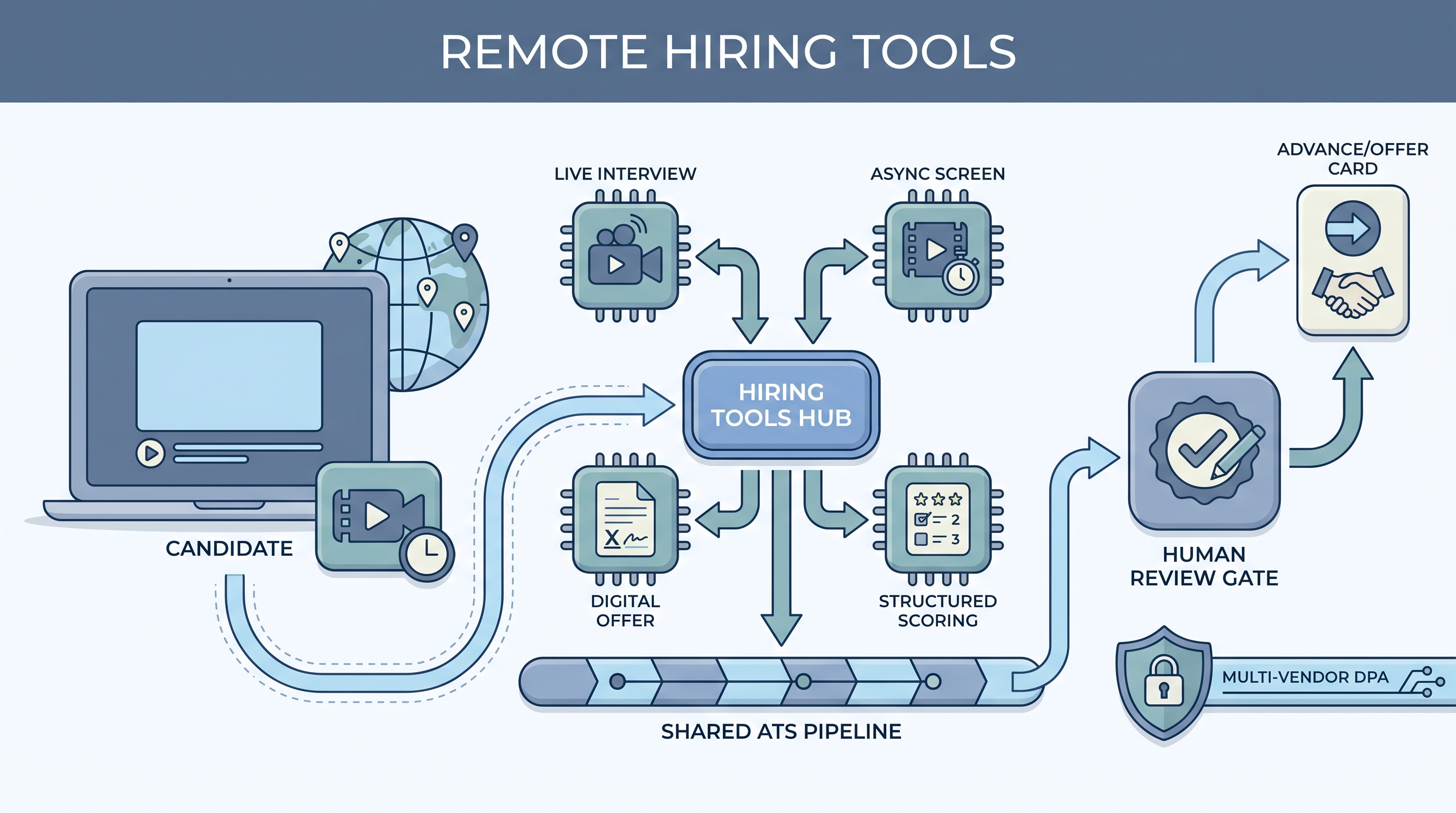
Remote hiring tools are the software platforms and process steps that allow teams to attract, assess, and hire candidates without everyone being in the same location. The category spans video interview platforms, async screening tools, digital offer delivery, and remote onboarding flows.
Each tool solves a specific coordination gap that physical presence used to fill: live video replaces the office visit, one-way async video replaces the preliminary phone screen, e-signature software closes the offer without a printer. What they do not replace is the process layer: a clear rubric, a named decision owner at each stage, and a defined window for the panel to submit feedback.
In practice
- A recruiter filling a senior engineering role with candidates across three continents used async video for the first round so candidates in Singapore, Berlin, and Toronto could each record at a reasonable hour. The live panel only happened once per candidate rather than three times per time zone.
- A TA ops lead described "our remote hiring tools" as everything from the job board to the offer link: Greenhouse for the pipeline, Willo for async screens, Google Meet for panels, and DocuSign for offers. The bottleneck was not the tools but the three-day gap between the last interview and when the scorecard was submitted.
- A hiring manager who was skeptical of async video said the first time a candidate's clip got five consistent rubric scores back within 24 hours, the team moved faster than they ever had for an in-person role. The tool forced the structure that the hallway debrief never had.
Quick read, then how hiring teams use it
This is for recruiters, sourcers, TA, and HR partners who need the same vocabulary in vendor evaluations, compliance reviews, and hiring manager conversations. Skim the first section for the shared picture. Use the second when you are setting up remote pipelines or evaluating specific tools.
Plain-language summary
- What it means for you: Remote hiring tools are the software that replaces the site visit, the phone screen, and the paper offer so the hiring process can run when candidates and the team are in different places.
- How you would use it: Pick one bottleneck first: scheduling across time zones, getting consistent rubric scores, or closing the offer. Choose the simplest tool that solves that one problem, then add more only when the first is stable.
- How to get started: Map your current hiring steps and mark which ones require physical presence. Replace those with the lightest tool that works, starting with video conferencing and e-signature before investing in purpose-built async video platforms.
- When it is a good time: When a great candidate lives far from the office, when the hiring team itself works remotely, or when your time-to-interview is stretched by scheduling overhead more than by evaluation quality.
When you are running live reqs and tools
- What it means for you: Remote tools extend the data and compliance surface. Each platform holds candidate recordings, scores, and contact details under its own data processing agreement, retention schedule, and deletion mechanism.
- When it is a good time: Before you enable AI scoring or behavioral analysis features in video tools. Check the DPA, confirm how scores write back to the ATS, and run a group pass-rate check before using scores in decisions.
- How to use it: Keep one candidate record per person in your ATS. Document which tool produces which kind of data, who can access recordings, and when they are deleted. Require the same rubric conditions for every candidate in the same role.
- How to get started: Audit your current video interview setup: do recordings have a retention window, do scores write back to the ATS, and does every interviewer use the same rubric? Fix those before adding more tools.
- What to watch for: AI analysis features (tone, speech, behavior) that activate by default, recording libraries that accumulate indefinitely, and rubric drift when different hiring managers score the same async clip differently.
Where we talk about this
On AI with Michal live sessions, remote hiring tools come up across both tracks: the AI in recruiting track covers async screening, video interview rubric design, and how AI scoring features interact with fair hiring obligations, and the sourcing automation track shows how remote tools connect to the broader pipeline without creating data silos. Start at Sourcing Lab with your current remote stack and your top scheduling and evaluation pain points.
Around the web (opinions and rabbit holes)
Third-party creators move fast and tooling changes frequently. Treat these as starting points, not endorsements, and check anything before you connect candidate data to a new system.
YouTube
- Search "async video interview recruiting" on YouTube for practitioner walkthroughs of one-way video setup and rubric calibration. Filter by upload date: tooling and platform policies change often.
- Search "remote hiring process recruiter" for full pipeline walkthroughs from independent recruiters who describe what actually breaks, not only what vendors promise.
- Search "remote interview best practices hiring manager" for the hiring manager perspective on async clip review and panel calibration without a shared physical debrief.
- r/recruiting has recurring threads on which remote tools teams actually use in production and what they wish they had tested before going fully remote.
- r/TalentAcquisition surfaces candid TA leader conversations on video platform selection, rubric design, and what remote tools cannot fix on their own.
Quora
- What are the best tools for remote hiring and virtual interviews? collects practitioner answers on specific tool choices, which is useful for building a shortlist before evaluating vendors directly.
Remote tools versus in-person hiring
| Aspect | In-person hiring | Remote hiring |
|---|---|---|
| Scheduling | Office calendar, local travel | Video link, timezone converter |
| Calibration | Hallway debrief | Shared rubric, required |
| Data surface | Mostly internal notes | Multiple vendor systems |
| Offer close | Physical signature | E-signature or digital |
| Time zone | Usually same city | Global reach possible |
| Rubric discipline | Social pressure fills gaps | Structure must be explicit |
Related on this site
- Glossary: Async screening, One-way video interview, Applicant tracking software, Scorecard, Human-in-the-loop (HITL), AI bias audit, GDPR first-touch outreach, Workflow automation, Recruitment tracking system
- Blog: AI sourcing tools for recruiters
- Guides: Sourcers
- Live cohort: Sourcing Lab
- Membership: Become a member