AI-automated recruiting
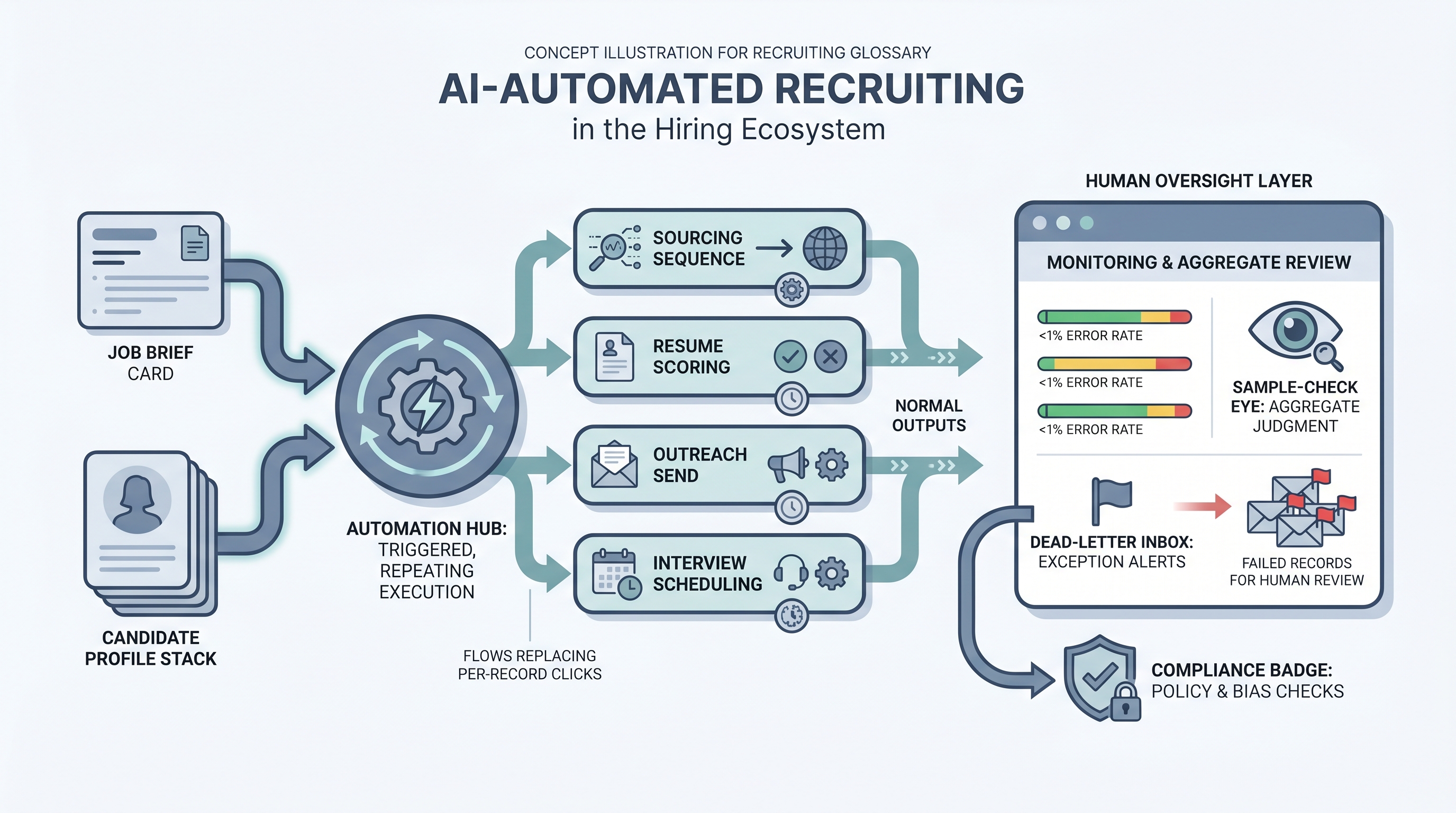
Using AI to execute routine hiring tasks without per-record human intervention: screening resumes, sending outreach sequences, scheduling interviews, and updating ATS records, while keeping human oversight at the aggregate level and review gates at decisions that affect individual candidates.
Michal Juhas · Last reviewed May 9, 2026
What is AI-automated recruiting?
AI-automated recruiting is the practice of using AI tools to run routine hiring tasks end-to-end without a per-record human decision at each step. Instead of a recruiter clicking through each candidate, a trigger fires, the AI processes the record, and the result lands in the ATS, a spreadsheet, or a message queue. The human role shifts from executing the step to setting the criteria, reviewing aggregate outputs, and owning the error inbox.
This is distinct from AI-assisted recruiting, where a recruiter prompts the tool and decides what to do with the result. Automation is the step that runs without the click. That difference changes what governance looks like: you need error dashboards and pass-rate audits, not just prompt quality reviews.
In practice
- A sourcing team sets up an outreach sequence in a tool like Lemlist or Apollo, wires it to a candidate list generated by a Boolean or semantic search, and lets the automation send initial messages, follow-ups, and a final nudge on a schedule, without manually hitting send for each one.
- An ATS configuration triggers a screening scorecard note to be drafted by an LLM every time a new application arrives, drops it into the recruiter's queue as a draft, and pings Slack so nothing sits unreviewed for more than a day.
- A TA ops lead describes "our automation broke" when the nightly job that syncs ATS stage changes to the reporting spreadsheet stops running after the vendor API updates a field name, something that only surfaces when someone notices empty rows two days later.
Quick read, then how hiring teams use it
This is for recruiters, sourcers, TA partners, and HR leaders who need a working vocabulary for evaluating tools, scoping automation projects, and explaining trade-offs to legal and compliance. Skim the first section for a shared picture. Use the second when you are building or reviewing a live automated flow.
Plain-language summary
- What it means for you: AI automation removes the per-record human click from a repeating hiring task. You still own the criteria, the error inbox, and the decision to expand or roll back.
- How you would use it: Pick one repeating task that runs more than fifty times a week, draw the trigger-process-outcome on paper, agree on who owns failures, then wire one step at a time.
- How to get started: Run the first automation with a human still doing the same step in parallel for two weeks. Compare outputs. Only remove the manual step when error rates are flat.
- When it is a good time: After the criteria or prompt is stable and reviewed, not while the process still changes every week or every hiring manager wants different logic.
When you are running live reqs and tools
- What it means for you: Automated steps move state in systems: stages, tags, timestamps, CRM fields. A failed run that goes unnoticed for three days is three days of wrong data in your ATS, and it compounds.
- When it is a good time: When the same trigger fires dozens of times per week, when error monitoring is in place before you deploy, and when one person owns the run log and the suppression list.
- How to use it: Pair your ATS webhooks or stage-change triggers with a router like n8n or Make. Keep candidate-facing sends behind a review queue until error rates are boringly low for a month. Log model version, criteria version, and run timestamp for every automated decision.
- How to get started: Deploy one internal automation first, such as a Slack ping on a new req or a scorecard reminder. Add a prompt chain for drafting only after the data plumbing is trusted. Read AI sourcing tools for recruiters before you chain paid enrichment vendors.
- What to watch for: Silent partial runs, duplicate records after retries, schema changes that break JSON parsing, GDPR opt-outs that do not propagate across connected tools, and prompts baked into flows that nobody updates when the policy changes. Plan error alerting with the same care you plan the happy path.
Where we talk about this
On AI with Michal live sessions, the sourcing automation track works through trigger design, API credentials, retry logic, and what happens when a provider changes a schema, problems that live demos rarely show. The AI in recruiting track connects automated steps to hiring manager trust and GDPR policy so the room can talk through the governance questions before they become incidents. Start at Sourcing Lab and bring your real ATS name, a flow you want to build, and the person who would own the error inbox in your team.
Around the web (opinions and rabbit holes)
Third-party creators move fast here. Treat these as starting points, not endorsements, and verify compliance postures and vendor details directly before wiring candidate data to any automation you find in a tutorial.
YouTube
- How to Automate Your Entire Hiring Process with n8n and Notion (Michele Torti) walks a full hiring-shaped automation build in public, including triggers and error handling.
- n8n Tutorial: Build an AI HR Assistant That Shortlist… shows AI plus workflow nodes in one chain; watch how the builder structures the review queue before outputs reach a candidate record.
- Boost Your Productivity: Mastering the Power of Workflow Automation (DottoTech) stays tool-agnostic and covers the vocabulary differences between triggers, actions, and filters before you pick a vendor.
- How are you actually using AI in your recruiting workflow right now? in r/recruiting is a candid practitioner survey that distinguishes genuine automation from AI-assisted steps and shows what is live versus experimental.
- I want to make some recruitment automated workflows but… in r/RecruitmentAgencies is an honest "where do I start" thread from practitioners working through the same governance questions.
- Has anyone used Zapier? in r/recruiting collects small real automations that recruiters actually run, including what broke and why.
Quora
- How do we automate the process of recruiting as a recruiter? collects a wide range of practitioner answers on which steps are actually automatable and where human oversight remains essential.
AI-automated versus AI-assisted recruiting
| Dimension | AI-assisted | AI-automated |
|---|---|---|
| Human trigger | Required per record | One-time setup |
| Monitoring need | Prompt quality reviews | Error dashboards, pass-rate audits |
| GDPR exposure | Lower (human decides) | Higher (system decides) |
| Good fit | Novel roles, low volume | Stable criteria, high volume |
| First step to take | Write and review the prompt | Prove the prompt stable for four weeks |
Related on this site
- Glossary: Workflow automation, No-code recruiting automation, Recruiting email automation, Recruiting webhooks, Human-in-the-loop, AI in recruiting, Adverse impact, Prompt chain, AI-powered recruiting
- Blog: AI sourcing tools for recruiters
- Guides: Sourcers
- Workshops: AI Sourcing Lab
- Courses: Starting with AI: the foundations in recruiting
- Membership: Become a member