Best HR onboarding software
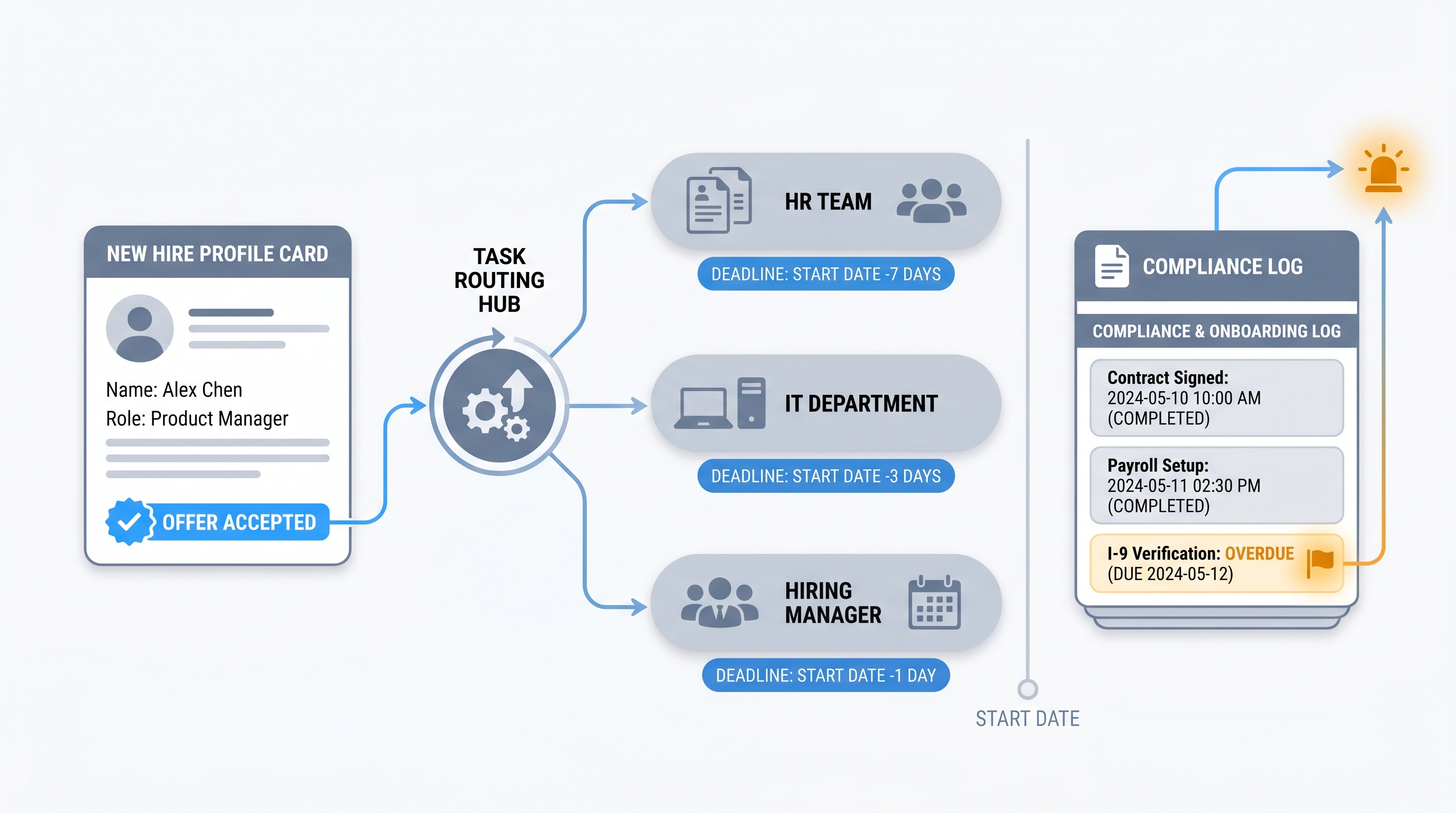
The right HR onboarding software routes new hire tasks to HR, IT, and managers with named owners and hard deadlines, integrates cleanly with your HRIS and ATS, timestamps compliance documents, and surfaces overdue steps before a start date is missed.
Michal Juhas · Last reviewed May 10, 2026
What is HR onboarding software?
HR onboarding software is a platform that routes the administrative and compliance tasks a new hire triggers across HR, IT, payroll, and the hiring manager, with named owners, deadline enforcement, and a timestamped audit trail. When a candidate accepts an offer, a well-configured system fires provisioning requests to IT, sends benefits election prompts to HR, routes tax form collection to payroll, and assigns a first-week task to the hiring manager, all without a coordination email chain.
The distinction from a general onboarding experience tool is emphasis: HR onboarding software is designed for the admin who needs to prove every step happened on time, not only for the new hire who needs a good first week.
In practice
- An HR team at a 200-person company described their pre-software process as "a Slack message to IT, a manual benefits email, and a shared Google Sheet with no owner column." After configuring onboarding software with named task owners and start-date-relative deadlines, overdue steps dropped from a regular occurrence to a dashboard metric reviewed weekly and closed before any start date.
- A People Ops lead evaluating onboarding platforms ran a demo using their most complex hire profile: a remote employee in a second jurisdiction with a right-to-work verification step. One platform could not surface the jurisdiction-specific compliance step without a custom field. That information surfaced in a 30-minute demo faster than it would have in any feature comparison document.
- An HR manager at a scale-up onboarding 15 people per month described the AI-generated 30-60-90 day plan feature as useful for first drafts, but noted that every plan required a human edit before it reached the new hire. The gap was manager context: working style and first-project scope that the model could not reliably infer from a job description.
Quick read, then how HR teams use it
This is for HR managers, People Ops leads, and TA specialists who manage the operational side of onboarding and need a grounded view before the next platform evaluation or procurement review. The first section gives you the vocabulary. The second helps you decide what to prioritise.
Plain-language summary
- What it means for you: A platform that assigns each onboarding task to a named person with a deadline, tracks overdue steps, timestamps compliance documents, and integrates with your HRIS and ATS so field mapping does not become a manual export.
- How you would use it: Map your current onboarding steps by owner: HR, IT, payroll, hiring manager, and new hire. Configure one task per step with a deadline relative to the start date. Run a dry-run on a dummy profile before a live hire enters the flow.
- How to get started: Run a demo using your most complex recent hire profile, not the vendor example. If the platform cannot map your jurisdiction-specific compliance step in 30 minutes, it will not fit without expensive custom work.
- When it is a good time: When you are onboarding more than one person per month, when IT provisioning spans more than three systems, or when a compliance audit requires timestamped evidence that a manual process cannot produce cleanly.
When you are running live reqs and tools
- What it means for you: Every onboarding task routes to real people with real deadlines in live systems. A misconfigured task owner means a provisioning request goes unanswered. A missing compliance step creates an audit finding. The coordination overhead is traceable and the cost of failure is visible.
- When it is a good time: After you have mapped your onboarding steps precisely and assigned each one a named owner. Run the flow in dry-run mode before a live new hire enters it. See workflow automation for the general approach to routing tasks between systems without manual handoffs.
- How to use it: Integrate the platform with your ATS at the offer-accepted trigger. Integrate with your HRIS at the first-day hire event. Confirm data processing agreements are in place for each integration before connecting employee data. Build the compliance step list from your most complex jurisdiction first.
- How to get started: Request the API documentation for your ATS and HRIS before agreeing to a contract. Ask the vendor for reference calls with a customer at a similar company size and stack, not the largest logo on their showcase page.
- What to watch for: Platforms that default document retention to indefinite (a GDPR data minimisation risk), role-based access controls that let IT see HR compensation data, AI-generated plans that reach new hires without a human review step, and overdue-task dashboards that notify a shared inbox rather than a named owner.
Where we talk about this
On AI with Michal live sessions, the post-offer handoff is a recurring topic in the AI in recruiting track. Sessions cover how ATS stage data flows into an onboarding platform, where automation replaces manual provisioning emails, and which AI features in current onboarding tools are ready for production versus still requiring significant human review. Both tracks assume the onboarding steps are documented and assigned before any automation is layered on top. Start at Sourcing Lab with your current onboarding checklist and your ATS name.
Around the web (opinions and rabbit holes)
Third-party creators move fast. Treat these as starting points, not endorsements. Do not copy external automation scripts that move employee data without reading the data processing terms first.
YouTube
- BambooHR Onboarding Tutorial shows the admin side of a mid-market HRIS onboarding module, including task templates and new hire portal configuration, so you can compare the admin experience against your own current setup.
- Rippling Demo: Employee Onboarding covers the unified HR and IT provisioning flow in one platform, useful for seeing how payroll and device setup can be triggered from a single hire event.
- How to Build an Onboarding Workflow in n8n is tool-agnostic and useful for understanding the trigger-action design behind onboarding automation before evaluating any specific HR platform.
- What onboarding software does your company use? in r/humanresources surfaces real practitioner experiences across platform choices with candid notes on what breaks at different company sizes.
- Best HR software for a 50-person startup? captures the moment when teams outgrow a spreadsheet and the trade-offs they weigh between standalone onboarding tools and HRIS-bundled modules.
Quora
- What is the best employee onboarding software? gathers practitioner perspectives across company sizes; read critically and cross-reference against your own integration requirements before drawing conclusions.
HR onboarding software by company size
| Company size | Typical approach | Key consideration |
|---|---|---|
| Under 50 employees | HRIS onboarding module (BambooHR, Rippling, Gusto) | Avoid a standalone tool until your HRIS integration is stable |
| 50 to 500 employees | Purpose-built platform (Sapling, Leapsome, Greenhouse Onboarding) | ATS integration depth and task template quality matter more than feature count |
| 500 to 5,000 employees | Suite module or best-of-breed with HRIS sync | Role-based access control and compliance reporting become critical |
| Enterprise | Workday, SAP SuccessFactors, ServiceNow HR | Onboarding is one module in a larger suite; evaluate the HR admin experience specifically |
Related on this site
- Glossary: Employee onboarding software, Best employee onboarding software, Employee onboarding tools, New hire onboarding software, New employee onboarding software, HR employee onboarding software, Workflow automation, Human-in-the-loop, AI in recruiting
- Blog: AI sourcing tools for recruiters
- Live cohort: Sourcing Lab
- Course: Starting with AI: the foundations in recruiting
- Membership: Become a member