Conversational scheduling
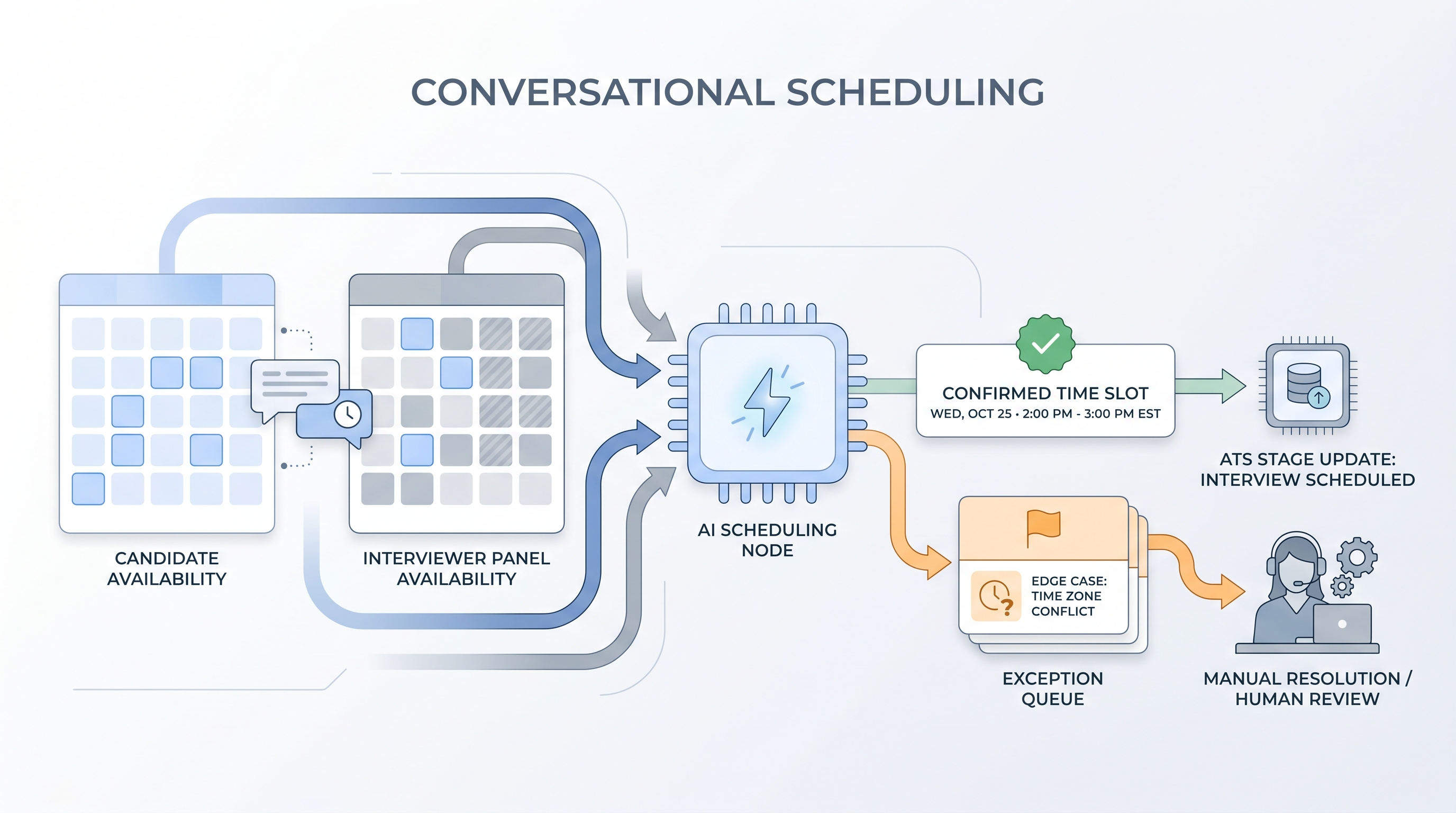
AI-powered chat or voice tools that handle interview scheduling through natural dialogue, eliminating email back-and-forth by reading calendar availability and confirming times with candidates and interviewers automatically.
Michal Juhas · Last reviewed May 24, 2026
What is conversational scheduling?
Conversational scheduling uses AI-powered chat or voice tools to handle the back-and-forth of setting up interviews. Instead of a recruiter sending five emails to find a time that works for a candidate and three panelists, the tool reads calendar availability and conducts a short exchange in plain language, confirms a slot, and sends the invite to everyone automatically.
The recruiter only steps in when something falls outside the tool's rules: an unusual time zone, a last-minute reschedule, or a candidate who does not engage with the automated prompt. Everything else runs without a hand on the keyboard.
In practice
- When a sourcer books 20 first-round screens a week, the scheduling step alone can take two to four hours of email management. A conversational scheduling tool cuts that to a short review queue of exceptions, usually fewer than three per week.
- A candidate who receives a Calendly link after a cold outreach message experiences a transactional self-serve booking. A candidate who receives a conversational exchange that adapts to their stated availability experiences something closer to a human interaction, even when the tool is fully automated.
- TA ops teams that deploy these tools often discover that calendar sync latency was silently causing double-bookings at a rate nobody had measured, because the manual scheduling step had been masking the problem.
Quick read, then how hiring teams use it
This is for recruiters, sourcers, and TA ops practitioners who want to remove scheduling overhead without degrading candidate experience. Skim the first section for a fast picture. Use the second when you are evaluating tools, designing the integration, or troubleshooting what goes wrong in production.
Plain-language summary
- What it means for you: Instead of manually finding a time that works for both sides, a tool reads the calendars and handles the candidate exchange automatically. You review the exceptions.
- How you would use it: Wire the tool to fire after a candidate responds positively to an outreach or advances past a screen. Set the rules for what counts as a confirmed booking. Review the exception queue daily.
- How to get started: Pick one high-volume pipeline stage where scheduling repeats more than 10 times per week. Run a four-week test on that stage only before expanding.
- When it is a good time: When your team spends more than two hours per week on calendar coordination for a specific role type, and when the interview structure is standardized enough that the tool does not need to ask unexpected questions.
When you are running live reqs and tools
- What it means for you: Conversational scheduling adds a step between candidate response and interview confirmation that runs without human involvement. Every failure at that step, whether a stale calendar slot or a misread intent, creates a candidate experience problem that is harder to recover from than a delayed human reply.
- When it is a good time: After you have verified calendar sync reliability, confirmed GDPR documentation, and tested natural-language edge cases in a sandboxed inbox, not before.
- How to use it: Set a clear handoff rule: the tool handles scheduling, a human handles anything flagged as ambiguous or unresolved after one exchange cycle. Log every ATS update the tool writes so you can audit what it recorded versus what the candidate agreed to.
- How to get started: Map the exact point in your current pipeline where scheduling emails begin. Wire the tool at that handoff only. Expand after you have clean data on exception rates.
- What to watch for: Calendar sync lag creating false availability, natural-language parsers confirming times the candidate did not accept, tools storing full conversation threads as candidate records without lawful basis, and time zone mismatches that book the wrong slot silently.
Where we talk about this
On AI with Michal live sessions, conversational scheduling comes up when teams audit their full pipeline for automation candidates. It almost always ranks in the top three by time saved relative to strategic value. In the sourcing automation track, we connect scheduling automation to the broader outreach-to-screen handoff so each step passes clean data to the next. If you want the full room conversation, start at Sourcing Lab and bring your current calendar tool stack.
Around the web (opinions and rabbit holes)
Third-party creators move fast. Treat these as starting points, not endorsements, and double-check anything before you wire candidate data to a new tool.
YouTube
- AI Scheduling Tools for Recruiting Teams (search) covers practitioner walkthroughs of conversational scheduling tools, integration patterns, and failure modes.
- How to Automate Interview Scheduling (search) includes step-by-step demos of tools connecting to calendar APIs and ATS systems.
- Candidate Experience and Scheduling Automation (search) explores the tension between automation efficiency and candidate relationship quality.
- Has anyone used AI scheduling tools in their recruiting stack? in r/recruiting covers real practitioner experiences, including what breaks at scale.
- Calendly vs AI scheduling: what actually saves recruiter time? in r/humanresources is a frank comparison thread.
- GDPR and automated candidate communications in r/gdpr covers the legal questions that TA teams rarely check before deploying scheduling tools.
Quora
- What are the best AI tools for automating interview scheduling? collects recommendations and comparisons from TA practitioners and HR tech evaluators.
Conversational scheduling vs. static booking links
| Dimension | Static booking link (e.g. Calendly) | Conversational scheduling |
|---|---|---|
| Candidate input method | Click on a grid of open slots | Natural language reply |
| Multi-panelist coordination | Requires manual pre-setup | Can resolve across calendars automatically |
| Edge case handling | Redirect to human | Attempts resolution, then escalates |
| GDPR data footprint | Minimal (slot selection only) | Higher (stores conversation thread) |
| Setup complexity | Low | Medium to high |
Related on this site
- Glossary: Chatbot screening, One-way video interview, Async assessment platform, Workflow automation, Candidate experience
- Blog: AI sourcing tools for recruiters
- Guides: Sourcers
- Live cohort: Sourcing Lab
- Self-paced: Starting with AI: the foundations in recruiting
- Membership: Become a member